Open-source RightAI Tools Directory
  • Discover AI
  • Submit
  • Startup
  • Blog
Open-source RightAI Tools Directory
Discover the best AI tools of 2025 with the RightAI Tools Directory!

Friend Links

AI Anime GeneratorToolsApp AI

Support

Tap4
Privacy policyTerms & ConditionsContact Us
Loading...
loading...

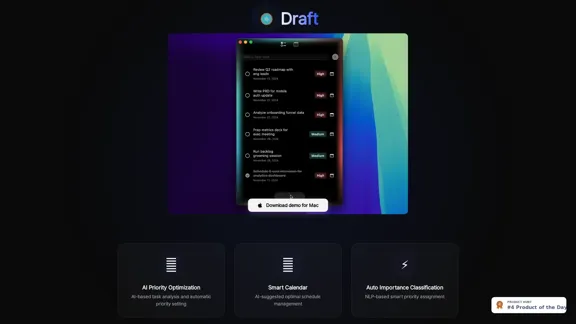
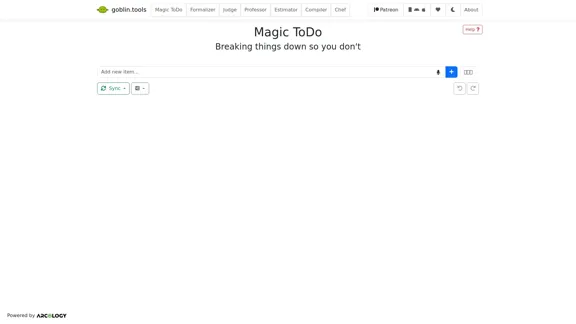
Draft - AI-powered Task List

AI helps you manage the priority, calendar, and importance of your to-do list.
Visit Website
Draft - AI-powered Task List
Visit Website

Introduction

Draft is an AI-powered todo list application designed to enhance productivity through intelligent task management. It utilizes advanced algorithms to optimize task prioritization and scheduling, making it easier for users to manage their daily activities efficiently. With features like AI priority optimization and smart calendar integration, Draft aims to streamline the process of organizing tasks and improving overall time management.

Feature

  1. AI Priority Optimization

    Draft employs AI technology to analyze tasks and automatically set priorities based on urgency and importance, ensuring that users focus on what matters most.

  2. Smart Calendar

    The application suggests optimal scheduling for tasks, helping users to allocate their time effectively and avoid conflicts in their daily agendas.

  3. Auto Importance Classification

    Utilizing Natural Language Processing (NLP), Draft classifies tasks based on their importance, allowing for a more organized approach to task management.

How to Use?

  1. Download the Draft demo for Mac to explore its features.
  2. Start by entering your tasks into the application.
  3. Allow the AI to analyze your tasks and set priorities automatically.
  4. Use the smart calendar feature to create an optimal schedule for your tasks.
  5. Regularly review and adjust your task list to stay on top of your priorities.

FAQ

What is Draft?

Draft is an AI-powered todo list application that helps users manage their tasks more effectively through intelligent prioritization and scheduling.

How does Draft work?

Draft analyzes tasks using AI algorithms to determine their priority and suggests an optimal schedule for completion, making task management easier.

Can I use Draft for team collaboration?

The current features focus on individual task management, but future updates may include collaborative tools for team use.

How is Draft different from other todo list apps?

Draft stands out with its AI-driven features that automate task prioritization and scheduling, providing a more efficient way to manage tasks compared to traditional todo list applications.

Price

  • Free demo available for Mac
  • Pricing details for full features not specified
The price is for reference only, please refer to the latest official data for actual information.

Evaluation

  1. Draft effectively utilizes AI to enhance task management, making it suitable for users looking to improve their productivity.
  2. The automatic priority setting and smart calendar features are particularly beneficial for users with busy schedules.
  3. However, the application may require further development in collaborative features to compete with other todo list apps that offer team functionalities.
  4. Overall, Draft presents a promising solution for individual users, but its value may be limited for those seeking comprehensive team management tools.

Latest Traffic Insights

  • Monthly Visits

    0

  • Bounce Rate

    0.00%

  • Pages Per Visit

    0.00

  • Time on Site(s)

    0.00

  • Global Rank

    -

  • Country Rank

    -

Recent Visits

Traffic Sources

  • Social Media:
    0.00%
  • Paid Referrals:
    0.00%
  • Email:
    0.00%
  • Referrals:
    0.00%
  • Search Engines:
    0.00%
  • Direct:
    0.00%
More Data

Related Websites

EasyGen | AI to write LinkedIn posts
View Detail

EasyGen | AI to write LinkedIn posts

EasyGen | AI to write LinkedIn posts

After reaching 78 million views on LinkedIn, Ruben Hassid built EasyGen - his AI to write LinkedIn posts.

63.03 K
Augurisk: Explore Disaster and Crime risk in the US
View Detail

Augurisk: Explore Disaster and Crime risk in the US

Augurisk: Explore Disaster and Crime risk in the US

Here is the translation: Discover Natural Disaster and Crime risk for cities and counties in your state, including Flood, Hurricanes, Tornadoes, Wildfires, Drought and Earthquakes.

22.03 K
Filo - AI Email Client & To-Do
View Detail

Filo - AI Email Client & To-Do

Filo - AI Email Client & To-Do

Turn overwhelming emails into clear summaries, quick replies, and AI-generated to-dos in one second.

6.31 K
AI Note Taking & Transcribe & Summarizer | AI Notebook App
View Detail

AI Note Taking & Transcribe & Summarizer | AI Notebook App

AI Note Taking & Transcribe & Summarizer | AI Notebook App

Generate transcripts and AI summarize for College Students in lectures. Specializing in YouTube Video Summarizer, PDF Summarizer, Article Summarizer. Save key insights and review with study guides, quizzes, and flashcards. Build your AI-powered notes library.

0
One-Click SEO Links - Chrome Web Store
View Detail

One-Click SEO Links - Chrome Web Store

One-Click SEO Links - Chrome Web Store

# User Guide for One-Click SEO Links Chrome Extension ## Overview One-Click SEO Links is a Chrome extension designed for web developers and SEO professionals. It allows users to quickly generate and copy various SEO-related links for the current webpage with just one click. ## Features - Generate and copy Google Cache link - Generate and copy Google Index link - Generate and copy Wayback Machine link - Generate and copy PageSpeed Insights link - Generate and copy Mobile-Friendly Test link - Generate and copy Rich Results Test link ## Installation 1. Open the Chrome Web Store 2. Search for "One-Click SEO Links" 3. Click "Add to Chrome" 4. Confirm the installation when prompted ## How to Use 1. Navigate to the webpage you want to analyze 2. Click on the One-Click SEO Links extension icon in your Chrome toolbar 3. Select the desired link type from the dropdown menu 4. The link will be automatically copied to your clipboard 5. Paste the link into your desired location (e.g., browser address bar, document, etc.) ## Troubleshooting If you encounter any issues: - Ensure you have the latest version of the extension installed - Try refreshing the webpage - Restart your Chrome browser - If problems persist, please contact our support team ## Privacy Policy We do not collect or store any personal data. The extension only accesses the current tab's URL to generate the SEO links. ## Feedback and Support For feedback, suggestions, or support, please email us at [email protected] or visit our website www.oneclickseolinks.com. Thank you for using One-Click SEO Links!

193.90 M
Engage AI | Generative AI for LinkedIn Comments and Content
View Detail

Engage AI | Generative AI for LinkedIn Comments and Content

Engage AI | Generative AI for LinkedIn Comments and Content

Engage AI empowers LinkedIn power users with Generative AI. Craft meaningful LinkedIn comments and content that allow you to stand out, break the ice, and start conversations even with prospects who are usually unresponsive to calls, messages, and emails.

71.94 K
eDiscovery & Legal Search Software Solutions
View Detail

eDiscovery & Legal Search Software Solutions

eDiscovery & Legal Search Software Solutions

Organizations worldwide utilize Relativity's secure, comprehensive legal software to address their most significant data challenges.

104.27 K
Open Multiple URLs
View Detail

Open Multiple URLs

Open Multiple URLs

Multiple URL Opener is a free online tool to open multiple URLs simultaneously.

0