Open-source RightAI Tools Directory
  • Discover AI
  • Submit
  • Startup
  • Blog
Open-source RightAI Tools Directory
Discover the best AI tools of 2025 with the RightAI Tools Directory!

Friend Links

AI Anime GeneratorToolsApp AI

Support

Tap4
Privacy policyTerms & ConditionsContact Us
Loading...
loading...

Parabola | Simplify complex logic

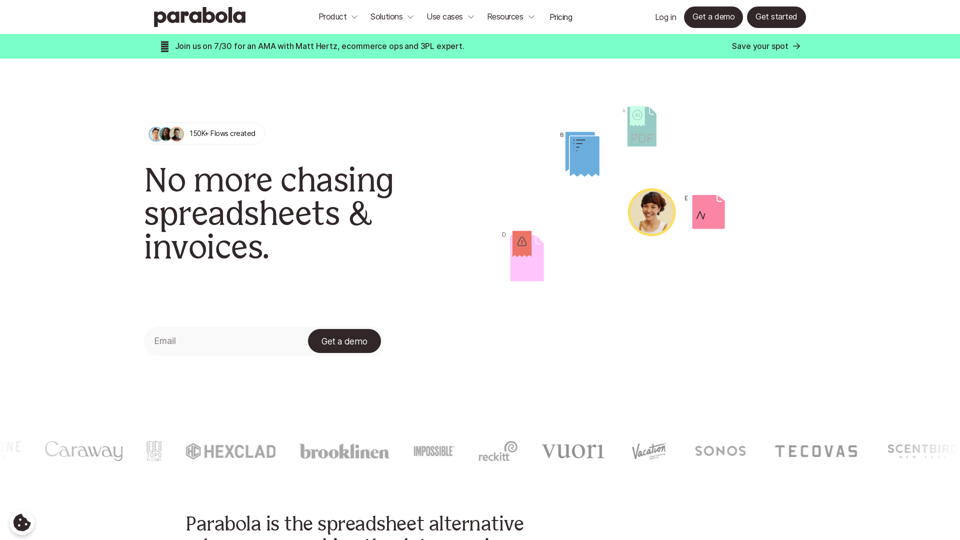
Parabola is the spreadsheet alternative that allows you to integrate data from across your company and create automated workflows.
Visit Website
Parabola | Simplify complex logic
Visit Website

Introduction

Parabola is a powerful data automation platform designed to streamline business processes and eliminate manual spreadsheet work. It combines data from various sources within a company to create automated workflows, serving as an alternative to traditional spreadsheets. Parabola caters to various industries, including retail, e-commerce, freight, logistics, SaaS, finance, and IT, offering solutions for tasks such as inventory management, order processing, shipment tracking, and financial reporting.

Feature

Data Integration and Workflow Automation

Parabola combines data from multiple sources across your company and creates automated processes to replace manual tasks. This feature streamlines operations and increases efficiency across various business functions.

No-Code Interface

Users can build complex workflows without coding skills, making powerful tools accessible to non-technical team members. This empowers teams to create and manage their own automated processes.

Real-Time Triggers and Actions

Parabola can initiate actions in other applications based on data changes, allowing for seamless integration with existing business tools and enhancing overall system responsiveness.

Transparency and Collaboration

The platform provides shareable reports and logic views, enabling team collaboration. Workflows are repeatable and shareable, fostering a more efficient and cohesive work environment.

Scalability and Flexibility

Parabola supports growing businesses without the need for additional staff and is adaptable to various industries and use cases. This makes it suitable for businesses of all sizes, from startups to large enterprises.

Time-Saving and Accuracy

By automating repetitive tasks, Parabola saves hours of manual work and reduces human error in data processing and reporting, leading to increased productivity and reliability.

FAQ

Is coding knowledge required to use Parabola?

No, Parabola offers a no-code interface that allows users to build complex workflows without programming skills.

Can Parabola integrate with other business applications?

Yes, Parabola offers numerous integrations with popular business tools and can trigger actions in other applications.

Is Parabola suitable for small businesses?

Parabola is scalable and can be beneficial for businesses of all sizes, from startups to large enterprises.

How secure is the data processed through Parabola?

Parabola prioritizes data security, but for specific security measures, it's best to contact their support team or review their security documentation.

Can I try Parabola before committing to a subscription?

While not explicitly stated on the website, many SaaS platforms offer demos or trial periods. Contact Parabola's sales team for more information on trying the platform.

Latest Traffic Insights

  • Monthly Visits

    87.60 K

  • Bounce Rate

    38.73%

  • Pages Per Visit

    2.19

  • Time on Site(s)

    35.55

  • Global Rank

    405230

  • Country Rank

    United States 207853

Recent Visits

Traffic Sources

  • Social Media:
    2.85%
  • Paid Referrals:
    1.42%
  • Email:
    0.11%
  • Referrals:
    8.52%
  • Search Engines:
    42.16%
  • Direct:
    44.83%
More Data

Related Websites

Web Scraping Tool & Free Web Crawlers | Octoparse
View Detail

Web Scraping Tool & Free Web Crawlers | Octoparse

Web Scraping Tool & Free Web Crawlers | Octoparse

Web scraping simplified. Gather information from any website in minutes using our code-free web crawler. Obtain the essential data to propel your business forward. Begin at no cost today!

309.69 K
Crossword Solver AI - Get Instant Help for Any Puzzle
View Detail

Crossword Solver AI - Get Instant Help for Any Puzzle

Crossword Solver AI - Get Instant Help for Any Puzzle

Get instant crossword help with our AI-powered solver. Enter your clue and letter count to find accurate answers quickly for any puzzle, cryptic or standard.

7.02 K
Automatic Technical Documentation Updates with AI
View Detail

Automatic Technical Documentation Updates with AI

Automatic Technical Documentation Updates with AI

Promptless keeps your technical documents up to date by automatically drafting document updates from GitHub pull requests, enhancing customer satisfaction and increasing free user conversions while reducing implementation time and support requests.

2.23 K
Copilot for Microsoft 365 – Microsoft Adoption

Copilot for Microsoft 365 is a powerful AI assistant that helps you work smarter and faster across Microsoft 365 apps and services. It combines the power of large language models (LLMs) with your organization's data in the Microsoft Graph and Microsoft 365 apps to turn your words into the most powerful productivity tool on the planet.

Copilot is designed to help you:

• Unleash creativity
• Unlock productivity
• Uplevel skills

Copilot is built on Microsoft's comprehensive approach to security, compliance, and privacy. Copilot in Microsoft 365 apps and services:

• Does not use your data to train the underlying LLM
• Does not replace human ingenuity and judgment
• Is designed to keep humans in the loop

Copilot is currently available in Word, Excel, PowerPoint, Outlook, Teams, and more.

Getting Started with Copilot

To get started with Copilot, follow these steps:

1. Check availability: Ensure your organization has access to Copilot.
2. Learn the basics: Familiarize yourself with Copilot's capabilities and how to use it effectively.
3. Explore use cases: Discover how Copilot can help you in your specific role and tasks.
4. Practice and refine: Use Copilot regularly and refine your prompts for better results.
5. Share and collaborate: Collaborate with colleagues using Copilot and share best practices.

Best Practices for Using Copilot

1. Be specific in your prompts
2. Provide context for better results
3. Review and edit Copilot's output
4. Use Copilot as a starting point, not a final product
5. Experiment with different approaches
6. Stay informed about new features and updates

Copilot in Different Microsoft 365 Apps

• Word: Draft, edit, summarize, and rewrite content
• Excel: Analyze data, create formulas, and generate insights
• PowerPoint: Create presentations, design slides, and generate content
• Outlook: Compose emails, summarize threads, and manage your inbox
• Teams: Summarize meetings, generate action items, and create meeting notes

Responsible AI and Copilot

Microsoft is committed to developing AI systems responsibly. When using Copilot, keep in mind:

• AI-generated content may contain biases or inaccuracies
• Always review and verify Copilot's output
• Use your judgment and expertise alongside Copilot's suggestions
• Be aware of your organization's policies regarding AI use

Conclusion

Copilot for Microsoft 365 is a powerful tool that can significantly enhance your productivity and creativity. By understanding its capabilities, following best practices, and using it responsibly, you can make the most of this AI assistant in your daily work.
View Detail

Copilot for Microsoft 365 – Microsoft Adoption Copilot for Microsoft 365 is a powerful AI assistant that helps you work smarter and faster across Microsoft 365 apps and services. It combines the power of large language models (LLMs) with your organization's data in the Microsoft Graph and Microsoft 365 apps to turn your words into the most powerful productivity tool on the planet. Copilot is designed to help you: • Unleash creativity • Unlock productivity • Uplevel skills Copilot is built on Microsoft's comprehensive approach to security, compliance, and privacy. Copilot in Microsoft 365 apps and services: • Does not use your data to train the underlying LLM • Does not replace human ingenuity and judgment • Is designed to keep humans in the loop Copilot is currently available in Word, Excel, PowerPoint, Outlook, Teams, and more. Getting Started with Copilot To get started with Copilot, follow these steps: 1. Check availability: Ensure your organization has access to Copilot. 2. Learn the basics: Familiarize yourself with Copilot's capabilities and how to use it effectively. 3. Explore use cases: Discover how Copilot can help you in your specific role and tasks. 4. Practice and refine: Use Copilot regularly and refine your prompts for better results. 5. Share and collaborate: Collaborate with colleagues using Copilot and share best practices. Best Practices for Using Copilot 1. Be specific in your prompts 2. Provide context for better results 3. Review and edit Copilot's output 4. Use Copilot as a starting point, not a final product 5. Experiment with different approaches 6. Stay informed about new features and updates Copilot in Different Microsoft 365 Apps • Word: Draft, edit, summarize, and rewrite content • Excel: Analyze data, create formulas, and generate insights • PowerPoint: Create presentations, design slides, and generate content • Outlook: Compose emails, summarize threads, and manage your inbox • Teams: Summarize meetings, generate action items, and create meeting notes Responsible AI and Copilot Microsoft is committed to developing AI systems responsibly. When using Copilot, keep in mind: • AI-generated content may contain biases or inaccuracies • Always review and verify Copilot's output • Use your judgment and expertise alongside Copilot's suggestions • Be aware of your organization's policies regarding AI use Conclusion Copilot for Microsoft 365 is a powerful tool that can significantly enhance your productivity and creativity. By understanding its capabilities, following best practices, and using it responsibly, you can make the most of this AI assistant in your daily work.

Copilot for Microsoft 365 – Microsoft Adoption Copilot for Microsoft 365 is a powerful AI assistant that helps you work smarter and faster across Microsoft 365 apps and services. It combines the power of large language models (LLMs) with your organization's data in the Microsoft Graph and Microsoft 365 apps to turn your words into the most powerful productivity tool on the planet. Copilot is designed to help you: • Unleash creativity • Unlock productivity • Uplevel skills Copilot is built on Microsoft's comprehensive approach to security, compliance, and privacy. Copilot in Microsoft 365 apps and services: • Does not use your data to train the underlying LLM • Does not replace human ingenuity and judgment • Is designed to keep humans in the loop Copilot is currently available in Word, Excel, PowerPoint, Outlook, Teams, and more. Getting Started with Copilot To get started with Copilot, follow these steps: 1. Check availability: Ensure your organization has access to Copilot. 2. Learn the basics: Familiarize yourself with Copilot's capabilities and how to use it effectively. 3. Explore use cases: Discover how Copilot can help you in your specific role and tasks. 4. Practice and refine: Use Copilot regularly and refine your prompts for better results. 5. Share and collaborate: Collaborate with colleagues using Copilot and share best practices. Best Practices for Using Copilot 1. Be specific in your prompts 2. Provide context for better results 3. Review and edit Copilot's output 4. Use Copilot as a starting point, not a final product 5. Experiment with different approaches 6. Stay informed about new features and updates Copilot in Different Microsoft 365 Apps • Word: Draft, edit, summarize, and rewrite content • Excel: Analyze data, create formulas, and generate insights • PowerPoint: Create presentations, design slides, and generate content • Outlook: Compose emails, summarize threads, and manage your inbox • Teams: Summarize meetings, generate action items, and create meeting notes Responsible AI and Copilot Microsoft is committed to developing AI systems responsibly. When using Copilot, keep in mind: • AI-generated content may contain biases or inaccuracies • Always review and verify Copilot's output • Use your judgment and expertise alongside Copilot's suggestions • Be aware of your organization's policies regarding AI use Conclusion Copilot for Microsoft 365 is a powerful tool that can significantly enhance your productivity and creativity. By understanding its capabilities, following best practices, and using it responsibly, you can make the most of this AI assistant in your daily work.

Microsoft Copilot combines the power of large language models (LLMs) with your organization's data to turn your words into one of the most powerful productivity tools on the planet.

608.60 K
Hootsuite | Social Media Marketing and Management Tool
View Detail

Hootsuite | Social Media Marketing and Management Tool

Hootsuite | Social Media Marketing and Management Tool

Hootsuite is a social media management tool that combines scheduling, content creation, analytics, and social listening in a single platform.

2.19 M
Sigma AI Browser
View Detail

Sigma AI Browser

Sigma AI Browser

60.85 K
Create AI Tools without coding in minutes | TypeflowAI
View Detail

Create AI Tools without coding in minutes | TypeflowAI

Create AI Tools without coding in minutes | TypeflowAI

TypeflowAI enables users to create AI tools using dynamic forms and advanced prompts. Improve your SEO, boost traffic, and generate more leads by incorporating these tools into your website.

593
UCG - Chrome Web Store
View Detail

UCG - Chrome Web Store

UCG - Chrome Web Store

ChatGPT without leaving the tab or visible chat!

193.90 M