Open-source RightAI Tools Directory
  • Discover AI
  • Submit
  • Startup
  • Blog
Open-source RightAI Tools Directory
Discover the best AI tools of 2025 with the RightAI Tools Directory!

Friend Links

AI Anime GeneratorToolsApp AI

Support

Tap4
Privacy policyTerms & ConditionsContact Us
Loading...
loading...

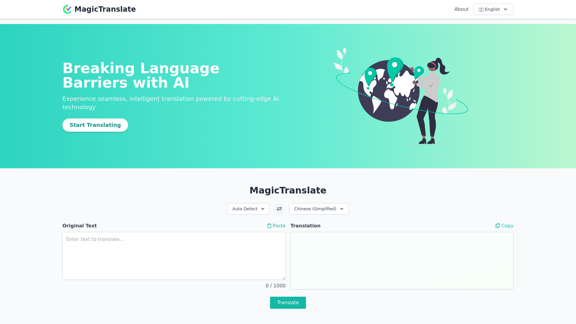
MagicTranslate - AI-Powered Translation - MagicTranslate

Experience seamless, intelligent translation powered by cutting-edge AI technology with MagicTranslate.
Visit Website
MagicTranslate - AI-Powered Translation - MagicTranslate
Visit Website

Introduction

MagicTranslate is an innovative AI-powered translation platform that revolutionizes language conversion. It combines cutting-edge AI technology with advanced language models to provide seamless, intelligent, and context-aware translations. MagicTranslate offers unprecedented accuracy, comprehensive language support, and a streamlined process that sets it apart from conventional translation software and even advanced large language models.

Feature

Unprecedented Accuracy

  • Combines state-of-the-art translation engines with advanced large language models
  • Utilizes meticulously crafted prompts to capture nuances and context
  • Delivers translations that are both accurate and true to the intended meaning

Comprehensive Language Support

  • Extensive support for multiple languages and dialects
  • Tackles both major world languages and rare dialects with remarkable precision

Context-Aware Intelligence

  • Goes beyond word-for-word translation
  • Understands context, idioms, cultural references, and industry-specific terminology
  • Produces translations that read naturally in the target language

Streamlined Process

  • One-stop solution for translation and refinement
  • Eliminates the need for multiple translations and refinements
  • Offers the benefits of large model translation without the wait

Continuous Evolution

  • Committed to staying at the forefront of AI translation technology
  • Regular improvements and updates ensure access to the most advanced capabilities

Enhanced Security

  • Prioritizes data security and privacy
  • Advanced encryption and data protection measures
  • Ensures confidentiality throughout the translation process

FAQ

What sets MagicTranslate apart from other translation tools?

MagicTranslate combines state-of-the-art translation engines with advanced large language models, offering unprecedented accuracy, context-aware intelligence, and a streamlined process. It goes beyond word-for-word translation, understanding context, idioms, and cultural references to produce natural-sounding translations.

What languages does MagicTranslate support?

MagicTranslate offers extensive support for multiple languages and dialects, tackling both major world languages and rare dialects with remarkable precision.

How does MagicTranslate ensure the security of my translations?

MagicTranslate prioritizes data security and privacy by implementing advanced encryption and data protection measures. This ensures confidentiality throughout the translation process.

Are there any upcoming features for MagicTranslate?

Yes, MagicTranslate is planning to introduce API Integration, Document Translation, and Premium Membership features in the future.

Can MagicTranslate guarantee 100% accuracy in translations?

While MagicTranslate employs various mature technologies to enhance translation quality, absolute accuracy cannot be guaranteed due to the inherent randomness of Large Language Models. Users are advised to review translations personally.

Related Websites
Get ChatGPT for Free with Google

You can now access ChatGPT, a powerful language model, for free with Google. Here's how:

Method 1: Google Colab

* Open Google Colab ([colab.research.google.com](http://colab.research.google.com))
* Create a new notebook
* Install the `transformers` library by running `!pip install transformers`
* Import the `transformers` library and load the ChatGPT model using `from transformers import AutoModelForCausalLM, AutoTokenizer; model = AutoModelForCausalLM.from_pretrained('chatgpt'); tokenizer = AutoTokenizer.from_pretrained('chatgpt')`
* Use the model to generate text using `input_text = "Your input here"; inputs = tokenizer.encode_plus(input_text, return_tensors='pt', max_length=1024, padding='max_length', truncation=True); output = model(inputs['input_ids'], attention_mask=inputs['attention_mask']); print(tokenizer.decode(output.logits[0], skip_special_tokens=True))`

Method 2: Google Apps Script

* Open Google Apps Script ([script.google.com](http://script.google.com))
* Create a new project
* Install the `transformers` library by running `npm install transformers`
* Import the `transformers` library and load the ChatGPT model using `const { AutoModelForCausalLM, AutoTokenizer } = require('transformers'); const model = new AutoModelForCausalLM('chatgpt'); const tokenizer = new AutoTokenizer('chatgpt');`
* Use the model to generate text using `const inputText = "Your input here"; const inputs = tokenizer.encodePlus(inputText, { return_tensors: 'pt', max_length: 1024, padding: 'max_length', truncation: true }); const output = model(inputs.inputIds, inputs.attentionMask); console.log(tokenizer.decode(output.logits[0], { skipSpecialTokens: true }));`

Note: These methods require some technical knowledge and may have limitations compared to the original ChatGPT model.
View Detail

Get ChatGPT for Free with Google You can now access ChatGPT, a powerful language model, for free with Google. Here's how: Method 1: Google Colab * Open Google Colab ([colab.research.google.com](http://colab.research.google.com)) * Create a new notebook * Install the `transformers` library by running `!pip install transformers` * Import the `transformers` library and load the ChatGPT model using `from transformers import AutoModelForCausalLM, AutoTokenizer; model = AutoModelForCausalLM.from_pretrained('chatgpt'); tokenizer = AutoTokenizer.from_pretrained('chatgpt')` * Use the model to generate text using `input_text = "Your input here"; inputs = tokenizer.encode_plus(input_text, return_tensors='pt', max_length=1024, padding='max_length', truncation=True); output = model(inputs['input_ids'], attention_mask=inputs['attention_mask']); print(tokenizer.decode(output.logits[0], skip_special_tokens=True))` Method 2: Google Apps Script * Open Google Apps Script ([script.google.com](http://script.google.com)) * Create a new project * Install the `transformers` library by running `npm install transformers` * Import the `transformers` library and load the ChatGPT model using `const { AutoModelForCausalLM, AutoTokenizer } = require('transformers'); const model = new AutoModelForCausalLM('chatgpt'); const tokenizer = new AutoTokenizer('chatgpt');` * Use the model to generate text using `const inputText = "Your input here"; const inputs = tokenizer.encodePlus(inputText, { return_tensors: 'pt', max_length: 1024, padding: 'max_length', truncation: true }); const output = model(inputs.inputIds, inputs.attentionMask); console.log(tokenizer.decode(output.logits[0], { skipSpecialTokens: true }));` Note: These methods require some technical knowledge and may have limitations compared to the original ChatGPT model.

Get ChatGPT for Free with Google You can now access ChatGPT, a powerful language model, for free with Google. Here's how: Method 1: Google Colab * Open Google Colab ([colab.research.google.com](http://colab.research.google.com)) * Create a new notebook * Install the `transformers` library by running `!pip install transformers` * Import the `transformers` library and load the ChatGPT model using `from transformers import AutoModelForCausalLM, AutoTokenizer; model = AutoModelForCausalLM.from_pretrained('chatgpt'); tokenizer = AutoTokenizer.from_pretrained('chatgpt')` * Use the model to generate text using `input_text = "Your input here"; inputs = tokenizer.encode_plus(input_text, return_tensors='pt', max_length=1024, padding='max_length', truncation=True); output = model(inputs['input_ids'], attention_mask=inputs['attention_mask']); print(tokenizer.decode(output.logits[0], skip_special_tokens=True))` Method 2: Google Apps Script * Open Google Apps Script ([script.google.com](http://script.google.com)) * Create a new project * Install the `transformers` library by running `npm install transformers` * Import the `transformers` library and load the ChatGPT model using `const { AutoModelForCausalLM, AutoTokenizer } = require('transformers'); const model = new AutoModelForCausalLM('chatgpt'); const tokenizer = new AutoTokenizer('chatgpt');` * Use the model to generate text using `const inputText = "Your input here"; const inputs = tokenizer.encodePlus(inputText, { return_tensors: 'pt', max_length: 1024, padding: 'max_length', truncation: true }); const output = model(inputs.inputIds, inputs.attentionMask); console.log(tokenizer.decode(output.logits[0], { skipSpecialTokens: true }));` Note: These methods require some technical knowledge and may have limitations compared to the original ChatGPT model.

How to Add ChatGPT to All Google Searches ===================================================== Step 1: Create a Custom Search Engine -------------------------------------- * Go to the [Google Custom Search Engine](https://cse.google.com/) website and sign in with your Google account. * Click on the "New Search Engine" button. * Fill in the required information, such as the name and description of your search engine. * Click on the "Create" button. Step 2: Add ChatGPT to the Search Engine ----------------------------------------- * In the "Setup" tab, click on the "Add" button next to "Sites to search". * Enter the following URL: `https://chat.openai.com/` * Click on the "Add" button. Step 3: Configure the Search Engine -------------------------------------- * In the "Setup" tab, click on the "Edit" button next to "Search engine keywords". * Add the following keywords: `ChatGPT` * Click on the "Save" button. Step 4: Get the Search Engine Code ------------------------------------- * In the "Setup" tab, click on the "Get code" button. * Copy the HTML code provided. Step 5: Add the Search Engine to Your Browser ------------------------------------------------ * Open your browser and go to the "Settings" or "Options" page. * Look for the "Search engine" or "Default search engine" option. * Click on the "Add" or "Manage search engines" button. * Paste the HTML code you copied earlier. * Click on the "Add" or "Save" button. You're Done! =============== Now, whenever you search on Google, ChatGPT will be included in the search results. You can also use the custom search engine URL provided by Google to search directly.

193.90 M
Google Translate
View Detail

Google Translate

Google Translate

Google's service, provided at no cost, instantly translates words, phrases, and web pages between English and more than 100 other languages.

598.01 M
Mindie - Your AI Second Brain
View Detail

Mindie - Your AI Second Brain

Mindie - Your AI Second Brain

Talk to anything on the web, like YouTube videos, PDFs, or blogs - almost anything!

193.90 M
Rolemantic - NSFW Character AI Chat - NSFW Character AI Chat
View Detail

Rolemantic - NSFW Character AI Chat - NSFW Character AI Chat

Rolemantic - NSFW Character AI Chat - NSFW Character AI Chat

Explore the fantasy realm of Rolemantic. Our unrestricted adult AI chatbot enables you to experience AI-powered flirtatious messaging, explicit conversations, and imaginative roleplaying at no cost.

1.03 K
TurboLearn AI
View Detail

TurboLearn AI

TurboLearn AI

TurboLearn AI quickly makes complete notes, interactive flashcards, and custom quizzes from your lectures. Made to help you learn better and remember more, TurboLearn AI changes to fit your specific learning needs. Make the most of your study time today!

292.80 K
Linkster.ai
View Detail

Linkster.ai

Linkster.ai

Transform your video experience: AI summaries, mood insights, & trending highlights in one plugin!

193.90 M
Castofly
View Detail

Castofly

Castofly

Castofly Chrome Extension

193.90 M
File Zen, a tool for AI-powered intelligent file organization and classification.
View Detail

File Zen, a tool for AI-powered intelligent file organization and classification.

File Zen, a tool for AI-powered intelligent file organization and classification.

FileNeatAI is a professional AI-powered file organization tool designed to streamline the process of categorizing and organizing text files on your computer. By leveraging advanced AI capabilities, FileNeatAI reads the content of each file within a specified folder and intelligently categorizes these files into different folders based on their content.

2.42 K