Open-source RightAI Tools Directory
  • Discover AI
  • Submit
  • Startup
  • Blog
Open-source RightAI Tools Directory
Discover the best AI tools of 2025 with the RightAI Tools Directory!

Friend Links

AI Anime GeneratorToolsApp AI

Support

Tap4
Privacy policyTerms & ConditionsContact Us
Loading...
loading...

ChatGPT Browser Extension

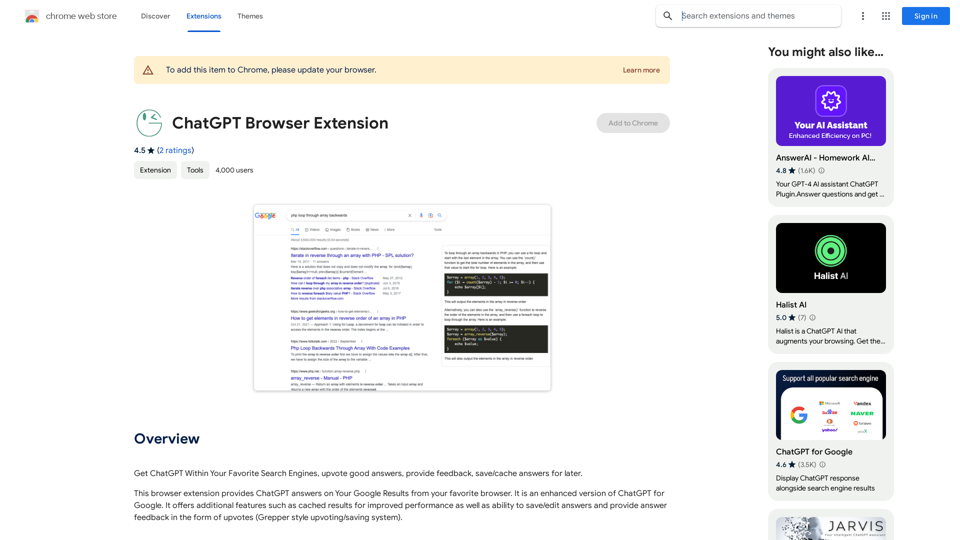
Use ChatGPT directly in your preferred search engines. Rate helpful answers, give feedback, and save or store answers for later use.
Visit Website
ChatGPT Browser Extension
Visit Website

Introduction

ChatGPT Browser Extension is an AI-powered platform that integrates various AI technologies into your web browsing experience. It offers access to ChatGPT, GPT-4o for text generation and image understanding, and Dalle3 for image creation. This extension enhances Google search results with AI-generated answers and provides a range of features to improve productivity and creativity.

Feature

AI-Enhanced Google Search Results

ChatGPT Browser Extension integrates AI-generated answers directly into your Google search results, providing quick and relevant information without leaving the search page.

Vast GPT Model Library

The extension offers access to nearly 200,000 GPT models, covering a wide range of applications for work, study, and daily life, without requiring a ChatGPT Plus subscription.

Performance Optimization

Users can benefit from cached results, improving response times and overall performance when using the extension.

User Feedback System

The extension incorporates a Grepper-style upvoting system, allowing users to provide feedback on answers, which helps improve the accuracy of responses over time.

Save and Edit Functionality

Users can save and edit AI-generated answers, creating a personalized knowledge base for future reference.

Image Generation with Dalle3

The extension includes Dalle3's text-to-image generation capability, enabling users to create images based on textual descriptions.

Document Analysis with GPT-4o

GPT-4o's advanced capabilities allow for comprehensive document analysis and understanding.

Privacy Protection

The platform prioritizes user privacy, ensuring that personal information is not used for training purposes and offering the option to delete accounts and associated data.

FAQ

How can I start using ChatGPT Browser Extension?

ChatGPT Browser Extension is available for free use up to certain limits. Users can simply install the extension and start exploring its features. For extended access and additional benefits, a subscription option is available.

What are the limitations of the free version?

While the free version offers access to various AI technologies, there are daily usage limits, particularly for GPT-4o conversations. Subscribing to the platform provides more extensive access beyond these free usage limits.

How does the extension improve Google search results?

The extension integrates AI-generated answers directly into Google search results, providing quick and relevant information without the need to navigate away from the search page.

Can I use the GPT models without a ChatGPT Plus subscription?

Yes, ChatGPT Browser Extension offers access to nearly 200,000 GPT models without requiring a ChatGPT Plus subscription, making advanced AI tools more accessible to users.

How does the extension ensure user privacy?

The platform prioritizes user privacy by not using personal data for training purposes. Users also have the option to delete their accounts at any time, which removes all associated data.

Latest Traffic Insights

  • Monthly Visits

    193.90 M

  • Bounce Rate

    56.27%

  • Pages Per Visit

    2.71

  • Time on Site(s)

    115.91

  • Global Rank

    -

  • Country Rank

    -

Recent Visits

Traffic Sources

  • Social Media:
    0.48%
  • Paid Referrals:
    0.55%
  • Email:
    0.15%
  • Referrals:
    12.81%
  • Search Engines:
    16.21%
  • Direct:
    69.81%
More Data

Related Websites

Chrome Web Store
View Detail

Chrome Web Store

Chrome Web Store

Enhance your browser with new features and customize your browsing experience.

193.90 M
BEXI.ai - Humanize AI Text | Free AI Humanizer Tool for Natural Language
View Detail

BEXI.ai - Humanize AI Text | Free AI Humanizer Tool for Natural Language

BEXI.ai - Humanize AI Text | Free AI Humanizer Tool for Natural Language

BEXI.ai is a free tool for making AI-generated text more natural and undetectable. With support for multiple languages and customizable styles, BEXI.ai helps you easily create engaging, human-like content.

33.18 K
ChatGPT Keyboard Shortcuts

#Navigation

* Ctrl + →: Move to the next message
* Ctrl + ←: Move to the previous message
* Home: Move to the beginning of the conversation
* End: Move to the end of the conversation

#Editing

* Ctrl + A: Select all text
* Ctrl + C: Copy selected text
* Ctrl + X: Cut selected text
* Ctrl + V: Paste copied or cut text
* Ctrl + Z: Undo
* Ctrl + Y: Redo
* Ctrl + Shift + F: Format text as code

#Actions

* Enter: Send the message
* Shift + Enter: Insert a new line
* Ctrl + Shift + Enter: Send the message and insert a new line
* Esc: Cancel editing and close the message input field
* Ctrl + Shift + Space: Open the emoji picker
* Ctrl + Shift + /: Open the help menu

#Accessibility

* Ctrl + +: Increase font size
* Ctrl + -: Decrease font size
* Ctrl + 0: Reset font size to default
View Detail

ChatGPT Keyboard Shortcuts #Navigation * Ctrl + →: Move to the next message * Ctrl + ←: Move to the previous message * Home: Move to the beginning of the conversation * End: Move to the end of the conversation #Editing * Ctrl + A: Select all text * Ctrl + C: Copy selected text * Ctrl + X: Cut selected text * Ctrl + V: Paste copied or cut text * Ctrl + Z: Undo * Ctrl + Y: Redo * Ctrl + Shift + F: Format text as code #Actions * Enter: Send the message * Shift + Enter: Insert a new line * Ctrl + Shift + Enter: Send the message and insert a new line * Esc: Cancel editing and close the message input field * Ctrl + Shift + Space: Open the emoji picker * Ctrl + Shift + /: Open the help menu #Accessibility * Ctrl + +: Increase font size * Ctrl + -: Decrease font size * Ctrl + 0: Reset font size to default

ChatGPT Keyboard Shortcuts #Navigation * Ctrl + →: Move to the next message * Ctrl + ←: Move to the previous message * Home: Move to the beginning of the conversation * End: Move to the end of the conversation #Editing * Ctrl + A: Select all text * Ctrl + C: Copy selected text * Ctrl + X: Cut selected text * Ctrl + V: Paste copied or cut text * Ctrl + Z: Undo * Ctrl + Y: Redo * Ctrl + Shift + F: Format text as code #Actions * Enter: Send the message * Shift + Enter: Insert a new line * Ctrl + Shift + Enter: Send the message and insert a new line * Esc: Cancel editing and close the message input field * Ctrl + Shift + Space: Open the emoji picker * Ctrl + Shift + /: Open the help menu #Accessibility * Ctrl + +: Increase font size * Ctrl + -: Decrease font size * Ctrl + 0: Reset font size to default

Enhance your ChatGPT experience with easy-to-use keyboard shortcuts.

193.90 M
Talefy - AI Story Generator | Interactive Stories
View Detail

Talefy - AI Story Generator | Interactive Stories

Talefy - AI Story Generator | Interactive Stories

Unleash your imagination with Talefy, the AI-powered story generator. Explore interactive tales across various genres, unbounded by choices.

209.20 K
MIA - Writing Assistant
View Detail

MIA - Writing Assistant

MIA - Writing Assistant

Write Faster, Better, and More Engaging Content On LinkedIn and Medium Tired of staring at a blank page? We've all been there. But what if you could write compelling content for LinkedIn and Medium with ease? Here's how: * Find Your Niche: What are you passionate about? What do you know a lot about? Focus your writing on topics that genuinely interest you. * Craft a Killer Headline: Your headline is your first impression. Make it catchy, clear, and benefit-driven. * Structure for Success: Use headings, subheadings, and bullet points to break up your text and make it easy to read. * Tell a Story: People connect with stories. Weave narratives into your content to make it more engaging. * Keep it Concise: Get to the point quickly. People have short attention spans, so respect their time. * Use Visuals: Images, videos, and infographics can break up text and make your content more visually appealing. * Proofread Carefully: Typos and grammatical errors can damage your credibility. Always proofread your work before publishing. * Promote Your Content: Share your articles on social media and engage with your audience in the comments. By following these tips, you can write faster, better, and more engaging content for LinkedIn and Medium.

193.90 M
Online Story Planner - Plot Factory
View Detail

Online Story Planner - Plot Factory

Online Story Planner - Plot Factory

Online story planner, organizer, and writing app that allows you to create fictional universes, develop rich characters, and write amazing stories.

32.05 K
Deploy GPTsDeploying GPTs
View Detail

Deploy GPTsDeploying GPTs

Deploy GPTsDeploying GPTs

This extension deploys your OpenAI GPTs to places like websites, WhatsApp, Telegram, and more.

193.90 M
Satellite AI. Minutes Creation AI
View Detail

Satellite AI. Minutes Creation AI

Satellite AI. Minutes Creation AI

Satellite AI. The minutes creation AI is a function that utilizes AI to automatically create minutes of meetings on Google Meet™, Microsoft Teams, and Zoom.

193.90 M