Open-source RightAI Tools Directory
  • Discover AI
  • Submit
  • Startup
  • Blog
Open-source RightAI Tools Directory
Discover the best AI tools of 2025 with the RightAI Tools Directory!

Friend Links

AI Anime GeneratorToolsApp AI

Support

Tap4
Privacy policyTerms & ConditionsContact Us
Loading...
loading...

Omost | Try Omost for Free Online - AI-Powered Image Generation from Code

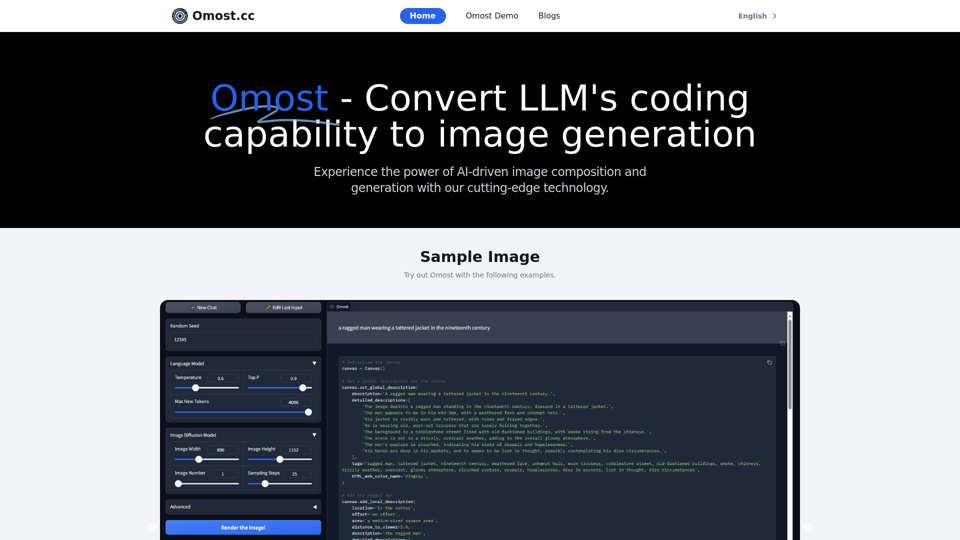
Omost offers large language model (LLM) models that can generate code to create visual images using Omost's virtual Canvas agent.
Visit Website
Omost | Try Omost for Free Online - AI-Powered Image Generation from Code
Visit Website

Introduction

Omost is an innovative project that harnesses the power of Large Language Models (LLMs) to transform coding capabilities into image generation and composition. This cutting-edge technology allows users to create high-quality images from simple text prompts, revolutionizing the creative process and enhancing efficiency in visual content creation.

Feature

LLM-Powered Image Generation

Omost utilizes pretrained LLM models to write codes that compose visual contents on a virtual Canvas, which are then rendered by image generators. This unique approach combines the power of language models with image creation techniques.

Multiple Pretrained Models

The platform offers three pretrained models based on variations of Llama3 and Phi3, providing users with diverse options for image generation.

Free Stable Video Diffusion Tool

Users can access the Stable Video Diffusion tool online for free, expanding the possibilities of AI-driven content creation.

Text-to-Image Generation

With Omost, users can generate stunning images from simple text prompts, making complex image creation accessible to everyone.

User-Friendly Interface

The platform is designed to be easy to use, allowing users to explore different models and features without extensive technical knowledge.

Experimental Playground

Omost encourages users to experiment with various text prompts and parameters, fostering creativity and innovation in image generation.

FAQ

What is Omost?

Omost is a project that leverages Large Language Models (LLMs) to convert coding capabilities into image generation and composition. It enables users to create high-quality images from simple text prompts.

How does Omost work?

Omost uses pretrained LLM models to write codes that compose visual contents on a virtual Canvas, which are then rendered by image generators. This innovative approach combines language processing with image creation techniques.

Is Omost free to use?

Yes, users can try the Stable Video Diffusion tool for free online. However, more advanced features or extended access may require a paid subscription.

What models does Omost use?

Omost offers three pretrained models based on variations of Llama3 and Phi3, providing users with diverse options for image generation.

How can I get the best results with Omost?

To maximize your experience with Omost:

  1. Explore the available models and features
  2. Experiment with different text prompts and parameters
  3. Don't hesitate to try new approaches and push the boundaries of what's possible

Related Websites
Kuakua - Psychology and AI Tools for Well-Being
View Detail

Kuakua - Psychology and AI Tools for Well-Being

Kuakua - Psychology and AI Tools for Well-Being

Explore psychology, AI tools, mindfulness, lifestyle, and therapy resources. Find happy languages, tasks, websites, and apps to boost your well-being and happiness.

0
ChatGPT TextCheck - analyze any text for Influence & Propaganda with AI
View Detail

ChatGPT TextCheck - analyze any text for Influence & Propaganda with AI

ChatGPT TextCheck - analyze any text for Influence & Propaganda with AI

An extension to help you avoid misinformation

193.90 M
Chat Bot
View Detail

Chat Bot

Chat Bot

ChatGPT Browser Plugin

193.90 M
Ikigai Ads Companion
View Detail

Ikigai Ads Companion

Ikigai Ads Companion

Track the success of your TikTok ads as they run and get helpful tips to improve them.

193.90 M
Astra Vision
View Detail

Astra Vision

Astra Vision

Astra Vision is an AI-powered web extension that includes a set of powerful AI tools: Astra Guard and AI Snapper.

193.90 M
Grey Cat - Randomizer
View Detail

Grey Cat - Randomizer

Grey Cat - Randomizer

This extension randomly selects a specific number of items from a given list.

193.90 M
Searching for ChatGPT Plugins

Searching for ChatGPT plugins can be an exciting experience, as it allows you to explore and discover new features and functionalities to enhance your conversational AI model. Here are some ways to search for ChatGPT plugins:

Official Plugin Directory

The official ChatGPT plugin directory is a great place to start your search. This directory provides a curated list of plugins that are compatible with ChatGPT, along with their descriptions, features, and installation instructions.

GitHub and Open-Source Repositories

GitHub and other open-source repositories are treasure troves for ChatGPT plugins. You can search for plugins using keywords like "ChatGPT plugin" or "conversational AI plugin" to find relevant repositories. You can also explore popular open-source repositories like the ChatGPT community repository.

Plugin Marketplaces

Some plugin marketplaces, like the ChatGPT Marketplace, offer a wide range of plugins for ChatGPT. These marketplaces often provide user reviews, ratings, and descriptions to help you make informed decisions.

Forums and Communities

ChatGPT forums and communities are great places to ask for plugin recommendations or search for plugins. You can ask other users about their favorite plugins or search for threads related to specific plugin categories.

Search Engines

Finally, you can use search engines like Google to search for ChatGPT plugins. Use specific keywords like "ChatGPT plugin for [specific feature]" or "best ChatGPT plugins" to get relevant results.

Remember to always evaluate the plugins you find based on their compatibility, features, and user reviews before installing them. Happy searching!
View Detail

Searching for ChatGPT Plugins Searching for ChatGPT plugins can be an exciting experience, as it allows you to explore and discover new features and functionalities to enhance your conversational AI model. Here are some ways to search for ChatGPT plugins: Official Plugin Directory The official ChatGPT plugin directory is a great place to start your search. This directory provides a curated list of plugins that are compatible with ChatGPT, along with their descriptions, features, and installation instructions. GitHub and Open-Source Repositories GitHub and other open-source repositories are treasure troves for ChatGPT plugins. You can search for plugins using keywords like "ChatGPT plugin" or "conversational AI plugin" to find relevant repositories. You can also explore popular open-source repositories like the ChatGPT community repository. Plugin Marketplaces Some plugin marketplaces, like the ChatGPT Marketplace, offer a wide range of plugins for ChatGPT. These marketplaces often provide user reviews, ratings, and descriptions to help you make informed decisions. Forums and Communities ChatGPT forums and communities are great places to ask for plugin recommendations or search for plugins. You can ask other users about their favorite plugins or search for threads related to specific plugin categories. Search Engines Finally, you can use search engines like Google to search for ChatGPT plugins. Use specific keywords like "ChatGPT plugin for [specific feature]" or "best ChatGPT plugins" to get relevant results. Remember to always evaluate the plugins you find based on their compatibility, features, and user reviews before installing them. Happy searching!

Searching for ChatGPT Plugins Searching for ChatGPT plugins can be an exciting experience, as it allows you to explore and discover new features and functionalities to enhance your conversational AI model. Here are some ways to search for ChatGPT plugins: Official Plugin Directory The official ChatGPT plugin directory is a great place to start your search. This directory provides a curated list of plugins that are compatible with ChatGPT, along with their descriptions, features, and installation instructions. GitHub and Open-Source Repositories GitHub and other open-source repositories are treasure troves for ChatGPT plugins. You can search for plugins using keywords like "ChatGPT plugin" or "conversational AI plugin" to find relevant repositories. You can also explore popular open-source repositories like the ChatGPT community repository. Plugin Marketplaces Some plugin marketplaces, like the ChatGPT Marketplace, offer a wide range of plugins for ChatGPT. These marketplaces often provide user reviews, ratings, and descriptions to help you make informed decisions. Forums and Communities ChatGPT forums and communities are great places to ask for plugin recommendations or search for plugins. You can ask other users about their favorite plugins or search for threads related to specific plugin categories. Search Engines Finally, you can use search engines like Google to search for ChatGPT plugins. Use specific keywords like "ChatGPT plugin for [specific feature]" or "best ChatGPT plugins" to get relevant results. Remember to always evaluate the plugins you find based on their compatibility, features, and user reviews before installing them. Happy searching!

Here are some of the best, top, and popular ChatGPT plugins: 1. WebChat: A plugin that allows users to interact with ChatGPT through a web interface. 2. ChatGPT Writer: A plugin that helps users generate high-quality content, such as articles, stories, and emails, using ChatGPT's language generation capabilities. 3. ChatGPT Code Interpreter: A plugin that enables users to write code in various programming languages and have ChatGPT interpret and execute it. 4. ChatGPT Conversational AI: A plugin that allows users to create conversational AI models using ChatGPT's language understanding capabilities. 5. ChatGPT Language Translator: A plugin that enables users to translate text from one language to another using ChatGPT's language translation capabilities. 6. ChatGPT Summarizer: A plugin that helps users summarize long pieces of text, such as articles or documents, into concise summaries using ChatGPT's text summarization capabilities. 7. ChatGPT Q&A: A plugin that enables users to ask questions and receive answers from ChatGPT on a wide range of topics. 8. ChatGPT Creative Writing: A plugin that helps users generate creative writing, such as poetry, stories, and dialogues, using ChatGPT's language generation capabilities. 9. ChatGPT Dialogue System: A plugin that enables users to create conversational dialogue systems using ChatGPT's language understanding capabilities. 10. ChatGPT Sentiment Analyzer: A plugin that helps users analyze the sentiment of text, such as determining whether a piece of text is positive, negative, or neutral, using ChatGPT's sentiment analysis capabilities.

193.90 M
Ads Society
View Detail

Ads Society

Ads Society

Ads Society is the best way to save ads from TikTok and Facebook Ads libraries with one click.

193.90 M