Open-source RightAI Tools Directory
  • Discover AI
  • Submit
  • Startup
  • Blog
Open-source RightAI Tools Directory
Discover the best AI tools of 2025 with the RightAI Tools Directory!

Friend Links

AI Anime GeneratorToolsApp AI

Support

Tap4
Privacy policyTerms & ConditionsContact Us
Loading...
loading...

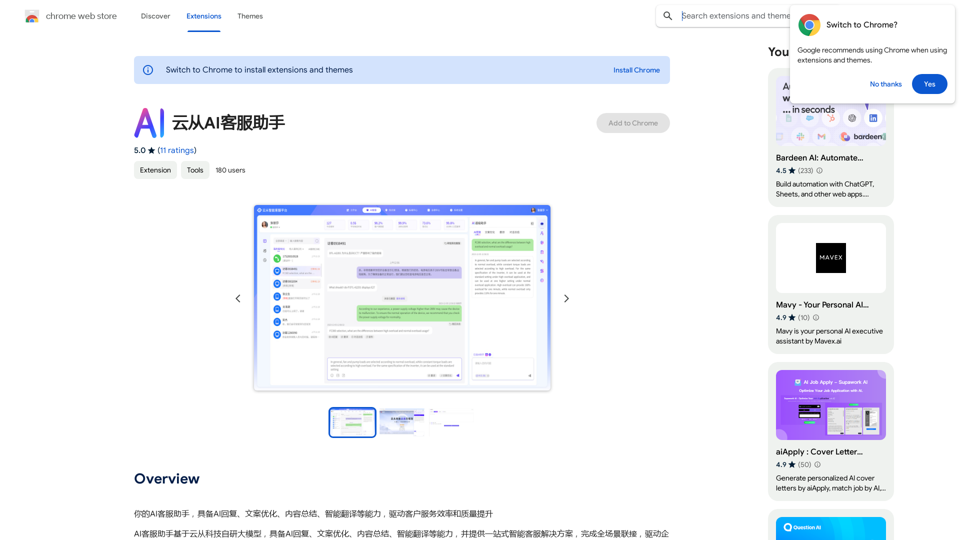
AI Customer Service Assistant

Your AI customer service assistant has the capabilities of AI replies, copywriting optimization, content summarization, and intelligent translation, driving improvements in customer service efficiency and quality.
Visit Website
AI Customer Service Assistant
Visit Website

Introduction

AI Customer Service Assistant is an innovative extension designed to enhance customer service efficiency and quality. It offers AI-driven capabilities including automated responses, content optimization, summarization, and smart translation. This tool is perfect for businesses looking to streamline their customer service operations and provide quick, accurate assistance to their clients.

Feature

AI Response

The extension utilizes artificial intelligence to generate quick and accurate responses to customer inquiries, significantly reducing response times and improving overall service quality.

Content Optimization

AI Customer Service Assistant optimizes content for better readability and comprehension, ensuring that customer inquiries are addressed effectively and clearly.

Content Summary

Long pieces of text can be summarized by the AI, providing a concise overview of the main points. This feature helps in quickly understanding and addressing complex customer issues.

Smart Translation

With its ability to translate text in multiple languages, the extension enables seamless communication with customers from diverse linguistic backgrounds, breaking down language barriers in customer service.

Easy Installation and Configuration

Users can easily install the extension from the Chrome Web Store and configure it to suit their specific customer service needs, making it adaptable to various business requirements.

Cost-Effective Solution

The AI Customer Service Assistant is offered as a free extension, with no subscription fees or hidden costs, making it an accessible tool for businesses of all sizes.

FAQ

What are the main features of AI Customer Service Assistant?

The main features include:

  1. AI-generated responses
  2. Content optimization
  3. Text summarization
  4. Smart translation across multiple languages

How do I start using the AI Customer Service Assistant?

To start using the AI Customer Service Assistant:

  1. Install the extension from the Chrome Web Store
  2. Configure the extension according to your customer service needs
  3. Begin using it to respond to customer inquiries

Is there a cost associated with using this extension?

No, the AI Customer Service Assistant is completely free. There are no subscription fees or hidden costs associated with its use.

Can the AI Customer Service Assistant handle multiple languages?

Yes, the extension includes a smart translation feature that can translate text in multiple languages, facilitating communication with customers from diverse linguistic backgrounds.

How does the AI Customer Service Assistant improve efficiency?

The extension improves efficiency by:

  1. Providing quick AI-generated responses
  2. Optimizing content for better comprehension
  3. Summarizing long texts
  4. Offering instant translation services These features combined help in reducing response times and improving the overall quality of customer service.

Related Websites

Candy Jar
View Detail

Candy Jar

Candy Jar

Find IT candidates via CandyJar

193.90 M
Transcripo - Free Audio-to-Text Converter
View Detail

Transcripo - Free Audio-to-Text Converter

Transcripo - Free Audio-to-Text Converter

Transcription AI that turns your audio and video files into text or subtitles. It is fast, easy to use, and free to try. Easily summarize your files with our AI.

6.49 K
mymap.ai: Mapping Ideas That Change the World
View Detail

mymap.ai: Mapping Ideas That Change the World

mymap.ai: Mapping Ideas That Change the World

MyMap transforms your textual concepts into visual representations such as mind maps and presentations through a straightforward chat interface. It's perfect for students, educators, and professionals, requiring no design expertise. This tool saves you time by enabling effortless, collaborative visual creation.

1.04 M
CurseCut - Automatic AI Profanity Removal for Video and Audio
View Detail

CurseCut - Automatic AI Profanity Removal for Video and Audio

CurseCut - Automatic AI Profanity Removal for Video and Audio

Effortlessly remove profanity from your video audio using our advanced AI technology. Try CurseCut today for clean, professional content.

28.22 K
ChatShelf - Save ChatGPT to Notion

ChatShelf is a tool that lets you save your ChatGPT conversations directly into Notion. 

It's a simple way to keep track of your AI interactions and use them later. 

Just copy the link to your ChatGPT conversation and paste it into ChatShelf. 

It will then extract the conversation and create a Notion page for you.
View Detail

ChatShelf - Save ChatGPT to Notion ChatShelf is a tool that lets you save your ChatGPT conversations directly into Notion. It's a simple way to keep track of your AI interactions and use them later. Just copy the link to your ChatGPT conversation and paste it into ChatShelf. It will then extract the conversation and create a Notion page for you.

ChatShelf - Save ChatGPT to Notion ChatShelf is a tool that lets you save your ChatGPT conversations directly into Notion. It's a simple way to keep track of your AI interactions and use them later. Just copy the link to your ChatGPT conversation and paste it into ChatShelf. It will then extract the conversation and create a Notion page for you.

It's fast, stable, beautiful, and free.

193.90 M
Dewagear CreateAI
View Detail

Dewagear CreateAI

Dewagear CreateAI

Dewagear CreateAI

0
Overcome Copilot AI Message Limit, Export Chats to JSON File: TopicsGPT

This is a tool to help you work around the message limit in Copilot AI and export your conversations to a JSON file. 

Here's how it works:

* Extend Your Conversations: TopicsGPT allows you to continue your conversations with Copilot AI beyond the usual message limit. 

* Save Your History: Export your entire chat history with Copilot AI as a structured JSON file. This makes it easy to review past interactions, analyze your conversations, or even use the data for other purposes.

Benefits:

* No More Interruptions: Keep your creative flow going without worrying about hitting the message limit.
* Organized Data:  Have a clear and organized record of your conversations with Copilot AI.
* Flexibility: Use the exported JSON data for your own projects or analysis. 


Let me know if you have any questions!
View Detail

Overcome Copilot AI Message Limit, Export Chats to JSON File: TopicsGPT This is a tool to help you work around the message limit in Copilot AI and export your conversations to a JSON file. Here's how it works: * Extend Your Conversations: TopicsGPT allows you to continue your conversations with Copilot AI beyond the usual message limit. * Save Your History: Export your entire chat history with Copilot AI as a structured JSON file. This makes it easy to review past interactions, analyze your conversations, or even use the data for other purposes. Benefits: * No More Interruptions: Keep your creative flow going without worrying about hitting the message limit. * Organized Data: Have a clear and organized record of your conversations with Copilot AI. * Flexibility: Use the exported JSON data for your own projects or analysis. Let me know if you have any questions!

Overcome Copilot AI Message Limit, Export Chats to JSON File: TopicsGPT This is a tool to help you work around the message limit in Copilot AI and export your conversations to a JSON file. Here's how it works: * Extend Your Conversations: TopicsGPT allows you to continue your conversations with Copilot AI beyond the usual message limit. * Save Your History: Export your entire chat history with Copilot AI as a structured JSON file. This makes it easy to review past interactions, analyze your conversations, or even use the data for other purposes. Benefits: * No More Interruptions: Keep your creative flow going without worrying about hitting the message limit. * Organized Data: Have a clear and organized record of your conversations with Copilot AI. * Flexibility: Use the exported JSON data for your own projects or analysis. Let me know if you have any questions!

Bypass Copilot's Message Limit and Move Conversations * Get around the message limit in Microsoft's Copilot: Find ways to exceed the character or message count restrictions within Copilot. * Transfer conversations to new chats: Move existing conversations from one chat space to another. Export AI Chat Histories * Download chat history from any AI platform: Save your conversations with various AI systems as JSON files.

193.90 M
Bing Search Engine
View Detail

Bing Search Engine

Bing Search Engine

Use the Bing Search Engine to make your searches even better, powered by GPT-4!

193.90 M