Open-source RightAI Tools Directory
  • Discover AI
  • Submit
  • Startup
  • Blog
Open-source RightAI Tools Directory
Discover the best AI tools of 2025 with the RightAI Tools Directory!

Friend Links

AI Anime GeneratorToolsApp AI

Support

Tap4
Privacy policyTerms & ConditionsContact Us
Loading...
loading...

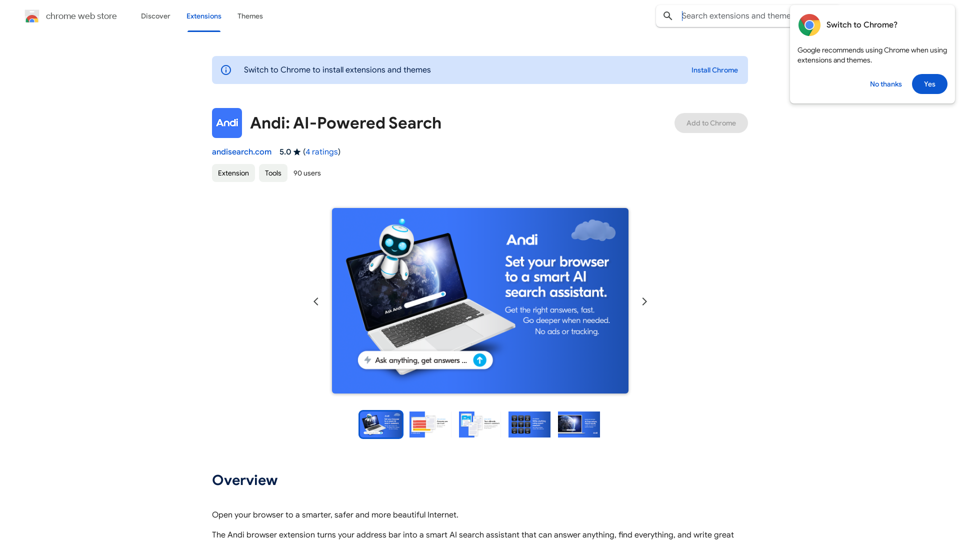
Andi: AI-Powered Search

Open your browser to a smarter, safer, and more beautiful internet.
Visit Website
Andi: AI-Powered Search
Visit Website

Introduction

Andi is an innovative browser extension that transforms your address bar into a powerful AI-powered search assistant. It offers a wide range of capabilities, from answering questions and finding information to generating content. Andi's user-friendly interface allows for seamless searching directly from the address bar, making information retrieval effortless and efficient.

Feature

AI-Powered Search Assistant

Andi leverages advanced AI technology to provide accurate answers, summarize content, and even generate high-quality written material based on web research.

Comprehensive Information Retrieval

Users can ask any question and receive precise answers, making Andi a versatile tool for various information needs.

Content Generation and Summarization

Andi can create excellent content and provide concise summaries of complex information, saving users time and effort.

Visual Results

The extension offers visually appealing results and beautifully formatted content, enhancing the user experience.

Privacy-Focused

Andi prioritizes user privacy with no ads, spam, or tracking. The service is free and anonymous, ensuring a secure search experience.

Daily Free Usage

Users can enjoy 20 free Andi conversations per day, allowing them to explore the AI-powered tools for various tasks without cost.

Address Bar Integration

Andi seamlessly integrates with the browser's address bar, enabling users to search directly from the popup for quick and easy access.

FAQ

How does Andi work?

Andi utilizes AI technology to reimagine the search experience, offering a more efficient way to find and explore knowledge. It provides answers, summarizes information, and generates content using advanced AI algorithms.

Is user data protected?

Andi places a high value on user privacy. Your information is not used for training purposes, and you have the option to delete your account at any time, which will remove all associated data.

When should I consider a subscription?

If you find that the 20 free daily Andi conversations are insufficient for your needs and you rely heavily on the service, subscribing to Andi's affordable products might be beneficial.

What are some tips for maximizing Andi's use?

  • Utilize Andi for answering questions and summarizing information
  • Leverage the content generation feature for writing tasks
  • Take advantage of the address bar integration for quick searches
  • Explore the visual results and beautifully formatted content

Latest Traffic Insights

  • Monthly Visits

    193.90 M

  • Bounce Rate

    56.27%

  • Pages Per Visit

    2.71

  • Time on Site(s)

    115.91

  • Global Rank

    -

  • Country Rank

    -

Recent Visits

Traffic Sources

  • Social Media:
    0.48%
  • Paid Referrals:
    0.55%
  • Email:
    0.15%
  • Referrals:
    12.81%
  • Search Engines:
    16.21%
  • Direct:
    69.81%
More Data

Related Websites

ChatGPT Email
View Detail

ChatGPT Email

ChatGPT Email

Unleash the power of ChatGPT-Mail, simplify your email writing, and elevate your communication.

193.90 M
Cartifind Importer
View Detail

Cartifind Importer

Cartifind Importer

With Cartifind, you can easily import products from vetted dropshipping suppliers to your store. It becomes efficient for you to manage your product catalog, track inventory, and fulfill orders seamlessly.

193.90 M
pixeldraw007 & Stable Diffusion Sidebar
View Detail

pixeldraw007 & Stable Diffusion Sidebar

pixeldraw007 & Stable Diffusion Sidebar

pixeldraw007 & Stable Diffusion & Midjourney AI

193.90 M
UMLGenius
View Detail

UMLGenius

UMLGenius

A Chrome extension for generating UML diagrams

193.90 M
Article Summary with ChatGPT and Take Notes

This is a guide on how to use ChatGPT to summarize articles and take notes effectively. 

Step 1:  Provide ChatGPT with the Article

Copy and paste the full text of the article into the ChatGPT interface. 

Step 2:  Craft Your Prompt

Tell ChatGPT what you want it to do. Here are some examples:

* Summarize: "Please summarize this article in 200 words."
* Key Points: "What are the main points of this article?"
* Bullet Points: "Summarize the key findings of this article in bullet points."
* Notes: "Take notes on this article, focusing on the author's arguments and supporting evidence."

Step 3:  Review and Refine

ChatGPT will generate a summary, key points, bullet points, or notes based on your prompt. 

* Read carefully: Make sure the output accurately reflects the article's content.
* Edit as needed:  You can ask ChatGPT to rephrase sections or provide more detail.
* Add your own insights:  Don't just copy ChatGPT's output. Use it as a starting point and add your own thoughts, questions, and connections.

Tips for Effective Use:

* Be specific: The more specific your prompt, the better the output will be.
* Experiment with different prompts: Try various phrasing to see what works best.
* Use ChatGPT as a tool:  It's a powerful aid, but it's not a replacement for critical reading and thinking.
View Detail

Article Summary with ChatGPT and Take Notes This is a guide on how to use ChatGPT to summarize articles and take notes effectively. Step 1: Provide ChatGPT with the Article Copy and paste the full text of the article into the ChatGPT interface. Step 2: Craft Your Prompt Tell ChatGPT what you want it to do. Here are some examples: * Summarize: "Please summarize this article in 200 words." * Key Points: "What are the main points of this article?" * Bullet Points: "Summarize the key findings of this article in bullet points." * Notes: "Take notes on this article, focusing on the author's arguments and supporting evidence." Step 3: Review and Refine ChatGPT will generate a summary, key points, bullet points, or notes based on your prompt. * Read carefully: Make sure the output accurately reflects the article's content. * Edit as needed: You can ask ChatGPT to rephrase sections or provide more detail. * Add your own insights: Don't just copy ChatGPT's output. Use it as a starting point and add your own thoughts, questions, and connections. Tips for Effective Use: * Be specific: The more specific your prompt, the better the output will be. * Experiment with different prompts: Try various phrasing to see what works best. * Use ChatGPT as a tool: It's a powerful aid, but it's not a replacement for critical reading and thinking.

Article Summary with ChatGPT and Take Notes This is a guide on how to use ChatGPT to summarize articles and take notes effectively. Step 1: Provide ChatGPT with the Article Copy and paste the full text of the article into the ChatGPT interface. Step 2: Craft Your Prompt Tell ChatGPT what you want it to do. Here are some examples: * Summarize: "Please summarize this article in 200 words." * Key Points: "What are the main points of this article?" * Bullet Points: "Summarize the key findings of this article in bullet points." * Notes: "Take notes on this article, focusing on the author's arguments and supporting evidence." Step 3: Review and Refine ChatGPT will generate a summary, key points, bullet points, or notes based on your prompt. * Read carefully: Make sure the output accurately reflects the article's content. * Edit as needed: You can ask ChatGPT to rephrase sections or provide more detail. * Add your own insights: Don't just copy ChatGPT's output. Use it as a starting point and add your own thoughts, questions, and connections. Tips for Effective Use: * Be specific: The more specific your prompt, the better the output will be. * Experiment with different prompts: Try various phrasing to see what works best. * Use ChatGPT as a tool: It's a powerful aid, but it's not a replacement for critical reading and thinking.

I can do that! Please provide me with the URL of the webpage or article you'd like me to summarize. I'll do my best to create a concise and easy-to-understand summary for you.

193.90 M
Online Story Planner - Plot Factory
View Detail

Online Story Planner - Plot Factory

Online Story Planner - Plot Factory

Online story planner, organizer, and writing app that allows you to create fictional universes, develop rich characters, and write amazing stories.

32.05 K
Pulse App AI

Pulse App AI is an innovative artificial intelligence-powered healthcare platform that enables patients to take control of their health and wellness.
View Detail

Pulse App AI Pulse App AI is an innovative artificial intelligence-powered healthcare platform that enables patients to take control of their health and wellness.

Pulse App AI Pulse App AI is an innovative artificial intelligence-powered healthcare platform that enables patients to take control of their health and wellness.

The Power of Artificial Intelligence in Your Pocket

0
Chrome Web Store
View Detail

Chrome Web Store

Chrome Web Store

Enhance your browser with new features and customize your browsing experience.

193.90 M