Open-source RightAI Tools Directory
  • Discover AI
  • Submit
  • Startup
  • Blog
Open-source RightAI Tools Directory
Discover the best AI tools of 2025 with the RightAI Tools Directory!

Friend Links

AI Anime GeneratorToolsApp AI

Support

Tap4
Privacy policyTerms & ConditionsContact Us
Loading...
loading...

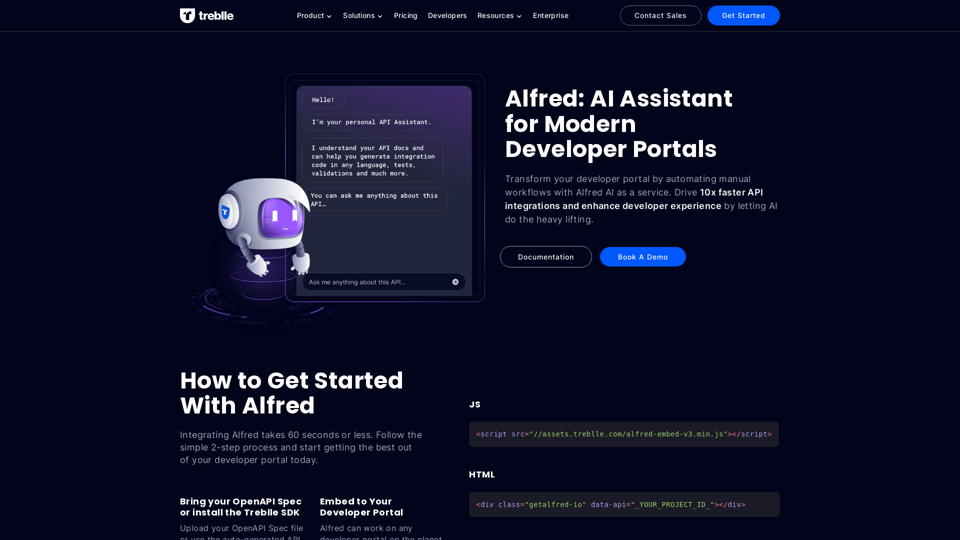
Alfred: AI Assistant for Modern Developer Portals

Transform your developer portal by automating manual workflows with Alfred AI as a service. Drive 10x faster API integrations and enhance developer experience by letting AI do the heavy lifting.
Visit Website
Alfred: AI Assistant for Modern Developer Portals
Visit Website

Introduction

Alfred is an AI assistant designed to revolutionize modern developer portals. It automates manual workflows, enhances the developer experience, and accelerates API integrations. By leveraging Alfred's capabilities, developers can significantly improve their productivity and make the most of their APIs.

Feature

Data Collection and Analysis

Alfred gathers and analyzes user behavior data, providing valuable insights to enhance the overall developer experience.

Workflow Automation

Streamline your development process with Alfred's ability to automate manual workflows, saving time and boosting efficiency.

Enhanced API Discovery

Quickly locate the APIs you need with Alfred's advanced search capabilities, reducing time spent sifting through documentation.

Rapid API Integration

Generate code and models in seconds, dramatically reducing the time required for API integration.

Improved API Adoption

Navigate through your APIs effortlessly, leading to enhanced adoption rates and an improved developer experience.

Quick Integration Process

Integrate Alfred in 60 seconds or less with a simple 2-step process:

  1. Upload your OpenAPI Spec or use auto-generated API Docs from Treblle
  2. Embed Alfred into your developer portal with just 2 lines of code

Versatile Compatibility

Alfred is designed to work seamlessly with any developer portal worldwide.

Flexible Pricing Options

Offering various pricing plans tailored for startups, SMBs, and enterprises to suit different needs and budgets.

Comprehensive Resources

Access a wealth of resources including documentation, blog posts, and case studies to support your development journey.

FAQ

What is Alfred?

Alfred is an AI-powered assistant for modern developer portals. It's designed to automate workflows, enhance the developer experience, and accelerate API integrations, ultimately helping developers to be 10 times more efficient in their API-related tasks.

How does Alfred improve API discovery and integration?

Alfred enhances API discovery by providing advanced search capabilities, allowing developers to quickly find the APIs they need. For integration, Alfred can generate code and models in seconds, significantly reducing the time and effort required for API integration.

How long does it take to integrate Alfred?

Integrating Alfred is a quick and straightforward process that takes 60 seconds or less. It involves a simple 2-step process: uploading your OpenAPI Spec (or using auto-generated API Docs from Treblle) and embedding Alfred into your developer portal with just two lines of code.

What kind of resources does Alfred provide?

Alfred offers a range of resources to support developers, including comprehensive documentation, informative blog posts, and insightful case studies. These resources are designed to help developers make the most of Alfred's capabilities and improve their overall development process.

Is Alfred suitable for different sizes of businesses?

Yes, Alfred offers various pricing plans and solutions tailored for different business sizes, including startups, small to medium-sized businesses (SMBs), and enterprises. This flexibility ensures that businesses of all scales can benefit from Alfred's AI-powered assistance.

Related Websites
Midjourney SREF Codes Library for Style Reference

What are SREF Codes?

SREF codes are special text strings used in Midjourney to quickly and easily apply specific artistic styles to your image generations. 

How to Use SREF Codes:

Simply add an SREF code to your Midjourney prompt. For example:

`/imagine a majestic dragon, SREF:cyberpunk`

SREF Code Library:

This library contains a collection of SREF codes categorized by style. 

* Art Styles:
    * `photorealistic`: Creates images with high levels of realism.
    * `impressionistic`:  Captures the essence of a scene with loose brushstrokes and vibrant colors.
    * `cubist`:  Breaks down objects into geometric shapes.
    * `surrealist`:  Creates dreamlike and fantastical images.
    * `abstract`:  Focuses on form, color, and composition rather than representational imagery.

* Visual Effects:
    * `cinematic`:  Gives images a cinematic look and feel.
    * `HDR`:  Creates images with high dynamic range, resulting in greater detail and contrast.
    * `neon`:  Adds vibrant neon lights to the image.
    * `pixel art`:  Generates images in a retro pixel art style.

* Other Styles:
    * `anime`:  Creates images in the style of Japanese animation.
    * `manga`:  Similar to anime, but with a more comic book aesthetic.
    * `sketch`:  Generates images that resemble pencil sketches.
    * `watercolor`:  Creates images with the look and feel of watercolor paintings.

Note: This is just a small sample of the many SREF codes available. 

Explore and Experiment:

The best way to learn about SREF codes is to experiment with them! Try combining different codes to create unique and interesting styles.
View Detail

Midjourney SREF Codes Library for Style Reference What are SREF Codes? SREF codes are special text strings used in Midjourney to quickly and easily apply specific artistic styles to your image generations. How to Use SREF Codes: Simply add an SREF code to your Midjourney prompt. For example: `/imagine a majestic dragon, SREF:cyberpunk` SREF Code Library: This library contains a collection of SREF codes categorized by style. * Art Styles: * `photorealistic`: Creates images with high levels of realism. * `impressionistic`: Captures the essence of a scene with loose brushstrokes and vibrant colors. * `cubist`: Breaks down objects into geometric shapes. * `surrealist`: Creates dreamlike and fantastical images. * `abstract`: Focuses on form, color, and composition rather than representational imagery. * Visual Effects: * `cinematic`: Gives images a cinematic look and feel. * `HDR`: Creates images with high dynamic range, resulting in greater detail and contrast. * `neon`: Adds vibrant neon lights to the image. * `pixel art`: Generates images in a retro pixel art style. * Other Styles: * `anime`: Creates images in the style of Japanese animation. * `manga`: Similar to anime, but with a more comic book aesthetic. * `sketch`: Generates images that resemble pencil sketches. * `watercolor`: Creates images with the look and feel of watercolor paintings. Note: This is just a small sample of the many SREF codes available. Explore and Experiment: The best way to learn about SREF codes is to experiment with them! Try combining different codes to create unique and interesting styles.

Midjourney SREF Codes Library for Style Reference What are SREF Codes? SREF codes are special text strings used in Midjourney to quickly and easily apply specific artistic styles to your image generations. How to Use SREF Codes: Simply add an SREF code to your Midjourney prompt. For example: `/imagine a majestic dragon, SREF:cyberpunk` SREF Code Library: This library contains a collection of SREF codes categorized by style. * Art Styles: * `photorealistic`: Creates images with high levels of realism. * `impressionistic`: Captures the essence of a scene with loose brushstrokes and vibrant colors. * `cubist`: Breaks down objects into geometric shapes. * `surrealist`: Creates dreamlike and fantastical images. * `abstract`: Focuses on form, color, and composition rather than representational imagery. * Visual Effects: * `cinematic`: Gives images a cinematic look and feel. * `HDR`: Creates images with high dynamic range, resulting in greater detail and contrast. * `neon`: Adds vibrant neon lights to the image. * `pixel art`: Generates images in a retro pixel art style. * Other Styles: * `anime`: Creates images in the style of Japanese animation. * `manga`: Similar to anime, but with a more comic book aesthetic. * `sketch`: Generates images that resemble pencil sketches. * `watercolor`: Creates images with the look and feel of watercolor paintings. Note: This is just a small sample of the many SREF codes available. Explore and Experiment: The best way to learn about SREF codes is to experiment with them! Try combining different codes to create unique and interesting styles.

Explore a list of 177 unique Midjourney sref codes and style references to find your perfect Midjourney sref code effect.

149.96 K
Dashworks

Dashworks is a powerful and flexible IT transformation and cloud migration planning tool that helps organizations to assess, plan, and execute their IT transformation projects.
View Detail

Dashworks Dashworks is a powerful and flexible IT transformation and cloud migration planning tool that helps organizations to assess, plan, and execute their IT transformation projects.

Dashworks Dashworks is a powerful and flexible IT transformation and cloud migration planning tool that helps organizations to assess, plan, and execute their IT transformation projects.

Dash AI is your company's knowledge assistant.

193.90 M
Gmail Bot
View Detail

Gmail Bot

Gmail Bot

Ask ChatGPT about your Gmail messages

193.90 M
Google for Jobs Structured Data by Tarta.ai
View Detail

Google for Jobs Structured Data by Tarta.ai

Google for Jobs Structured Data by Tarta.ai

SEO Job Postings Structured Data by Tarta.ai is an AI-driven platform that enhances job postings with structured data for improved search engine optimization.

193.90 M
SumMe - AI Article Summarizer
View Detail

SumMe - AI Article Summarizer

SumMe - AI Article Summarizer

I can do that! Just paste the web article text here, and I'll generate a professional and concise summary using OpenAI's powerful GPT-4 model.

193.90 M
TraceMail Extension
View Detail

TraceMail Extension

TraceMail Extension

Track your emails in real-time with TraceMail and get instant notifications when someone opens them.

193.90 M
EclecticIQ Threat Scout
View Detail

EclecticIQ Threat Scout

EclecticIQ Threat Scout

Turn information about online dangers into data that artificial intelligence can understand and use. This data will follow the STIX 2.1 standard, so you can easily include it in your security programs.

193.90 M
Smart Scholar
View Detail

Smart Scholar

Smart Scholar

Finding relevant articles can be a tedious and time-consuming task. Smart Scholar simplifies your search by personalizing search results based on your interests and preferences.

193.90 M