Open-source RightAI Tools Directory
  • Discover AI
  • Submit
  • Startup
  • Blog
Open-source RightAI Tools Directory
Discover the best AI tools of 2025 with the RightAI Tools Directory!

Friend Links

AI Anime GeneratorToolsApp AI

Support

Tap4
Privacy policyTerms & ConditionsContact Us
Loading...
loading...

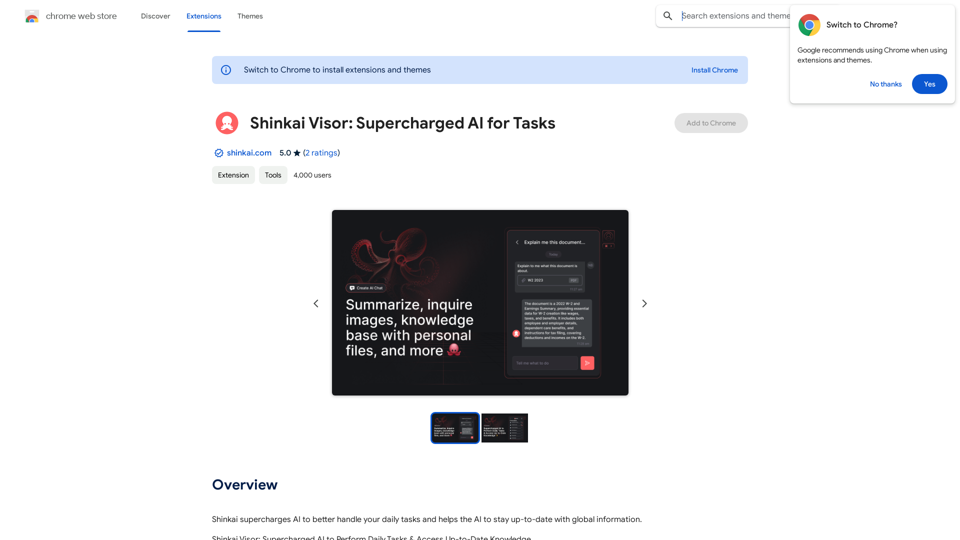
Shinkai Visor: Supercharged AI for Tasks

Shinkai enhances AI capabilities to better manage your daily tasks and keeps the AI current with worldwide information.
Visit Website
Shinkai Visor: Supercharged AI for Tasks
Visit Website

Introduction

Shinkai Visor is an innovative AI-powered Chrome extension designed to enhance daily tasks and provide real-time knowledge access. This revolutionary tool operates on a decentralized P2P network, ensuring up-to-date AI capabilities while prioritizing user privacy. Shinkai Visor integrates seamlessly into users' digital routines, offering a range of AI tools for various tasks and connecting users to a global network of intelligence.

Feature

AI-Driven Chrome Extension

Shinkai Visor is a cutting-edge Chrome extension that leverages AI technology to supercharge daily tasks and provide instant access to real-time knowledge.

Decentralized P2P Network

The extension operates on a decentralized peer-to-peer network, ensuring that the AI remains informed with the latest information at all times.

Privacy-Centric Design

Shinkai Visor prioritizes user privacy, maintaining an open-source ecosystem that respects data sovereignty and keeps user information under their control.

AI Tools for Daily Tasks

The extension offers a range of AI-powered tools to simplify digital routines, including email scheduling and dynamic workflow creation using integrations like Zapier, Google Docs, and Slack.

VectorFS File System

Shinkai Visor features a dedicated file system called VectorFS, which enhances AI performance, enables collaborative intelligence, and promotes open-source innovation.

Real-Time Knowledge Access

Users can access up-to-date information and knowledge through the extension's AI capabilities.

Customization Options

As an open-source project, Shinkai Visor allows users to build, customize, and extend its functionality to suit their specific needs.

FAQ

How does Shinkai Visor handle user data?

Shinkai Visor respects data sovereignty and does not collect or use user data, ensuring complete privacy for its users.

Is Shinkai Visor compatible with other Chrome extensions?

Yes, Shinkai Visor is designed to work seamlessly alongside other Chrome extensions, enhancing the overall browsing experience.

Can users customize Shinkai Visor?

Absolutely. As an open-source project, Shinkai Visor can be built upon, customized, and extended to fit individual user needs and preferences.

How can users get started with Shinkai Visor?

To begin using Shinkai Visor, users can install the extension and start exploring its features and capabilities. It's recommended to customize the extension to fit personal workflows and join the Shinkai Visor community for updates and innovations.

What are the main benefits of using Shinkai Visor?

Benefits
Anticipates user needs
Maintains data privacy
Connects to a global intelligence network
Simplifies digital routines
Provides real-time knowledge access

Related Websites

Potis.AI | Your Hiring Copilot
View Detail

Potis.AI | Your Hiring Copilot

Potis.AI | Your Hiring Copilot

Hiring Copilot for Clean and Fast Bulk Candidates Screening with Behavioral Interview and Real Cases

6.63 K
Open ChatGPT in a New Tab

You can open ChatGPT in a new tab by following these steps:

#Method 1: Using the Browser's Context Menu

1. Right-click on the ChatGPT link or button.
2. Select "Open in new tab" or "Open link in new tab" from the context menu.

#Method 2: Using the Keyboard Shortcut

1. Press `Ctrl + Click` (Windows/Linux) or `Cmd + Click` (Mac) on the ChatGPT link or button.

#Method 3: Using the Browser's Toolbar

1. Click on the ChatGPT link or button while holding down the `Ctrl` key (Windows/Linux) or `Cmd` key (Mac).
2. Release the key after the new tab is opened.

By following these methods, you can easily open ChatGPT in a new tab and start chatting without leaving your current page.
View Detail

Open ChatGPT in a New Tab You can open ChatGPT in a new tab by following these steps: #Method 1: Using the Browser's Context Menu 1. Right-click on the ChatGPT link or button. 2. Select "Open in new tab" or "Open link in new tab" from the context menu. #Method 2: Using the Keyboard Shortcut 1. Press `Ctrl + Click` (Windows/Linux) or `Cmd + Click` (Mac) on the ChatGPT link or button. #Method 3: Using the Browser's Toolbar 1. Click on the ChatGPT link or button while holding down the `Ctrl` key (Windows/Linux) or `Cmd` key (Mac). 2. Release the key after the new tab is opened. By following these methods, you can easily open ChatGPT in a new tab and start chatting without leaving your current page.

Open ChatGPT in a New Tab You can open ChatGPT in a new tab by following these steps: #Method 1: Using the Browser's Context Menu 1. Right-click on the ChatGPT link or button. 2. Select "Open in new tab" or "Open link in new tab" from the context menu. #Method 2: Using the Keyboard Shortcut 1. Press `Ctrl + Click` (Windows/Linux) or `Cmd + Click` (Mac) on the ChatGPT link or button. #Method 3: Using the Browser's Toolbar 1. Click on the ChatGPT link or button while holding down the `Ctrl` key (Windows/Linux) or `Cmd` key (Mac). 2. Release the key after the new tab is opened. By following these methods, you can easily open ChatGPT in a new tab and start chatting without leaving your current page.

New Tab with Quick ChatGPT Access

193.90 M
Copilot - Stop scrolling down to search pages
View Detail

Copilot - Stop scrolling down to search pages

Copilot - Stop scrolling down to search pages

This extension stops users from accidentally scrolling down to the search page when using Bing AI Copilot.

193.90 M
LinkedIn AI Result Booster
View Detail

LinkedIn AI Result Booster

LinkedIn AI Result Booster

Handle Objections. Smart Follow-ups. Personalized Invites. Boost your LinkedIn prospecting with Salee and get booked meetings!

193.90 M
ChatBot AI - ChatGPT & Claude & Bard & BingOverviewChatBot AI
View Detail

ChatBot AI - ChatGPT & Claude & Bard & BingOverviewChatBot AI

ChatBot AI - ChatGPT & Claude & Bard & BingOverviewChatBot AI

ChatBot is a copilot that uses ChatGPT, Bing, Claude, Bard, and more to answer questions like translations, emails, Q&As, and more.

193.90 M
Upgrade My Chat
View Detail

Upgrade My Chat

Upgrade My Chat

ChatGPT Improvements: Enhanced User Experience: * Seamless Chat History Search: Easily find past conversations and specific messages within your chat history. New Features: * Search your Chat History: A dedicated search bar allows you to quickly locate past interactions, saving time and effort.

193.90 M
SafeGPT
===============

SafeGPT is an AI model designed to generate human-like text while avoiding harmful or toxic content. It is trained on a massive dataset of text from the internet and can understand and respond to user input in a conversational manner. SafeGPT is capable of generating text on a wide range of topics, from simple questions to complex discussions, and can even create stories, dialogues, and more.

Key Features:

* Harmless responses: SafeGPT is designed to avoid generating harmful or toxic content, making it a safe and reliable tool for users of all ages.
* Conversational understanding: SafeGPT can understand and respond to user input in a conversational manner, making it feel more like a human-like interaction.
* Creative freedom: SafeGPT can generate text on a wide range of topics, from simple questions to complex discussions, and can even create stories, dialogues, and more.
* Continuous learning: SafeGPT is constantly learning and improving its responses based on user feedback, ensuring that it becomes more accurate and helpful over time.

Use Cases:

* Chatbots and virtual assistants: SafeGPT can be used to power chatbots and virtual assistants, providing users with a safe and reliable way to interact with machines.
* Content generation: SafeGPT can be used to generate content for websites, social media, and other platforms, helping to reduce the workload of content creators.
* Language learning: SafeGPT can be used to help language learners practice their conversational skills, providing them with a safe and interactive way to improve their language abilities.

Benefits:

* Improved safety: SafeGPT's ability to avoid generating harmful or toxic content makes it a safer tool for users of all ages.
* Increased creativity: SafeGPT's ability to generate text on a wide range of topics and in various styles makes it a valuable tool for content creators and language learners.
* Enhanced user experience: SafeGPT's conversational understanding and ability to respond in a human-like manner make it a more enjoyable and interactive tool for users.
View Detail

SafeGPT =============== SafeGPT is an AI model designed to generate human-like text while avoiding harmful or toxic content. It is trained on a massive dataset of text from the internet and can understand and respond to user input in a conversational manner. SafeGPT is capable of generating text on a wide range of topics, from simple questions to complex discussions, and can even create stories, dialogues, and more. Key Features: * Harmless responses: SafeGPT is designed to avoid generating harmful or toxic content, making it a safe and reliable tool for users of all ages. * Conversational understanding: SafeGPT can understand and respond to user input in a conversational manner, making it feel more like a human-like interaction. * Creative freedom: SafeGPT can generate text on a wide range of topics, from simple questions to complex discussions, and can even create stories, dialogues, and more. * Continuous learning: SafeGPT is constantly learning and improving its responses based on user feedback, ensuring that it becomes more accurate and helpful over time. Use Cases: * Chatbots and virtual assistants: SafeGPT can be used to power chatbots and virtual assistants, providing users with a safe and reliable way to interact with machines. * Content generation: SafeGPT can be used to generate content for websites, social media, and other platforms, helping to reduce the workload of content creators. * Language learning: SafeGPT can be used to help language learners practice their conversational skills, providing them with a safe and interactive way to improve their language abilities. Benefits: * Improved safety: SafeGPT's ability to avoid generating harmful or toxic content makes it a safer tool for users of all ages. * Increased creativity: SafeGPT's ability to generate text on a wide range of topics and in various styles makes it a valuable tool for content creators and language learners. * Enhanced user experience: SafeGPT's conversational understanding and ability to respond in a human-like manner make it a more enjoyable and interactive tool for users.

SafeGPT =============== SafeGPT is an AI model designed to generate human-like text while avoiding harmful or toxic content. It is trained on a massive dataset of text from the internet and can understand and respond to user input in a conversational manner. SafeGPT is capable of generating text on a wide range of topics, from simple questions to complex discussions, and can even create stories, dialogues, and more. Key Features: * Harmless responses: SafeGPT is designed to avoid generating harmful or toxic content, making it a safe and reliable tool for users of all ages. * Conversational understanding: SafeGPT can understand and respond to user input in a conversational manner, making it feel more like a human-like interaction. * Creative freedom: SafeGPT can generate text on a wide range of topics, from simple questions to complex discussions, and can even create stories, dialogues, and more. * Continuous learning: SafeGPT is constantly learning and improving its responses based on user feedback, ensuring that it becomes more accurate and helpful over time. Use Cases: * Chatbots and virtual assistants: SafeGPT can be used to power chatbots and virtual assistants, providing users with a safe and reliable way to interact with machines. * Content generation: SafeGPT can be used to generate content for websites, social media, and other platforms, helping to reduce the workload of content creators. * Language learning: SafeGPT can be used to help language learners practice their conversational skills, providing them with a safe and interactive way to improve their language abilities. Benefits: * Improved safety: SafeGPT's ability to avoid generating harmful or toxic content makes it a safer tool for users of all ages. * Increased creativity: SafeGPT's ability to generate text on a wide range of topics and in various styles makes it a valuable tool for content creators and language learners. * Enhanced user experience: SafeGPT's conversational understanding and ability to respond in a human-like manner make it a more enjoyable and interactive tool for users.

Safe Web Co-pilot

193.90 M
Algae
View Detail

Algae

Algae

Offers ideas for MSP support requests.

193.90 M