Open-source RightAI Tools Directory
  • Discover AI
  • Submit
  • Startup
  • Blog
Open-source RightAI Tools Directory
Discover the best AI tools of 2025 with the RightAI Tools Directory!

Friend Links

AI Anime GeneratorToolsApp AI

Support

Tap4
Privacy policyTerms & ConditionsContact Us
Loading...
loading...

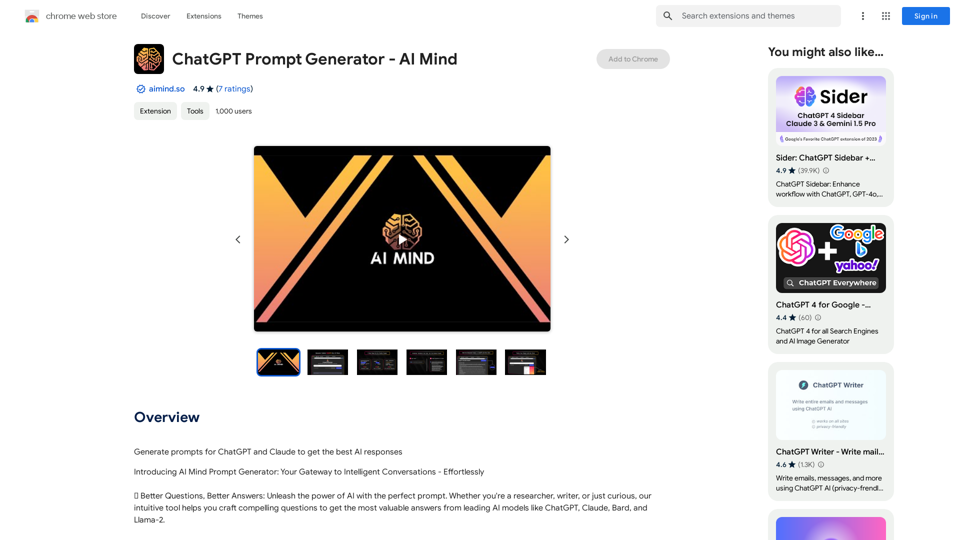
ChatGPT Prompt Generator - AI Mind This is a tool to help you generate creative and effective prompts for ChatGPT. Features: * Diverse Prompt Types: Explore various prompt categories like story writing, dialogue, code generation, and more. * Customization Options: Tailor your prompts with specific details, tone, style, and length preferences. * Inspiration & Examples: Discover a library of pre-made prompts and examples to spark your imagination. * AI-Powered Suggestions: Get intelligent suggestions and refinements for your prompts based on your input. How it Works: 1. Choose a Prompt Type: Select the type of output you desire from ChatGPT. 2. Provide Input: Enter your desired keywords, themes, or specific instructions. 3. Customize Settings: Adjust parameters like tone, style, length, and format. 4. Generate Prompt: Click "Generate" to receive a unique and optimized prompt tailored to your needs. Start Creating! Let your imagination run wild and explore the possibilities of ChatGPT with our AI-powered prompt generator.

Generate prompts for ChatGPT and Claude to get the best AI responses
Visit Website
ChatGPT Prompt Generator - AI Mind 

This is a tool to help you generate creative and effective prompts for ChatGPT. 

Features:

* Diverse Prompt Types: Explore various prompt categories like story writing, dialogue, code generation, and more.
* Customization Options: Tailor your prompts with specific details, tone, style, and length preferences.
* Inspiration & Examples: Discover a library of pre-made prompts and examples to spark your imagination.
* AI-Powered Suggestions: Get intelligent suggestions and refinements for your prompts based on your input.

How it Works:

1. Choose a Prompt Type: Select the type of output you desire from ChatGPT.
2. Provide Input: Enter your desired keywords, themes, or specific instructions.
3. Customize Settings: Adjust parameters like tone, style, length, and format.
4. Generate Prompt: Click "Generate" to receive a unique and optimized prompt tailored to your needs.

Start Creating!

Let your imagination run wild and explore the possibilities of ChatGPT with our AI-powered prompt generator.
Visit Website

Introduction

ChatGPT Prompt Generator - AI Mind is an innovative AI-driven platform that provides access to a wide range of AI technologies, including ChatGPT, GPT-4o, Claude, Bard, and Llama-2. This user-friendly tool is designed to help users generate compelling prompts for various AI models, enabling them to craft effective questions and obtain valuable answers quickly and efficiently.

Feature

Effortless Prompt Engineering

Type your idea and watch as the platform generates a compelling prompt, streamlining the process of creating effective questions for AI models.

Time-Saving Technology

Get valuable answers in seconds, significantly reducing the time spent on formulating questions and waiting for responses.

Intuitive User Interface

The platform boasts a user-friendly interface with no learning curve, making it accessible and easy to use for all users, regardless of their technical expertise.

Quality-Focused Approach

By improving prompt quality, users can elevate the insights they receive from AI models, leading to more valuable and accurate responses.

Multi-Model Support

Access a variety of GPT models, including ChatGPT, GPT-4o, Claude, Bard, and Llama-2, providing users with a diverse range of AI technologies to suit their needs.

Privacy Protection

The platform prioritizes user privacy, ensuring that user information is not used for training data or any other purposes without consent.

FAQ

How do I use ChatGPT Prompt Generator - AI Mind?

Simply type your idea into the platform's intuitive interface, and it will generate a prompt designed to engage and enlighten when used with AI models like ChatGPT and Claude.

Can I generate images using this platform?

No, the platform is primarily designed for generating prompts for text-based AI models and does not support image generation.

When would I need a subscription?

If the free version doesn't meet your needs and you heavily rely on the platform's features, you may consider subscribing to the affordable premium products.

How can I maximize my use of the platform?

To get the most out of ChatGPT Prompt Generator - AI Mind:

  1. Experiment with different prompts to obtain the most valuable answers
  2. Utilize the time-saving technology to generate high-quality prompts quickly
  3. Explore the various AI-powered tools available to support different tasks

Related Websites

Aggregata: GPT to Earn
View Detail

Aggregata: GPT to Earn

Aggregata: GPT to Earn

Transform your conversations with Chat-GPT into valuable datasets for model training, and get rewarded with cryptocurrencies.

193.90 M
AI Photo Caption - Text Generator on the App Store
View Detail

AI Photo Caption - Text Generator on the App Store

AI Photo Caption - Text Generator on the App Store

Welcome to PhotoCaption AI – where your photos speak a thousand words in multiple languages! Do you often find yourself struggling to come up with the perfect caption for your amazing photos?

654.73 K
Leexi - Google Meet recording
View Detail

Leexi - Google Meet recording

Leexi - Google Meet recording

Never forget to record your Google Meet video conferences again and find them in the Leexi app in one click.

193.90 M
Paraphrasing Tool - Free AI Paraphraser
View Detail

Paraphrasing Tool - Free AI Paraphraser

Paraphrasing Tool - Free AI Paraphraser

Paraphraser is a complimentary rephrasing tool that utilizes AI algorithms to assist you in rewording text, sentences, and paragraphs, enabling you to convey ideas using your own language.

1.18 M
Get ChatGPT for Free with Google

You can now access ChatGPT, a powerful language model, for free with Google. Here's how:

Method 1: Google Colab

* Open Google Colab ([colab.research.google.com](http://colab.research.google.com))
* Create a new notebook
* Install the `transformers` library by running `!pip install transformers`
* Import the `transformers` library and load the ChatGPT model using `from transformers import AutoModelForCausalLM, AutoTokenizer; model = AutoModelForCausalLM.from_pretrained('chatgpt'); tokenizer = AutoTokenizer.from_pretrained('chatgpt')`
* Use the model to generate text using `input_text = "Your input here"; inputs = tokenizer.encode_plus(input_text, return_tensors='pt', max_length=1024, padding='max_length', truncation=True); output = model(inputs['input_ids'], attention_mask=inputs['attention_mask']); print(tokenizer.decode(output.logits[0], skip_special_tokens=True))`

Method 2: Google Apps Script

* Open Google Apps Script ([script.google.com](http://script.google.com))
* Create a new project
* Install the `transformers` library by running `npm install transformers`
* Import the `transformers` library and load the ChatGPT model using `const { AutoModelForCausalLM, AutoTokenizer } = require('transformers'); const model = new AutoModelForCausalLM('chatgpt'); const tokenizer = new AutoTokenizer('chatgpt');`
* Use the model to generate text using `const inputText = "Your input here"; const inputs = tokenizer.encodePlus(inputText, { return_tensors: 'pt', max_length: 1024, padding: 'max_length', truncation: true }); const output = model(inputs.inputIds, inputs.attentionMask); console.log(tokenizer.decode(output.logits[0], { skipSpecialTokens: true }));`

Note: These methods require some technical knowledge and may have limitations compared to the original ChatGPT model.
View Detail

Get ChatGPT for Free with Google You can now access ChatGPT, a powerful language model, for free with Google. Here's how: Method 1: Google Colab * Open Google Colab ([colab.research.google.com](http://colab.research.google.com)) * Create a new notebook * Install the `transformers` library by running `!pip install transformers` * Import the `transformers` library and load the ChatGPT model using `from transformers import AutoModelForCausalLM, AutoTokenizer; model = AutoModelForCausalLM.from_pretrained('chatgpt'); tokenizer = AutoTokenizer.from_pretrained('chatgpt')` * Use the model to generate text using `input_text = "Your input here"; inputs = tokenizer.encode_plus(input_text, return_tensors='pt', max_length=1024, padding='max_length', truncation=True); output = model(inputs['input_ids'], attention_mask=inputs['attention_mask']); print(tokenizer.decode(output.logits[0], skip_special_tokens=True))` Method 2: Google Apps Script * Open Google Apps Script ([script.google.com](http://script.google.com)) * Create a new project * Install the `transformers` library by running `npm install transformers` * Import the `transformers` library and load the ChatGPT model using `const { AutoModelForCausalLM, AutoTokenizer } = require('transformers'); const model = new AutoModelForCausalLM('chatgpt'); const tokenizer = new AutoTokenizer('chatgpt');` * Use the model to generate text using `const inputText = "Your input here"; const inputs = tokenizer.encodePlus(inputText, { return_tensors: 'pt', max_length: 1024, padding: 'max_length', truncation: true }); const output = model(inputs.inputIds, inputs.attentionMask); console.log(tokenizer.decode(output.logits[0], { skipSpecialTokens: true }));` Note: These methods require some technical knowledge and may have limitations compared to the original ChatGPT model.

Get ChatGPT for Free with Google You can now access ChatGPT, a powerful language model, for free with Google. Here's how: Method 1: Google Colab * Open Google Colab ([colab.research.google.com](http://colab.research.google.com)) * Create a new notebook * Install the `transformers` library by running `!pip install transformers` * Import the `transformers` library and load the ChatGPT model using `from transformers import AutoModelForCausalLM, AutoTokenizer; model = AutoModelForCausalLM.from_pretrained('chatgpt'); tokenizer = AutoTokenizer.from_pretrained('chatgpt')` * Use the model to generate text using `input_text = "Your input here"; inputs = tokenizer.encode_plus(input_text, return_tensors='pt', max_length=1024, padding='max_length', truncation=True); output = model(inputs['input_ids'], attention_mask=inputs['attention_mask']); print(tokenizer.decode(output.logits[0], skip_special_tokens=True))` Method 2: Google Apps Script * Open Google Apps Script ([script.google.com](http://script.google.com)) * Create a new project * Install the `transformers` library by running `npm install transformers` * Import the `transformers` library and load the ChatGPT model using `const { AutoModelForCausalLM, AutoTokenizer } = require('transformers'); const model = new AutoModelForCausalLM('chatgpt'); const tokenizer = new AutoTokenizer('chatgpt');` * Use the model to generate text using `const inputText = "Your input here"; const inputs = tokenizer.encodePlus(inputText, { return_tensors: 'pt', max_length: 1024, padding: 'max_length', truncation: true }); const output = model(inputs.inputIds, inputs.attentionMask); console.log(tokenizer.decode(output.logits[0], { skipSpecialTokens: true }));` Note: These methods require some technical knowledge and may have limitations compared to the original ChatGPT model.

How to Add ChatGPT to All Google Searches ===================================================== Step 1: Create a Custom Search Engine -------------------------------------- * Go to the [Google Custom Search Engine](https://cse.google.com/) website and sign in with your Google account. * Click on the "New Search Engine" button. * Fill in the required information, such as the name and description of your search engine. * Click on the "Create" button. Step 2: Add ChatGPT to the Search Engine ----------------------------------------- * In the "Setup" tab, click on the "Add" button next to "Sites to search". * Enter the following URL: `https://chat.openai.com/` * Click on the "Add" button. Step 3: Configure the Search Engine -------------------------------------- * In the "Setup" tab, click on the "Edit" button next to "Search engine keywords". * Add the following keywords: `ChatGPT` * Click on the "Save" button. Step 4: Get the Search Engine Code ------------------------------------- * In the "Setup" tab, click on the "Get code" button. * Copy the HTML code provided. Step 5: Add the Search Engine to Your Browser ------------------------------------------------ * Open your browser and go to the "Settings" or "Options" page. * Look for the "Search engine" or "Default search engine" option. * Click on the "Add" or "Manage search engines" button. * Paste the HTML code you copied earlier. * Click on the "Add" or "Save" button. You're Done! =============== Now, whenever you search on Google, ChatGPT will be included in the search results. You can also use the custom search engine URL provided by Google to search directly.

193.90 M
Free AI Face Swap - Photo & Video
View Detail

Free AI Face Swap - Photo & Video

Free AI Face Swap - Photo & Video

Free AI Face Swapper supports single photo face swaps, multiple photo face swaps, and video face swaps!

193.90 M
Automatically Apply to Jobs on LinkedIn, Indeed, Monster, and Auto-Fill on All Websites
View Detail

Automatically Apply to Jobs on LinkedIn, Indeed, Monster, and Auto-Fill on All Websites

Automatically Apply to Jobs on LinkedIn, Indeed, Monster, and Auto-Fill on All Websites

Save time applying for jobs! Auto-applies job bot. Auto-fills in forms on all websites. Get hired faster! - Apply smarter, not harder.

260
Chart GPT
View Detail

Chart GPT

Chart GPT

AI-Powered Trading Companion

193.90 M