Open-source RightAI Tools Directory
  • Discover AI
  • Submit
  • Startup
  • Blog
Open-source RightAI Tools Directory
Discover the best AI tools of 2025 with the RightAI Tools Directory!

Friend Links

AI Anime GeneratorToolsApp AI

Support

Tap4
Privacy policyTerms & ConditionsContact Us
Loading...
loading...

Home

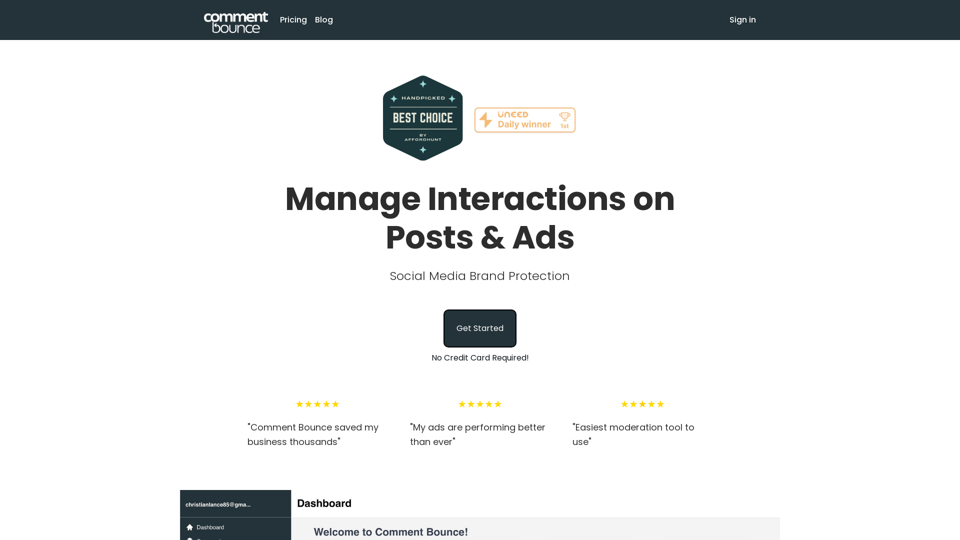
The #1 Social Media Brand Protection tool. Protect your posts and ads from negative/spam comments.
Visit Website
Home
Visit Website

Introduction

Comment Bounce is an AI-powered platform designed to manage social media interactions on posts and ads. It automatically moderates comments, provides analytical insights, and offers AI-driven comment responses. The platform aims to create a safe, positive environment for users while protecting brand reputation and enhancing ad campaign performance.

Feature

Automated Moderation

  • AI technology automatically hides harmful comments
  • Maintains positive brand image
  • Ensures engagement from positive followers
  • Saves time and effort in comment management

Analytical Insights

  • Provides advanced insights into ad campaigns
  • Offers user sentiment analysis
  • Delivers ad campaign analytics
  • Enables data-driven decision making

AI Comment Response

  • Responds to comments automatically
  • Maintains consistent positive and professional tone
  • Ideal for busy businesses or individuals
  • Ensures timely engagement with audience

Easy Setup and Free Trial

  • Simple sign-up process
  • 7-day free trial available
  • No credit card required for trial
  • Various pricing plans to suit different needs

Flexible Pricing Options

  • Monthly and yearly billing options
  • Plans include unlimited social media accounts
  • AI responses included in plans
  • Ad campaign analytics available

Multi-Platform Support

  • Works with Instagram
  • Compatible with other social media platforms
  • Protects unlimited number of social media pages

FAQ

Is Comment Bounce approved through Meta?

Yes, Comment Bounce is approved through Meta.

Does Comment Bounce work with Instagram?

Yes, Comment Bounce works with Instagram and other social media platforms.

How does the Spam Detection work?

Comment Bounce's AI technology uses advanced algorithms to detect and hide spam comments.

Are there any hidden fees?

No, there are no secret or usage fees with Comment Bounce.

How many pages can Comment Bounce protect?

Comment Bounce can protect an unlimited number of social media pages.

How does the free trial work?

The free trial is a 7-day risk-free period that allows users to test Comment Bounce's features and benefits without requiring a credit card.

Related Websites
AI Cover Letter Generator by Kickresume
=============================================

Get hired faster with our AI-powered cover letter generator. Write a compelling cover letter in minutes and increase your chances of getting noticed by the hiring manager.

How it Works
---------------

1. Choose a Template: Select from a variety of professionally-designed cover letter templates.
2. Answer a Few Questions: Provide some basic information about the job you're applying for and your qualifications.
3. AI Generates Your Cover Letter: Our AI algorithm creates a tailored cover letter based on your input.
4. Customize and Refine: Review and edit your cover letter to make it perfect.

Benefits
------------

* Save Time: Write a cover letter in minutes, not hours.
* Increase Chances of Getting Hired: Our AI-generated cover letters are optimized to pass through applicant tracking systems (ATS) and catch the hiring manager's attention.
* Get Professional Results: Our templates and AI algorithm ensure your cover letter looks and sounds professional.

Try it Now
--------------

Generate a compelling cover letter with our AI cover letter generator and start getting noticed by hiring managers today!
View Detail

AI Cover Letter Generator by Kickresume ============================================= Get hired faster with our AI-powered cover letter generator. Write a compelling cover letter in minutes and increase your chances of getting noticed by the hiring manager. How it Works --------------- 1. Choose a Template: Select from a variety of professionally-designed cover letter templates. 2. Answer a Few Questions: Provide some basic information about the job you're applying for and your qualifications. 3. AI Generates Your Cover Letter: Our AI algorithm creates a tailored cover letter based on your input. 4. Customize and Refine: Review and edit your cover letter to make it perfect. Benefits ------------ * Save Time: Write a cover letter in minutes, not hours. * Increase Chances of Getting Hired: Our AI-generated cover letters are optimized to pass through applicant tracking systems (ATS) and catch the hiring manager's attention. * Get Professional Results: Our templates and AI algorithm ensure your cover letter looks and sounds professional. Try it Now -------------- Generate a compelling cover letter with our AI cover letter generator and start getting noticed by hiring managers today!

AI Cover Letter Generator by Kickresume ============================================= Get hired faster with our AI-powered cover letter generator. Write a compelling cover letter in minutes and increase your chances of getting noticed by the hiring manager. How it Works --------------- 1. Choose a Template: Select from a variety of professionally-designed cover letter templates. 2. Answer a Few Questions: Provide some basic information about the job you're applying for and your qualifications. 3. AI Generates Your Cover Letter: Our AI algorithm creates a tailored cover letter based on your input. 4. Customize and Refine: Review and edit your cover letter to make it perfect. Benefits ------------ * Save Time: Write a cover letter in minutes, not hours. * Increase Chances of Getting Hired: Our AI-generated cover letters are optimized to pass through applicant tracking systems (ATS) and catch the hiring manager's attention. * Get Professional Results: Our templates and AI algorithm ensure your cover letter looks and sounds professional. Try it Now -------------- Generate a compelling cover letter with our AI cover letter generator and start getting noticed by hiring managers today!

Instantly generate an AI-tailored cover letter for any given job post — all with a single click!

193.90 M
Kinky Chat - Unleash Your Fantasies
View Detail

Kinky Chat - Unleash Your Fantasies

Kinky Chat - Unleash Your Fantasies

Sign up for Kinky Chat's early access! Be the first to meet the world's most intense chatbot. Don't miss out!

17.07 K
AiReelGenerator.com | Faceless Videos on Autopilot.
View Detail

AiReelGenerator.com | Faceless Videos on Autopilot.

AiReelGenerator.com | Faceless Videos on Autopilot.

Discover AiReelGenerator, the newest app that automatically makes videos without faces. Just pick a subject, and our AI will make and upload fresh videos to your YouTube, TikTok, Instagram, or Facebook account every day.

196
Hadana: Your AI Travel Planner
View Detail

Hadana: Your AI Travel Planner

Hadana: Your AI Travel Planner

An AI-powered travel companion that crafts personalized travel plans based on your preferences.

593.63 K
Cartifind Importer
View Detail

Cartifind Importer

Cartifind Importer

With Cartifind, you can easily import products from vetted dropshipping suppliers to your store. It becomes efficient for you to manage your product catalog, track inventory, and fulfill orders seamlessly.

193.90 M
Discord Translator
View Detail

Discord Translator

Discord Translator

Translate Messages in Discord ============================= What is the "Translate" feature in Discord? The "Translate" feature in Discord allows users to translate messages in real-time, making it easier for people who speak different languages to communicate with each other. How to use the "Translate" feature in Discord? #1. Enable the "Translate" feature To enable the "Translate" feature, you need to go to the "User Settings" and click on the "Language" tab. Then, toggle the switch next to "Translator" to the "On" position. #2. Set your preferred language After enabling the "Translate" feature, you need to set your preferred language. You can do this by clicking on the "Language" dropdown menu and selecting your preferred language from the list. #3. Translate messages Once you've set your preferred language, you can start translating messages. To translate a message, simply hover over the message and click on the "Translate" button that appears. #4. View translated messages After clicking the "Translate" button, the message will be translated into your preferred language. You can view the translated message below the original message. Benefits of the "Translate" feature in Discord The "Translate" feature in Discord has several benefits, including: * Improved communication: The "Translate" feature helps to break down language barriers, making it easier for people who speak different languages to communicate with each other. * Increased accessibility: The "Translate" feature makes Discord more accessible to people who may not speak the dominant language of a server or community. * Enhanced collaboration: The "Translate" feature enables people to collaborate more effectively, even if they speak different languages.

193.90 M
Wonder AI - Your GPT Writing Assistant
View Detail

Wonder AI - Your GPT Writing Assistant

Wonder AI - Your GPT Writing Assistant

Wonder AI: The AI Writing Assistant That Makes Your Content Stand Out Wonder AI is an AI writing assistant that uses the power of artificial intelligence to help you create high-quality, engaging content that resonates with your audience.

193.90 M
Lai画 - Link-Generated AI Video Tool
View Detail

Lai画 - Link-Generated AI Video Tool

Lai画 - Link-Generated AI Video Tool

With just one URL link, you can quickly generate videos in multiple styles using AI. It supports secondary editing and ensures controllable results.

193.90 M