Open-source RightAI Tools Directory
  • Discover AI
  • Submit
  • Startup
  • Blog
Open-source RightAI Tools Directory
Discover the best AI tools of 2025 with the RightAI Tools Directory!

Friend Links

AI Anime GeneratorToolsApp AI

Support

Tap4
Privacy policyTerms & ConditionsContact Us
Loading...
loading...

Candy Jar

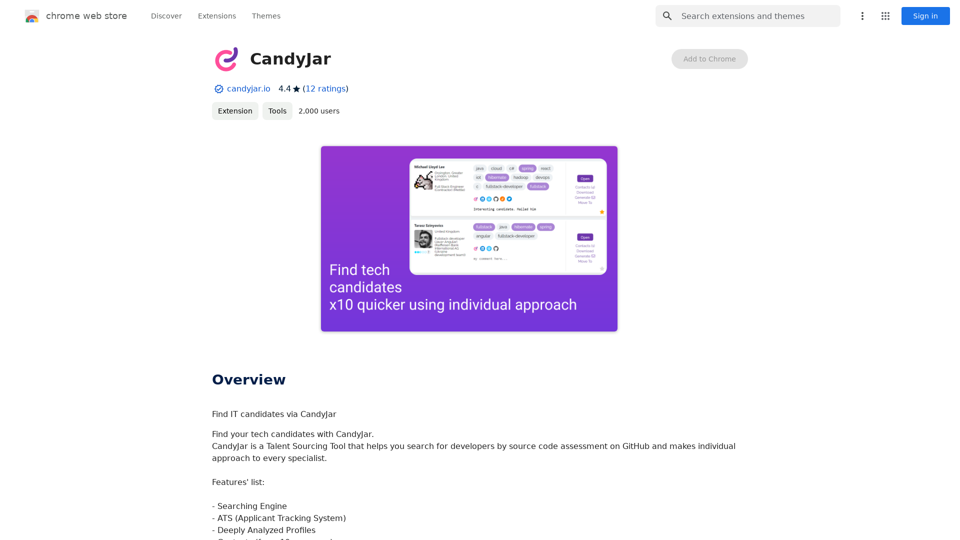
Find IT candidates via CandyJar
Visit Website
Candy Jar
Visit Website

Introduction

CandyJar is a comprehensive Talent Sourcing Tool designed to revolutionize the way companies find and recruit developers. By leveraging GitHub's source code assessment capabilities, CandyJar offers a unique approach to identifying and evaluating potential candidates. The platform provides a personalized experience for each specialist, ensuring a more efficient and effective recruitment process.

Feature

Powerful Searching Engine

CandyJar's advanced searching engine enables users to find the most suitable candidates for their projects with precision and ease.

Applicant Tracking System (ATS)

Streamline your recruitment process with an integrated ATS that helps manage and track candidates throughout the hiring journey.

In-depth Candidate Profiles

Access deeply analyzed profiles that provide comprehensive information about each candidate's skills, experience, and interests.

Extensive Contact Network

Tap into a vast network of contacts sourced from over 10 platforms, including GitHub and LinkedIn.

AI-powered Message Generator

Automate and personalize your outreach process with an intelligent message generator, crafting tailored communications for each candidate.

PDF CV Export

Easily export candidate profiles in PDF format for convenient sharing and reference.

Similar Candidate Recommendations

Receive suggestions for candidates with similar profiles based on your search criteria, saving time and expanding your talent pool.

Candidate Ranking System

Efficiently identify top candidates with a ranking system based on skills, experience, and project fit.

Gmail Integration

Seamlessly integrate CandyJar with your Gmail account to streamline candidate communication.

Technology Prompts

Receive assistance in identifying required technologies and skills for your project through helpful prompts.

FAQ

How can I start using CandyJar?

CandyJar offers free access to its searching engine and ATS features for all users. Subscribing to the platform unlocks additional benefits and extends access beyond free usage limits.

Is there a limit to the number of candidates available on CandyJar?

CandyJar boasts a growing network of over 2,000 candidates, providing a wide range of talent options for recruiters.

How does CandyJar protect user privacy?

CandyJar prioritizes user privacy and does not collect or use personal data. Users have the option to delete their accounts at any time, which removes all associated data.

When should I consider a CandyJar subscription?

If the free features do not meet your recruitment needs and you find yourself relying heavily on CandyJar's services, subscribing to their affordable products may be beneficial.

Can CandyJar help with understanding technical requirements?

Yes, CandyJar's prompts feature assists users in identifying and understanding the technologies and skills required for their projects.

Related Websites
Chrome Web Store
View Detail

Chrome Web Store

Chrome Web Store

Add new features to your browser and personalize your browsing experience.

193.90 M
Open ChatGPT in a New Tab

You can open ChatGPT in a new tab by following these steps:

#Method 1: Using the Browser's Context Menu

1. Right-click on the ChatGPT link or button.
2. Select "Open in new tab" or "Open link in new tab" from the context menu.

#Method 2: Using the Keyboard Shortcut

1. Press `Ctrl + Click` (Windows/Linux) or `Cmd + Click` (Mac) on the ChatGPT link or button.

#Method 3: Using the Browser's Toolbar

1. Click on the ChatGPT link or button while holding down the `Ctrl` key (Windows/Linux) or `Cmd` key (Mac).
2. Release the key after the new tab is opened.

By following these methods, you can easily open ChatGPT in a new tab and start chatting without leaving your current page.
View Detail

Open ChatGPT in a New Tab You can open ChatGPT in a new tab by following these steps: #Method 1: Using the Browser's Context Menu 1. Right-click on the ChatGPT link or button. 2. Select "Open in new tab" or "Open link in new tab" from the context menu. #Method 2: Using the Keyboard Shortcut 1. Press `Ctrl + Click` (Windows/Linux) or `Cmd + Click` (Mac) on the ChatGPT link or button. #Method 3: Using the Browser's Toolbar 1. Click on the ChatGPT link or button while holding down the `Ctrl` key (Windows/Linux) or `Cmd` key (Mac). 2. Release the key after the new tab is opened. By following these methods, you can easily open ChatGPT in a new tab and start chatting without leaving your current page.

Open ChatGPT in a New Tab You can open ChatGPT in a new tab by following these steps: #Method 1: Using the Browser's Context Menu 1. Right-click on the ChatGPT link or button. 2. Select "Open in new tab" or "Open link in new tab" from the context menu. #Method 2: Using the Keyboard Shortcut 1. Press `Ctrl + Click` (Windows/Linux) or `Cmd + Click` (Mac) on the ChatGPT link or button. #Method 3: Using the Browser's Toolbar 1. Click on the ChatGPT link or button while holding down the `Ctrl` key (Windows/Linux) or `Cmd` key (Mac). 2. Release the key after the new tab is opened. By following these methods, you can easily open ChatGPT in a new tab and start chatting without leaving your current page.

New Tab with Quick ChatGPT Access

193.90 M
super memory
View Detail

super memory

super memory

An extension for https://supermemory.ai - an AI hub for all your bookmarks.

193.90 M
Mindie - Your AI Second Brain
View Detail

Mindie - Your AI Second Brain

Mindie - Your AI Second Brain

Talk to anything on the web, like YouTube videos, PDFs, or blogs - almost anything!

193.90 M
BlockDefend AI
View Detail

BlockDefend AI

BlockDefend AI

Protect yourself from phishing websites and analyze contracts, tokens, NFTs, approvals, and airdrops with BlockDefend AI.

193.90 M
AI Content Detector for ChatGPT - Sapling.ai

Sapling.ai's AI Content Detector is a powerful tool designed to detect AI-generated content, including those produced by ChatGPT. This innovative solution helps you identify and flag suspicious content, ensuring the authenticity and credibility of the information you receive.

How it Works

Our AI Content Detector uses advanced machine learning algorithms to analyze the linguistic patterns, syntax, and semantics of the input text. This allows it to identify the subtle differences between human-written and AI-generated content.

Key Features

* High Accuracy: Our detector boasts an impressive accuracy rate, ensuring reliable results even with complex or nuanced content.
* Real-time Analysis: Get instant results with our real-time analysis feature, perfect for high-volume content screening.
* Customizable Thresholds: Set your own thresholds for detection, allowing you to fine-tune the sensitivity of the tool to your specific needs.
* Integration Ready: Seamlessly integrate our API with your existing workflows and platforms.

Use Cases

* Content Moderation: Ensure the quality and authenticity of user-generated content on your platform.
* Academic Integrity: Detect AI-generated essays and papers, promoting original work and academic honesty.
* Marketing and Advertising: Verify the authenticity of customer reviews and testimonials.

Try it Out

Experience the power of Sapling.ai's AI Content Detector for yourself. Sign up for a free trial and start detecting AI-generated content today!
View Detail

AI Content Detector for ChatGPT - Sapling.ai Sapling.ai's AI Content Detector is a powerful tool designed to detect AI-generated content, including those produced by ChatGPT. This innovative solution helps you identify and flag suspicious content, ensuring the authenticity and credibility of the information you receive. How it Works Our AI Content Detector uses advanced machine learning algorithms to analyze the linguistic patterns, syntax, and semantics of the input text. This allows it to identify the subtle differences between human-written and AI-generated content. Key Features * High Accuracy: Our detector boasts an impressive accuracy rate, ensuring reliable results even with complex or nuanced content. * Real-time Analysis: Get instant results with our real-time analysis feature, perfect for high-volume content screening. * Customizable Thresholds: Set your own thresholds for detection, allowing you to fine-tune the sensitivity of the tool to your specific needs. * Integration Ready: Seamlessly integrate our API with your existing workflows and platforms. Use Cases * Content Moderation: Ensure the quality and authenticity of user-generated content on your platform. * Academic Integrity: Detect AI-generated essays and papers, promoting original work and academic honesty. * Marketing and Advertising: Verify the authenticity of customer reviews and testimonials. Try it Out Experience the power of Sapling.ai's AI Content Detector for yourself. Sign up for a free trial and start detecting AI-generated content today!

AI Content Detector for ChatGPT - Sapling.ai Sapling.ai's AI Content Detector is a powerful tool designed to detect AI-generated content, including those produced by ChatGPT. This innovative solution helps you identify and flag suspicious content, ensuring the authenticity and credibility of the information you receive. How it Works Our AI Content Detector uses advanced machine learning algorithms to analyze the linguistic patterns, syntax, and semantics of the input text. This allows it to identify the subtle differences between human-written and AI-generated content. Key Features * High Accuracy: Our detector boasts an impressive accuracy rate, ensuring reliable results even with complex or nuanced content. * Real-time Analysis: Get instant results with our real-time analysis feature, perfect for high-volume content screening. * Customizable Thresholds: Set your own thresholds for detection, allowing you to fine-tune the sensitivity of the tool to your specific needs. * Integration Ready: Seamlessly integrate our API with your existing workflows and platforms. Use Cases * Content Moderation: Ensure the quality and authenticity of user-generated content on your platform. * Academic Integrity: Detect AI-generated essays and papers, promoting original work and academic honesty. * Marketing and Advertising: Verify the authenticity of customer reviews and testimonials. Try it Out Experience the power of Sapling.ai's AI Content Detector for yourself. Sign up for a free trial and start detecting AI-generated content today!

Quickly Check if Any Content was AI Generated, and Make Sure Your Writing Isn't! With the rapid development of artificial intelligence (AI) technology, AI-generated content has become increasingly prevalent. As a result, it's essential to verify the authenticity of content and ensure that your writing is original. Here are some tips to help you quickly check if any content was AI generated and make sure your writing isn't: #1. Check for Overly Formal Language AI-generated content often uses overly formal language, which may sound unnatural or even awkward. Be wary of sentences that are too structured or contain overly complex vocabulary. #2. Look for Repetitive Phrases or Sentences AI algorithms may reuse phrases or sentences to fill content gaps. If you notice repetitive language or sentences that seem out of place, it could be a sign of AI-generated content. #3. Verify Facts and Statistics AI-generated content may contain inaccurate or outdated information. Always fact-check statistics, quotes, and other data to ensure they are reliable and up-to-date. #4. Evaluate the Writing Style AI-generated content often lacks the personal touch and emotional depth of human writing. Look for writing that seems too perfect, lacks humor, or feels overly generic. #5. Use AI Detection Tools There are various AI detection tools available online that can help identify AI-generated content. These tools analyze language patterns, syntax, and other factors to determine the likelihood of AI involvement. #6. Read Beyond the Headlines AI-generated content may have attention-grabbing headlines, but the actual content may be lacking in substance. Always read beyond the headlines to ensure the content is well-researched and informative. #7. Check for Human Touch Human writing often includes personal anecdotes, experiences, and emotions. Look for content that includes these elements, as they are more difficult for AI algorithms to replicate. By following these tips, you can quickly check if any content was AI generated and ensure that your writing is original and authentic. Remember, AI-generated content may be convenient, but it can never replace the creativity, empathy, and nuance of human writing.

193.90 M
Free AI Face Swap Online Tool for Videos, GIFs and Photos | Faceswap.tech
View Detail

Free AI Face Swap Online Tool for Videos, GIFs and Photos | Faceswap.tech

Free AI Face Swap Online Tool for Videos, GIFs and Photos | Faceswap.tech

Try our free online face swap tool to swap faces in photos, videos, and GIFs. Easy, fast, and powered by AI for amazing results. Swap faces now!

1.81 K
Apexgo
View Detail

Apexgo

Apexgo

Check the rarity and score of all your favorite NFTs, calculated directly by Apexgo on Opensea. This feature goes beyond the...

193.90 M