Open-source RightAI Tools Directory
  • Discover AI
  • Submit
  • Startup
  • Blog
Open-source RightAI Tools Directory
Discover the best AI tools of 2025 with the RightAI Tools Directory!

Friend Links

AI Anime GeneratorToolsApp AI

Support

Tap4
Privacy policyTerms & ConditionsContact Us
Loading...
loading...

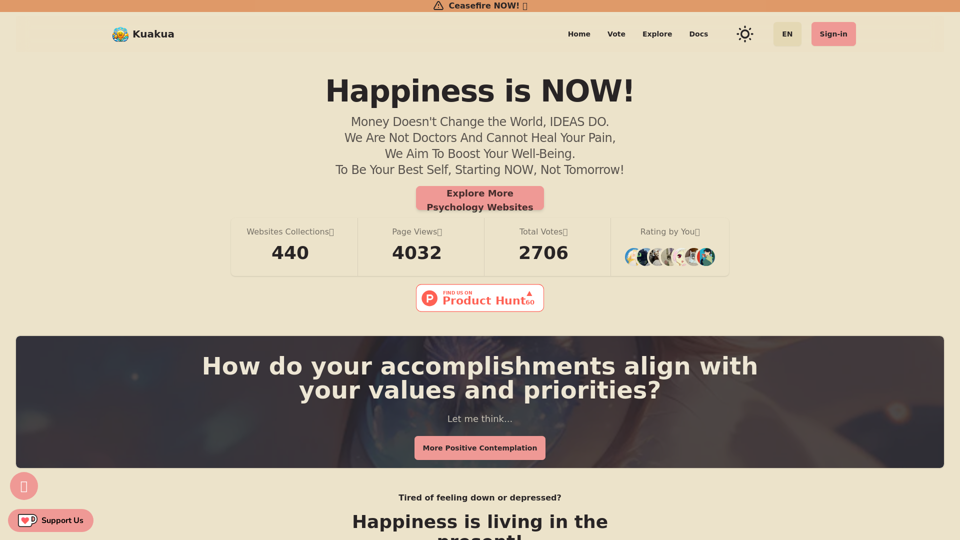
Kuakua - Psychology and AI Tools for Well-Being

Explore psychology, AI tools, mindfulness, lifestyle, and therapy resources. Find happy languages, tasks, websites, and apps to boost your well-being and happiness.
Visit Website
Kuakua - Psychology and AI Tools for Well-Being
Visit Website

Introduction

Kuakua is an innovative platform that combines psychology and AI tools to enhance well-being and happiness. It offers a comprehensive range of resources including mindfulness exercises, lifestyle tips, and therapy resources, all designed to boost mental health and overall well-being. The platform utilizes AI-driven tools to provide personalized recommendations and insights, helping individuals achieve their specific well-being goals.

Feature

AI-Powered Personalization

Kuakua leverages artificial intelligence to offer tailored recommendations and insights, ensuring each user receives a personalized experience aligned with their well-being objectives.

Comprehensive Well-being Resources

The platform provides a diverse array of tools and resources:

  • Mindfulness exercises and meditation techniques
  • Lifestyle tips covering nutrition, exercise, and sleep habits
  • Access to therapy resources, including online sessions and support groups
  • Positive affirmations and "happy languages" to foster a positive mindset

Goal-Oriented Approach

Users begin their journey by:

  1. Creating an account
  2. Taking a quiz to determine well-being goals
  3. Receiving personalized recommendations based on quiz results

Community Connection

Kuakua facilitates connections among users through:

  • Online support groups
  • Forums for sharing experiences and tips

Flexible Pricing Options

The platform offers:

  • Free trial period
  • Various subscription plans to suit different needs and budgets

FAQ

How do I get started with Kuakua?

To begin using Kuakua:

  1. Sign up for an account on the platform
  2. Take the initial quiz to determine your well-being goals
  3. Explore the personalized recommendations and resources provided

What types of resources does Kuakua offer?

Kuakua provides a wide range of resources, including:

  • Mindfulness exercises
  • Lifestyle tips
  • Therapy resources
  • AI-driven personalized recommendations
  • Positive affirmations and "happy languages"

Is Kuakua free to use?

Kuakua offers a free trial period. After the trial, users need to subscribe to access the full range of resources and tools. Various pricing options are available to suit different needs.

Can I cancel my Kuakua subscription?

Yes, you can cancel your subscription at any time.

What are some tips for getting the most out of Kuakua?

To maximize your experience with Kuakua:

  1. Set clear and specific well-being goals
  2. Use the platform consistently for best results
  3. Experiment with different resources to find what works best for you
  4. Connect with other users for motivation and inspiration

Related Websites
What is a Prompster?

A Prompster is a person who assists a speaker, actor, or presenter by providing them with lines or cues, usually in a subtle and discreet manner, during a performance, presentation, or speech.
View Detail

What is a Prompster? A Prompster is a person who assists a speaker, actor, or presenter by providing them with lines or cues, usually in a subtle and discreet manner, during a performance, presentation, or speech.

What is a Prompster? A Prompster is a person who assists a speaker, actor, or presenter by providing them with lines or cues, usually in a subtle and discreet manner, during a performance, presentation, or speech.

Slash Commands for ChatGPT and Bard ===================================== Introduction Slash commands are a convenient way to interact with ChatGPT and Bard, allowing you to perform various tasks and actions within the chat interface. This guide provides an overview of the available slash commands for both ChatGPT and Bard. ChatGPT Slash Commands #General Commands * `/help`: Displays a list of available slash commands and their descriptions. * `/reset`: Resets the conversation, clearing all previous messages and context. #Conversation Management * `/start`: Starts a new conversation, allowing you to begin a fresh topic or task. * `/stop`: Ends the current conversation, stopping any ongoing tasks or topics. #Language and Tone * `/lang <language_code>`: Sets the language for the conversation (e.g., `/lang en` for English). * `/tone <tone>`: Adjusts the tone of the responses (e.g., `/tone formal` for formal tone). #Task Management * `/task <task_name>`: Creates a new task or topic for the conversation (e.g., `/task math problem`). * `/done`: Marks the current task as completed. #Information and Resources * `/define <word>`: Provides the definition of a word or phrase. * `/wiki <topic>`: Displays information about a topic from Wikipedia. Bard Slash Commands #General Commands * `/help`: Displays a list of available slash commands and their descriptions. * `/reset`: Resets the conversation, clearing all previous messages and context. #Conversation Management * `/start`: Starts a new conversation, allowing you to begin a fresh topic or task. * `/stop`: Ends the current conversation, stopping any ongoing tasks or topics. #Language and Tone * `/lang <language_code>`: Sets the language for the conversation (e.g., `/lang en` for English). * `/tone <tone>`: Adjusts the tone of the responses (e.g., `/tone formal` for formal tone). #Task Management * `/task <task_name>`: Creates a new task or topic for the conversation (e.g., `/task math problem`). * `/done`: Marks the current task as completed. #Information and Resources * `/define <word>`: Provides the definition of a word or phrase. * `/wiki <topic>`: Displays information about a topic from Wikipedia. * `/news <topic>`: Displays news articles related to a specific topic. Conclusion Slash commands provide a convenient way to interact with ChatGPT and Bard, allowing you to manage conversations, adjust language and tone, and access various resources. By mastering these commands, you can optimize your experience and get the most out of your interactions with these AI models.

193.90 M
Lymia Discover
View Detail

Lymia Discover

Lymia Discover

Lymia Discover helps users easily find new talents and leads on LinkedIn using artificial intelligence.

193.90 M
⚡️ Invertigo: Read More, Read Faster
View Detail

⚡️ Invertigo: Read More, Read Faster

⚡️ Invertigo: Read More, Read Faster

Read smarter, retain more. Go beyond skimming: Supercharge your web reading.

193.90 M
Free AI Face Swap - Photo & Video
View Detail

Free AI Face Swap - Photo & Video

Free AI Face Swap - Photo & Video

Free AI Face Swapper supports single photo face swaps, multiple photo face swaps, and video face swaps!

193.90 M
AI Assistant - ChatGPT and Gemini for Chrome
View Detail

AI Assistant - ChatGPT and Gemini for Chrome

AI Assistant - ChatGPT and Gemini for Chrome

Take your online search experience to new heights with this extension.

193.90 M
Speech to Text using cantonese.ai
View Detail

Speech to Text using cantonese.ai

Speech to Text using cantonese.ai

The extension lets you turn WhatsApp audio messages into text, saving you time and boosting your productivity!

193.90 M
AIScraper

This is a Python library for scraping data from websites that use the Amazon Interactive Search (AIS) API. 

Features:

* Easy to use: Simply provide a search query and the library will return a list of product results.
* Flexible: You can customize your scraping by specifying filters, such as price range, brand, and category.
* Efficient: The library uses asynchronous requests to speed up the scraping process.
* Reliable: The library is designed to handle rate limits and other website restrictions.

Installation:

```bash
pip install aiscraper
```

Usage:

```python
from aiscraper import AIScraper

Create an instance of the AIScraper class
scraper = AIScraper()

Perform a search for "laptops"
results = scraper.search("laptops")

Print the product titles
for result in results:
    print(result["title"])
```

Documentation:

https://github.com/aiscraper/aiscraper
View Detail

AIScraper This is a Python library for scraping data from websites that use the Amazon Interactive Search (AIS) API. Features: * Easy to use: Simply provide a search query and the library will return a list of product results. * Flexible: You can customize your scraping by specifying filters, such as price range, brand, and category. * Efficient: The library uses asynchronous requests to speed up the scraping process. * Reliable: The library is designed to handle rate limits and other website restrictions. Installation: ```bash pip install aiscraper ``` Usage: ```python from aiscraper import AIScraper Create an instance of the AIScraper class scraper = AIScraper() Perform a search for "laptops" results = scraper.search("laptops") Print the product titles for result in results: print(result["title"]) ``` Documentation: https://github.com/aiscraper/aiscraper

AIScraper This is a Python library for scraping data from websites that use the Amazon Interactive Search (AIS) API. Features: * Easy to use: Simply provide a search query and the library will return a list of product results. * Flexible: You can customize your scraping by specifying filters, such as price range, brand, and category. * Efficient: The library uses asynchronous requests to speed up the scraping process. * Reliable: The library is designed to handle rate limits and other website restrictions. Installation: ```bash pip install aiscraper ``` Usage: ```python from aiscraper import AIScraper Create an instance of the AIScraper class scraper = AIScraper() Perform a search for "laptops" results = scraper.search("laptops") Print the product titles for result in results: print(result["title"]) ``` Documentation: https://github.com/aiscraper/aiscraper

Web scraper, powered by AI! Collect structured data from web pages in just a few clicks! What's new 🔹Simplified data collection…

193.90 M
Justdone: AI Writing & Copywriting Assistant
View Detail

Justdone: AI Writing & Copywriting Assistant

Justdone: AI Writing & Copywriting Assistant

Justdone AI Chrome Extension

193.90 M