Open-source RightAI Tools Directory
  • Discover AI
  • Submit
  • Startup
  • Blog
Open-source RightAI Tools Directory
Discover the best AI tools of 2025 with the RightAI Tools Directory!

Friend Links

AI Anime GeneratorToolsApp AI

Support

Tap4
Privacy policyTerms & ConditionsContact Us
Loading...
loading...

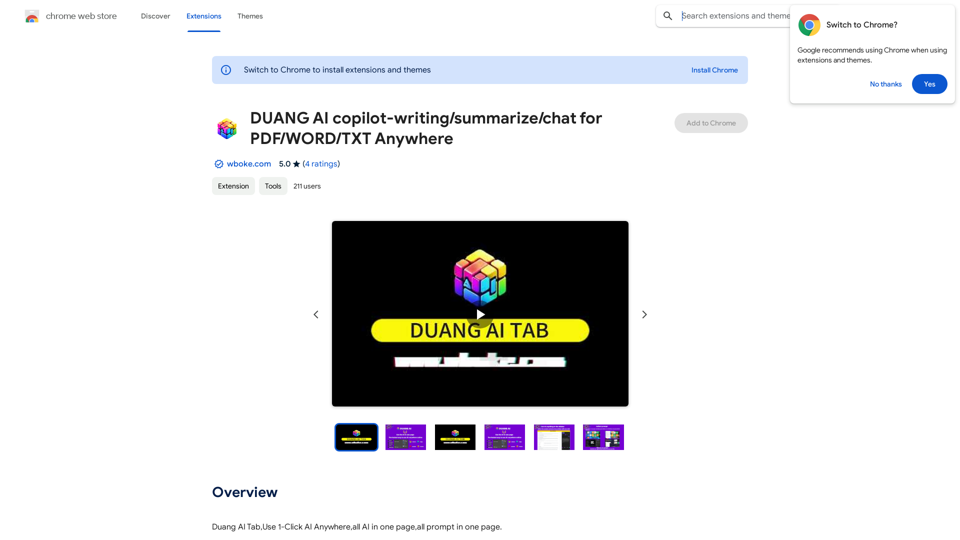
AI Copilot for Writing, Summarizing, and Chatting with PDF, WORD, and TXT Files Anywhere

Duang AI Tab, Use 1-Click AI Anywhere, All AI in One Page, All Prompts in One Page.
Visit Website
AI Copilot for Writing, Summarizing, and Chatting with PDF, WORD, and TXT Files Anywhere
Visit Website

Introduction

Duang AI is an innovative browser extension that brings the power of AI to your fingertips. It offers a wide range of AI-driven features accessible with just one click, transforming your workflow and enhancing productivity across various online platforms. From summarizing videos to automating searches and creating content, Duang AI integrates seamlessly into your browsing experience, making AI technology more accessible than ever.

Feature

AI-Powered Chrome Startpage

Reinvent your new tab experience with intelligent AI suggestions, enhancing your browsing efficiency from the moment you open a new tab.

Multi-functional AI Assistant

  • Summarize videos
  • Scrape websites
  • Respond to emails
  • Automate searches
  • Perform summarizations and translations
  • Assist with writing tasks on various websites

Versatile AI Writer

Create diverse content types including:

  • Social media posts
  • Emails
  • Art descriptions
  • Code snippets
  • And more

Integrated AI Plugins

Access powerful AI tools directly in your browser:

  • AI Chat functionality
  • Compatibility with PDF, WORD, and TXT files

Convenient Keyboard Shortcuts

  • 'Alt + Q': Open AI chat sidebar on any webpage
  • 'Ctrl + D': Add current page to Favorites

One-Click Text Operations

Select text on any webpage to instantly:

  • Rewrite
  • Proofread
  • Explain
  • Translate
  • Execute custom prompts

Custom Prompt Management

Manage and create your own prompts in the 'one-click-prompt' section within the extension Settings.

Document Analysis

Upload PDF, WORD, or TXT files for immediate summaries and answers.

AI-Powered Search

Use the 'Search' tab in the sidebar to ask questions and receive quick answers with cited search results.

FAQ

Is Duang AI free to use?

Duang AI offers a 7-day free trial. For unlimited access, users can opt for Pro Plans. Sharing an invitation code provides additional benefits.

Do I need a ChatGPT/OpenAI account to use this extension?

No, you can log in using Google, Microsoft, Twitter, or WeChat accounts.

How can I get a coupon code?

After logging in, open a new homepage in your browser, click 'More,' select 'Coupon,' and enter the "invite code" shared by your friend to activate it.

How do I get started with Duang AI?

  1. Click "Add to Chrome" at the upper right corner.
  2. Refresh all tabs to activate the Alt+Q shortcut.
  3. Start using Duang AI to increase your productivity!

Are there any important notes for using Duang AI?

  • Refresh webpages after installation for proper functionality.
  • The extension won't work on Chrome/Edge Web Store pages for security reasons.

Where can I get help or provide feedback?

For assistance or to share feedback, you can contact the Duang AI team at https://ai.wboke.com/.

Related Websites

Talefy - AI Story Generator | Interactive Stories
View Detail

Talefy - AI Story Generator | Interactive Stories

Talefy - AI Story Generator | Interactive Stories

Unleash your imagination with Talefy, the AI-powered story generator. Explore interactive tales across various genres, unbounded by choices.

209.20 K
Searching for ChatGPT Plugins

Searching for ChatGPT plugins can be an exciting experience, as it allows you to explore and discover new features and functionalities to enhance your conversational AI model. Here are some ways to search for ChatGPT plugins:

Official Plugin Directory

The official ChatGPT plugin directory is a great place to start your search. This directory provides a curated list of plugins that are compatible with ChatGPT, along with their descriptions, features, and installation instructions.

GitHub and Open-Source Repositories

GitHub and other open-source repositories are treasure troves for ChatGPT plugins. You can search for plugins using keywords like "ChatGPT plugin" or "conversational AI plugin" to find relevant repositories. You can also explore popular open-source repositories like the ChatGPT community repository.

Plugin Marketplaces

Some plugin marketplaces, like the ChatGPT Marketplace, offer a wide range of plugins for ChatGPT. These marketplaces often provide user reviews, ratings, and descriptions to help you make informed decisions.

Forums and Communities

ChatGPT forums and communities are great places to ask for plugin recommendations or search for plugins. You can ask other users about their favorite plugins or search for threads related to specific plugin categories.

Search Engines

Finally, you can use search engines like Google to search for ChatGPT plugins. Use specific keywords like "ChatGPT plugin for [specific feature]" or "best ChatGPT plugins" to get relevant results.

Remember to always evaluate the plugins you find based on their compatibility, features, and user reviews before installing them. Happy searching!
View Detail

Searching for ChatGPT Plugins Searching for ChatGPT plugins can be an exciting experience, as it allows you to explore and discover new features and functionalities to enhance your conversational AI model. Here are some ways to search for ChatGPT plugins: Official Plugin Directory The official ChatGPT plugin directory is a great place to start your search. This directory provides a curated list of plugins that are compatible with ChatGPT, along with their descriptions, features, and installation instructions. GitHub and Open-Source Repositories GitHub and other open-source repositories are treasure troves for ChatGPT plugins. You can search for plugins using keywords like "ChatGPT plugin" or "conversational AI plugin" to find relevant repositories. You can also explore popular open-source repositories like the ChatGPT community repository. Plugin Marketplaces Some plugin marketplaces, like the ChatGPT Marketplace, offer a wide range of plugins for ChatGPT. These marketplaces often provide user reviews, ratings, and descriptions to help you make informed decisions. Forums and Communities ChatGPT forums and communities are great places to ask for plugin recommendations or search for plugins. You can ask other users about their favorite plugins or search for threads related to specific plugin categories. Search Engines Finally, you can use search engines like Google to search for ChatGPT plugins. Use specific keywords like "ChatGPT plugin for [specific feature]" or "best ChatGPT plugins" to get relevant results. Remember to always evaluate the plugins you find based on their compatibility, features, and user reviews before installing them. Happy searching!

Searching for ChatGPT Plugins Searching for ChatGPT plugins can be an exciting experience, as it allows you to explore and discover new features and functionalities to enhance your conversational AI model. Here are some ways to search for ChatGPT plugins: Official Plugin Directory The official ChatGPT plugin directory is a great place to start your search. This directory provides a curated list of plugins that are compatible with ChatGPT, along with their descriptions, features, and installation instructions. GitHub and Open-Source Repositories GitHub and other open-source repositories are treasure troves for ChatGPT plugins. You can search for plugins using keywords like "ChatGPT plugin" or "conversational AI plugin" to find relevant repositories. You can also explore popular open-source repositories like the ChatGPT community repository. Plugin Marketplaces Some plugin marketplaces, like the ChatGPT Marketplace, offer a wide range of plugins for ChatGPT. These marketplaces often provide user reviews, ratings, and descriptions to help you make informed decisions. Forums and Communities ChatGPT forums and communities are great places to ask for plugin recommendations or search for plugins. You can ask other users about their favorite plugins or search for threads related to specific plugin categories. Search Engines Finally, you can use search engines like Google to search for ChatGPT plugins. Use specific keywords like "ChatGPT plugin for [specific feature]" or "best ChatGPT plugins" to get relevant results. Remember to always evaluate the plugins you find based on their compatibility, features, and user reviews before installing them. Happy searching!

Here are some of the best, top, and popular ChatGPT plugins: 1. WebChat: A plugin that allows users to interact with ChatGPT through a web interface. 2. ChatGPT Writer: A plugin that helps users generate high-quality content, such as articles, stories, and emails, using ChatGPT's language generation capabilities. 3. ChatGPT Code Interpreter: A plugin that enables users to write code in various programming languages and have ChatGPT interpret and execute it. 4. ChatGPT Conversational AI: A plugin that allows users to create conversational AI models using ChatGPT's language understanding capabilities. 5. ChatGPT Language Translator: A plugin that enables users to translate text from one language to another using ChatGPT's language translation capabilities. 6. ChatGPT Summarizer: A plugin that helps users summarize long pieces of text, such as articles or documents, into concise summaries using ChatGPT's text summarization capabilities. 7. ChatGPT Q&A: A plugin that enables users to ask questions and receive answers from ChatGPT on a wide range of topics. 8. ChatGPT Creative Writing: A plugin that helps users generate creative writing, such as poetry, stories, and dialogues, using ChatGPT's language generation capabilities. 9. ChatGPT Dialogue System: A plugin that enables users to create conversational dialogue systems using ChatGPT's language understanding capabilities. 10. ChatGPT Sentiment Analyzer: A plugin that helps users analyze the sentiment of text, such as determining whether a piece of text is positive, negative, or neutral, using ChatGPT's sentiment analysis capabilities.

193.90 M
HearMeOut (GPT Webpage Summarizer)
View Detail

HearMeOut (GPT Webpage Summarizer)

HearMeOut (GPT Webpage Summarizer)

Where webpages speak to you. Summarizes a Google Search result and converts it into audio using GPT.

193.90 M
Website Optimizer AI
View Detail

Website Optimizer AI

Website Optimizer AI

Improve your website's text with AI. Simply click on any text on a website and receive AI-powered suggestions for making it better.

193.90 M
Make AI Text More Human
View Detail

Make AI Text More Human

Make AI Text More Human

Meet Humanize.io, the best AI tool to make your AI content sound more human. Try our AI humanizer for free now!

164.25 K
ChatSearch: ChatGPT for Search Engine (GPT-4)
View Detail

ChatSearch: ChatGPT for Search Engine (GPT-4)

ChatSearch: ChatGPT for Search Engine (GPT-4)

ChatSearch is a free ChatGPT tool that makes search engines more efficient. It now has GPT4, Claude2, and access to the web!

193.90 M
GPT Assistant Mexico

This AI-powered assistant is designed to provide helpful and informative responses to your queries, with a focus on Mexico-related topics. Whether you need information on Mexican culture, history, travel, or daily life, this assistant is here to assist you.

Features:

* Answering questions: Get accurate and reliable information on a wide range of topics, from Mexican history to cultural traditions.
* Providing recommendations: Looking for the best places to visit, eat, or stay in Mexico? This assistant has got you covered.
* Language translation: Need help translating Spanish to English or vice versa? This assistant is happy to assist.
* Conversation: Engage in natural-sounding conversations, just like you would with a local.

Benefits:

* Convenience: Get instant answers to your questions, 24/7.
* Accuracy: Rely on trustworthy information, verified by experts.
* Personalization: Receive tailored recommendations based on your preferences.
* Language support: Communicate effortlessly, without language barriers.

How to use:

1. Ask a question: Type your query, and the assistant will respond with a helpful answer.
2. Provide context: Share more information about your question, and the assistant will give you a more accurate response.
3. Start a conversation: Engage in a natural conversation, and the assistant will respond accordingly.

Get started today!
View Detail

GPT Assistant Mexico This AI-powered assistant is designed to provide helpful and informative responses to your queries, with a focus on Mexico-related topics. Whether you need information on Mexican culture, history, travel, or daily life, this assistant is here to assist you. Features: * Answering questions: Get accurate and reliable information on a wide range of topics, from Mexican history to cultural traditions. * Providing recommendations: Looking for the best places to visit, eat, or stay in Mexico? This assistant has got you covered. * Language translation: Need help translating Spanish to English or vice versa? This assistant is happy to assist. * Conversation: Engage in natural-sounding conversations, just like you would with a local. Benefits: * Convenience: Get instant answers to your questions, 24/7. * Accuracy: Rely on trustworthy information, verified by experts. * Personalization: Receive tailored recommendations based on your preferences. * Language support: Communicate effortlessly, without language barriers. How to use: 1. Ask a question: Type your query, and the assistant will respond with a helpful answer. 2. Provide context: Share more information about your question, and the assistant will give you a more accurate response. 3. Start a conversation: Engage in a natural conversation, and the assistant will respond accordingly. Get started today!

GPT Assistant Mexico This AI-powered assistant is designed to provide helpful and informative responses to your queries, with a focus on Mexico-related topics. Whether you need information on Mexican culture, history, travel, or daily life, this assistant is here to assist you. Features: * Answering questions: Get accurate and reliable information on a wide range of topics, from Mexican history to cultural traditions. * Providing recommendations: Looking for the best places to visit, eat, or stay in Mexico? This assistant has got you covered. * Language translation: Need help translating Spanish to English or vice versa? This assistant is happy to assist. * Conversation: Engage in natural-sounding conversations, just like you would with a local. Benefits: * Convenience: Get instant answers to your questions, 24/7. * Accuracy: Rely on trustworthy information, verified by experts. * Personalization: Receive tailored recommendations based on your preferences. * Language support: Communicate effortlessly, without language barriers. How to use: 1. Ask a question: Type your query, and the assistant will respond with a helpful answer. 2. Provide context: Share more information about your question, and the assistant will give you a more accurate response. 3. Start a conversation: Engage in a natural conversation, and the assistant will respond accordingly. Get started today!

Free add-on, no ads, fast for ChatGPT in the Mexican community with highlighted links.

193.90 M
Midjourney SREF Codes Library for Style Reference

What are SREF Codes?

SREF codes are special text strings used in Midjourney to quickly and easily apply specific artistic styles to your image generations. 

How to Use SREF Codes:

Simply add an SREF code to your Midjourney prompt. For example:

`/imagine a majestic dragon, SREF:cyberpunk`

SREF Code Library:

This library contains a collection of SREF codes categorized by style. 

* Art Styles:
    * `photorealistic`: Creates images with high levels of realism.
    * `impressionistic`:  Captures the essence of a scene with loose brushstrokes and vibrant colors.
    * `cubist`:  Breaks down objects into geometric shapes.
    * `surrealist`:  Creates dreamlike and fantastical images.
    * `abstract`:  Focuses on form, color, and composition rather than representational imagery.

* Visual Effects:
    * `cinematic`:  Gives images a cinematic look and feel.
    * `HDR`:  Creates images with high dynamic range, resulting in greater detail and contrast.
    * `neon`:  Adds vibrant neon lights to the image.
    * `pixel art`:  Generates images in a retro pixel art style.

* Other Styles:
    * `anime`:  Creates images in the style of Japanese animation.
    * `manga`:  Similar to anime, but with a more comic book aesthetic.
    * `sketch`:  Generates images that resemble pencil sketches.
    * `watercolor`:  Creates images with the look and feel of watercolor paintings.

Note: This is just a small sample of the many SREF codes available. 

Explore and Experiment:

The best way to learn about SREF codes is to experiment with them! Try combining different codes to create unique and interesting styles.
View Detail

Midjourney SREF Codes Library for Style Reference What are SREF Codes? SREF codes are special text strings used in Midjourney to quickly and easily apply specific artistic styles to your image generations. How to Use SREF Codes: Simply add an SREF code to your Midjourney prompt. For example: `/imagine a majestic dragon, SREF:cyberpunk` SREF Code Library: This library contains a collection of SREF codes categorized by style. * Art Styles: * `photorealistic`: Creates images with high levels of realism. * `impressionistic`: Captures the essence of a scene with loose brushstrokes and vibrant colors. * `cubist`: Breaks down objects into geometric shapes. * `surrealist`: Creates dreamlike and fantastical images. * `abstract`: Focuses on form, color, and composition rather than representational imagery. * Visual Effects: * `cinematic`: Gives images a cinematic look and feel. * `HDR`: Creates images with high dynamic range, resulting in greater detail and contrast. * `neon`: Adds vibrant neon lights to the image. * `pixel art`: Generates images in a retro pixel art style. * Other Styles: * `anime`: Creates images in the style of Japanese animation. * `manga`: Similar to anime, but with a more comic book aesthetic. * `sketch`: Generates images that resemble pencil sketches. * `watercolor`: Creates images with the look and feel of watercolor paintings. Note: This is just a small sample of the many SREF codes available. Explore and Experiment: The best way to learn about SREF codes is to experiment with them! Try combining different codes to create unique and interesting styles.

Midjourney SREF Codes Library for Style Reference What are SREF Codes? SREF codes are special text strings used in Midjourney to quickly and easily apply specific artistic styles to your image generations. How to Use SREF Codes: Simply add an SREF code to your Midjourney prompt. For example: `/imagine a majestic dragon, SREF:cyberpunk` SREF Code Library: This library contains a collection of SREF codes categorized by style. * Art Styles: * `photorealistic`: Creates images with high levels of realism. * `impressionistic`: Captures the essence of a scene with loose brushstrokes and vibrant colors. * `cubist`: Breaks down objects into geometric shapes. * `surrealist`: Creates dreamlike and fantastical images. * `abstract`: Focuses on form, color, and composition rather than representational imagery. * Visual Effects: * `cinematic`: Gives images a cinematic look and feel. * `HDR`: Creates images with high dynamic range, resulting in greater detail and contrast. * `neon`: Adds vibrant neon lights to the image. * `pixel art`: Generates images in a retro pixel art style. * Other Styles: * `anime`: Creates images in the style of Japanese animation. * `manga`: Similar to anime, but with a more comic book aesthetic. * `sketch`: Generates images that resemble pencil sketches. * `watercolor`: Creates images with the look and feel of watercolor paintings. Note: This is just a small sample of the many SREF codes available. Explore and Experiment: The best way to learn about SREF codes is to experiment with them! Try combining different codes to create unique and interesting styles.

Explore a list of 177 unique Midjourney sref codes and style references to find your perfect Midjourney sref code effect.

149.96 K