Open-source RightAI Tools Directory
  • Discover AI
  • Submit
  • Startup
  • Blog
Open-source RightAI Tools Directory
Discover the best AI tools of 2025 with the RightAI Tools Directory!

Friend Links

AI Anime GeneratorToolsApp AI

Support

Tap4
Privacy policyTerms & ConditionsContact Us
Loading...
loading...

Find Emails + Cell Phone Numbers in Seconds

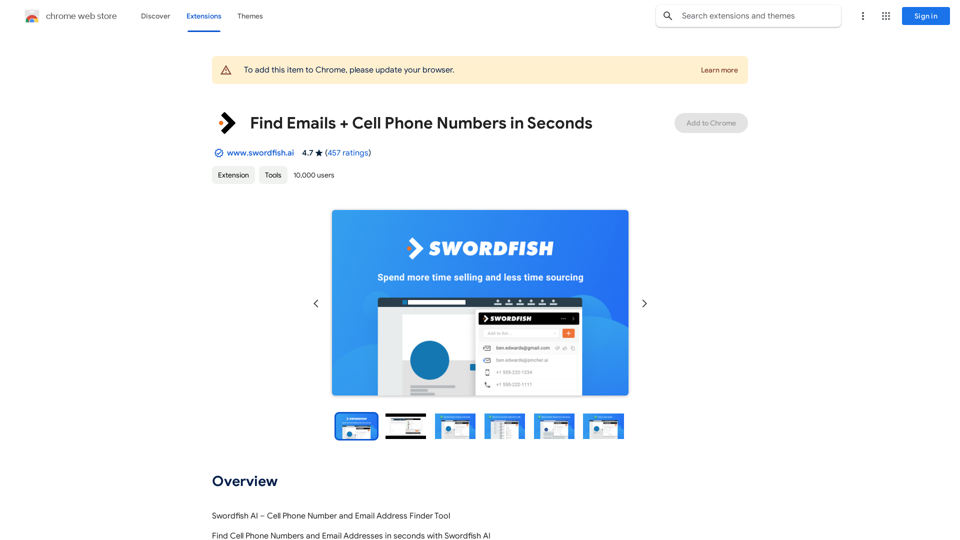
Swordfish AI – Mobile Phone Number and Email Address Finder Tool
Visit Website
Find Emails + Cell Phone Numbers in Seconds
Visit Website

Introduction

Swordfish AI is an AI-driven platform that provides access to a wide range of AI technologies for various needs, particularly focused on finding contact information such as cell phone numbers and email addresses. It offers a powerful tool for sales teams, recruiters, and professionals seeking to enhance their prospecting and lead generation efforts. The platform connects to over 200 network partners to deliver up-to-date and accurate contact information in real-time.

Feature

Find Personal and Business Contact Information

  • Cell phone numbers
  • Direct dials
  • Personal email addresses
  • Business email addresses

Smash Sales Goals

  • Access accurate contact information (email addresses and cell phone numbers) using a powerful contact database
  • Reach sales prospects or recruitment candidates that competitors cannot access

Versatile User Base

  • Sales Teams: Accelerate Sales Prospecting and Lead Generation efforts
  • Recruiters and HR Professionals: Recruit and hire talented top performers

Real-Time B2C and B2B Database

  • Provides fresh and accurate contact information in real-time
  • Eliminates reliance on static, outdated databases

Multi-Platform Integration

  • Google Chrome Extension / Plugin
  • Works with LinkedIn, Twitter, Facebook profiles
  • Seamless integration with Github & Stack Overflow
  • Supports X-ray searches on Google and Bing

FAQ

Is Swordfish AI endorsed by any of the social profiles it covers?

No, Swordfish is not endorsed by any of the social profiles it covers.

What is the purpose of Swordfish AI?

The purpose of Swordfish AI is to provide access to a vast array of AI technologies for various needs, including finding cell phone numbers and email addresses in seconds.

How does Swordfish AI work?

Swordfish AI connects to over 200 network partners to bring you updated and accurate contact information in real-time.

How much does Swordfish AI cost?

Swordfish AI offers in-app purchases. Specific pricing details are not provided in the given information.

Latest Traffic Insights

  • Monthly Visits

    193.90 M

  • Bounce Rate

    56.27%

  • Pages Per Visit

    2.71

  • Time on Site(s)

    115.91

  • Global Rank

    -

  • Country Rank

    -

Recent Visits

Traffic Sources

  • Social Media:
    0.48%
  • Paid Referrals:
    0.55%
  • Email:
    0.15%
  • Referrals:
    12.81%
  • Search Engines:
    16.21%
  • Direct:
    69.81%
More Data

Related Websites

Prospecting and Lead Generation Tool
View Detail

Prospecting and Lead Generation Tool

Prospecting and Lead Generation Tool

All-in-one Website Technologies and Prospecting Tool

193.90 M
Get your top AI Tools | ToolsApp AI Tools Directory
View Detail

Get your top AI Tools | ToolsApp AI Tools Directory

Get your top AI Tools | ToolsApp AI Tools Directory

ToolsApp AI Directory is a tool that provides a free directory of AI tools. Find your favorite AI tools with ToolsApp AI Directory. ToolsApp AI Directory aims to gather all AI tools and offer the best options for users.

0
Photoleap - Creative & powerful photo editing app by Lightricks
View Detail

Photoleap - Creative & powerful photo editing app by Lightricks

Photoleap - Creative & powerful photo editing app by Lightricks

Use the comprehensive photo editor Photoleap for incredible creations on your iPhone: Alter backgrounds, eliminate objects, design collages, and apply filters & effects. Start a 7-day free trial now.

196.20 K
SellerPic: AI Fashion Models and Product Image Creator
View Detail

SellerPic: AI Fashion Models and Product Image Creator

SellerPic: AI Fashion Models and Product Image Creator

Transform your eCommerce store with AI Fashion Models and AI Product Images. Create stunning images that drive sales and revenue. Try it FREE!

203.22 K
VMX – Powered by LotLinx
View Detail

VMX – Powered by LotLinx

VMX – Powered by LotLinx

Utilize Lotlinx's AI platform to match buyer demand to specific vehicles, according to your sales goals.

193.90 M
Mimic AI
View Detail

Mimic AI

Mimic AI

Imitate your desired picture copyright-free with AI

0
ScreenRedact on the Mac App Store

#Description
ScreenRedact is a powerful and easy-to-use screenshot editing tool that allows you to quickly and easily remove sensitive information from your screenshots. With its intuitive interface and advanced features, ScreenRedact is the perfect solution for anyone who needs to share screenshots online or with others.

#Features
* Easy to use: ScreenRedact's intuitive interface makes it easy to get started, even if you're not tech-savvy.
* Advanced editing tools: ScreenRedact offers a range of advanced editing tools, including blur, pixelate, and redact, to help you remove sensitive information from your screenshots.
* Customizable: ScreenRedact allows you to customize the appearance of your redactions, including the color, opacity, and style.
* Support for multiple file formats: ScreenRedact supports a range of file formats, including JPEG, PNG, and TIFF.
* Share easily: ScreenRedact makes it easy to share your edited screenshots with others, either by saving them to your computer or sharing them directly to social media or email.

#What's New
* Improved performance: ScreenRedact is now faster and more efficient, making it easier to edit your screenshots.
* New editing tools: ScreenRedact now includes new editing tools, including a magic wand and a lasso tool, to make it even easier to remove sensitive information from your screenshots.
* Enhanced customization options: ScreenRedact now offers even more customization options, including the ability to change the color and opacity of your redactions.

#Ratings and Reviews
* 4.5/5 stars: ScreenRedact has an average rating of 4.5 out of 5 stars on the Mac App Store.
* "Easy to use and effective": One reviewer praised ScreenRedact's ease of use and effectiveness, saying "I was able to quickly and easily remove sensitive information from my screenshots."
* "A must-have for anyone who shares screenshots online": Another reviewer called ScreenRedact "a must-have for anyone who shares screenshots online," citing its ease of use and advanced features.
View Detail

ScreenRedact on the Mac App Store #Description ScreenRedact is a powerful and easy-to-use screenshot editing tool that allows you to quickly and easily remove sensitive information from your screenshots. With its intuitive interface and advanced features, ScreenRedact is the perfect solution for anyone who needs to share screenshots online or with others. #Features * Easy to use: ScreenRedact's intuitive interface makes it easy to get started, even if you're not tech-savvy. * Advanced editing tools: ScreenRedact offers a range of advanced editing tools, including blur, pixelate, and redact, to help you remove sensitive information from your screenshots. * Customizable: ScreenRedact allows you to customize the appearance of your redactions, including the color, opacity, and style. * Support for multiple file formats: ScreenRedact supports a range of file formats, including JPEG, PNG, and TIFF. * Share easily: ScreenRedact makes it easy to share your edited screenshots with others, either by saving them to your computer or sharing them directly to social media or email. #What's New * Improved performance: ScreenRedact is now faster and more efficient, making it easier to edit your screenshots. * New editing tools: ScreenRedact now includes new editing tools, including a magic wand and a lasso tool, to make it even easier to remove sensitive information from your screenshots. * Enhanced customization options: ScreenRedact now offers even more customization options, including the ability to change the color and opacity of your redactions. #Ratings and Reviews * 4.5/5 stars: ScreenRedact has an average rating of 4.5 out of 5 stars on the Mac App Store. * "Easy to use and effective": One reviewer praised ScreenRedact's ease of use and effectiveness, saying "I was able to quickly and easily remove sensitive information from my screenshots." * "A must-have for anyone who shares screenshots online": Another reviewer called ScreenRedact "a must-have for anyone who shares screenshots online," citing its ease of use and advanced features.

ScreenRedact on the Mac App Store #Description ScreenRedact is a powerful and easy-to-use screenshot editing tool that allows you to quickly and easily remove sensitive information from your screenshots. With its intuitive interface and advanced features, ScreenRedact is the perfect solution for anyone who needs to share screenshots online or with others. #Features * Easy to use: ScreenRedact's intuitive interface makes it easy to get started, even if you're not tech-savvy. * Advanced editing tools: ScreenRedact offers a range of advanced editing tools, including blur, pixelate, and redact, to help you remove sensitive information from your screenshots. * Customizable: ScreenRedact allows you to customize the appearance of your redactions, including the color, opacity, and style. * Support for multiple file formats: ScreenRedact supports a range of file formats, including JPEG, PNG, and TIFF. * Share easily: ScreenRedact makes it easy to share your edited screenshots with others, either by saving them to your computer or sharing them directly to social media or email. #What's New * Improved performance: ScreenRedact is now faster and more efficient, making it easier to edit your screenshots. * New editing tools: ScreenRedact now includes new editing tools, including a magic wand and a lasso tool, to make it even easier to remove sensitive information from your screenshots. * Enhanced customization options: ScreenRedact now offers even more customization options, including the ability to change the color and opacity of your redactions. #Ratings and Reviews * 4.5/5 stars: ScreenRedact has an average rating of 4.5 out of 5 stars on the Mac App Store. * "Easy to use and effective": One reviewer praised ScreenRedact's ease of use and effectiveness, saying "I was able to quickly and easily remove sensitive information from my screenshots." * "A must-have for anyone who shares screenshots online": Another reviewer called ScreenRedact "a must-have for anyone who shares screenshots online," citing its ease of use and advanced features.

ScreenRedact allows you to remove sensitive text from an image by utilizing Apple's on-device machine learning model, which identifies text within an image and enables you to redact it with ease.

124.77 M
Hentai AI-Free AI Hentai Generator&NSFW Chat
View Detail

Hentai AI-Free AI Hentai Generator&NSFW Chat

Hentai AI-Free AI Hentai Generator&NSFW Chat

The Hentai AI generator enables you to customize personalized Hentai content, while NSFW Chat provides you with a platform to interact with others and jointly discuss various topics in the adult field.

579