Open-source RightAI Tools Directory
  • Discover AI
  • Submit
  • Startup
  • Blog
Open-source RightAI Tools Directory
Discover the best AI tools of 2025 with the RightAI Tools Directory!

Friend Links

AI Anime GeneratorToolsApp AI

Support

Tap4
Privacy policyTerms & ConditionsContact Us
Loading...
loading...

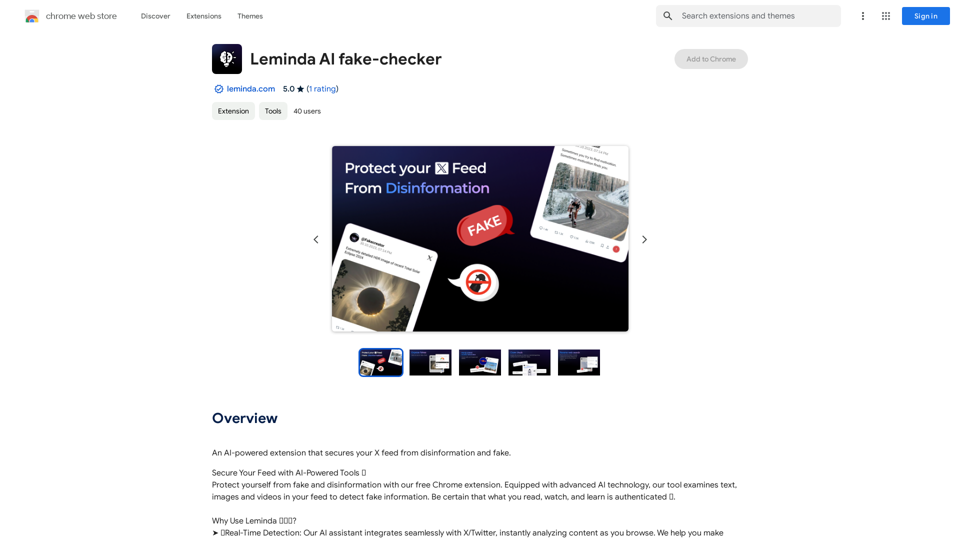
Leminda AI Fake Checker

An AI-powered extension that protects your X feed from false information and scams.
Visit Website
Leminda AI Fake Checker
Visit Website

Introduction

Leminda AI Fake-Checker is a Chrome extension designed to combat disinformation and fake news on social media platforms. Using advanced AI technology, it analyzes text, images, and videos in users' feeds to detect and verify information. This tool ensures that users can confidently consume authenticated content across various social media platforms.

Feature

Instant Verification

Leminda AI Fake-Checker provides instant verification of text, images, and videos, ensuring users have immediate access to authenticated information.

Social Media Integration

The tool is fully integrated with social media platforms, offering seamless and user-friendly functionality.

Claim Checker

Distinguishes between verified facts and unproven claims, safeguarding the accuracy of consumed information.

Out-of-Context Detection

Reveals the full context of media content by tracing it back to its original source across various platforms.

Media Manipulation Detection

Uncovers edits and AI-generated content across different media types, including videos, images, and text.

Social Media Insights

Provides access to user comments across various social media platforms to help uncover the truth behind posts.

AI-Generated Text Detection

Identifies AI-generated text, helping users distinguish between human-created content and content produced by bots or bad actors.

Subtitle Verification

Ensures video subtitles match the audio, preventing the spread of misleading or incorrect information through modified subtitles.

Easy-to-Use Interface

Users can start the verification process by clicking the Leminda button on any post, receiving immediate proof and explanations if disinformation is detected.

Free of Charge

Leminda AI Fake-Checker is available as a free Chrome extension, allowing users to install and use it without any cost.

FAQ

How does Leminda AI Fake-Checker work?

Leminda AI Fake-Checker utilizes advanced AI technology to examine text, images, and videos in your social media feed, detecting fake information and providing instant verification.

Is Leminda AI Fake-Checker free to use?

Yes, Leminda AI Fake-Checker is a free Chrome extension that can be installed and used without any cost.

How can users report suspicious or fake content?

Users can report suspicious or fake content by clicking the "Report" button on the Leminda AI Fake-Checker extension, helping improve detection algorithms.

What should users do to maximize the benefits of Leminda AI Fake-Checker?

To get the most out of Leminda AI Fake-Checker, users should:

  • Use it regularly to stay informed and protected from disinformation
  • Report any suspicious or fake content to help improve detection algorithms
  • Share feedback and suggestions to contribute to the development of more innovative AI technologies

How can users contact Leminda AI Fake-Checker for support or feedback?

Users can contact Leminda AI Fake-Checker at [email protected] for any questions, feedback, or suggestions regarding the tool.

Related Websites
Kerqu.Ai
View Detail

Kerqu.Ai

Kerqu.Ai

Essential AI Tools for Cross-Border Business, All-in-One Content Generator

193.90 M
Image Background Remover API
View Detail

Image Background Remover API

Image Background Remover API

Remove image backgrounds automatically with our powerful API. High-quality cutouts with affordable credit-based pricing. Start with 50 free credits today.

18.26 K
Please provide me with the poster content you want me to translate. 

For example, you can give me:

* Text from the poster: Copy and paste the text directly.
* A picture of the poster: I can try to extract the text from the image.
* A description of the poster: Tell me what the poster says and what it looks like. 


Once I have the poster content, I can translate it into English for you.
View Detail

Please provide me with the poster content you want me to translate. For example, you can give me: * Text from the poster: Copy and paste the text directly. * A picture of the poster: I can try to extract the text from the image. * A description of the poster: Tell me what the poster says and what it looks like. Once I have the poster content, I can translate it into English for you.

Please provide me with the poster content you want me to translate. For example, you can give me: * Text from the poster: Copy and paste the text directly. * A picture of the poster: I can try to extract the text from the image. * A description of the poster: Tell me what the poster says and what it looks like. Once I have the poster content, I can translate it into English for you.

An AI tool to turn an image into your own poster.

193.90 M
UniOne AI
View Detail

UniOne AI

UniOne AI

UniOne AI is an AI assistant that integrates several AI services such as GPT3.5, GPT4, Claude 3, Gemini Pro and more!

193.90 M
Grok AI Image Generator
View Detail

Grok AI Image Generator

Grok AI Image Generator

Generate Grok AI Images Free Online with Flux. Free Online | No Credit Card or Login Required

1.92 K
Text to Voice Generator
==========================

A text-to-voice generator, also known as a text-to-speech (TTS) system, is a software that converts written text into a spoken voice output. This technology has been widely used in various applications, including virtual assistants, audiobooks, and language learning platforms.

How it Works
---------------

The process of generating voice from text involves several steps:

1. Text Analysis: The input text is analyzed to identify the language, syntax, and semantics.
2. Phonetic Transcription: The text is converted into a phonetic transcription, which represents the sounds of the spoken language.
3. Prosody Generation: The phonetic transcription is then used to generate the prosody, or rhythm and intonation, of the spoken voice.
4. Waveform Generation: The prosody and phonetic transcription are combined to generate the audio waveform, which is the final spoken voice output.

Types of Text-to-Voice Generators
-----------------------------------

There are two main types of text-to-voice generators:

Rule-Based Systems

These systems use a set of predefined rules to generate the spoken voice output. They are often limited in their ability to produce natural-sounding voices and may sound robotic.

Machine Learning-Based Systems

These systems use machine learning algorithms to learn from large datasets of spoken voices and generate more natural-sounding voices. They are often more advanced and can produce high-quality voice outputs.

Applications of Text-to-Voice Generators
-----------------------------------------

Text-to-voice generators have a wide range of applications, including:

Virtual Assistants

Virtual assistants, such as Siri and Alexa, use text-to-voice generators to respond to user queries.

Audiobooks

Text-to-voice generators can be used to create audiobooks from written texts, making it easier for people to access written content.

Language Learning

Language learning platforms use text-to-voice generators to provide pronunciation guidance and practice exercises for learners.

Accessibility

Text-to-voice generators can be used to assist people with disabilities, such as visual impairments, by providing an auditory interface to written content.
View Detail

Text to Voice Generator ========================== A text-to-voice generator, also known as a text-to-speech (TTS) system, is a software that converts written text into a spoken voice output. This technology has been widely used in various applications, including virtual assistants, audiobooks, and language learning platforms. How it Works --------------- The process of generating voice from text involves several steps: 1. Text Analysis: The input text is analyzed to identify the language, syntax, and semantics. 2. Phonetic Transcription: The text is converted into a phonetic transcription, which represents the sounds of the spoken language. 3. Prosody Generation: The phonetic transcription is then used to generate the prosody, or rhythm and intonation, of the spoken voice. 4. Waveform Generation: The prosody and phonetic transcription are combined to generate the audio waveform, which is the final spoken voice output. Types of Text-to-Voice Generators ----------------------------------- There are two main types of text-to-voice generators: Rule-Based Systems These systems use a set of predefined rules to generate the spoken voice output. They are often limited in their ability to produce natural-sounding voices and may sound robotic. Machine Learning-Based Systems These systems use machine learning algorithms to learn from large datasets of spoken voices and generate more natural-sounding voices. They are often more advanced and can produce high-quality voice outputs. Applications of Text-to-Voice Generators ----------------------------------------- Text-to-voice generators have a wide range of applications, including: Virtual Assistants Virtual assistants, such as Siri and Alexa, use text-to-voice generators to respond to user queries. Audiobooks Text-to-voice generators can be used to create audiobooks from written texts, making it easier for people to access written content. Language Learning Language learning platforms use text-to-voice generators to provide pronunciation guidance and practice exercises for learners. Accessibility Text-to-voice generators can be used to assist people with disabilities, such as visual impairments, by providing an auditory interface to written content.

Text to Voice Generator ========================== A text-to-voice generator, also known as a text-to-speech (TTS) system, is a software that converts written text into a spoken voice output. This technology has been widely used in various applications, including virtual assistants, audiobooks, and language learning platforms. How it Works --------------- The process of generating voice from text involves several steps: 1. Text Analysis: The input text is analyzed to identify the language, syntax, and semantics. 2. Phonetic Transcription: The text is converted into a phonetic transcription, which represents the sounds of the spoken language. 3. Prosody Generation: The phonetic transcription is then used to generate the prosody, or rhythm and intonation, of the spoken voice. 4. Waveform Generation: The prosody and phonetic transcription are combined to generate the audio waveform, which is the final spoken voice output. Types of Text-to-Voice Generators ----------------------------------- There are two main types of text-to-voice generators: Rule-Based Systems These systems use a set of predefined rules to generate the spoken voice output. They are often limited in their ability to produce natural-sounding voices and may sound robotic. Machine Learning-Based Systems These systems use machine learning algorithms to learn from large datasets of spoken voices and generate more natural-sounding voices. They are often more advanced and can produce high-quality voice outputs. Applications of Text-to-Voice Generators ----------------------------------------- Text-to-voice generators have a wide range of applications, including: Virtual Assistants Virtual assistants, such as Siri and Alexa, use text-to-voice generators to respond to user queries. Audiobooks Text-to-voice generators can be used to create audiobooks from written texts, making it easier for people to access written content. Language Learning Language learning platforms use text-to-voice generators to provide pronunciation guidance and practice exercises for learners. Accessibility Text-to-voice generators can be used to assist people with disabilities, such as visual impairments, by providing an auditory interface to written content.

Generate Voice from Text on Any Web Page With the advancement of technology, it is now possible to generate voice from text on any web page. This feature is particularly useful for people who prefer listening to content rather than reading it. Here's how you can do it: #Method 1: Using Browser Extension You can use a browser extension like Read Aloud or SpeakIt! to generate voice from text on any web page. These extensions are available for both Google Chrome and Mozilla Firefox browsers. #Method 2: Using Online Tools There are several online tools available that can convert text to speech. Some popular tools include NaturalReader, Voice Dream Reader, and Google Text-to-Speech. You can copy and paste the text from any web page into these tools to generate voice. #Method 3: Using Screen Reader If you are using a Windows operating system, you can use the built-in Narrator screen reader to generate voice from text on any web page. For Mac users, you can use VoiceOver. By using any of these methods, you can easily generate voice from text on any web page and enjoy a more convenient and accessible reading experience.

193.90 M
4o Image API: Affordable, Stable, and Versatile AI Image Generation
View Detail

4o Image API: Affordable, Stable, and Versatile AI Image Generation

4o Image API: Affordable, Stable, and Versatile AI Image Generation

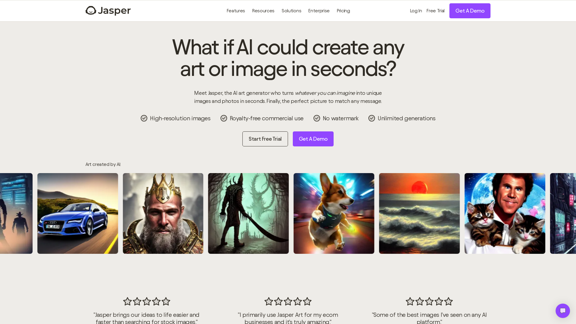
4oimageapi.io’s 4o Image API provides affordable, stable, and accurate AI image generation, allowing creators to easily produce high-quality visuals. With features such as text-to-image and image-to-image transformations, along with a variety of artistic styles, it offers dependable and effective tools for creative projects.

0
Image Describer - Free AI Image Description Tool, Allowing Every Image to Communicate
View Detail

Image Describer - Free AI Image Description Tool, Allowing Every Image to Communicate

Image Describer - Free AI Image Description Tool, Allowing Every Image to Communicate

Image Descriptor is a free AI tool that identifies and describes the contents of images. Generate accurate, detailed image descriptions effortlessly.

5.16 K