Open-source RightAI Tools Directory
  • Discover AI
  • Submit
  • Startup
  • Blog
Open-source RightAI Tools Directory
Discover the best AI tools of 2025 with the RightAI Tools Directory!

Friend Links

AI Anime GeneratorToolsApp AI

Support

Tap4
Privacy policyTerms & ConditionsContact Us
Loading...
loading...

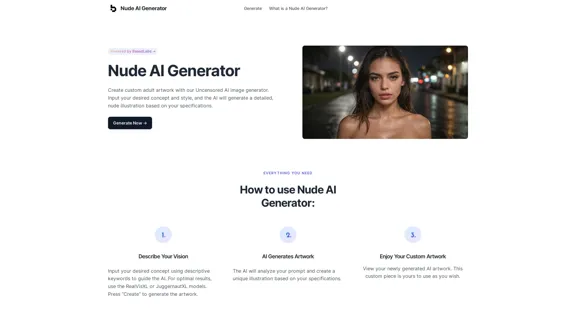
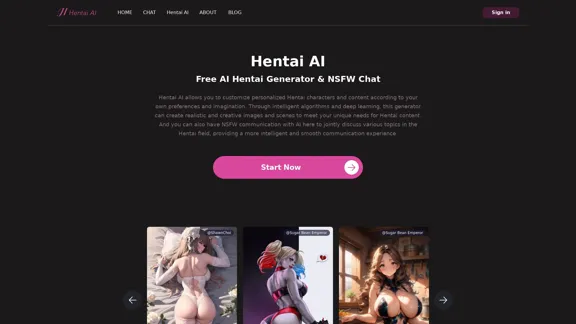
Hentai AI-Free AI Hentai Generator&NSFW Chat

The Hentai AI generator enables you to customize personalized Hentai content, while NSFW Chat provides you with a platform to interact with others and jointly discuss various topics in the adult field.
Visit Website
Hentai AI-Free AI Hentai Generator&NSFW Chat
Visit Website

Introduction

Hentai AI is a platform that offers an AI-powered hentai generator and NSFW chat functionality. It allows users to create customized hentai characters and content based on their preferences and imagination. The platform utilizes intelligent algorithms and deep learning to produce realistic and creative images and scenes, catering to users' unique desires for hentai content.

Feature

  • AI Hentai Generator:

    • Customizable character creation
    • Diverse theme selection
    • Detailed description input
    • Realistic image generation
    • Post-generation image adjustment
  • NSFW AI Chat:

    • In-depth communication with AI characters
    • Exploration of adult topics
    • Anonymous chatting
    • Real-time text interaction
    • Diverse user base for broader perspectives
  • Character Gallery:

    • Wide range of pre-designed characters
    • Various character types (e.g., fictional, celebrity, original)
    • Detailed character descriptions
    • NSFW rating system

FAQ

What is an AI Hentai Generator?

An AI Hentai Generator is a tool that uses artificial intelligence technology to create adult artworks in the hentai style. It allows users to customize characters and settings to easily generate high-quality hentai images.

How do I use the AI Hentai Generator?

  1. Select a theme or enter a detailed description of the desired content.
  2. Click the "Start Now" button and wait for the AI to generate the image.
  3. Adjust and modify the generated image as needed to achieve the desired result.

Is the NSFW AI Chat anonymous?

Yes, the NSFW AI Chat feature allows users to remain anonymous while freely expressing their views and feelings.

What kind of topics can be discussed in the NSFW AI Chat?

Users can discuss their hentai preferences, experiences, ideas, and explore various topics in the adult field with AI character robots.

Evaluation

  1. Hentai AI offers a unique platform for users interested in AI-generated hentai content, providing both image generation and interactive chat features. This combination allows for a comprehensive experience in exploring and creating adult content.

  2. The AI Hentai Generator's ability to create customized content based on user preferences is a significant strength, catering to individual tastes and imaginations.

  3. The NSFW AI Chat feature adds an interactive dimension to the platform, allowing users to engage in discussions about adult topics in a safe, anonymous environment.

  4. However, the platform's focus on adult content limits its audience and may raise ethical concerns regarding the generation and distribution of such material.

  5. While the AI technology behind the generator seems advanced, the quality and consistency of the generated images may vary, potentially leading to user dissatisfaction in some cases.

  6. The platform should ensure robust content moderation and age verification systems to prevent misuse and protect minors from accessing inappropriate content.

  7. As with any AI-generated content, there may be concerns about copyright and ownership of the created images, which the platform should address clearly in its terms of service.

Related Websites
FluxImage | Free Flux AI Image Generator with Flux.1 Models
View Detail

FluxImage | Free Flux AI Image Generator with Flux.1 Models

FluxImage | Free Flux AI Image Generator with Flux.1 Models

Flux AI is a state-of-the-art text-to-image Flux.1 AI model created by Black Forest Labs. It includes Flux.1 Pro, Flux.1 Dev, and Flux.1 Schnell versions.

0
Recorditor: Record your browser activity.
View Detail

Recorditor: Record your browser activity.

Recorditor: Record your browser activity.

Record, write down, and shorten web browser activities for simple how-to guides and sharing information.

193.90 M
ScreenRedact on the Mac App Store

#Description
ScreenRedact is a powerful and easy-to-use screenshot editing tool that allows you to quickly and easily remove sensitive information from your screenshots. With its intuitive interface and advanced features, ScreenRedact is the perfect solution for anyone who needs to share screenshots online or with others.

#Features
* Easy to use: ScreenRedact's intuitive interface makes it easy to get started, even if you're not tech-savvy.
* Advanced editing tools: ScreenRedact offers a range of advanced editing tools, including blur, pixelate, and redact, to help you remove sensitive information from your screenshots.
* Customizable: ScreenRedact allows you to customize the appearance of your redactions, including the color, opacity, and style.
* Support for multiple file formats: ScreenRedact supports a range of file formats, including JPEG, PNG, and TIFF.
* Share easily: ScreenRedact makes it easy to share your edited screenshots with others, either by saving them to your computer or sharing them directly to social media or email.

#What's New
* Improved performance: ScreenRedact is now faster and more efficient, making it easier to edit your screenshots.
* New editing tools: ScreenRedact now includes new editing tools, including a magic wand and a lasso tool, to make it even easier to remove sensitive information from your screenshots.
* Enhanced customization options: ScreenRedact now offers even more customization options, including the ability to change the color and opacity of your redactions.

#Ratings and Reviews
* 4.5/5 stars: ScreenRedact has an average rating of 4.5 out of 5 stars on the Mac App Store.
* "Easy to use and effective": One reviewer praised ScreenRedact's ease of use and effectiveness, saying "I was able to quickly and easily remove sensitive information from my screenshots."
* "A must-have for anyone who shares screenshots online": Another reviewer called ScreenRedact "a must-have for anyone who shares screenshots online," citing its ease of use and advanced features.
View Detail

ScreenRedact on the Mac App Store #Description ScreenRedact is a powerful and easy-to-use screenshot editing tool that allows you to quickly and easily remove sensitive information from your screenshots. With its intuitive interface and advanced features, ScreenRedact is the perfect solution for anyone who needs to share screenshots online or with others. #Features * Easy to use: ScreenRedact's intuitive interface makes it easy to get started, even if you're not tech-savvy. * Advanced editing tools: ScreenRedact offers a range of advanced editing tools, including blur, pixelate, and redact, to help you remove sensitive information from your screenshots. * Customizable: ScreenRedact allows you to customize the appearance of your redactions, including the color, opacity, and style. * Support for multiple file formats: ScreenRedact supports a range of file formats, including JPEG, PNG, and TIFF. * Share easily: ScreenRedact makes it easy to share your edited screenshots with others, either by saving them to your computer or sharing them directly to social media or email. #What's New * Improved performance: ScreenRedact is now faster and more efficient, making it easier to edit your screenshots. * New editing tools: ScreenRedact now includes new editing tools, including a magic wand and a lasso tool, to make it even easier to remove sensitive information from your screenshots. * Enhanced customization options: ScreenRedact now offers even more customization options, including the ability to change the color and opacity of your redactions. #Ratings and Reviews * 4.5/5 stars: ScreenRedact has an average rating of 4.5 out of 5 stars on the Mac App Store. * "Easy to use and effective": One reviewer praised ScreenRedact's ease of use and effectiveness, saying "I was able to quickly and easily remove sensitive information from my screenshots." * "A must-have for anyone who shares screenshots online": Another reviewer called ScreenRedact "a must-have for anyone who shares screenshots online," citing its ease of use and advanced features.

ScreenRedact on the Mac App Store #Description ScreenRedact is a powerful and easy-to-use screenshot editing tool that allows you to quickly and easily remove sensitive information from your screenshots. With its intuitive interface and advanced features, ScreenRedact is the perfect solution for anyone who needs to share screenshots online or with others. #Features * Easy to use: ScreenRedact's intuitive interface makes it easy to get started, even if you're not tech-savvy. * Advanced editing tools: ScreenRedact offers a range of advanced editing tools, including blur, pixelate, and redact, to help you remove sensitive information from your screenshots. * Customizable: ScreenRedact allows you to customize the appearance of your redactions, including the color, opacity, and style. * Support for multiple file formats: ScreenRedact supports a range of file formats, including JPEG, PNG, and TIFF. * Share easily: ScreenRedact makes it easy to share your edited screenshots with others, either by saving them to your computer or sharing them directly to social media or email. #What's New * Improved performance: ScreenRedact is now faster and more efficient, making it easier to edit your screenshots. * New editing tools: ScreenRedact now includes new editing tools, including a magic wand and a lasso tool, to make it even easier to remove sensitive information from your screenshots. * Enhanced customization options: ScreenRedact now offers even more customization options, including the ability to change the color and opacity of your redactions. #Ratings and Reviews * 4.5/5 stars: ScreenRedact has an average rating of 4.5 out of 5 stars on the Mac App Store. * "Easy to use and effective": One reviewer praised ScreenRedact's ease of use and effectiveness, saying "I was able to quickly and easily remove sensitive information from my screenshots." * "A must-have for anyone who shares screenshots online": Another reviewer called ScreenRedact "a must-have for anyone who shares screenshots online," citing its ease of use and advanced features.

ScreenRedact allows you to remove sensitive text from an image by utilizing Apple's on-device machine learning model, which identifies text within an image and enables you to redact it with ease.

124.77 M
Effortless Image Splitting Tool for Creative Projects
View Detail

Effortless Image Splitting Tool for Creative Projects

Effortless Image Splitting Tool for Creative Projects

Easily split large images online into smaller parts for social media, web design, and creative projects with our intuitive Image Splitter tool.

9.99 K
Abacus.AI - Effortlessly Embed Cutting-Edge AI in Your Applications.
View Detail

Abacus.AI - Effortlessly Embed Cutting-Edge AI in Your Applications.

Abacus.AI - Effortlessly Embed Cutting-Edge AI in Your Applications.

Abacus.AI is the world’s first AI super assistant built on our state-of-the-art generative AI technology. Abacus Enterprise is a fully featured AI platform where AI, not humans, builds enterprise-scale applied AI systems and agents. ChatLLM is our AI super assistant for small teams and individuals.

3.84 M
Please provide me with the poster content you want me to translate. 

For example, you can give me:

* Text from the poster: Copy and paste the text directly.
* A picture of the poster: I can try to extract the text from the image.
* A description of the poster: Tell me what the poster says and what it looks like. 


Once I have the poster content, I can translate it into English for you.
View Detail

Please provide me with the poster content you want me to translate. For example, you can give me: * Text from the poster: Copy and paste the text directly. * A picture of the poster: I can try to extract the text from the image. * A description of the poster: Tell me what the poster says and what it looks like. Once I have the poster content, I can translate it into English for you.

Please provide me with the poster content you want me to translate. For example, you can give me: * Text from the poster: Copy and paste the text directly. * A picture of the poster: I can try to extract the text from the image. * A description of the poster: Tell me what the poster says and what it looks like. Once I have the poster content, I can translate it into English for you.

An AI tool to turn an image into your own poster.

193.90 M
Buyers List Builder
View Detail

Buyers List Builder

Buyers List Builder

Build a Cash Buyer List Fast and Easy

193.90 M
Text Generation for X (formerly Twitter)
View Detail

Text Generation for X (formerly Twitter)

Text Generation for X (formerly Twitter)

This is a Chrome extension that analyzes images you want to post to X (formerly Twitter) and automatically generates alternative text for them.

193.90 M