Open-source RightAI Tools Directory
  • Discover AI
  • Submit
  • Startup
  • Blog
Open-source RightAI Tools Directory
Discover the best AI tools of 2025 with the RightAI Tools Directory!

Friend Links

AI Anime GeneratorToolsApp AI

Support

Tap4
Privacy policyTerms & ConditionsContact Us
Loading...
loading...

Musemind

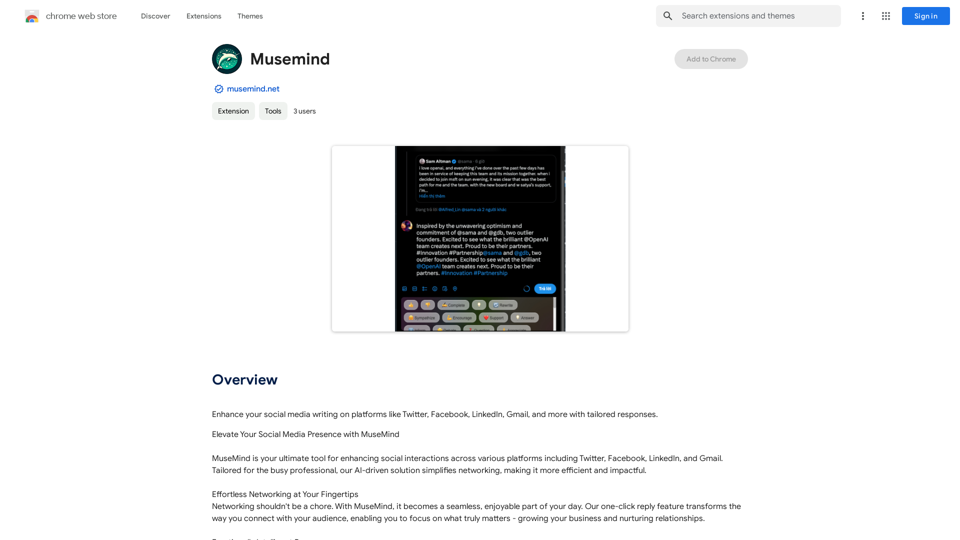
Improve your social media posts on platforms like Twitter, Facebook, LinkedIn, and Gmail with customized replies.
Visit Website
Musemind
Visit Website

Introduction

MuseMind is an AI-powered platform designed to enhance social media writing across various platforms. It caters to busy professionals seeking to streamline their networking efforts, making them more efficient and impactful. The tool offers tailored responses for platforms like Twitter, Facebook, LinkedIn, and Gmail, simplifying the process of engaging with audiences and nurturing relationships.

Feature

One-Click Reply

MuseMind's one-click reply feature revolutionizes networking, allowing users to focus on growing their business and building relationships without spending excessive time crafting responses.

Emotionally Intelligent Responses

The platform's unique emotional intelligence feature enables users to express themselves clearly. Options like "Like," "Dislike," and "Support" help tailor responses with the appropriate tone, helping users stand out in their network.

Tailored Replies for Maximum Engagement

MuseMind generates emotionally compelling comments and thought-provoking responses, ensuring meaningful interactions. Users can regenerate and refine their thoughts until they perfectly capture their intended message.

Seamless Integration

The tool integrates effortlessly with popular social networks such as Twitter, LinkedIn, and Product Hunt, expanding users' global reach and facilitating connections with key decision-makers.

Automated Personalization

MuseMind allows users to automate replies while maintaining a personal touch, creating responses that truly resonate with their audience.

Voice Customization

Users can fine-tune their replies to reflect their unique voice, ensuring consistency in their online presence.

Multi-Platform Compatibility

MuseMind works seamlessly with various social media platforms, enhancing user experience across different networks.

FAQ

What are the main benefits of using MuseMind?

MuseMind offers several key benefits:

  1. Automated, personalized responses
  2. Emotionally intelligent communication
  3. Increased engagement on social media
  4. Time-saving for busy professionals
  5. Seamless integration with popular platforms

How does MuseMind protect user privacy?

MuseMind prioritizes user privacy:

  • User information is not used for training purposes
  • Users can delete their account and data at any time

How can I get started with MuseMind?

To start using MuseMind:

  1. Download the MuseMind extension
  2. Follow the prompts to set up your account
  3. Begin using the tool on your preferred social media platforms

What is the pricing structure for MuseMind?

MuseMind offers in-app purchases with varying pricing plans. For detailed information on pricing, users should visit the official MuseMind website.

Related Websites

Read smoothly.
View Detail

Read smoothly.

Read smoothly.

An AI translation engine that understands context will provide a more user-friendly translation for websites, allowing everyone to have a reading experience in their native language.

193.90 M
AI The Name & Latest AI Names Generator in 2024
View Detail

AI The Name & Latest AI Names Generator in 2024

AI The Name & Latest AI Names Generator in 2024

Explore our name generator to easily create unique names! Whether it's for a business name or a character name, we offer a wide variety of options, and each name comes with a detailed meaning. Try it now to discover creative names that add charm to your projects or pets!

6.03 K
CO-STAR Prompt Template
==========================

Task Description
Describe the task you want the AI to perform. Be specific and concise.

Input Prompt
Provide the input prompt that the AI will receive. This can be a question, a statement, or a scenario.

Desired Response
Describe the desired response from the AI. What type of answer or output are you expecting?

Constraints
List any constraints or rules that the AI should follow when generating a response. This can include tone, style, or specific keywords to include or avoid.

Evaluation Metrics
Describe how you will evaluate the AI's response. What metrics or criteria will you use to determine the quality of the response?

Example Output
Provide an example of what a good response from the AI might look like. This can help clarify the task and provide a target for the AI to aim for.
View Detail

CO-STAR Prompt Template ========================== Task Description Describe the task you want the AI to perform. Be specific and concise. Input Prompt Provide the input prompt that the AI will receive. This can be a question, a statement, or a scenario. Desired Response Describe the desired response from the AI. What type of answer or output are you expecting? Constraints List any constraints or rules that the AI should follow when generating a response. This can include tone, style, or specific keywords to include or avoid. Evaluation Metrics Describe how you will evaluate the AI's response. What metrics or criteria will you use to determine the quality of the response? Example Output Provide an example of what a good response from the AI might look like. This can help clarify the task and provide a target for the AI to aim for.

CO-STAR Prompt Template ========================== Task Description Describe the task you want the AI to perform. Be specific and concise. Input Prompt Provide the input prompt that the AI will receive. This can be a question, a statement, or a scenario. Desired Response Describe the desired response from the AI. What type of answer or output are you expecting? Constraints List any constraints or rules that the AI should follow when generating a response. This can include tone, style, or specific keywords to include or avoid. Evaluation Metrics Describe how you will evaluate the AI's response. What metrics or criteria will you use to determine the quality of the response? Example Output Provide an example of what a good response from the AI might look like. This can help clarify the task and provide a target for the AI to aim for.

Using CO-STAR to Make Your Prompt 10 Times More Effective!

193.90 M
AutoNotes | AI Progress Notes, Assessments & More!
View Detail

AutoNotes | AI Progress Notes, Assessments & More!

AutoNotes | AI Progress Notes, Assessments & More!

AutoNotes is the top AI Progress Notes tool for Mental Health, Speech, and Occupational Therapy. Try AutoNotes for Free Now!

82.19 K
Explore GPT-4 for Free Online: OpenAI's Cutting-Edge Multimodal AI Platform
View Detail

Explore GPT-4 for Free Online: OpenAI's Cutting-Edge Multimodal AI Platform

Explore GPT-4 for Free Online: OpenAI's Cutting-Edge Multimodal AI Platform

Explore the future of AI with GPT-4o, OpenAI's groundbreaking multimodal platform that interprets and generates text, visuals, and audio. Experience unparalleled speed, cost efficiency, and accessibility in AI technology. Dive into GPT-4o's capabilities and learn how it can revolutionize your interaction with AI. Perfect for tech enthusiasts, developers, and businesses aiming to enhance operational efficiency and engagement.

1.33 K
TurboLearn AI
View Detail

TurboLearn AI

TurboLearn AI

TurboLearn AI quickly makes complete notes, interactive flashcards, and custom quizzes from your lectures. Made to help you learn better and remember more, TurboLearn AI changes to fit your specific learning needs. Make the most of your study time today!

292.80 K
Google Translate
View Detail

Google Translate

Google Translate

Google's service, provided at no cost, instantly translates words, phrases, and web pages between English and more than 100 other languages.

598.01 M
Magic Cal
View Detail

Magic Cal

Magic Cal

Make events with AI -- ChatGPT in Google Calendar This is a guide on how to use ChatGPT to create events in your Google Calendar. 1. Open ChatGPT and Google Calendar: * Start a new conversation in ChatGPT. * Open your Google Calendar in a separate tab or window. 2. Tell ChatGPT what you want to schedule: * Be specific about the event details, including: * Event name: (e.g., "Team Meeting") * Date and time: (e.g., "Next Tuesday at 2:00 PM") * Duration: (e.g., "1 hour") * Location: (e.g., "Conference Room") * Description: (optional, add any relevant details) 3. ChatGPT will generate a calendar event string: * ChatGPT will provide you with a text string that includes all the event details in a format suitable for Google Calendar. 4. Copy and paste the event string into Google Calendar: * Click on the "Create" button in Google Calendar. * Paste the event string generated by ChatGPT into the event details field. * Adjust any details if needed. 5. Save the event: * Click "Save" to add the event to your Google Calendar. Let me know if you have any other questions.

193.90 M