Open-source RightAI Tools Directory
  • Discover AI
  • Submit
  • Startup
  • Blog
Open-source RightAI Tools Directory
Discover the best AI tools of 2025 with the RightAI Tools Directory!

Friend Links

AI Anime GeneratorToolsApp AI

Support

Tap4
Privacy policyTerms & ConditionsContact Us
Loading...
loading...

GPTSnow - Supercharge your ChatGPT

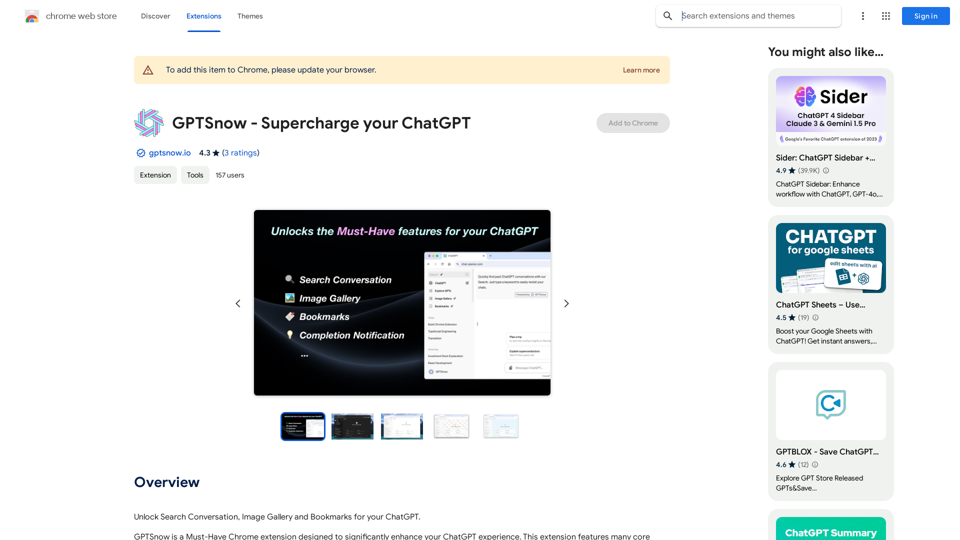
Unlock Search, Conversation History, Image Gallery, and Bookmarks for your ChatGPT.
Visit Website
GPTSnow - Supercharge your ChatGPT
Visit Website

Introduction

GPTSnow is a Chrome extension designed to enhance the ChatGPT experience. It offers features like conversation search, image gallery, bookmarks, and completion notifications to improve workflow and overall chat interaction. Compatible with various AI tools, GPTSnow is a free extension that can be easily installed from the Chrome Web Store.

Feature

🔍 Search Conversation

Easily access and search through all historical conversations, making it simple to find specific information or revisit previous chats.

🏞️ Image Gallery

Browse all generated images in one window, allowing for easy viewing and management of creative output.

🔖 Bookmarks

Save and easily access memorable conversations, simplifying the process of keeping track of important information.

💡 Completion Notification

Receive notifications when generation succeeds, ensuring users stay informed and up-to-date with their chat progress.

🔄 Compatibility

Works with the latest version of ChatGPT and is compatible with other AI tools, including GPT-4o, Claude 3.5, and Gemini 1.5.

💻 Easy Installation

Can be installed directly from the Chrome Web Store and accessed via the extension icon in the Chrome browser.

FAQ

How much does GPTSnow cost?

GPTSnow is a free extension that can be used without any additional costs.

How can I ensure I have the latest features?

Check for updates regularly to ensure you have the latest features and bug fixes.

Can I use GPTSnow with other AI tools?

Yes, GPTSnow is compatible with other AI tools, including GPT-4o, Claude 3.5, and Gemini 1.5.

How do I report a concern or issue with GPTSnow?

You can report a concern or issue with GPTSnow by visiting the developer's support hub.

Latest Traffic Insights

  • Monthly Visits

    193.90 M

  • Bounce Rate

    56.27%

  • Pages Per Visit

    2.71

  • Time on Site(s)

    115.91

  • Global Rank

    -

  • Country Rank

    -

Recent Visits

Traffic Sources

  • Social Media:
    0.48%
  • Paid Referrals:
    0.55%
  • Email:
    0.15%
  • Referrals:
    12.81%
  • Search Engines:
    16.21%
  • Direct:
    69.81%
More Data

Related Websites

Aggregata: GPT to Earn
View Detail

Aggregata: GPT to Earn

Aggregata: GPT to Earn

Transform your conversations with Chat-GPT into valuable datasets for model training, and get rewarded with cryptocurrencies.

193.90 M
At a Glance
View Detail

At a Glance

At a Glance

Use an AI like ChatGPT to condense and translate articles into short, ready-to-publish paragraphs directly on the webpage.

193.90 M
Talefy - AI Story Generator | Interactive Stories
View Detail

Talefy - AI Story Generator | Interactive Stories

Talefy - AI Story Generator | Interactive Stories

Unleash your imagination with Talefy, the AI-powered story generator. Explore interactive tales across various genres, unbounded by choices.

209.20 K
Article Summary with ChatGPT and Take Notes

This is a guide on how to use ChatGPT to summarize articles and take notes effectively. 

Step 1:  Provide ChatGPT with the Article

Copy and paste the full text of the article into the ChatGPT interface. 

Step 2:  Craft Your Prompt

Tell ChatGPT what you want it to do. Here are some examples:

* Summarize: "Please summarize this article in 200 words."
* Key Points: "What are the main points of this article?"
* Bullet Points: "Summarize the key findings of this article in bullet points."
* Notes: "Take notes on this article, focusing on the author's arguments and supporting evidence."

Step 3:  Review and Refine

ChatGPT will generate a summary, key points, bullet points, or notes based on your prompt. 

* Read carefully: Make sure the output accurately reflects the article's content.
* Edit as needed:  You can ask ChatGPT to rephrase sections or provide more detail.
* Add your own insights:  Don't just copy ChatGPT's output. Use it as a starting point and add your own thoughts, questions, and connections.

Tips for Effective Use:

* Be specific: The more specific your prompt, the better the output will be.
* Experiment with different prompts: Try various phrasing to see what works best.
* Use ChatGPT as a tool:  It's a powerful aid, but it's not a replacement for critical reading and thinking.
View Detail

Article Summary with ChatGPT and Take Notes This is a guide on how to use ChatGPT to summarize articles and take notes effectively. Step 1: Provide ChatGPT with the Article Copy and paste the full text of the article into the ChatGPT interface. Step 2: Craft Your Prompt Tell ChatGPT what you want it to do. Here are some examples: * Summarize: "Please summarize this article in 200 words." * Key Points: "What are the main points of this article?" * Bullet Points: "Summarize the key findings of this article in bullet points." * Notes: "Take notes on this article, focusing on the author's arguments and supporting evidence." Step 3: Review and Refine ChatGPT will generate a summary, key points, bullet points, or notes based on your prompt. * Read carefully: Make sure the output accurately reflects the article's content. * Edit as needed: You can ask ChatGPT to rephrase sections or provide more detail. * Add your own insights: Don't just copy ChatGPT's output. Use it as a starting point and add your own thoughts, questions, and connections. Tips for Effective Use: * Be specific: The more specific your prompt, the better the output will be. * Experiment with different prompts: Try various phrasing to see what works best. * Use ChatGPT as a tool: It's a powerful aid, but it's not a replacement for critical reading and thinking.

Article Summary with ChatGPT and Take Notes This is a guide on how to use ChatGPT to summarize articles and take notes effectively. Step 1: Provide ChatGPT with the Article Copy and paste the full text of the article into the ChatGPT interface. Step 2: Craft Your Prompt Tell ChatGPT what you want it to do. Here are some examples: * Summarize: "Please summarize this article in 200 words." * Key Points: "What are the main points of this article?" * Bullet Points: "Summarize the key findings of this article in bullet points." * Notes: "Take notes on this article, focusing on the author's arguments and supporting evidence." Step 3: Review and Refine ChatGPT will generate a summary, key points, bullet points, or notes based on your prompt. * Read carefully: Make sure the output accurately reflects the article's content. * Edit as needed: You can ask ChatGPT to rephrase sections or provide more detail. * Add your own insights: Don't just copy ChatGPT's output. Use it as a starting point and add your own thoughts, questions, and connections. Tips for Effective Use: * Be specific: The more specific your prompt, the better the output will be. * Experiment with different prompts: Try various phrasing to see what works best. * Use ChatGPT as a tool: It's a powerful aid, but it's not a replacement for critical reading and thinking.

I can do that! Please provide me with the URL of the webpage or article you'd like me to summarize. I'll do my best to create a concise and easy-to-understand summary for you.

193.90 M
TubeInsights
View Detail

TubeInsights

TubeInsights

Boost your YouTube channel with automatic titles, descriptions, tags, and powerful media tools for effortless content improvement.

193.90 M
ChatGPT Learning
View Detail

ChatGPT Learning

ChatGPT Learning

Welcome to join us in learning about ChatGPT!

193.90 M
MagicTranslate - AI-Powered Translation - MagicTranslate
View Detail

MagicTranslate - AI-Powered Translation - MagicTranslate

MagicTranslate - AI-Powered Translation - MagicTranslate

Experience seamless, intelligent translation powered by cutting-edge AI technology with MagicTranslate.

0
TubeSumma: YouTube Summarizer
View Detail

TubeSumma: YouTube Summarizer

TubeSumma: YouTube Summarizer

TubeSumma lets you quickly summarize YouTube videos, grabbing the main points without having to watch the entire thing.

193.90 M