Open-source RightAI Tools Directory
  • Discover AI
  • Submit
  • Startup
  • Blog
Open-source RightAI Tools Directory
Discover the best AI tools of 2025 with the RightAI Tools Directory!

Friend Links

AI Anime GeneratorToolsApp AI

Support

Tap4
Privacy policyTerms & ConditionsContact Us
Loading...
loading...

Smart Scholar

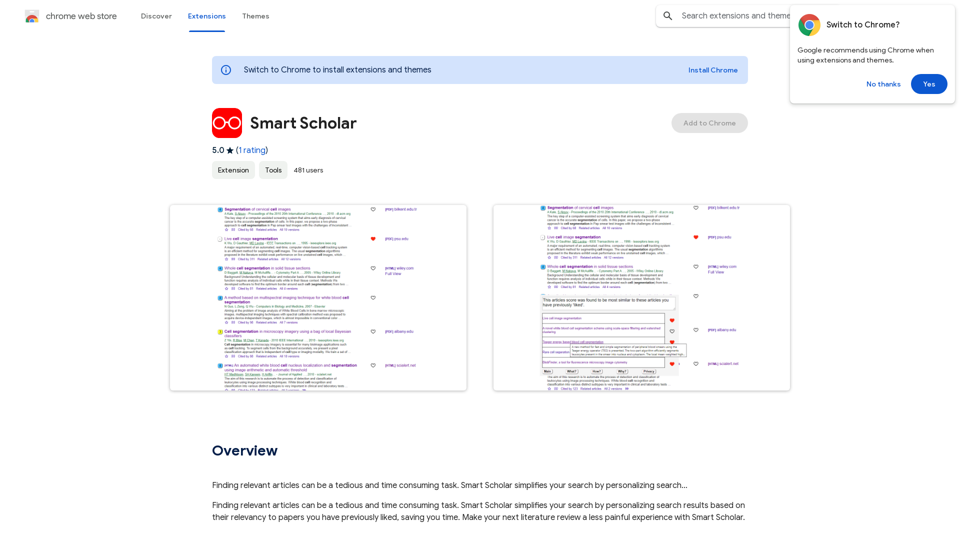
Finding relevant articles can be a tedious and time-consuming task. Smart Scholar simplifies your search by personalizing search results based on your interests and preferences.
Visit Website
Smart Scholar
Visit Website

Introduction

Smart Scholar is an AI-powered browser extension designed to streamline the process of finding relevant academic articles. By personalizing search results based on previously liked papers, it significantly reduces the time and effort required for literature reviews. This innovative tool caters to researchers, students, and academics, making scholarly searches more efficient and less daunting.

Feature

Personalized Search Results

Smart Scholar leverages AI technology to analyze user search history and preferences, delivering tailored article recommendations that align with individual research interests.

Time-Efficient Literature Review

By providing customized search results, Smart Scholar dramatically reduces the time spent on finding relevant articles, allowing users to focus on core research activities.

User-Friendly Interface

The extension boasts an intuitive design, making it easy to install and navigate. Users can seamlessly integrate Smart Scholar into their research workflow without a steep learning curve.

Cost-Free Access

Smart Scholar is available as a free extension, offering unrestricted access to its features without any subscription fees or hidden costs.

AI-Driven Article Analysis

The extension employs advanced AI algorithms to comprehend user preferences and deliver highly relevant search results, enhancing the overall research experience.

Continuous Learning

Smart Scholar adapts to user behavior over time, continuously improving its recommendations to provide increasingly accurate and useful search results.

FAQ

How does Smart Scholar function?

Smart Scholar utilizes AI technology to analyze your search history and provide personalized search results tailored to your research interests and preferences.

Is there a cost associated with using Smart Scholar?

No, Smart Scholar is completely free to use. There are no subscription fees or hidden costs associated with the extension.

How user-friendly is Smart Scholar?

Smart Scholar is designed with user experience in mind. It features an intuitive interface that makes installation and usage straightforward, allowing users to easily navigate and find the information they need.

Can Smart Scholar help me stay updated with recent research in my field?

Yes, by providing personalized search results based on your interests, Smart Scholar can help you discover the latest research articles relevant to your field of study.

Related Websites
Midjourney SREF Codes Library for Style Reference

What are SREF Codes?

SREF codes are special text strings used in Midjourney to quickly and easily apply specific artistic styles to your image generations. 

How to Use SREF Codes:

Simply add an SREF code to your Midjourney prompt. For example:

`/imagine a majestic dragon, SREF:cyberpunk`

SREF Code Library:

This library contains a collection of SREF codes categorized by style. 

* Art Styles:
    * `photorealistic`: Creates images with high levels of realism.
    * `impressionistic`:  Captures the essence of a scene with loose brushstrokes and vibrant colors.
    * `cubist`:  Breaks down objects into geometric shapes.
    * `surrealist`:  Creates dreamlike and fantastical images.
    * `abstract`:  Focuses on form, color, and composition rather than representational imagery.

* Visual Effects:
    * `cinematic`:  Gives images a cinematic look and feel.
    * `HDR`:  Creates images with high dynamic range, resulting in greater detail and contrast.
    * `neon`:  Adds vibrant neon lights to the image.
    * `pixel art`:  Generates images in a retro pixel art style.

* Other Styles:
    * `anime`:  Creates images in the style of Japanese animation.
    * `manga`:  Similar to anime, but with a more comic book aesthetic.
    * `sketch`:  Generates images that resemble pencil sketches.
    * `watercolor`:  Creates images with the look and feel of watercolor paintings.

Note: This is just a small sample of the many SREF codes available. 

Explore and Experiment:

The best way to learn about SREF codes is to experiment with them! Try combining different codes to create unique and interesting styles.
View Detail

Midjourney SREF Codes Library for Style Reference What are SREF Codes? SREF codes are special text strings used in Midjourney to quickly and easily apply specific artistic styles to your image generations. How to Use SREF Codes: Simply add an SREF code to your Midjourney prompt. For example: `/imagine a majestic dragon, SREF:cyberpunk` SREF Code Library: This library contains a collection of SREF codes categorized by style. * Art Styles: * `photorealistic`: Creates images with high levels of realism. * `impressionistic`: Captures the essence of a scene with loose brushstrokes and vibrant colors. * `cubist`: Breaks down objects into geometric shapes. * `surrealist`: Creates dreamlike and fantastical images. * `abstract`: Focuses on form, color, and composition rather than representational imagery. * Visual Effects: * `cinematic`: Gives images a cinematic look and feel. * `HDR`: Creates images with high dynamic range, resulting in greater detail and contrast. * `neon`: Adds vibrant neon lights to the image. * `pixel art`: Generates images in a retro pixel art style. * Other Styles: * `anime`: Creates images in the style of Japanese animation. * `manga`: Similar to anime, but with a more comic book aesthetic. * `sketch`: Generates images that resemble pencil sketches. * `watercolor`: Creates images with the look and feel of watercolor paintings. Note: This is just a small sample of the many SREF codes available. Explore and Experiment: The best way to learn about SREF codes is to experiment with them! Try combining different codes to create unique and interesting styles.

Midjourney SREF Codes Library for Style Reference What are SREF Codes? SREF codes are special text strings used in Midjourney to quickly and easily apply specific artistic styles to your image generations. How to Use SREF Codes: Simply add an SREF code to your Midjourney prompt. For example: `/imagine a majestic dragon, SREF:cyberpunk` SREF Code Library: This library contains a collection of SREF codes categorized by style. * Art Styles: * `photorealistic`: Creates images with high levels of realism. * `impressionistic`: Captures the essence of a scene with loose brushstrokes and vibrant colors. * `cubist`: Breaks down objects into geometric shapes. * `surrealist`: Creates dreamlike and fantastical images. * `abstract`: Focuses on form, color, and composition rather than representational imagery. * Visual Effects: * `cinematic`: Gives images a cinematic look and feel. * `HDR`: Creates images with high dynamic range, resulting in greater detail and contrast. * `neon`: Adds vibrant neon lights to the image. * `pixel art`: Generates images in a retro pixel art style. * Other Styles: * `anime`: Creates images in the style of Japanese animation. * `manga`: Similar to anime, but with a more comic book aesthetic. * `sketch`: Generates images that resemble pencil sketches. * `watercolor`: Creates images with the look and feel of watercolor paintings. Note: This is just a small sample of the many SREF codes available. Explore and Experiment: The best way to learn about SREF codes is to experiment with them! Try combining different codes to create unique and interesting styles.

Explore a list of 177 unique Midjourney sref codes and style references to find your perfect Midjourney sref code effect.

149.96 K
CatPaw: Fast AI Keyboard on the App Store
View Detail

CatPaw: Fast AI Keyboard on the App Store

CatPaw: Fast AI Keyboard on the App Store

The CatPaw Ai keyboard is powered by your own trusted ChatGPT / Gemini API service, designed to enhance your input efficiency. It supports customizable AI commands for a more personalized experience.

124.77 M
Leadeasy - Company Research
View Detail

Leadeasy - Company Research

Leadeasy - Company Research

Search for companies and contacts in the best online sources.

193.90 M
Western Language Assistant
View Detail

Western Language Assistant

Western Language Assistant

Provides authoritative Xi Han-Han Xi dictionary references, with web-based paragraph-by-paragraph translation and PDF document translation functions, making it an essential reference tool for Spanish learners. It also allows synchronization of learning records with clients.

193.90 M
Flica
View Detail

Flica

Flica

An extension for pilots to automatically submit flight requests at Flica.

193.90 M
Coursera Summary with ChatGPT and Take Notes
=====================================================

What is Coursera?

Coursera is an online learning platform that partners with top universities and organizations to offer courses and degree programs in a wide range of fields.

What is ChatGPT?

ChatGPT is a conversational AI tool that can understand and respond to human input in a human-like way. It can be used to generate text, answer questions, and even create content.

How to Use ChatGPT for Coursera Summary?

You can use ChatGPT to summarize Coursera courses by:

* Providing the course material or lecture notes to ChatGPT
* Asking ChatGPT to summarize the key points or main ideas
* Reviewing and editing the summary generated by ChatGPT

Benefits of Using ChatGPT for Coursera Summary

Using ChatGPT for Coursera summary can help you:

* Save time by automating the summarization process
* Improve understanding and retention of course material
* Focus on key concepts and ideas
* Enhance learning experience

How to Take Notes with ChatGPT?

You can use ChatGPT to take notes by:

* Providing the course material or lecture notes to ChatGPT
* Asking ChatGPT to generate notes or key points
* Reviewing and editing the notes generated by ChatGPT
* Organizing and structuring the notes for easy reference

Benefits of Using ChatGPT for Taking Notes

Using ChatGPT for taking notes can help you:

* Save time by automating the note-taking process
* Improve organization and structure of notes
* Enhance understanding and retention of course material
* Focus on key concepts and ideas
View Detail

Coursera Summary with ChatGPT and Take Notes ===================================================== What is Coursera? Coursera is an online learning platform that partners with top universities and organizations to offer courses and degree programs in a wide range of fields. What is ChatGPT? ChatGPT is a conversational AI tool that can understand and respond to human input in a human-like way. It can be used to generate text, answer questions, and even create content. How to Use ChatGPT for Coursera Summary? You can use ChatGPT to summarize Coursera courses by: * Providing the course material or lecture notes to ChatGPT * Asking ChatGPT to summarize the key points or main ideas * Reviewing and editing the summary generated by ChatGPT Benefits of Using ChatGPT for Coursera Summary Using ChatGPT for Coursera summary can help you: * Save time by automating the summarization process * Improve understanding and retention of course material * Focus on key concepts and ideas * Enhance learning experience How to Take Notes with ChatGPT? You can use ChatGPT to take notes by: * Providing the course material or lecture notes to ChatGPT * Asking ChatGPT to generate notes or key points * Reviewing and editing the notes generated by ChatGPT * Organizing and structuring the notes for easy reference Benefits of Using ChatGPT for Taking Notes Using ChatGPT for taking notes can help you: * Save time by automating the note-taking process * Improve organization and structure of notes * Enhance understanding and retention of course material * Focus on key concepts and ideas

Coursera Summary with ChatGPT and Take Notes ===================================================== What is Coursera? Coursera is an online learning platform that partners with top universities and organizations to offer courses and degree programs in a wide range of fields. What is ChatGPT? ChatGPT is a conversational AI tool that can understand and respond to human input in a human-like way. It can be used to generate text, answer questions, and even create content. How to Use ChatGPT for Coursera Summary? You can use ChatGPT to summarize Coursera courses by: * Providing the course material or lecture notes to ChatGPT * Asking ChatGPT to summarize the key points or main ideas * Reviewing and editing the summary generated by ChatGPT Benefits of Using ChatGPT for Coursera Summary Using ChatGPT for Coursera summary can help you: * Save time by automating the summarization process * Improve understanding and retention of course material * Focus on key concepts and ideas * Enhance learning experience How to Take Notes with ChatGPT? You can use ChatGPT to take notes by: * Providing the course material or lecture notes to ChatGPT * Asking ChatGPT to generate notes or key points * Reviewing and editing the notes generated by ChatGPT * Organizing and structuring the notes for easy reference Benefits of Using ChatGPT for Taking Notes Using ChatGPT for taking notes can help you: * Save time by automating the note-taking process * Improve organization and structure of notes * Enhance understanding and retention of course material * Focus on key concepts and ideas

Automate Your Learning: Coursera Videos Transcript and Summary with ChatGPT ============================================================ Are you tired of manually taking notes while watching Coursera videos? Do you wish you had a summary of the video to review later? Look no further! With the power of ChatGPT, you can now generate transcripts and summaries of Coursera videos with ease. How it Works --------------- 1. Transcribe the Video: Use a transcription tool to convert the audio from the Coursera video into text. 2. Feed it to ChatGPT: Input the transcript into ChatGPT, and it will generate a concise summary of the video. 3. Review and Refine: Review the summary, refine it as needed, and you're good to go! Benefits ------------ * Save Time: No more manual note-taking or re-watching videos to understand the content. * Improve Retention: A summary of the video helps you retain information better and review it quickly. * Enhance Learning: Focus on understanding the concepts rather than taking notes. Get Started -------------- Try it out today and take your learning to the next level!

193.90 M
AI video generator - TikTok Instagram Youtube
View Detail

AI video generator - TikTok Instagram Youtube

AI video generator - TikTok Instagram Youtube

AI video generator

0
Chrome Web Store
View Detail

Chrome Web Store

Chrome Web Store

Enhance your browser with new features and customize your browsing experience.

193.90 M