Open-source RightAI Tools Directory
  • Discover AI
  • Submit
  • Startup
  • Blog
Open-source RightAI Tools Directory
Discover the best AI tools of 2025 with the RightAI Tools Directory!

Friend Links

AI Anime GeneratorToolsApp AI

Support

Tap4
Privacy policyTerms & ConditionsContact Us
Loading...
loading...

ChatGPT Voice Master

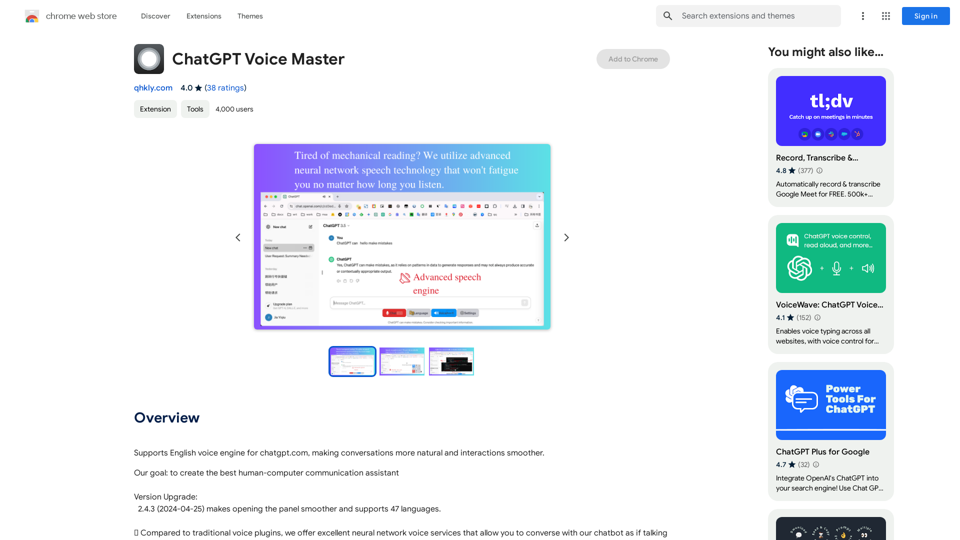
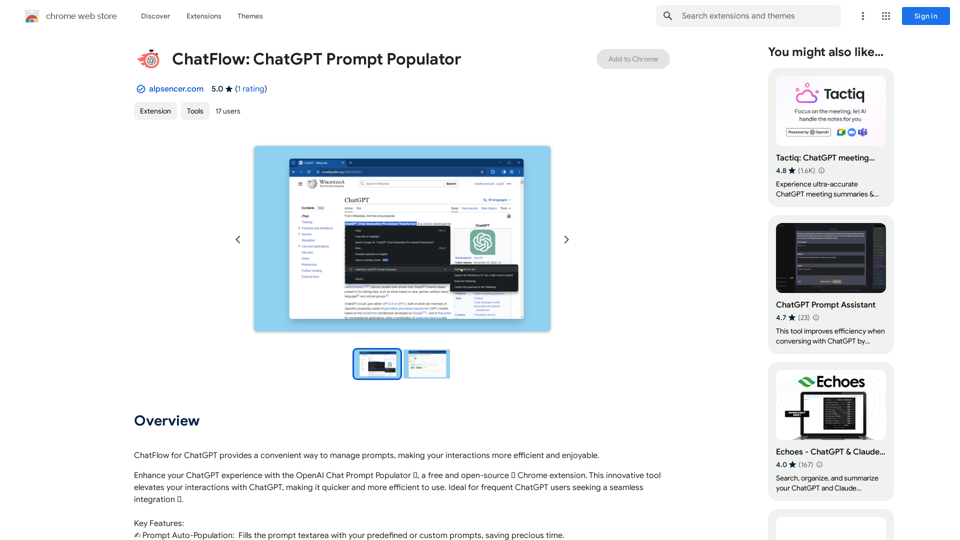
Supports English voice engine for chatgpt.com, making conversations more natural and interactions smoother.
Visit Website
ChatGPT Voice Master
Visit Website

Introduction

ChatGPT Voice Master is an AI-driven platform that offers a comprehensive suite of AI technologies for various needs, including text generation and image understanding. It features a voice engine for chatgpt.com, enhancing the naturalness of conversations and smoothing interactions. The platform provides a wide array of tools and features designed to improve user experience and productivity.

Feature

Wide-screen Display and Optimized Code Area

  • Enhanced viewing and copying experience for programmers
  • Improved readability and accessibility of code snippets

Export and Share Functionality

  • Export conversation content in various formats (image, PDF, MD)
  • Generate sharing links for easy communication

Smooth Communication Mode

  • Interrupt AI speech at any time
  • Issue new instructions without disruption

Smart Correction

  • Edit speech recognition results without re-recording
  • Select and modify specific parts of the input

Easy Wakeup

  • Activate the assistant with a simple English word "one"
  • Similar to "Hey Siri" functionality

Convenient Sidebar

  • Quick access to conversation history
  • Easy content copying and action performance

Multilingual Support and Translation

  • Support for 70 languages and dialects
  • Automatic translation of replies to user's native language

Voice Control and Customization

  • Adjust speed and volume of voice output
  • Personalize the listening experience

Keyboard Shortcuts

  • Streamline voice input and questioning process
  • Enhance user efficiency and convenience

FAQ

What is ChatGPT Voice Master?

ChatGPT Voice Master is an AI-driven platform providing access to various AI technologies for text generation and image understanding. It features a voice engine for chatgpt.com, making conversations more natural and interactions smoother.

How can I use ChatGPT Voice Master?

Users can utilize GPT-4o for free up to 20 times a day. Subscribing to the platform grants additional benefits and extended access beyond the free usage limits.

What are the main features of ChatGPT Voice Master?

Key features include wide-screen display, export functionality, smooth communication mode, smart correction, multilingual support, automatic translation, and voice control customization.

How do I purchase more coins on ChatGPT Voice Master?

You can purchase more coins using PayPal. Select PayPal as your payment method and follow the instructions to complete the secure and convenient purchase process.

Related Websites

GetEm Jobs
View Detail

GetEm Jobs

GetEm Jobs

GetEm Jobs - AI-Powered Job Application Automation

193.90 M
ChatGPT Keyboard Shortcuts

#Navigation

* Ctrl + →: Move to the next message
* Ctrl + ←: Move to the previous message
* Home: Move to the beginning of the conversation
* End: Move to the end of the conversation

#Editing

* Ctrl + A: Select all text
* Ctrl + C: Copy selected text
* Ctrl + X: Cut selected text
* Ctrl + V: Paste copied or cut text
* Ctrl + Z: Undo
* Ctrl + Y: Redo
* Ctrl + Shift + F: Format text as code

#Actions

* Enter: Send the message
* Shift + Enter: Insert a new line
* Ctrl + Shift + Enter: Send the message and insert a new line
* Esc: Cancel editing and close the message input field
* Ctrl + Shift + Space: Open the emoji picker
* Ctrl + Shift + /: Open the help menu

#Accessibility

* Ctrl + +: Increase font size
* Ctrl + -: Decrease font size
* Ctrl + 0: Reset font size to default
View Detail

ChatGPT Keyboard Shortcuts #Navigation * Ctrl + →: Move to the next message * Ctrl + ←: Move to the previous message * Home: Move to the beginning of the conversation * End: Move to the end of the conversation #Editing * Ctrl + A: Select all text * Ctrl + C: Copy selected text * Ctrl + X: Cut selected text * Ctrl + V: Paste copied or cut text * Ctrl + Z: Undo * Ctrl + Y: Redo * Ctrl + Shift + F: Format text as code #Actions * Enter: Send the message * Shift + Enter: Insert a new line * Ctrl + Shift + Enter: Send the message and insert a new line * Esc: Cancel editing and close the message input field * Ctrl + Shift + Space: Open the emoji picker * Ctrl + Shift + /: Open the help menu #Accessibility * Ctrl + +: Increase font size * Ctrl + -: Decrease font size * Ctrl + 0: Reset font size to default

ChatGPT Keyboard Shortcuts #Navigation * Ctrl + →: Move to the next message * Ctrl + ←: Move to the previous message * Home: Move to the beginning of the conversation * End: Move to the end of the conversation #Editing * Ctrl + A: Select all text * Ctrl + C: Copy selected text * Ctrl + X: Cut selected text * Ctrl + V: Paste copied or cut text * Ctrl + Z: Undo * Ctrl + Y: Redo * Ctrl + Shift + F: Format text as code #Actions * Enter: Send the message * Shift + Enter: Insert a new line * Ctrl + Shift + Enter: Send the message and insert a new line * Esc: Cancel editing and close the message input field * Ctrl + Shift + Space: Open the emoji picker * Ctrl + Shift + /: Open the help menu #Accessibility * Ctrl + +: Increase font size * Ctrl + -: Decrease font size * Ctrl + 0: Reset font size to default

Enhance your ChatGPT experience with easy-to-use keyboard shortcuts.

193.90 M
ChatCraft - ChatGPT Prompts

What is ChatCraft?

ChatCraft is a tool that helps you generate creative and effective prompts for ChatGPT. 

Why Use ChatCraft?

* Unlock ChatGPT's Potential: Get more insightful, engaging, and surprising responses from ChatGPT.
* Save Time and Effort:  Quickly brainstorm and refine prompts without getting stuck.
* Explore New Ideas: Discover unique angles and perspectives for your ChatGPT interactions.

How to Use ChatCraft:

1. Choose a Category: Select from a range of categories like storytelling, code generation, dialogue writing, and more.
2. Provide Input:  Give ChatCraft some context or keywords related to your desired outcome.
3. Generate Prompts: ChatCraft will generate a variety of tailored prompts for you to use with ChatGPT.
4. Experiment and Refine:  Try out different prompts and see what works best for your needs.


Let ChatCraft be your guide to unlocking the full potential of ChatGPT!
View Detail

ChatCraft - ChatGPT Prompts What is ChatCraft? ChatCraft is a tool that helps you generate creative and effective prompts for ChatGPT. Why Use ChatCraft? * Unlock ChatGPT's Potential: Get more insightful, engaging, and surprising responses from ChatGPT. * Save Time and Effort: Quickly brainstorm and refine prompts without getting stuck. * Explore New Ideas: Discover unique angles and perspectives for your ChatGPT interactions. How to Use ChatCraft: 1. Choose a Category: Select from a range of categories like storytelling, code generation, dialogue writing, and more. 2. Provide Input: Give ChatCraft some context or keywords related to your desired outcome. 3. Generate Prompts: ChatCraft will generate a variety of tailored prompts for you to use with ChatGPT. 4. Experiment and Refine: Try out different prompts and see what works best for your needs. Let ChatCraft be your guide to unlocking the full potential of ChatGPT!

ChatCraft - ChatGPT Prompts What is ChatCraft? ChatCraft is a tool that helps you generate creative and effective prompts for ChatGPT. Why Use ChatCraft? * Unlock ChatGPT's Potential: Get more insightful, engaging, and surprising responses from ChatGPT. * Save Time and Effort: Quickly brainstorm and refine prompts without getting stuck. * Explore New Ideas: Discover unique angles and perspectives for your ChatGPT interactions. How to Use ChatCraft: 1. Choose a Category: Select from a range of categories like storytelling, code generation, dialogue writing, and more. 2. Provide Input: Give ChatCraft some context or keywords related to your desired outcome. 3. Generate Prompts: ChatCraft will generate a variety of tailored prompts for you to use with ChatGPT. 4. Experiment and Refine: Try out different prompts and see what works best for your needs. Let ChatCraft be your guide to unlocking the full potential of ChatGPT!

Helping users of generative AI get the most out of ChatGPT by giving them easy-to-use, advanced prompts.

193.90 M
AIskNet
View Detail

AIskNet

AIskNet

AI that runs on your computer and answers questions about the web page you are currently viewing.

193.90 M
Satellite AI. Minutes Creation AI
View Detail

Satellite AI. Minutes Creation AI

Satellite AI. Minutes Creation AI

Satellite AI. The minutes creation AI is a function that utilizes AI to automatically create minutes of meetings on Google Meet™, Microsoft Teams, and Zoom.

193.90 M
TransHono: All-in-One Translation
View Detail

TransHono: All-in-One Translation

TransHono: All-in-One Translation

A concise, efficient, and visually appealing translation extension for Chrome.

193.90 M
CO-STAR Prompt Template
==========================

Task Description
Describe the task you want the AI to perform. Be specific and concise.

Input Prompt
Provide the input prompt that the AI will receive. This can be a question, a statement, or a scenario.

Desired Response
Describe the desired response from the AI. What type of answer or output are you expecting?

Constraints
List any constraints or rules that the AI should follow when generating a response. This can include tone, style, or specific keywords to include or avoid.

Evaluation Metrics
Describe how you will evaluate the AI's response. What metrics or criteria will you use to determine the quality of the response?

Example Output
Provide an example of what a good response from the AI might look like. This can help clarify the task and provide a target for the AI to aim for.
View Detail

CO-STAR Prompt Template ========================== Task Description Describe the task you want the AI to perform. Be specific and concise. Input Prompt Provide the input prompt that the AI will receive. This can be a question, a statement, or a scenario. Desired Response Describe the desired response from the AI. What type of answer or output are you expecting? Constraints List any constraints or rules that the AI should follow when generating a response. This can include tone, style, or specific keywords to include or avoid. Evaluation Metrics Describe how you will evaluate the AI's response. What metrics or criteria will you use to determine the quality of the response? Example Output Provide an example of what a good response from the AI might look like. This can help clarify the task and provide a target for the AI to aim for.

CO-STAR Prompt Template ========================== Task Description Describe the task you want the AI to perform. Be specific and concise. Input Prompt Provide the input prompt that the AI will receive. This can be a question, a statement, or a scenario. Desired Response Describe the desired response from the AI. What type of answer or output are you expecting? Constraints List any constraints or rules that the AI should follow when generating a response. This can include tone, style, or specific keywords to include or avoid. Evaluation Metrics Describe how you will evaluate the AI's response. What metrics or criteria will you use to determine the quality of the response? Example Output Provide an example of what a good response from the AI might look like. This can help clarify the task and provide a target for the AI to aim for.

Using CO-STAR to Make Your Prompt 10 Times More Effective!

193.90 M
Chrome Web Store
View Detail

Chrome Web Store

Chrome Web Store

Enhance your browser with new features and customize your browsing experience.

193.90 M