Open-source RightAI Tools Directory
  • Discover AI
  • Submit
  • Startup
  • Blog
Open-source RightAI Tools Directory
Discover the best AI tools of 2025 with the RightAI Tools Directory!

Friend Links

AI Anime GeneratorToolsApp AI

Support

Tap4
Privacy policyTerms & ConditionsContact Us
Loading...
loading...

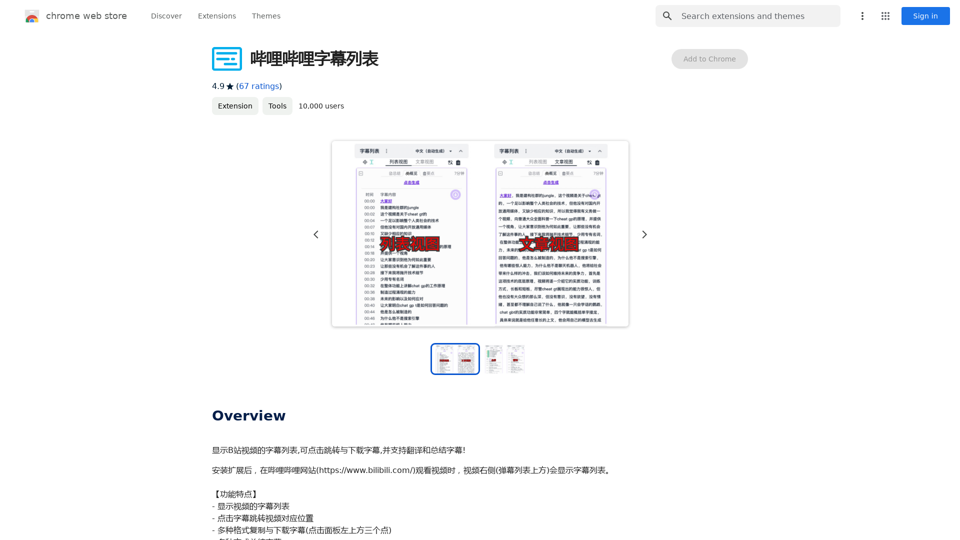
Bilibili Subtitle List

Display a list of Bilibili video subtitles, allowing you to click to jump and download subtitles, and supporting translation and summary of subtitles!
Visit Website
Bilibili Subtitle List
Visit Website

Introduction

Bilibili Subtitle is a Chrome extension that enhances the video-watching experience on Bilibili. It offers a range of features including subtitle display, navigation, and AI-powered tools for text generation, image creation, and document analysis. The extension supports multiple AI models and provides free daily usage of advanced AI services like GPT-4o and Dalle3.

Feature

Subtitle Enhancement

  • Displays video subtitles
  • Clicking on subtitles jumps to the corresponding video position
  • Supports multiple formats for copying and downloading subtitles
  • Enables subtitle summarization, translation, and search

AI-Powered Tools

  • Integrates GPT-4o for text generation and image understanding
  • Incorporates Dalle3 for image creation
  • Offers document analysis capabilities

Model Support

  • Compatible with multiple AI models:
    • OpenAI
    • Gemini
    • Local Ollama model

Customization

  • Supports deep theme settings through the Settings panel

Extensive GPT Library

  • Provides access to nearly 200,000 GPT models for various applications

Free Daily Usage

  • Offers 20 free GPT-4o uses per day
  • Shares credits between GPT-4o and Dalle3 for image generation

FAQ

How can I maximize my use of Bilibili Subtitle's AI services?

Users can leverage the daily free uses of GPT-4o for document reading and Dalle's image generation to explore a wide range of AI-powered tools supporting various tasks.

Will my information be used for your training data?

We highly value user privacy. Your data will not be used for any training purposes. If needed, you can delete your account at any time, and all your data will be removed as well.

When would I need a Bilibili Subtitle subscription?

If the 20 free GPT-4o conversations per day do not meet your needs and you heavily rely on GPT-4o, we invite you to subscribe to our affordable products for extended access.

Latest Traffic Insights

  • Monthly Visits

    193.90 M

  • Bounce Rate

    56.27%

  • Pages Per Visit

    2.71

  • Time on Site(s)

    115.91

  • Global Rank

    -

  • Country Rank

    -

Recent Visits

Traffic Sources

  • Social Media:
    0.48%
  • Paid Referrals:
    0.55%
  • Email:
    0.15%
  • Referrals:
    12.81%
  • Search Engines:
    16.21%
  • Direct:
    69.81%
More Data

Related Websites

Glue Trail
View Detail

Glue Trail

Glue Trail

Turn Screen Recordings into How-To Content in Seconds! Tired of spending hours editing videos for tutorials? Introducing [Your Product Name]! Our revolutionary tool lets you instantly transform your screen recordings into professional-looking how-to articles and videos. Here's how it works: 1. Record your screen: Capture your steps clearly and concisely. 2. Upload to [Your Product Name]: Our AI does the heavy lifting. 3. Get your content: Choose from automatically generated articles or polished videos, ready to share! [Your Product Name] is perfect for: * Educators: Create engaging online lessons. * Businesses: Train employees efficiently. * YouTubers: Boost your content creation speed. Stop wasting time editing. Start creating with [Your Product Name]!

193.90 M
Maika AI - Your Intelligent Assistant with GPT-4
View Detail

Maika AI - Your Intelligent Assistant with GPT-4

Maika AI - Your Intelligent Assistant with GPT-4

Maika AI - Your Second Brain with GPT-4. Work faster. Learn better

193.90 M
ChatGPT Hero
View Detail

ChatGPT Hero

ChatGPT Hero

The ChatGPT Hero extension gives you a collection of ChatGPT prompt templates to make it simple to write great prompts.

193.90 M
KauGPT
View Detail

KauGPT

KauGPT

This extension gives you access to GPT-4, along with access to other GPT models and files.

193.90 M
TechLink - Genius Connection
View Detail

TechLink - Genius Connection

TechLink - Genius Connection

TechLink-Darling is a lightweight plugin designed for Kuaishou colleagues, mainly enabling users to conveniently access various development tools and data tools, and leveraging existing AI capabilities to help everyone improve quality and efficiency.

193.90 M
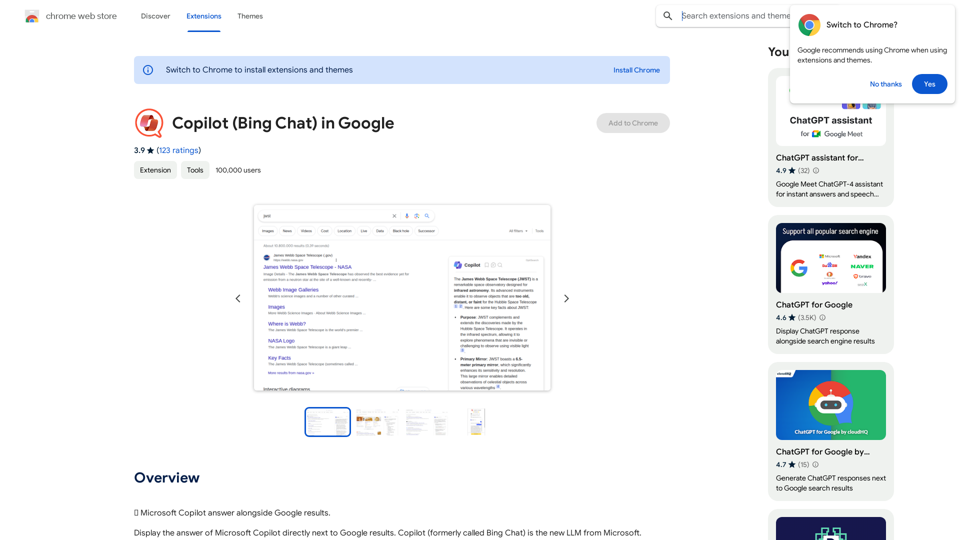
ChatGPT - Google, Bing, Baidu, More
View Detail

ChatGPT - Google, Bing, Baidu, More

ChatGPT - Google, Bing, Baidu, More

ChatGPT-powered search results

193.90 M
Chat-GPT PDF

What is Chat-GPT PDF?

Chat-GPT PDF is a tool that allows users to generate PDF files from Chat-GPT conversations. This innovative tool enables users to save and share their conversations in a more organized and visually appealing format.

How does Chat-GPT PDF work?

The process is simple and straightforward. Here's a step-by-step guide:

1. Copy the conversation: Copy the entire conversation from the Chat-GPT platform.
2. Paste the conversation: Paste the copied conversation into the Chat-GPT PDF tool.
3. Customize the layout: Customize the layout, font, and design of the PDF file according to your preferences.
4. Generate the PDF: Click the "Generate PDF" button to create a downloadable PDF file.

Features of Chat-GPT PDF

Chat-GPT PDF offers several features that make it an essential tool for users:

* Customizable layout: Customize the layout, font, and design of the PDF file to suit your needs.
* Easy sharing: Share the PDF file with others via email, social media, or messaging apps.
* Offline access: Access your conversations offline, even without an internet connection.
* Organization: Organize your conversations in a neat and tidy format, making it easier to review and reference.

Benefits of Chat-GPT PDF

The benefits of using Chat-GPT PDF are numerous:

* Improved productivity: Save time and increase productivity by having all your conversations in one place.
* Enhanced collaboration: Collaborate with others more effectively by sharing conversations in a clear and concise format.
* Better organization: Keep your conversations organized, making it easier to review and reference them later.

Conclusion

Chat-GPT PDF is a game-changer for anyone who uses Chat-GPT regularly. With its ease of use, customization options, and benefits, it's an essential tool for anyone looking to get the most out of their conversations.
View Detail

Chat-GPT PDF What is Chat-GPT PDF? Chat-GPT PDF is a tool that allows users to generate PDF files from Chat-GPT conversations. This innovative tool enables users to save and share their conversations in a more organized and visually appealing format. How does Chat-GPT PDF work? The process is simple and straightforward. Here's a step-by-step guide: 1. Copy the conversation: Copy the entire conversation from the Chat-GPT platform. 2. Paste the conversation: Paste the copied conversation into the Chat-GPT PDF tool. 3. Customize the layout: Customize the layout, font, and design of the PDF file according to your preferences. 4. Generate the PDF: Click the "Generate PDF" button to create a downloadable PDF file. Features of Chat-GPT PDF Chat-GPT PDF offers several features that make it an essential tool for users: * Customizable layout: Customize the layout, font, and design of the PDF file to suit your needs. * Easy sharing: Share the PDF file with others via email, social media, or messaging apps. * Offline access: Access your conversations offline, even without an internet connection. * Organization: Organize your conversations in a neat and tidy format, making it easier to review and reference. Benefits of Chat-GPT PDF The benefits of using Chat-GPT PDF are numerous: * Improved productivity: Save time and increase productivity by having all your conversations in one place. * Enhanced collaboration: Collaborate with others more effectively by sharing conversations in a clear and concise format. * Better organization: Keep your conversations organized, making it easier to review and reference them later. Conclusion Chat-GPT PDF is a game-changer for anyone who uses Chat-GPT regularly. With its ease of use, customization options, and benefits, it's an essential tool for anyone looking to get the most out of their conversations.

Chat-GPT PDF What is Chat-GPT PDF? Chat-GPT PDF is a tool that allows users to generate PDF files from Chat-GPT conversations. This innovative tool enables users to save and share their conversations in a more organized and visually appealing format. How does Chat-GPT PDF work? The process is simple and straightforward. Here's a step-by-step guide: 1. Copy the conversation: Copy the entire conversation from the Chat-GPT platform. 2. Paste the conversation: Paste the copied conversation into the Chat-GPT PDF tool. 3. Customize the layout: Customize the layout, font, and design of the PDF file according to your preferences. 4. Generate the PDF: Click the "Generate PDF" button to create a downloadable PDF file. Features of Chat-GPT PDF Chat-GPT PDF offers several features that make it an essential tool for users: * Customizable layout: Customize the layout, font, and design of the PDF file to suit your needs. * Easy sharing: Share the PDF file with others via email, social media, or messaging apps. * Offline access: Access your conversations offline, even without an internet connection. * Organization: Organize your conversations in a neat and tidy format, making it easier to review and reference. Benefits of Chat-GPT PDF The benefits of using Chat-GPT PDF are numerous: * Improved productivity: Save time and increase productivity by having all your conversations in one place. * Enhanced collaboration: Collaborate with others more effectively by sharing conversations in a clear and concise format. * Better organization: Keep your conversations organized, making it easier to review and reference them later. Conclusion Chat-GPT PDF is a game-changer for anyone who uses Chat-GPT regularly. With its ease of use, customization options, and benefits, it's an essential tool for anyone looking to get the most out of their conversations.

Exporting Chat History to PDF You can export your chat history with Chat-GPT to a PDF file using the following methods: #Method 1: Browser Print Function 1. Open your chat conversation with Chat-GPT in a web browser. 2. Press `Ctrl + P` (Windows) or `Cmd + P` (Mac) to open the print dialog box. 3. Select "Save as PDF" as the printer destination. 4. Choose a location to save the PDF file and set the file name. 5. Click "Save" to export the chat history to a PDF file. #Method 2: Online PDF Conversion Tools 1. Copy the entire chat conversation by pressing `Ctrl + A` (Windows) or `Cmd + A` (Mac) and then `Ctrl + C` (Windows) or `Cmd + C` (Mac). 2. Go to an online PDF conversion tool, such as SmallPDF or Convertio. 3. Paste the chat conversation into the conversion tool's text box. 4. Select the PDF format and click "Convert" to generate the PDF file. 5. Download the PDF file to your computer. #Method 3: Browser Extensions 1. Install a browser extension, such as Print Friendly & PDF or FireShot, that allows you to save web pages as PDF files. 2. Open your chat conversation with Chat-GPT in a web browser. 3. Click the browser extension's icon in the toolbar. 4. Select the "Save as PDF" option and choose a location to save the file. 5. Click "Save" to export the chat history to a PDF file. By following these methods, you can easily export your chat history with Chat-GPT to a PDF file for future reference or sharing.

193.90 M
AutoNotes | AI Progress Notes, Assessments & More!
View Detail

AutoNotes | AI Progress Notes, Assessments & More!

AutoNotes | AI Progress Notes, Assessments & More!

AutoNotes is the top AI Progress Notes tool for Mental Health, Speech, and Occupational Therapy. Try AutoNotes for Free Now!

82.19 K