Open-source RightAI Tools Directory
  • Discover AI
  • Submit
  • Startup
  • Blog
Open-source RightAI Tools Directory
Discover the best AI tools of 2025 with the RightAI Tools Directory!

Friend Links

AI Anime GeneratorToolsApp AI

Support

Tap4
Privacy policyTerms & ConditionsContact Us
Loading...
loading...

Holara - Anime Image Generation - Holara

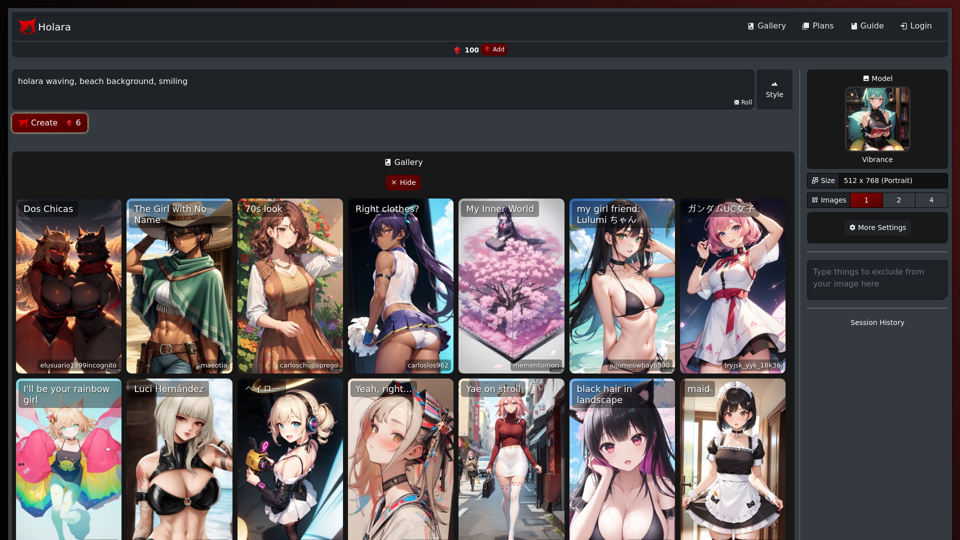
Holara: AI-generated anime artwork!
Visit Website
Holara - Anime Image Generation - Holara
Visit Website

Introduction

Holara is an innovative anime art creation platform that harnesses AI technology to generate high-quality anime-style images. Users can easily create unique and personalized anime artwork by inputting prompts and adjusting various settings. The platform offers both free and premium features, catering to casual users and dedicated anime art enthusiasts alike.

Feature

AI-Powered Anime Image Generation

Holara's advanced AI technology transforms user prompts into stunning anime-style images, allowing for quick and easy creation of unique artwork.

Customizable Settings

Users can fine-tune their creations by adjusting:

  • Image size
  • Art style
  • AI model selection

Free and Premium Options

  • Free tier: Basic image generation capabilities
  • Premium plans:
    • Unlimited image generation
    • Access to exclusive AI models
    • Priority customer support

User-Friendly Interface

  1. Sign up for an account
  2. Input desired prompt
  3. Customize settings
  4. Click "Create" to generate the image

Community Engagement

Join the Holara community to connect with fellow anime art enthusiasts, share creations, and learn new techniques.

FAQ

What exactly is Holara?

Holara is an AI-powered platform designed for creating anime-style artwork. It allows users to generate unique images by inputting prompts and customizing various settings.

How do I get started with Holara?

To begin using Holara:

  1. Sign up for an account on the platform
  2. Enter your desired prompt in the prompt box
  3. Customize settings such as image size, style, and model
  4. Click the "Create" button to generate your anime-style image

Is Holara free to use?

Holara offers a free tier with basic image generation capabilities. Premium features, including unlimited generation and access to exclusive models, are available through paid subscription plans.

Can I customize the generated images?

Yes, Holara provides various customization options. Users can adjust settings like image size, art style, and AI model to create personalized anime artwork.

Any tips for getting better results?

To improve your Holara experience:

  • Use specific and detailed prompts for more accurate results
  • Experiment with different settings to find your preferred style
  • Engage with the Holara community to learn new techniques and tips

Latest Traffic Insights

  • Monthly Visits

    42.69 K

  • Bounce Rate

    52.00%

  • Pages Per Visit

    2.33

  • Time on Site(s)

    129.45

  • Global Rank

    691264

  • Country Rank

    United States 364319

Recent Visits

Traffic Sources

  • Social Media:
    3.76%
  • Paid Referrals:
    1.00%
  • Email:
    0.12%
  • Referrals:
    6.42%
  • Search Engines:
    31.02%
  • Direct:
    57.35%
More Data

Related Websites

GPT Chinese Station - Experience the Official Chinese Website of ChatGPT, GPT-4, Midjourney AI Painting, AI Programming, AI Translation, and AI Creation.
View Detail

GPT Chinese Station - Experience the Official Chinese Website of ChatGPT, GPT-4, Midjourney AI Painting, AI Programming, AI Translation, and AI Creation.

GPT Chinese Station - Experience the Official Chinese Website of ChatGPT, GPT-4, Midjourney AI Painting, AI Programming, AI Translation, and AI Creation.

Experience the Chinese official website of ChatGPT, GPT-4, Midjourney AI painting, AI programming, AI translation, and AI creation.

1.25 K
FLUX Fill: Advanced AI Solution for Image Inpainting and Outpainting
View Detail

FLUX Fill: Advanced AI Solution for Image Inpainting and Outpainting

FLUX Fill: Advanced AI Solution for Image Inpainting and Outpainting

FLUX Fill provides professional-quality AI image inpainting and outpainting. Change your images with smooth edits and natural extensions.

664
BigJpg AI
View Detail

BigJpg AI

BigJpg AI

BigJPG AI: The excellent image upscaler. It enlarges photos beyond limits, delivering crystal-clear results. User-friendly BigJPG creates print-quality enlargements.

62.56 K
PaintShop Pro: Photo Editing Software by Corel
View Detail

PaintShop Pro: Photo Editing Software by Corel

PaintShop Pro: Photo Editing Software by Corel

The official website for the PaintShop Pro family of products. Get product information, updates and free trials. Access special offers, tutorials and videos.

155.73 K
AI Image Description, Markdown, and Text Converter
View Detail

AI Image Description, Markdown, and Text Converter

AI Image Description, Markdown, and Text Converter

Explore AI-powered image descriptions with Describe Picture. Get instant insights and connect with visuals in new ways. Join us now!

62.96 K
Image Describer - Free AI to Describe Images Online (No Login Required)
View Detail

Image Describer - Free AI to Describe Images Online (No Login Required)

Image Describer - Free AI to Describe Images Online (No Login Required)

Discover AI-Powered Image Descriptions with Image Describer. Gain Instant Insights and Unlock New Perspectives and Efficiency for Your Work and Creations. Join Us Today!

25.53 K
Text to Voice Generator
==========================

A text-to-voice generator, also known as a text-to-speech (TTS) system, is a software that converts written text into a spoken voice output. This technology has been widely used in various applications, including virtual assistants, audiobooks, and language learning platforms.

How it Works
---------------

The process of generating voice from text involves several steps:

1. Text Analysis: The input text is analyzed to identify the language, syntax, and semantics.
2. Phonetic Transcription: The text is converted into a phonetic transcription, which represents the sounds of the spoken language.
3. Prosody Generation: The phonetic transcription is then used to generate the prosody, or rhythm and intonation, of the spoken voice.
4. Waveform Generation: The prosody and phonetic transcription are combined to generate the audio waveform, which is the final spoken voice output.

Types of Text-to-Voice Generators
-----------------------------------

There are two main types of text-to-voice generators:

Rule-Based Systems

These systems use a set of predefined rules to generate the spoken voice output. They are often limited in their ability to produce natural-sounding voices and may sound robotic.

Machine Learning-Based Systems

These systems use machine learning algorithms to learn from large datasets of spoken voices and generate more natural-sounding voices. They are often more advanced and can produce high-quality voice outputs.

Applications of Text-to-Voice Generators
-----------------------------------------

Text-to-voice generators have a wide range of applications, including:

Virtual Assistants

Virtual assistants, such as Siri and Alexa, use text-to-voice generators to respond to user queries.

Audiobooks

Text-to-voice generators can be used to create audiobooks from written texts, making it easier for people to access written content.

Language Learning

Language learning platforms use text-to-voice generators to provide pronunciation guidance and practice exercises for learners.

Accessibility

Text-to-voice generators can be used to assist people with disabilities, such as visual impairments, by providing an auditory interface to written content.
View Detail

Text to Voice Generator ========================== A text-to-voice generator, also known as a text-to-speech (TTS) system, is a software that converts written text into a spoken voice output. This technology has been widely used in various applications, including virtual assistants, audiobooks, and language learning platforms. How it Works --------------- The process of generating voice from text involves several steps: 1. Text Analysis: The input text is analyzed to identify the language, syntax, and semantics. 2. Phonetic Transcription: The text is converted into a phonetic transcription, which represents the sounds of the spoken language. 3. Prosody Generation: The phonetic transcription is then used to generate the prosody, or rhythm and intonation, of the spoken voice. 4. Waveform Generation: The prosody and phonetic transcription are combined to generate the audio waveform, which is the final spoken voice output. Types of Text-to-Voice Generators ----------------------------------- There are two main types of text-to-voice generators: Rule-Based Systems These systems use a set of predefined rules to generate the spoken voice output. They are often limited in their ability to produce natural-sounding voices and may sound robotic. Machine Learning-Based Systems These systems use machine learning algorithms to learn from large datasets of spoken voices and generate more natural-sounding voices. They are often more advanced and can produce high-quality voice outputs. Applications of Text-to-Voice Generators ----------------------------------------- Text-to-voice generators have a wide range of applications, including: Virtual Assistants Virtual assistants, such as Siri and Alexa, use text-to-voice generators to respond to user queries. Audiobooks Text-to-voice generators can be used to create audiobooks from written texts, making it easier for people to access written content. Language Learning Language learning platforms use text-to-voice generators to provide pronunciation guidance and practice exercises for learners. Accessibility Text-to-voice generators can be used to assist people with disabilities, such as visual impairments, by providing an auditory interface to written content.

Text to Voice Generator ========================== A text-to-voice generator, also known as a text-to-speech (TTS) system, is a software that converts written text into a spoken voice output. This technology has been widely used in various applications, including virtual assistants, audiobooks, and language learning platforms. How it Works --------------- The process of generating voice from text involves several steps: 1. Text Analysis: The input text is analyzed to identify the language, syntax, and semantics. 2. Phonetic Transcription: The text is converted into a phonetic transcription, which represents the sounds of the spoken language. 3. Prosody Generation: The phonetic transcription is then used to generate the prosody, or rhythm and intonation, of the spoken voice. 4. Waveform Generation: The prosody and phonetic transcription are combined to generate the audio waveform, which is the final spoken voice output. Types of Text-to-Voice Generators ----------------------------------- There are two main types of text-to-voice generators: Rule-Based Systems These systems use a set of predefined rules to generate the spoken voice output. They are often limited in their ability to produce natural-sounding voices and may sound robotic. Machine Learning-Based Systems These systems use machine learning algorithms to learn from large datasets of spoken voices and generate more natural-sounding voices. They are often more advanced and can produce high-quality voice outputs. Applications of Text-to-Voice Generators ----------------------------------------- Text-to-voice generators have a wide range of applications, including: Virtual Assistants Virtual assistants, such as Siri and Alexa, use text-to-voice generators to respond to user queries. Audiobooks Text-to-voice generators can be used to create audiobooks from written texts, making it easier for people to access written content. Language Learning Language learning platforms use text-to-voice generators to provide pronunciation guidance and practice exercises for learners. Accessibility Text-to-voice generators can be used to assist people with disabilities, such as visual impairments, by providing an auditory interface to written content.

Generate Voice from Text on Any Web Page With the advancement of technology, it is now possible to generate voice from text on any web page. This feature is particularly useful for people who prefer listening to content rather than reading it. Here's how you can do it: #Method 1: Using Browser Extension You can use a browser extension like Read Aloud or SpeakIt! to generate voice from text on any web page. These extensions are available for both Google Chrome and Mozilla Firefox browsers. #Method 2: Using Online Tools There are several online tools available that can convert text to speech. Some popular tools include NaturalReader, Voice Dream Reader, and Google Text-to-Speech. You can copy and paste the text from any web page into these tools to generate voice. #Method 3: Using Screen Reader If you are using a Windows operating system, you can use the built-in Narrator screen reader to generate voice from text on any web page. For Mac users, you can use VoiceOver. By using any of these methods, you can easily generate voice from text on any web page and enjoy a more convenient and accessible reading experience.

193.90 M
AI Image Enlarger
View Detail

AI Image Enlarger

AI Image Enlarger

AI Image Upscaler | Enhance your images in size and quality using AI

68