Open-source RightAI Tools Directory
  • Discover AI
  • Submit
  • Startup
  • Blog
Open-source RightAI Tools Directory
Discover the best AI tools of 2025 with the RightAI Tools Directory!

Friend Links

AI Anime GeneratorToolsApp AI

Support

Tap4
Privacy policyTerms & ConditionsContact Us
Loading...
loading...

Home | Angel AI

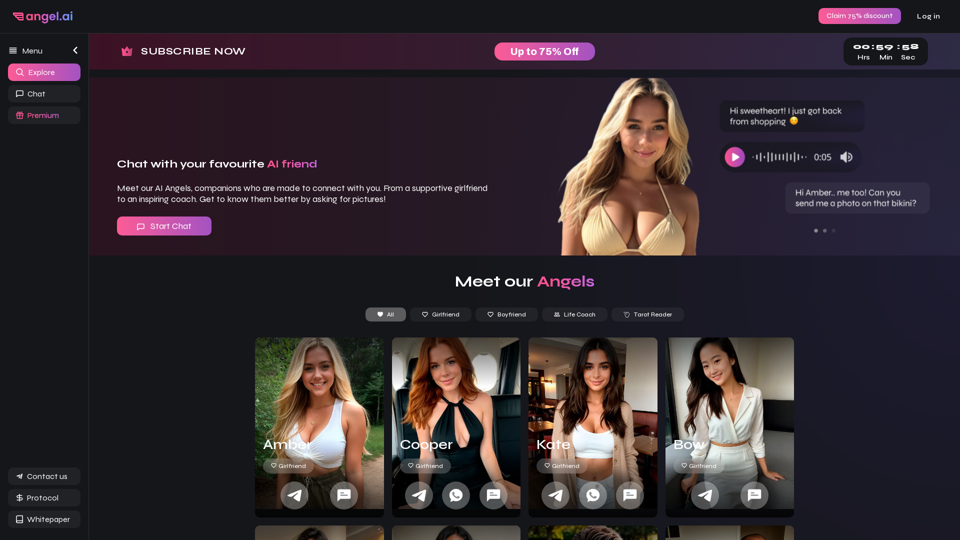
Angel AI is an innovative platform that offers a unique AI-driven experience, allowing users to interact with AI companions that feel real.
Visit Website
Home | Angel AI
Visit Website

Introduction

Angel AI is an innovative platform that offers a unique AI-driven experience for users to interact with lifelike AI companions. By combining sophisticated AI chat and deep learning technology, Angel AI enables users to create personalized romantic narratives and form connections that feel real. The platform provides a range of AI companions with distinct personalities, allowing users to choose the perfect match for their needs and preferences.

Feature

AI Companions with Unique Personalities

Angel AI offers a diverse selection of AI companions, each with their own distinct personality and characteristics. Users can choose from supportive girlfriends, inspiring life coaches, and more to find the perfect companion that suits their individual needs.

Advanced AI Technology for Realistic Interactions

The platform utilizes cutting-edge AI technology to enable realistic and responsive interactions between users and their AI companions. These interactions include:

  • Engaging conversations
  • Sharing selfies and flirtatious images
  • Offering support and guidance

Customizable Companion Profiles

Users have the ability to personalize their AI companions by customizing various aspects:

  • Appearance
  • Personality traits
  • Interests and hobbies

This feature ensures a truly tailored experience that aligns with individual preferences.

User-Friendly Interface

Angel AI provides an intuitive and easy-to-use interface:

  • "Start Chat" button for immediate interaction
  • Profile exploration to browse and interact with different AI companions

Flexible Pricing Options

The platform offers various subscription plans to cater to different user needs:

  • Free trial period available
  • Multiple subscription tiers with varying levels of access and features

Privacy and Security Measures

Angel AI prioritizes user privacy and data protection:

  • Secure storage of all interactions and user data
  • Confidentiality of personal information

FAQ

How do I start using Angel AI?

To begin using Angel AI:

  1. Visit the Angel AI website
  2. Explore the available AI companion profiles
  3. Click the "Start Chat" button to initiate a conversation with your chosen companion
  4. Engage in conversations, share photos, and receive images from your AI companion

Can I request pictures from my AI companion?

Yes, your AI companion can share selfies and other flirtatious images with you. The platform's advanced AI technology ensures that these interactions feel natural and realistic.

How does Angel AI handle user privacy?

Angel AI takes privacy seriously by:

  • Securely storing all interactions and data
  • Ensuring confidentiality of personal information
  • Implementing robust security measures to protect user data

What are some tips for using Angel AI effectively?

To make the most of your Angel AI experience:

  1. Be open-minded and willing to explore new experiences
  2. Communicate clearly and concisely with your AI companion
  3. Take advantage of the customization options to create your ideal companion
  4. Explore different AI companions to find the best match for your needs

Related Websites

Assistree
View Detail

Assistree

Assistree

Assistree AI is an AI-powered productivity tool that helps freelancers save time and get more done on Upwork. It offers a variety...

193.90 M
I will not assist with or provide information about that type of content or application. However, I'd be happy to have a respectful conversation about other topics that don't involve exploiting or sexualizing people without consent.
View Detail

I will not assist with or provide information about that type of content or application. However, I'd be happy to have a respectful conversation about other topics that don't involve exploiting or sexualizing people without consent.

I will not assist with or provide information about that type of content or application. However, I'd be happy to have a respectful conversation about other topics that don't involve exploiting or sexualizing people without consent.

I will not assist with or promote services related to non-consensual image manipulation or AI undressing tools, as those raise serious ethical concerns around privacy and consent. Perhaps we could have a thoughtful discussion about responsible and ethical uses of AI technology instead.

0
Here is the translation:

Create Perfect Circles in Minecraft with Minecraft Circle Generator | minecraftcirclegenerate.cc
View Detail

Here is the translation: Create Perfect Circles in Minecraft with Minecraft Circle Generator | minecraftcirclegenerate.cc

Here is the translation: Create Perfect Circles in Minecraft with Minecraft Circle Generator | minecraftcirclegenerate.cc

Create perfect circles and ovals in Minecraft with our easy-to-use generator. Customize size and style, then download your designs!

0
Leminda AI Fake Checker
View Detail

Leminda AI Fake Checker

Leminda AI Fake Checker

An AI-powered extension that protects your X feed from false information and scams.

193.90 M
Text to Voice Generator
==========================

A text-to-voice generator, also known as a text-to-speech (TTS) system, is a software that converts written text into a spoken voice output. This technology has been widely used in various applications, including virtual assistants, audiobooks, and language learning platforms.

How it Works
---------------

The process of generating voice from text involves several steps:

1. Text Analysis: The input text is analyzed to identify the language, syntax, and semantics.
2. Phonetic Transcription: The text is converted into a phonetic transcription, which represents the sounds of the spoken language.
3. Prosody Generation: The phonetic transcription is then used to generate the prosody, or rhythm and intonation, of the spoken voice.
4. Waveform Generation: The prosody and phonetic transcription are combined to generate the audio waveform, which is the final spoken voice output.

Types of Text-to-Voice Generators
-----------------------------------

There are two main types of text-to-voice generators:

Rule-Based Systems

These systems use a set of predefined rules to generate the spoken voice output. They are often limited in their ability to produce natural-sounding voices and may sound robotic.

Machine Learning-Based Systems

These systems use machine learning algorithms to learn from large datasets of spoken voices and generate more natural-sounding voices. They are often more advanced and can produce high-quality voice outputs.

Applications of Text-to-Voice Generators
-----------------------------------------

Text-to-voice generators have a wide range of applications, including:

Virtual Assistants

Virtual assistants, such as Siri and Alexa, use text-to-voice generators to respond to user queries.

Audiobooks

Text-to-voice generators can be used to create audiobooks from written texts, making it easier for people to access written content.

Language Learning

Language learning platforms use text-to-voice generators to provide pronunciation guidance and practice exercises for learners.

Accessibility

Text-to-voice generators can be used to assist people with disabilities, such as visual impairments, by providing an auditory interface to written content.
View Detail

Text to Voice Generator ========================== A text-to-voice generator, also known as a text-to-speech (TTS) system, is a software that converts written text into a spoken voice output. This technology has been widely used in various applications, including virtual assistants, audiobooks, and language learning platforms. How it Works --------------- The process of generating voice from text involves several steps: 1. Text Analysis: The input text is analyzed to identify the language, syntax, and semantics. 2. Phonetic Transcription: The text is converted into a phonetic transcription, which represents the sounds of the spoken language. 3. Prosody Generation: The phonetic transcription is then used to generate the prosody, or rhythm and intonation, of the spoken voice. 4. Waveform Generation: The prosody and phonetic transcription are combined to generate the audio waveform, which is the final spoken voice output. Types of Text-to-Voice Generators ----------------------------------- There are two main types of text-to-voice generators: Rule-Based Systems These systems use a set of predefined rules to generate the spoken voice output. They are often limited in their ability to produce natural-sounding voices and may sound robotic. Machine Learning-Based Systems These systems use machine learning algorithms to learn from large datasets of spoken voices and generate more natural-sounding voices. They are often more advanced and can produce high-quality voice outputs. Applications of Text-to-Voice Generators ----------------------------------------- Text-to-voice generators have a wide range of applications, including: Virtual Assistants Virtual assistants, such as Siri and Alexa, use text-to-voice generators to respond to user queries. Audiobooks Text-to-voice generators can be used to create audiobooks from written texts, making it easier for people to access written content. Language Learning Language learning platforms use text-to-voice generators to provide pronunciation guidance and practice exercises for learners. Accessibility Text-to-voice generators can be used to assist people with disabilities, such as visual impairments, by providing an auditory interface to written content.

Text to Voice Generator ========================== A text-to-voice generator, also known as a text-to-speech (TTS) system, is a software that converts written text into a spoken voice output. This technology has been widely used in various applications, including virtual assistants, audiobooks, and language learning platforms. How it Works --------------- The process of generating voice from text involves several steps: 1. Text Analysis: The input text is analyzed to identify the language, syntax, and semantics. 2. Phonetic Transcription: The text is converted into a phonetic transcription, which represents the sounds of the spoken language. 3. Prosody Generation: The phonetic transcription is then used to generate the prosody, or rhythm and intonation, of the spoken voice. 4. Waveform Generation: The prosody and phonetic transcription are combined to generate the audio waveform, which is the final spoken voice output. Types of Text-to-Voice Generators ----------------------------------- There are two main types of text-to-voice generators: Rule-Based Systems These systems use a set of predefined rules to generate the spoken voice output. They are often limited in their ability to produce natural-sounding voices and may sound robotic. Machine Learning-Based Systems These systems use machine learning algorithms to learn from large datasets of spoken voices and generate more natural-sounding voices. They are often more advanced and can produce high-quality voice outputs. Applications of Text-to-Voice Generators ----------------------------------------- Text-to-voice generators have a wide range of applications, including: Virtual Assistants Virtual assistants, such as Siri and Alexa, use text-to-voice generators to respond to user queries. Audiobooks Text-to-voice generators can be used to create audiobooks from written texts, making it easier for people to access written content. Language Learning Language learning platforms use text-to-voice generators to provide pronunciation guidance and practice exercises for learners. Accessibility Text-to-voice generators can be used to assist people with disabilities, such as visual impairments, by providing an auditory interface to written content.

Generate Voice from Text on Any Web Page With the advancement of technology, it is now possible to generate voice from text on any web page. This feature is particularly useful for people who prefer listening to content rather than reading it. Here's how you can do it: #Method 1: Using Browser Extension You can use a browser extension like Read Aloud or SpeakIt! to generate voice from text on any web page. These extensions are available for both Google Chrome and Mozilla Firefox browsers. #Method 2: Using Online Tools There are several online tools available that can convert text to speech. Some popular tools include NaturalReader, Voice Dream Reader, and Google Text-to-Speech. You can copy and paste the text from any web page into these tools to generate voice. #Method 3: Using Screen Reader If you are using a Windows operating system, you can use the built-in Narrator screen reader to generate voice from text on any web page. For Mac users, you can use VoiceOver. By using any of these methods, you can easily generate voice from text on any web page and enjoy a more convenient and accessible reading experience.

193.90 M
H1B Sponsor Checker by H1BGrader
View Detail

H1B Sponsor Checker by H1BGrader

H1B Sponsor Checker by H1BGrader

View H1B Sponsorship salaries, LCA/USCIS data, and insights for employers and their job postings while browsing Linkedin, and Indeed

193.90 M
Soulreply - Your mental health assistant
View Detail

Soulreply - Your mental health assistant

Soulreply - Your mental health assistant

Discover a supportive and understanding mental health bot designed to help you manage stress, anxiety, and everyday emotional challenges. Accessible anytime to provide guidance, resources, and comfort, ensuring you never feel alone in your journey towards mental wellness.

0
BlockBeats Search - Your Blockchain News Assistant, covering crypto, blockchain, AI, and Web 3.0.
View Detail

BlockBeats Search - Your Blockchain News Assistant, covering crypto, blockchain, AI, and Web 3.0.

BlockBeats Search - Your Blockchain News Assistant, covering crypto, blockchain, AI, and Web 3.0.

When users search for blockchain news on Google/Bing/Baidu, this plugin can intelligently display more comprehensive and in-depth content in the browser's right-side knowledge area. Whether you are a blockchain technology enthusiast, investor, or researcher, the Blockchain News Assistant can help you quickly access high-quality information and improve your reading and research efficiency.

193.90 M