Open-source RightAI Tools Directory
  • Discover AI
  • Submit
  • Startup
  • Blog
Open-source RightAI Tools Directory
Discover the best AI tools of 2025 with the RightAI Tools Directory!

Friend Links

AI Anime GeneratorToolsApp AI

Support

Tap4
Privacy policyTerms & ConditionsContact Us
Loading...
loading...

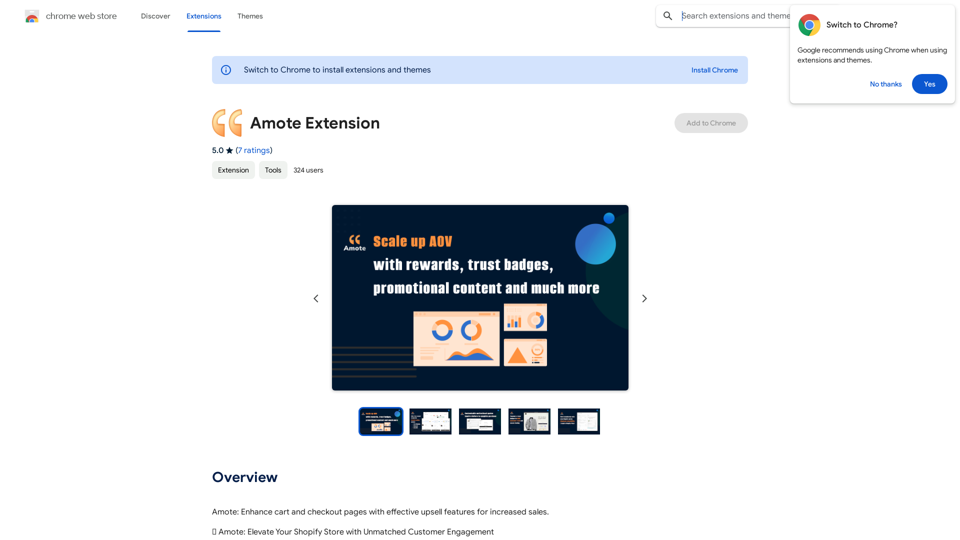
Amote Extension

Note: Improve the cart and checkout pages with effective upsell features to boost sales.
Visit Website
Amote Extension
Visit Website

Introduction

Amote is a Chrome extension designed to enhance cart and checkout pages for e-commerce websites. It offers effective upsell features that increase sales and customer engagement, transforming ordinary shopping experiences into extraordinary memories. This free tool seamlessly integrates with Shopify stores, providing a range of features to improve customer experience and boost sales.

Feature

Rewarding Customer Experience

Amote implements a captivating rewards system that turns customers into loyal advocates. This system offers enticing rewards that enhance the overall shopping journey, encouraging repeat purchases and customer loyalty.

AI-Generated Inspiration

The extension utilizes ChatGPT to generate inspirational quotes, infusing online stores with positivity. This feature creates an uplifting atmosphere that resonates with the audience, potentially improving customer mood and increasing the likelihood of purchases.

Trust-Building Information

Amote optimizes the presentation of shipping and refund details, providing clear and concise information. This feature helps build trust with customers, instilling confidence in their purchasing decisions.

Seamless Shopify Integration

The extension integrates smoothly with all Shopify themes, including:

  • Shopify Theme App Extension
  • Shopify Checkout Extensibility
  • Automatic Discounts

This ensures a consistent and polished appearance throughout Shopify stores, enhancing the overall user experience.

Free and Accessible

Amote is completely free to use, allowing store owners to elevate their performance without incurring additional costs. All powerful features are available at no charge, making it an accessible tool for businesses of all sizes.

FAQ

What are the main benefits of using Amote?

Amote enhances cart and checkout pages with effective upsell features, increasing sales and customer engagement. It also provides a positive and uplifting atmosphere in your online store, building trust with customers through optimized information presentation.

How do I get started with Amote?

To start using Amote, follow these steps:

  1. Install the extension from the Chrome Web Store
  2. Follow the provided setup instructions
  3. Once installed, Amote will automatically enhance your cart and checkout pages with its upsell features

Is Amote compatible with Shopify stores?

Yes, Amote seamlessly integrates with all Shopify themes, Shopify Theme App Extension, Shopify Checkout Extensibility, and Automatic Discounts, ensuring compatibility and consistent appearance across Shopify stores.

Are there any costs associated with using Amote?

No, Amote is completely free to use. There are no additional costs, subscription fees, or hidden charges. Users can enjoy all features and benefits without any financial commitment.

Latest Traffic Insights

  • Monthly Visits

    193.90 M

  • Bounce Rate

    56.27%

  • Pages Per Visit

    2.71

  • Time on Site(s)

    115.91

  • Global Rank

    -

  • Country Rank

    -

Recent Visits

Traffic Sources

  • Social Media:
    0.48%
  • Paid Referrals:
    0.55%
  • Email:
    0.15%
  • Referrals:
    12.81%
  • Search Engines:
    16.21%
  • Direct:
    69.81%
More Data

Related Websites

Flux AI Image Generator: The Future of Creative Visualization
View Detail

Flux AI Image Generator: The Future of Creative Visualization

Flux AI Image Generator: The Future of Creative Visualization

Explore the boundless possibilities of Flux AI, the leading AI image generator that converts your textual descriptions into breathtaking, one-of-a-kind visuals.

0
FLUX.1 AI: Advanced Text-to-Image Generation Model
View Detail

FLUX.1 AI: Advanced Text-to-Image Generation Model

FLUX.1 AI: Advanced Text-to-Image Generation Model

Experience the next level of image synthesis with FLUX.1 AI. Our cutting-edge AI technology creates stunning, diverse, and highly detailed images from text prompts.

152
Instant Background Remover
View Detail

Instant Background Remover

Instant Background Remover

Easily remove image backgrounds from any website with just two clicks!🚀

193.90 M
Youdao Smart Translation
View Detail

Youdao Smart Translation

Youdao Smart Translation

【Youdao Lingdong Translation】Using Youdao's large translation model, the top choice for immersive web translation tools! Real-time contrast translation: Turn any web page into a contrast. Image translation: Easily extract text from images. Instant translation input box: Enter Chinese and easily convert to English.

193.90 M
Journey ArtPrompt with Midjourney

This guide will walk you through creating stunning artwork using Midjourney, a powerful AI art generator. 

1. Accessing Midjourney

* You'll need a Discord account to use Midjourney. 
* Join the official Midjourney server: [https://discord.gg/midjourney](https://discord.gg/midjourney)

2. Understanding the Basics

* `/imagine` Command: This is the core command for generating images.
* Prompt:  A text description of the artwork you want to create. Be specific and descriptive!
* Parameters: Options that control aspects like image size, aspect ratio, and style.

3. Crafting Your Journey Prompt

Think about the story you want to tell with your artwork.  

* Setting: Where does your journey take place? (e.g., a mystical forest, a futuristic city, a desolate wasteland)
* Characters: Who is on this journey? (e.g., a lone traveler, a group of adventurers, mythical creatures)
* Mood: What feeling do you want to evoke? (e.g., adventurous, mysterious, hopeful, melancholic)
* Style: What artistic style appeals to you? (e.g., photorealistic, painterly, abstract)

4. Putting it Together

Combine these elements into a clear and concise prompt. 

Example:

`/imagine A lone traveler journeys through a mystical forest at sunset, bathed in golden light. The path ahead is shrouded in mist, hinting at unknown wonders. Style: painterly, ethereal`

5. Experiment and Refine

* Midjourney is all about experimentation! Try different prompts, parameters, and styles.
* Use the "upscale" command to enlarge your favorite images and reveal more detail.
* Don't be afraid to iterate and refine your prompts based on the results.
View Detail

Journey ArtPrompt with Midjourney This guide will walk you through creating stunning artwork using Midjourney, a powerful AI art generator. 1. Accessing Midjourney * You'll need a Discord account to use Midjourney. * Join the official Midjourney server: [https://discord.gg/midjourney](https://discord.gg/midjourney) 2. Understanding the Basics * `/imagine` Command: This is the core command for generating images. * Prompt: A text description of the artwork you want to create. Be specific and descriptive! * Parameters: Options that control aspects like image size, aspect ratio, and style. 3. Crafting Your Journey Prompt Think about the story you want to tell with your artwork. * Setting: Where does your journey take place? (e.g., a mystical forest, a futuristic city, a desolate wasteland) * Characters: Who is on this journey? (e.g., a lone traveler, a group of adventurers, mythical creatures) * Mood: What feeling do you want to evoke? (e.g., adventurous, mysterious, hopeful, melancholic) * Style: What artistic style appeals to you? (e.g., photorealistic, painterly, abstract) 4. Putting it Together Combine these elements into a clear and concise prompt. Example: `/imagine A lone traveler journeys through a mystical forest at sunset, bathed in golden light. The path ahead is shrouded in mist, hinting at unknown wonders. Style: painterly, ethereal` 5. Experiment and Refine * Midjourney is all about experimentation! Try different prompts, parameters, and styles. * Use the "upscale" command to enlarge your favorite images and reveal more detail. * Don't be afraid to iterate and refine your prompts based on the results.

Journey ArtPrompt with Midjourney This guide will walk you through creating stunning artwork using Midjourney, a powerful AI art generator. 1. Accessing Midjourney * You'll need a Discord account to use Midjourney. * Join the official Midjourney server: [https://discord.gg/midjourney](https://discord.gg/midjourney) 2. Understanding the Basics * `/imagine` Command: This is the core command for generating images. * Prompt: A text description of the artwork you want to create. Be specific and descriptive! * Parameters: Options that control aspects like image size, aspect ratio, and style. 3. Crafting Your Journey Prompt Think about the story you want to tell with your artwork. * Setting: Where does your journey take place? (e.g., a mystical forest, a futuristic city, a desolate wasteland) * Characters: Who is on this journey? (e.g., a lone traveler, a group of adventurers, mythical creatures) * Mood: What feeling do you want to evoke? (e.g., adventurous, mysterious, hopeful, melancholic) * Style: What artistic style appeals to you? (e.g., photorealistic, painterly, abstract) 4. Putting it Together Combine these elements into a clear and concise prompt. Example: `/imagine A lone traveler journeys through a mystical forest at sunset, bathed in golden light. The path ahead is shrouded in mist, hinting at unknown wonders. Style: painterly, ethereal` 5. Experiment and Refine * Midjourney is all about experimentation! Try different prompts, parameters, and styles. * Use the "upscale" command to enlarge your favorite images and reveal more detail. * Don't be afraid to iterate and refine your prompts based on the results.

New backgrounds with Midjourney on new tabs

193.90 M
YT Hacks
View Detail

YT Hacks

YT Hacks

Artificial Intelligence for Generating YouTube Content Ideas from Subtitles.

193.90 M
Bing search
View Detail

Bing search

Bing search

Upgrade your browsing with the Bing Search extension. Optimize your SEO with Bing's AI-powered search engine.

193.90 M
Mirror AI - Emoji Maker and Free AI Avatar Creator
View Detail

Mirror AI - Emoji Maker and Free AI Avatar Creator

Mirror AI - Emoji Maker and Free AI Avatar Creator

Mirror is your personal sticker creator! Take a single selfie and receive thousands of personalized emojis and stickers featuring you and your friends. Use them in WhatsApp, Facebook, iMessage, Telegram, and other messaging apps!

33.59 K