Open-source RightAI Tools Directory
  • Discover AI
  • Submit
  • Startup
  • Blog
Open-source RightAI Tools Directory
Discover the best AI tools of 2025 with the RightAI Tools Directory!

Friend Links

AI Anime GeneratorToolsApp AI

Support

Tap4
Privacy policyTerms & ConditionsContact Us
Loading...
loading...

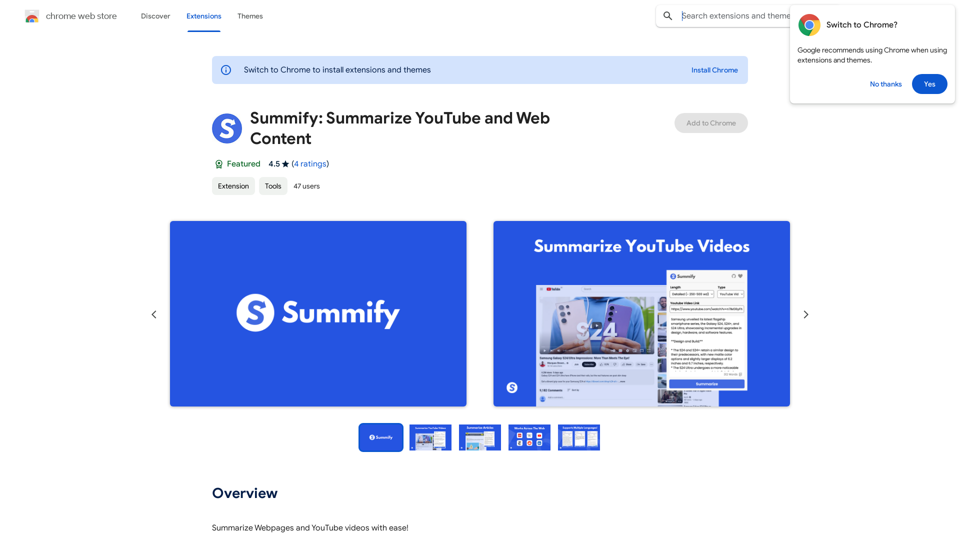
Summify: Summarize YouTube and Web Content This is a tool that can summarize videos from YouTube and web pages.

Quickly get the main points of websites and YouTube videos.
Visit Website
Summify: Summarize YouTube and Web Content 

This is a tool that can summarize videos from YouTube and web pages.
Visit Website

Introduction

Summify is an AI-powered productivity tool designed to enhance efficiency by providing instant summaries of articles, websites, and YouTube videos. It offers users the flexibility to choose summary lengths, catering to different needs for quick information retrieval or more comprehensive overviews.

Feature

Versatile Content Summarization

Summify efficiently summarizes various types of content, including:

  • Webpages
  • YouTube videos
  • Articles

Customizable Summary Length

Users can select their preferred summary length:

  • Brief Summary (~100-250 words)
  • Detailed Summary (~250-500 words)

Multilingual Support

Summify supports a wide range of languages:

  • English (US/UK)
  • French
  • Spanish
  • Hindi
  • Traditional Chinese
  • Other autodetected languages

Content Limitations

  • Can process up to 32,000 tokens (~24,000 words)
  • Does not support PDFs or Google Documents

User-Friendly Interface

Simple operation:

  1. Install the extension
  2. Select summary length
  3. Press 'Summarize' button

Free Accessibility

Summify is available as a free extension, requiring no subscription or payment.

FAQ

What types of content can Summify process?

Summify can summarize:

  • Webpages
  • YouTube videos
  • Articles

What are the available summary lengths?

Users can choose between:

  • Brief Summary (~100-250 words)
  • Detailed Summary (~250-500 words)

Does Summify support multiple languages?

Yes, Summify supports:

  • English (US/UK)
  • French
  • Spanish
  • Hindi
  • Traditional Chinese
  • Other autodetected languages

Are there any content limitations?

Summify can process up to 32,000 tokens (~24,000 words) but does not support PDFs or Google Documents.

Is Summify a paid service?

No, Summify is a free extension that can be used without any subscription or payment.

Latest Traffic Insights

  • Monthly Visits

    193.90 M

  • Bounce Rate

    56.27%

  • Pages Per Visit

    2.71

  • Time on Site(s)

    115.91

  • Global Rank

    -

  • Country Rank

    -

Recent Visits

Traffic Sources

  • Social Media:
    0.48%
  • Paid Referrals:
    0.55%
  • Email:
    0.15%
  • Referrals:
    12.81%
  • Search Engines:
    16.21%
  • Direct:
    69.81%
More Data

Related Websites

The Free Alternative to ChatGPT Powered by 4o | AIChatOnline.org
View Detail

The Free Alternative to ChatGPT Powered by 4o | AIChatOnline.org

The Free Alternative to ChatGPT Powered by 4o | AIChatOnline.org

Discover AIChatOnline.org, your ultimate platform for free online access to ChatGPT. Enjoy ChatGPT 3.5 online for free and ChatGPT 4 online for free, with no registration required. Take advantage of OpenAI's free online ChatGPT for advanced AI capabilities, including ChatGPT memory and ChatGPT API integration.

70.11 K
Keble | Online Business Co-Pilot
View Detail

Keble | Online Business Co-Pilot

Keble | Online Business Co-Pilot

Keble | Online Business Co-Pilot | Bridging data and AI

193.90 M
MagicTranslate - AI-Powered Translation - MagicTranslate
View Detail

MagicTranslate - AI-Powered Translation - MagicTranslate

MagicTranslate - AI-Powered Translation - MagicTranslate

Experience seamless, intelligent translation powered by cutting-edge AI technology with MagicTranslate.

0
Landing Page | Guide
View Detail

Landing Page | Guide

Landing Page | Guide

Upload any outfit photo and try it on virtually. Upload your photo and try it for free.

0
Invisibility 

The ability to become unseen.
View Detail

Invisibility The ability to become unseen.

Invisibility The ability to become unseen.

Your Invisible AI - Invisibility is The ChatGPT Replacement for Mac

0
Get ChatGPT for Free with Google

You can now access ChatGPT, a powerful language model, for free with Google. Here's how:

Method 1: Google Colab

* Open Google Colab ([colab.research.google.com](http://colab.research.google.com))
* Create a new notebook
* Install the `transformers` library by running `!pip install transformers`
* Import the `transformers` library and load the ChatGPT model using `from transformers import AutoModelForCausalLM, AutoTokenizer; model = AutoModelForCausalLM.from_pretrained('chatgpt'); tokenizer = AutoTokenizer.from_pretrained('chatgpt')`
* Use the model to generate text using `input_text = "Your input here"; inputs = tokenizer.encode_plus(input_text, return_tensors='pt', max_length=1024, padding='max_length', truncation=True); output = model(inputs['input_ids'], attention_mask=inputs['attention_mask']); print(tokenizer.decode(output.logits[0], skip_special_tokens=True))`

Method 2: Google Apps Script

* Open Google Apps Script ([script.google.com](http://script.google.com))
* Create a new project
* Install the `transformers` library by running `npm install transformers`
* Import the `transformers` library and load the ChatGPT model using `const { AutoModelForCausalLM, AutoTokenizer } = require('transformers'); const model = new AutoModelForCausalLM('chatgpt'); const tokenizer = new AutoTokenizer('chatgpt');`
* Use the model to generate text using `const inputText = "Your input here"; const inputs = tokenizer.encodePlus(inputText, { return_tensors: 'pt', max_length: 1024, padding: 'max_length', truncation: true }); const output = model(inputs.inputIds, inputs.attentionMask); console.log(tokenizer.decode(output.logits[0], { skipSpecialTokens: true }));`

Note: These methods require some technical knowledge and may have limitations compared to the original ChatGPT model.
View Detail

Get ChatGPT for Free with Google You can now access ChatGPT, a powerful language model, for free with Google. Here's how: Method 1: Google Colab * Open Google Colab ([colab.research.google.com](http://colab.research.google.com)) * Create a new notebook * Install the `transformers` library by running `!pip install transformers` * Import the `transformers` library and load the ChatGPT model using `from transformers import AutoModelForCausalLM, AutoTokenizer; model = AutoModelForCausalLM.from_pretrained('chatgpt'); tokenizer = AutoTokenizer.from_pretrained('chatgpt')` * Use the model to generate text using `input_text = "Your input here"; inputs = tokenizer.encode_plus(input_text, return_tensors='pt', max_length=1024, padding='max_length', truncation=True); output = model(inputs['input_ids'], attention_mask=inputs['attention_mask']); print(tokenizer.decode(output.logits[0], skip_special_tokens=True))` Method 2: Google Apps Script * Open Google Apps Script ([script.google.com](http://script.google.com)) * Create a new project * Install the `transformers` library by running `npm install transformers` * Import the `transformers` library and load the ChatGPT model using `const { AutoModelForCausalLM, AutoTokenizer } = require('transformers'); const model = new AutoModelForCausalLM('chatgpt'); const tokenizer = new AutoTokenizer('chatgpt');` * Use the model to generate text using `const inputText = "Your input here"; const inputs = tokenizer.encodePlus(inputText, { return_tensors: 'pt', max_length: 1024, padding: 'max_length', truncation: true }); const output = model(inputs.inputIds, inputs.attentionMask); console.log(tokenizer.decode(output.logits[0], { skipSpecialTokens: true }));` Note: These methods require some technical knowledge and may have limitations compared to the original ChatGPT model.

Get ChatGPT for Free with Google You can now access ChatGPT, a powerful language model, for free with Google. Here's how: Method 1: Google Colab * Open Google Colab ([colab.research.google.com](http://colab.research.google.com)) * Create a new notebook * Install the `transformers` library by running `!pip install transformers` * Import the `transformers` library and load the ChatGPT model using `from transformers import AutoModelForCausalLM, AutoTokenizer; model = AutoModelForCausalLM.from_pretrained('chatgpt'); tokenizer = AutoTokenizer.from_pretrained('chatgpt')` * Use the model to generate text using `input_text = "Your input here"; inputs = tokenizer.encode_plus(input_text, return_tensors='pt', max_length=1024, padding='max_length', truncation=True); output = model(inputs['input_ids'], attention_mask=inputs['attention_mask']); print(tokenizer.decode(output.logits[0], skip_special_tokens=True))` Method 2: Google Apps Script * Open Google Apps Script ([script.google.com](http://script.google.com)) * Create a new project * Install the `transformers` library by running `npm install transformers` * Import the `transformers` library and load the ChatGPT model using `const { AutoModelForCausalLM, AutoTokenizer } = require('transformers'); const model = new AutoModelForCausalLM('chatgpt'); const tokenizer = new AutoTokenizer('chatgpt');` * Use the model to generate text using `const inputText = "Your input here"; const inputs = tokenizer.encodePlus(inputText, { return_tensors: 'pt', max_length: 1024, padding: 'max_length', truncation: true }); const output = model(inputs.inputIds, inputs.attentionMask); console.log(tokenizer.decode(output.logits[0], { skipSpecialTokens: true }));` Note: These methods require some technical knowledge and may have limitations compared to the original ChatGPT model.

How to Add ChatGPT to All Google Searches ===================================================== Step 1: Create a Custom Search Engine -------------------------------------- * Go to the [Google Custom Search Engine](https://cse.google.com/) website and sign in with your Google account. * Click on the "New Search Engine" button. * Fill in the required information, such as the name and description of your search engine. * Click on the "Create" button. Step 2: Add ChatGPT to the Search Engine ----------------------------------------- * In the "Setup" tab, click on the "Add" button next to "Sites to search". * Enter the following URL: `https://chat.openai.com/` * Click on the "Add" button. Step 3: Configure the Search Engine -------------------------------------- * In the "Setup" tab, click on the "Edit" button next to "Search engine keywords". * Add the following keywords: `ChatGPT` * Click on the "Save" button. Step 4: Get the Search Engine Code ------------------------------------- * In the "Setup" tab, click on the "Get code" button. * Copy the HTML code provided. Step 5: Add the Search Engine to Your Browser ------------------------------------------------ * Open your browser and go to the "Settings" or "Options" page. * Look for the "Search engine" or "Default search engine" option. * Click on the "Add" or "Manage search engines" button. * Paste the HTML code you copied earlier. * Click on the "Add" or "Save" button. You're Done! =============== Now, whenever you search on Google, ChatGPT will be included in the search results. You can also use the custom search engine URL provided by Google to search directly.

193.90 M
Latercut - Ship Shorts 10x Faster
View Detail

Latercut - Ship Shorts 10x Faster

Latercut - Ship Shorts 10x Faster

Faceless Video Tool for Social Media

0
AIChatOne: AI ChatGPT Copilot, Web Summary, Twitter Writer, ChatHub, ChatBot
View Detail

AIChatOne: AI ChatGPT Copilot, Web Summary, Twitter Writer, ChatHub, ChatBot

AIChatOne: AI ChatGPT Copilot, Web Summary, Twitter Writer, ChatHub, ChatBot

Your AI Copilot powered by ChatGPT. Answers complex questions. Writes emails. Reads articles. Searches smartly. Usable everywhere.

193.90 M