Open-source RightAI Tools Directory
  • Discover AI
  • Submit
  • Startup
  • Blog
Open-source RightAI Tools Directory
Discover the best AI tools of 2025 with the RightAI Tools Directory!

Friend Links

AI Anime GeneratorToolsApp AI

Support

Tap4
Privacy policyTerms & ConditionsContact Us
Loading...
loading...

What's his face

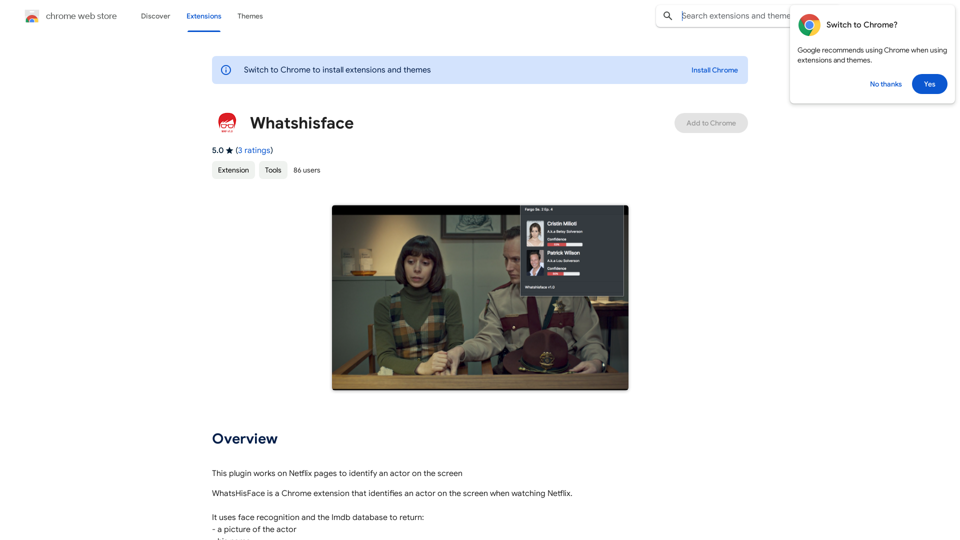
This plugin works on Netflix pages to identify an actor on the screen.
Visit Website
What's his face
Visit Website

Introduction

WhatsHisFace is a Chrome extension designed to enhance the Netflix viewing experience. It utilizes face recognition technology and the IMDb database to identify actors on screen in real-time. The extension provides users with the actor's picture, name, and character name, offering a seamless way to access information about the cast while watching movies or TV shows on Netflix.

Feature

Face Recognition Technology

WhatsHisFace employs advanced face recognition algorithms to accurately identify actors on screen during Netflix playback. This feature ensures precise and reliable actor identification.

IMDb Database Integration

The extension leverages the extensive IMDb database to provide comprehensive information about identified actors. Users can access details such as the actor's name and their character's name in the current production.

User-Friendly Interface

WhatsHisFace boasts a simple and intuitive interface, making it easy for users to access actor information without disrupting their viewing experience. The extension seamlessly integrates with the Netflix platform.

Automatic Actor Identification

Once installed, WhatsHisFace works automatically in the background. Users can simply watch their favorite Netflix content, and the extension will identify actors on screen without any manual input required.

Free to Use

WhatsHisFace is available as a free Chrome extension, allowing users to enjoy its features without any subscription or payment requirements.

FAQ

Is WhatsHisFace compatible with other browsers or streaming platforms?

WhatsHisFace is currently only available as a Chrome extension and is specifically designed for use with Netflix. It is not compatible with other browsers or streaming platforms at this time.

How can I optimize my experience with WhatsHisFace?

To get the most out of WhatsHisFace:

  • Ensure your Netflix browser is updated to the latest version
  • Restart your browser or check for extension updates if you encounter any issues
  • Note that WhatsHisFace can also identify actors in movies and TV shows outside of Netflix

Does WhatsHisFace collect or store user data?

No, WhatsHisFace does not collect or store any user data, ensuring user privacy and data security.

Latest Traffic Insights

  • Monthly Visits

    193.90 M

  • Bounce Rate

    56.27%

  • Pages Per Visit

    2.71

  • Time on Site(s)

    115.91

  • Global Rank

    -

  • Country Rank

    -

Recent Visits

Traffic Sources

  • Social Media:
    0.48%
  • Paid Referrals:
    0.55%
  • Email:
    0.15%
  • Referrals:
    12.81%
  • Search Engines:
    16.21%
  • Direct:
    69.81%
More Data

Related Websites

BlockP: AI Website, App & Porn Blocker
View Detail

BlockP: AI Website, App & Porn Blocker

BlockP: AI Website, App & Porn Blocker

Free AI-Based Chrome Productivity & Porn Blocker Protects Against Websites, Keywords, and Adult Content.

193.90 M
Bing ChatGPT

Bing ChatGPT is a conversational AI powered by Microsoft Bing and OpenAI's ChatGPT technology. It's a chatbot that allows users to have natural conversations, ask questions, and get accurate answers.
View Detail

Bing ChatGPT Bing ChatGPT is a conversational AI powered by Microsoft Bing and OpenAI's ChatGPT technology. It's a chatbot that allows users to have natural conversations, ask questions, and get accurate answers.

Bing ChatGPT Bing ChatGPT is a conversational AI powered by Microsoft Bing and OpenAI's ChatGPT technology. It's a chatbot that allows users to have natural conversations, ask questions, and get accurate answers.

Bing ChatGPT is a free AI app. Use Bing with an AI chatbot simultaneously on your browser's new tab page.

193.90 M
Shinkai Visor: Supercharged AI for Tasks
View Detail

Shinkai Visor: Supercharged AI for Tasks

Shinkai Visor: Supercharged AI for Tasks

Shinkai enhances AI capabilities to better manage your daily tasks and keeps the AI current with worldwide information.

193.90 M
Chat-GPT PDF

What is Chat-GPT PDF?

Chat-GPT PDF is a tool that allows users to generate PDF files from Chat-GPT conversations. This innovative tool enables users to save and share their conversations in a more organized and visually appealing format.

How does Chat-GPT PDF work?

The process is simple and straightforward. Here's a step-by-step guide:

1. Copy the conversation: Copy the entire conversation from the Chat-GPT platform.
2. Paste the conversation: Paste the copied conversation into the Chat-GPT PDF tool.
3. Customize the layout: Customize the layout, font, and design of the PDF file according to your preferences.
4. Generate the PDF: Click the "Generate PDF" button to create a downloadable PDF file.

Features of Chat-GPT PDF

Chat-GPT PDF offers several features that make it an essential tool for users:

* Customizable layout: Customize the layout, font, and design of the PDF file to suit your needs.
* Easy sharing: Share the PDF file with others via email, social media, or messaging apps.
* Offline access: Access your conversations offline, even without an internet connection.
* Organization: Organize your conversations in a neat and tidy format, making it easier to review and reference.

Benefits of Chat-GPT PDF

The benefits of using Chat-GPT PDF are numerous:

* Improved productivity: Save time and increase productivity by having all your conversations in one place.
* Enhanced collaboration: Collaborate with others more effectively by sharing conversations in a clear and concise format.
* Better organization: Keep your conversations organized, making it easier to review and reference them later.

Conclusion

Chat-GPT PDF is a game-changer for anyone who uses Chat-GPT regularly. With its ease of use, customization options, and benefits, it's an essential tool for anyone looking to get the most out of their conversations.
View Detail

Chat-GPT PDF What is Chat-GPT PDF? Chat-GPT PDF is a tool that allows users to generate PDF files from Chat-GPT conversations. This innovative tool enables users to save and share their conversations in a more organized and visually appealing format. How does Chat-GPT PDF work? The process is simple and straightforward. Here's a step-by-step guide: 1. Copy the conversation: Copy the entire conversation from the Chat-GPT platform. 2. Paste the conversation: Paste the copied conversation into the Chat-GPT PDF tool. 3. Customize the layout: Customize the layout, font, and design of the PDF file according to your preferences. 4. Generate the PDF: Click the "Generate PDF" button to create a downloadable PDF file. Features of Chat-GPT PDF Chat-GPT PDF offers several features that make it an essential tool for users: * Customizable layout: Customize the layout, font, and design of the PDF file to suit your needs. * Easy sharing: Share the PDF file with others via email, social media, or messaging apps. * Offline access: Access your conversations offline, even without an internet connection. * Organization: Organize your conversations in a neat and tidy format, making it easier to review and reference. Benefits of Chat-GPT PDF The benefits of using Chat-GPT PDF are numerous: * Improved productivity: Save time and increase productivity by having all your conversations in one place. * Enhanced collaboration: Collaborate with others more effectively by sharing conversations in a clear and concise format. * Better organization: Keep your conversations organized, making it easier to review and reference them later. Conclusion Chat-GPT PDF is a game-changer for anyone who uses Chat-GPT regularly. With its ease of use, customization options, and benefits, it's an essential tool for anyone looking to get the most out of their conversations.

Chat-GPT PDF What is Chat-GPT PDF? Chat-GPT PDF is a tool that allows users to generate PDF files from Chat-GPT conversations. This innovative tool enables users to save and share their conversations in a more organized and visually appealing format. How does Chat-GPT PDF work? The process is simple and straightforward. Here's a step-by-step guide: 1. Copy the conversation: Copy the entire conversation from the Chat-GPT platform. 2. Paste the conversation: Paste the copied conversation into the Chat-GPT PDF tool. 3. Customize the layout: Customize the layout, font, and design of the PDF file according to your preferences. 4. Generate the PDF: Click the "Generate PDF" button to create a downloadable PDF file. Features of Chat-GPT PDF Chat-GPT PDF offers several features that make it an essential tool for users: * Customizable layout: Customize the layout, font, and design of the PDF file to suit your needs. * Easy sharing: Share the PDF file with others via email, social media, or messaging apps. * Offline access: Access your conversations offline, even without an internet connection. * Organization: Organize your conversations in a neat and tidy format, making it easier to review and reference. Benefits of Chat-GPT PDF The benefits of using Chat-GPT PDF are numerous: * Improved productivity: Save time and increase productivity by having all your conversations in one place. * Enhanced collaboration: Collaborate with others more effectively by sharing conversations in a clear and concise format. * Better organization: Keep your conversations organized, making it easier to review and reference them later. Conclusion Chat-GPT PDF is a game-changer for anyone who uses Chat-GPT regularly. With its ease of use, customization options, and benefits, it's an essential tool for anyone looking to get the most out of their conversations.

Exporting Chat History to PDF You can export your chat history with Chat-GPT to a PDF file using the following methods: #Method 1: Browser Print Function 1. Open your chat conversation with Chat-GPT in a web browser. 2. Press `Ctrl + P` (Windows) or `Cmd + P` (Mac) to open the print dialog box. 3. Select "Save as PDF" as the printer destination. 4. Choose a location to save the PDF file and set the file name. 5. Click "Save" to export the chat history to a PDF file. #Method 2: Online PDF Conversion Tools 1. Copy the entire chat conversation by pressing `Ctrl + A` (Windows) or `Cmd + A` (Mac) and then `Ctrl + C` (Windows) or `Cmd + C` (Mac). 2. Go to an online PDF conversion tool, such as SmallPDF or Convertio. 3. Paste the chat conversation into the conversion tool's text box. 4. Select the PDF format and click "Convert" to generate the PDF file. 5. Download the PDF file to your computer. #Method 3: Browser Extensions 1. Install a browser extension, such as Print Friendly & PDF or FireShot, that allows you to save web pages as PDF files. 2. Open your chat conversation with Chat-GPT in a web browser. 3. Click the browser extension's icon in the toolbar. 4. Select the "Save as PDF" option and choose a location to save the file. 5. Click "Save" to export the chat history to a PDF file. By following these methods, you can easily export your chat history with Chat-GPT to a PDF file for future reference or sharing.

193.90 M
Adinspiration | Discover your Competitors' Winning Ads from Facebook Ad Library
View Detail

Adinspiration | Discover your Competitors' Winning Ads from Facebook Ad Library

Adinspiration | Discover your Competitors' Winning Ads from Facebook Ad Library

Boost your Return on Ad Spend (ROAS) with proven Ad Inspiration and winning Facebook & Instagram ad creatives from top brands and your Competitors. Meta Ad library with superpowers

0
TellMe | The Simple AI
View Detail

TellMe | The Simple AI

TellMe | The Simple AI

TellMe is the simplest AI assistant for Vision Pro. Unleash the power of AI with TellMe, the most intuitive and versatile assistant for your digital life.

2.48 K
Job Tracker
View Detail

Job Tracker

Job Tracker

Save, track, and manage all your job applications in one place. Build your professional network and get hired.

193.90 M
Rolemantic - NSFW Character AI Chat - NSFW Character AI Chat
View Detail

Rolemantic - NSFW Character AI Chat - NSFW Character AI Chat

Rolemantic - NSFW Character AI Chat - NSFW Character AI Chat

Explore the fantasy realm of Rolemantic. Our unrestricted adult AI chatbot enables you to experience AI-powered flirtatious messaging, explicit conversations, and imaginative roleplaying at no cost.

1.03 K