Open-source RightAI Tools Directory
  • Discover AI
  • Submit
  • Startup
  • Blog
Open-source RightAI Tools Directory
Discover the best AI tools of 2025 with the RightAI Tools Directory!

Friend Links

AI Anime GeneratorToolsApp AI

Support

Tap4
Privacy policyTerms & ConditionsContact Us
Loading...
loading...

Audiotext AI

Transform Your Ideas into Actionable Notes
Visit Website
Audiotext AI
Visit Website

Introduction

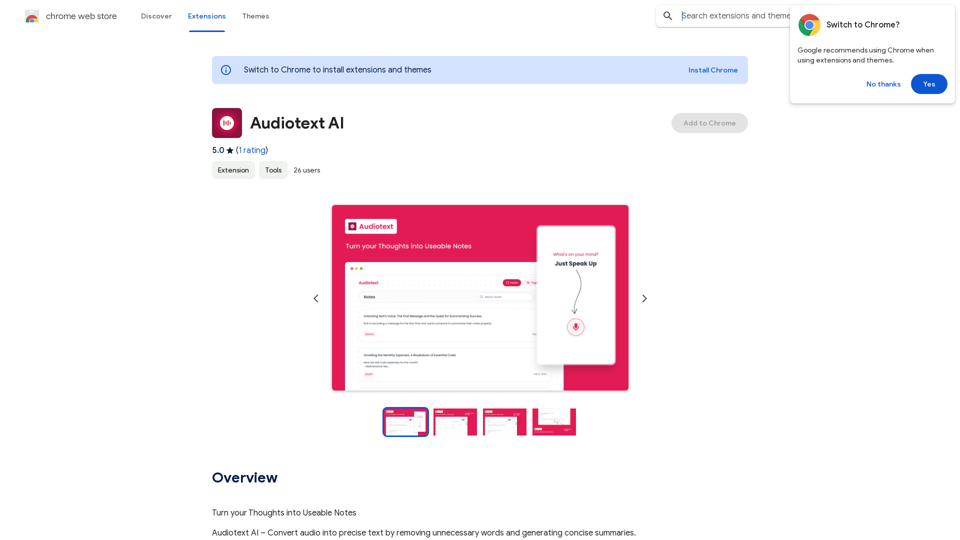
Audiotext AI is an innovative tool that transforms spoken words into concise, well-structured text. It removes unnecessary filler words and generates summaries in various styles. Users can speak naturally and select their preferred transcription style, making it an efficient solution for converting thoughts into usable notes.

Feature

Voice-to-Text Conversion

Audiotext AI accurately converts spoken words into text, including natural speech patterns and filler words. Users can speak normally, and the AI will process and refine the content.

Customizable Transcription Styles

Users can choose from various transcription styles, including short summaries, long summaries, bullet points, passive voice, and active voice. This flexibility allows for tailored output based on specific needs.

AI-Powered Rewriting

With a single click, Audiotext AI can intelligently rewrite notes according to the chosen style, enhancing clarity and coherence.

Easy Sharing

Users can quickly share their notes by toggling a switch, generating a unique link for web and social media sharing.

Multiple Use Cases

Audiotext AI supports various applications, including:

  • Note-taking
  • Content creation
  • Student lecture recording
  • Personal journaling
  • Interview transcription
  • Meeting minutes extraction

Privacy Protection

User privacy is prioritized, with no data used for training purposes. Users can delete their accounts at any time, removing all associated data.

Free Daily Usage

Users can access daily free uses of GPT-4o document reading and Dalle's image generation, providing a range of AI-powered tools for various tasks.

FAQ

How do I use Audiotext AI?

  1. Speak naturally, including filler words and pauses.
  2. Select your desired transcription style (e.g., short summary, bullet points, active voice).
  3. Click "Transcribe" to generate your text.

What are the benefits of using Audiotext AI for content creation?

Audiotext AI streamlines the content creation process by allowing bloggers, writers, and YouTubers to dictate their ideas, stories, or scripts and have them transcribed efficiently.

How can students benefit from Audiotext AI?

Students can record lectures, convert them to text, review at their own pace, highlight important points, and create comprehensive study guides.

Is there a subscription option for Audiotext AI?

Yes, if the 20 free GPT-4o conversations per day are insufficient, users can subscribe to affordable products for increased usage.

How does Audiotext AI handle user privacy?

Audiotext AI prioritizes user privacy. Your data is not used for training purposes, and you can delete your account at any time, removing all associated data.

Latest Traffic Insights

  • Monthly Visits

    193.90 M

  • Bounce Rate

    56.27%

  • Pages Per Visit

    2.71

  • Time on Site(s)

    115.91

  • Global Rank

    -

  • Country Rank

    -

Recent Visits

Traffic Sources

  • Social Media:
    0.48%
  • Paid Referrals:
    0.55%
  • Email:
    0.15%
  • Referrals:
    12.81%
  • Search Engines:
    16.21%
  • Direct:
    69.81%
More Data

Related Websites

CleanerPro - The Best Image Editor for Shopify
View Detail

CleanerPro - The Best Image Editor for Shopify

CleanerPro - The Best Image Editor for Shopify

CleanerPro, our AI-powered image editor, transforms e-commerce visuals by enabling effortless removal of logos, text, and unwanted elements with just one click.

0
SOAI Extensions
View Detail

SOAI Extensions

SOAI Extensions

soai Extension

193.90 M
ReText
View Detail

ReText

ReText

An AI-powered text processing tool to fix and simplify your text, making your texting experience as easy as possible.

193.90 M
Ask AI Browser
View Detail

Ask AI Browser

Ask AI Browser

Ask AI Browser Extension ========================== Description The Ask AI browser extension is a cutting-edge tool that revolutionizes the way you interact with the internet. This innovative extension harnesses the power of artificial intelligence to provide you with instant answers, suggestions, and insights as you browse the web. Features * Instant Answers: Get quick answers to your questions without leaving the current webpage. * Smart Suggestions: Receive relevant suggestions based on your browsing history and preferences. * AI-driven Insights: Uncover hidden gems and interesting facts about the topics you're interested in. * Personalized Experience: Enjoy a tailored browsing experience that adapts to your needs and preferences. How it Works 1. Install the Extension: Add the Ask AI browser extension to your favorite browser. 2. Ask Your Question: Type your question in the search bar or highlight a phrase on a webpage. 3. Get Instant Answers: Receive accurate and relevant answers, suggestions, and insights in real-time. Benefits * Save Time: Get instant answers and reduce your search time. * Enhance Productivity: Stay focused on your tasks with relevant suggestions and insights. * Improve Knowledge: Expand your knowledge with interesting facts and hidden gems. Get Started Download the Ask AI browser extension today and experience the future of browsing!

193.90 M
AI Sheets Assistant - For Excel & Sheets
View Detail

AI Sheets Assistant - For Excel & Sheets

AI Sheets Assistant - For Excel & Sheets

Generate Formulas and Receive Explanations with AI for Excel and Google Sheets This is a powerful tool that can help you with your spreadsheet work! Here's how it works: 1. You describe what you want to achieve. Be as specific as possible. For example, instead of saying "I need a formula to calculate the total," say "I need a formula to calculate the total of sales in column B." 2. The AI will generate a formula for you. It will also provide an explanation of how the formula works. 3. You can copy and paste the formula into your spreadsheet. Here are some examples: * "I need a formula to find the average of the numbers in cells A1 to A10." * Formula: `=AVERAGE(A1:A10)` * Explanation: The `AVERAGE` function calculates the average of a range of cells. In this case, it will calculate the average of the numbers in cells A1 through A10. * "I need a formula to count the number of cells that contain the word 'apple' in column C." * Formula: `=COUNTIF(C:C,"apple")` * Explanation: The `COUNTIF` function counts the number of cells in a range that meet a certain criteria. In this case, it will count the number of cells in column C that contain the word "apple". * "I need a formula to find the largest number in column D." * Formula: `=MAX(D:D)` * Explanation: The `MAX` function returns the largest number in a range of cells. In this case, it will return the largest number in column D. Let me know what you'd like to calculate, and I'll do my best to help!

193.90 M
Hocoos AI Website Builder - Create Your Website in 5 Minutes
View Detail

Hocoos AI Website Builder - Create Your Website in 5 Minutes

Hocoos AI Website Builder - Create Your Website in 5 Minutes

Create professional websites in seconds with Hocoos AI website builder. Get all the sales and marketing tools to start & grow your online business now.

111.35 K
PicTranslate - Translate Any Image Text
View Detail

PicTranslate - Translate Any Image Text

PicTranslate - Translate Any Image Text

PicTranslate is a powerful tool that empowers users to easily translate texts present in images directly on their device's screen,…

193.90 M
Rent GPUs | Vast.ai
View Detail

Rent GPUs | Vast.ai

Rent GPUs | Vast.ai

Reduce your cloud compute costs by 3-5 times with the best cloud GPU rentals. Vast.ai's simple search interface allows for fair comparison of GPU rentals from all providers.

869.48 K