Open-source RightAI Tools Directory
  • Discover AI
  • Submit
  • Startup
  • Blog
Open-source RightAI Tools Directory
Discover the best AI tools of 2025 with the RightAI Tools Directory!

Friend Links

AI Anime GeneratorToolsApp AI

Support

Tap4
Privacy policyTerms & ConditionsContact Us
Loading...
loading...

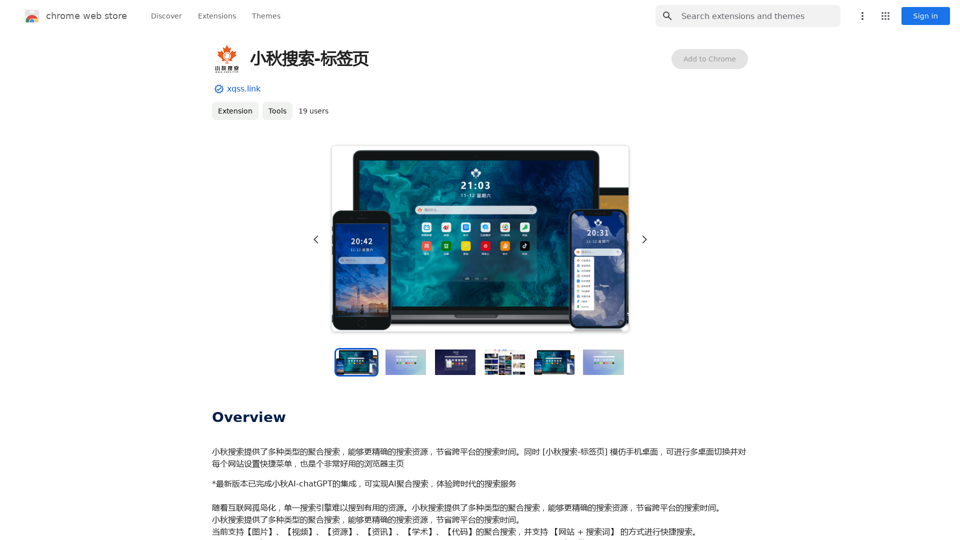
Xiaoqiu Search - Tab Page

Xiaoqiu Search provides multiple types of aggregated searches, enabling more precise resource searching and saving cross-platform search time. Simultaneously, the [Xiaoqiu Search - Tab Page] mimics a mobile desktop, allowing for multi-desktop switching and setting quick menus for each website, making it a very useful browser homepage as well.
Visit Website
Xiaoqiu Search - Tab Page
Visit Website

Introduction

Xiaoqiu Search is a versatile search engine offering aggregated searches across various content types. It combines traditional search capabilities with AI-powered features, providing users with an efficient and comprehensive search experience. The platform is designed to help users find resources more accurately and save time by integrating multiple search types and advanced functionalities.

Feature

Aggregated Search Capabilities

Xiaoqiu Search offers a wide range of aggregated searches, including:

  • Images
  • Videos
  • Resources
  • News
  • Academic papers
  • Code

This feature allows users to access diverse content types from a single search interface.

Advanced Search Options

The search engine supports:

  • Keyword searches
  • Operator-based searches Enabling users to refine their queries for more precise results.

Customizable Shortcuts

Users can set shortcuts for their favorite websites, enhancing navigation efficiency and personalizing their search experience.

AI-powered Search

Integration with AI-chatGPT provides:

  • Advanced search capabilities
  • Intelligent result interpretation
  • Enhanced user assistance

User-Friendly Interface

The platform features an intuitive search bar for easy access to its powerful search capabilities.

Free Access

Xiaoqiu Search is available to users at no cost, providing unrestricted access to its features and functionalities.

FAQ

What types of content can I search for using Xiaoqiu Search?

Xiaoqiu Search allows you to search for various content types, including images, videos, resources, news, academic papers, and code through its aggregated search feature.

How does the AI integration enhance the search experience?

The integration with AI-chatGPT provides advanced search capabilities, offering more intelligent and context-aware results. It can help interpret complex queries and provide more relevant search outcomes.

Are there any tips for using Xiaoqiu Search effectively?

Here are some helpful tips:

  • Utilize the search bar for quick queries
  • Take advantage of the aggregated search for multi-resource results
  • Leverage the AI-chatGPT integration for advanced searches
  • Set up shortcuts to quickly access your frequently visited websites

Is there a cost associated with using Xiaoqiu Search?

No, Xiaoqiu Search is a completely free search engine. Users can access all its features and functionalities without any fees or charges.

Related Websites

SummaryAI 

This is a large language model, trained by Google DeepMind, designed to generate concise and informative summaries of text.
View Detail

SummaryAI This is a large language model, trained by Google DeepMind, designed to generate concise and informative summaries of text.

SummaryAI This is a large language model, trained by Google DeepMind, designed to generate concise and informative summaries of text.

A browser extension that summarizes, explains, and lets you do anything you want with selected text using artificial intelligence.

193.90 M
Luna - Your AI Assistant in Chrome
View Detail

Luna - Your AI Assistant in Chrome

Luna - Your AI Assistant in Chrome

ChatGPT for Chrome

193.90 M
QuickReadAI
View Detail

QuickReadAI

QuickReadAI

Please provide me with the text you'd like me to summarize. ๐Ÿ˜Š

193.90 M
AI Voice Over for YouTube 

This is a guide to using AI voice over for your YouTube videos. 

Why Use AI Voice Over?

* Cost-Effective: AI voice over is much cheaper than hiring a professional voice actor.
* Time-Saving: You can generate voice over quickly and easily, without needing to schedule recording sessions.
* Variety of Voices: Choose from a wide range of AI voices, including male, female, and even robotic voices.
* Accessibility: Make your videos accessible to viewers who are deaf or hard of hearing by adding captions generated by AI.

How to Use AI Voice Over

1. Choose a Platform: There are many different platforms that offer AI voice over services, such as:
    * Google Cloud Text-to-Speech
    * Amazon Polly
    * Microsoft Azure Text to Speech
    * Murf.ai
    * NaturalReader
2. Write Your Script:  Write a clear and concise script for your video.
3. Upload Your Script:  Upload your script to the chosen platform.
4. Select a Voice: Choose the voice that best suits your video.
5. Adjust Settings:  Adjust settings such as speed, pitch, and volume.
6. Generate Voice Over:  Click the "Generate" button to create your voice over.
7. Download and Edit: Download the generated voice over file and edit it as needed.
8. Add to Your Video:  Add the voice over to your YouTube video.

Tips for Using AI Voice Over

* Use Natural Language:  Write your script as if you were speaking naturally.
* Vary Your Tone:  Use different tones of voice to keep your viewers engaged.
* Add Pauses:  Include pauses in your script to allow viewers to process information.
* Proofread Carefully:  Always proofread your script before generating the voice over.
* Experiment:  Try different voices, settings, and styles to find what works best for you.
View Detail

AI Voice Over for YouTube This is a guide to using AI voice over for your YouTube videos. Why Use AI Voice Over? * Cost-Effective: AI voice over is much cheaper than hiring a professional voice actor. * Time-Saving: You can generate voice over quickly and easily, without needing to schedule recording sessions. * Variety of Voices: Choose from a wide range of AI voices, including male, female, and even robotic voices. * Accessibility: Make your videos accessible to viewers who are deaf or hard of hearing by adding captions generated by AI. How to Use AI Voice Over 1. Choose a Platform: There are many different platforms that offer AI voice over services, such as: * Google Cloud Text-to-Speech * Amazon Polly * Microsoft Azure Text to Speech * Murf.ai * NaturalReader 2. Write Your Script: Write a clear and concise script for your video. 3. Upload Your Script: Upload your script to the chosen platform. 4. Select a Voice: Choose the voice that best suits your video. 5. Adjust Settings: Adjust settings such as speed, pitch, and volume. 6. Generate Voice Over: Click the "Generate" button to create your voice over. 7. Download and Edit: Download the generated voice over file and edit it as needed. 8. Add to Your Video: Add the voice over to your YouTube video. Tips for Using AI Voice Over * Use Natural Language: Write your script as if you were speaking naturally. * Vary Your Tone: Use different tones of voice to keep your viewers engaged. * Add Pauses: Include pauses in your script to allow viewers to process information. * Proofread Carefully: Always proofread your script before generating the voice over. * Experiment: Try different voices, settings, and styles to find what works best for you.

AI Voice Over for YouTube This is a guide to using AI voice over for your YouTube videos. Why Use AI Voice Over? * Cost-Effective: AI voice over is much cheaper than hiring a professional voice actor. * Time-Saving: You can generate voice over quickly and easily, without needing to schedule recording sessions. * Variety of Voices: Choose from a wide range of AI voices, including male, female, and even robotic voices. * Accessibility: Make your videos accessible to viewers who are deaf or hard of hearing by adding captions generated by AI. How to Use AI Voice Over 1. Choose a Platform: There are many different platforms that offer AI voice over services, such as: * Google Cloud Text-to-Speech * Amazon Polly * Microsoft Azure Text to Speech * Murf.ai * NaturalReader 2. Write Your Script: Write a clear and concise script for your video. 3. Upload Your Script: Upload your script to the chosen platform. 4. Select a Voice: Choose the voice that best suits your video. 5. Adjust Settings: Adjust settings such as speed, pitch, and volume. 6. Generate Voice Over: Click the "Generate" button to create your voice over. 7. Download and Edit: Download the generated voice over file and edit it as needed. 8. Add to Your Video: Add the voice over to your YouTube video. Tips for Using AI Voice Over * Use Natural Language: Write your script as if you were speaking naturally. * Vary Your Tone: Use different tones of voice to keep your viewers engaged. * Add Pauses: Include pauses in your script to allow viewers to process information. * Proofread Carefully: Always proofread your script before generating the voice over. * Experiment: Try different voices, settings, and styles to find what works best for you.

Watch foreign language YouTube videos in your own language.

193.90 M
Free Transcription Tool | Deepgram
View Detail

Free Transcription Tool | Deepgram

Free Transcription Tool | Deepgram

Easily convert your conversations, audio files, or YouTube videos into text for free with our advanced transcription tool.

835.16 K
AIDU
View Detail

AIDU

AIDU

This application helps users find and implement ideas based on advanced AI platforms with daily updated information...

193.90 M
popup
View Detail

popup

popup

An assistant powered by ChatGPT

193.90 M
PLIPER - Your AI Partner
View Detail

PLIPER - Your AI Partner

PLIPER - Your AI Partner

Here are some commonly used prompts that you can use directly in ChatGPT and LLaMA to boost your productivity today. Let's make today productive!

193.90 M