Open-source RightAI Tools Directory
  • Discover AI
  • Submit
  • Startup
  • Blog
Open-source RightAI Tools Directory
Discover the best AI tools of 2025 with the RightAI Tools Directory!

Friend Links

AI Anime GeneratorToolsApp AI

Support

Tap4
Privacy policyTerms & ConditionsContact Us
Loading...
loading...

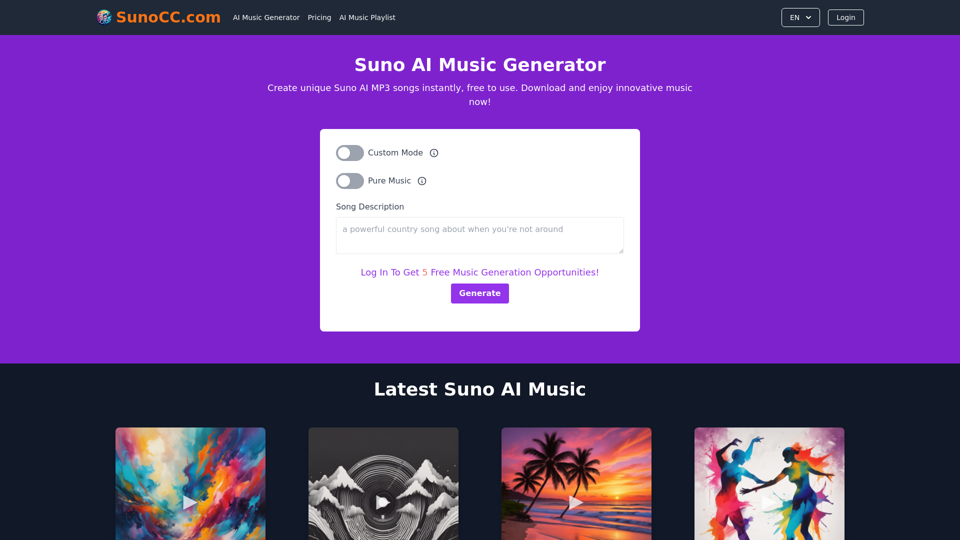
Free Suno AI Music Generator by SunoCC.com

Create music with Suno AI for free. Download and enjoy new music today! Discover SunoCC.com and the innovative Suno AI Music Generator V3.
Visit Website
Free Suno AI Music Generator by SunoCC.com
Visit Website

Introduction

Suno AI is an innovative artificial intelligence tool designed for music creation. It functions as a virtual music producer, allowing users to generate unique songs across various genres. The platform offers both free and paid plans, catering to different user needs and preferences.

Feature

AI-Powered Music Generation

Suno AI utilizes advanced artificial intelligence to create unique music tracks based on text descriptions. Users can generate professional-level songs in various styles, including pop, classical, electronic, and jazz.

Customization Options

Song Parameters

  • Title customization
  • Lyrics input
  • Style selection

Quick Generation Process

Suno AI typically produces music tracks within minutes, ensuring a swift creative process for users.

Multiple Plan Options

Plan TypeFeatures
FreeLimited song creations
PaidMore features, Unlimited creations, Download option

User-Friendly Interface

Custom Mode

Allows users to tailor their music creation experience by customizing song title, lyrics, and style.

High-Quality Output

Suno AI employs sophisticated AI technology to produce professional-grade music tracks, ensuring top-notch quality for users.

FAQ

How do I use Suno AI?

To use Suno AI, simply provide a description of the type of music you want or give a brief song description. The AI will then process this information and create an AI-generated song based on your input.

Can I download the songs I create?

Yes, users with a paid plan can download the songs they create with Suno AI for personal use. Once your music is generated, you can download it directly from the Suno AI website.

What are some helpful tips for using Suno AI?

Tips for Optimal Use

  • Utilize Custom Mode to personalize your song's title, lyrics, and style
  • Experiment with different musical styles to find your preferred sound
  • Be open to exploration and trying new possibilities within the Suno AI platform

Related Websites
What are we eating today?
View Detail

What are we eating today?

What are we eating today?

An extension that suggests recipes using the ingredients you have in your pantry.

193.90 M
Get ChatGPT for Free with Google

You can now access ChatGPT, a powerful language model, for free with Google. Here's how:

Method 1: Google Colab

* Open Google Colab ([colab.research.google.com](http://colab.research.google.com))
* Create a new notebook
* Install the `transformers` library by running `!pip install transformers`
* Import the `transformers` library and load the ChatGPT model using `from transformers import AutoModelForCausalLM, AutoTokenizer; model = AutoModelForCausalLM.from_pretrained('chatgpt'); tokenizer = AutoTokenizer.from_pretrained('chatgpt')`
* Use the model to generate text using `input_text = "Your input here"; inputs = tokenizer.encode_plus(input_text, return_tensors='pt', max_length=1024, padding='max_length', truncation=True); output = model(inputs['input_ids'], attention_mask=inputs['attention_mask']); print(tokenizer.decode(output.logits[0], skip_special_tokens=True))`

Method 2: Google Apps Script

* Open Google Apps Script ([script.google.com](http://script.google.com))
* Create a new project
* Install the `transformers` library by running `npm install transformers`
* Import the `transformers` library and load the ChatGPT model using `const { AutoModelForCausalLM, AutoTokenizer } = require('transformers'); const model = new AutoModelForCausalLM('chatgpt'); const tokenizer = new AutoTokenizer('chatgpt');`
* Use the model to generate text using `const inputText = "Your input here"; const inputs = tokenizer.encodePlus(inputText, { return_tensors: 'pt', max_length: 1024, padding: 'max_length', truncation: true }); const output = model(inputs.inputIds, inputs.attentionMask); console.log(tokenizer.decode(output.logits[0], { skipSpecialTokens: true }));`

Note: These methods require some technical knowledge and may have limitations compared to the original ChatGPT model.
View Detail

Get ChatGPT for Free with Google You can now access ChatGPT, a powerful language model, for free with Google. Here's how: Method 1: Google Colab * Open Google Colab ([colab.research.google.com](http://colab.research.google.com)) * Create a new notebook * Install the `transformers` library by running `!pip install transformers` * Import the `transformers` library and load the ChatGPT model using `from transformers import AutoModelForCausalLM, AutoTokenizer; model = AutoModelForCausalLM.from_pretrained('chatgpt'); tokenizer = AutoTokenizer.from_pretrained('chatgpt')` * Use the model to generate text using `input_text = "Your input here"; inputs = tokenizer.encode_plus(input_text, return_tensors='pt', max_length=1024, padding='max_length', truncation=True); output = model(inputs['input_ids'], attention_mask=inputs['attention_mask']); print(tokenizer.decode(output.logits[0], skip_special_tokens=True))` Method 2: Google Apps Script * Open Google Apps Script ([script.google.com](http://script.google.com)) * Create a new project * Install the `transformers` library by running `npm install transformers` * Import the `transformers` library and load the ChatGPT model using `const { AutoModelForCausalLM, AutoTokenizer } = require('transformers'); const model = new AutoModelForCausalLM('chatgpt'); const tokenizer = new AutoTokenizer('chatgpt');` * Use the model to generate text using `const inputText = "Your input here"; const inputs = tokenizer.encodePlus(inputText, { return_tensors: 'pt', max_length: 1024, padding: 'max_length', truncation: true }); const output = model(inputs.inputIds, inputs.attentionMask); console.log(tokenizer.decode(output.logits[0], { skipSpecialTokens: true }));` Note: These methods require some technical knowledge and may have limitations compared to the original ChatGPT model.

Get ChatGPT for Free with Google You can now access ChatGPT, a powerful language model, for free with Google. Here's how: Method 1: Google Colab * Open Google Colab ([colab.research.google.com](http://colab.research.google.com)) * Create a new notebook * Install the `transformers` library by running `!pip install transformers` * Import the `transformers` library and load the ChatGPT model using `from transformers import AutoModelForCausalLM, AutoTokenizer; model = AutoModelForCausalLM.from_pretrained('chatgpt'); tokenizer = AutoTokenizer.from_pretrained('chatgpt')` * Use the model to generate text using `input_text = "Your input here"; inputs = tokenizer.encode_plus(input_text, return_tensors='pt', max_length=1024, padding='max_length', truncation=True); output = model(inputs['input_ids'], attention_mask=inputs['attention_mask']); print(tokenizer.decode(output.logits[0], skip_special_tokens=True))` Method 2: Google Apps Script * Open Google Apps Script ([script.google.com](http://script.google.com)) * Create a new project * Install the `transformers` library by running `npm install transformers` * Import the `transformers` library and load the ChatGPT model using `const { AutoModelForCausalLM, AutoTokenizer } = require('transformers'); const model = new AutoModelForCausalLM('chatgpt'); const tokenizer = new AutoTokenizer('chatgpt');` * Use the model to generate text using `const inputText = "Your input here"; const inputs = tokenizer.encodePlus(inputText, { return_tensors: 'pt', max_length: 1024, padding: 'max_length', truncation: true }); const output = model(inputs.inputIds, inputs.attentionMask); console.log(tokenizer.decode(output.logits[0], { skipSpecialTokens: true }));` Note: These methods require some technical knowledge and may have limitations compared to the original ChatGPT model.

How to Add ChatGPT to All Google Searches ===================================================== Step 1: Create a Custom Search Engine -------------------------------------- * Go to the [Google Custom Search Engine](https://cse.google.com/) website and sign in with your Google account. * Click on the "New Search Engine" button. * Fill in the required information, such as the name and description of your search engine. * Click on the "Create" button. Step 2: Add ChatGPT to the Search Engine ----------------------------------------- * In the "Setup" tab, click on the "Add" button next to "Sites to search". * Enter the following URL: `https://chat.openai.com/` * Click on the "Add" button. Step 3: Configure the Search Engine -------------------------------------- * In the "Setup" tab, click on the "Edit" button next to "Search engine keywords". * Add the following keywords: `ChatGPT` * Click on the "Save" button. Step 4: Get the Search Engine Code ------------------------------------- * In the "Setup" tab, click on the "Get code" button. * Copy the HTML code provided. Step 5: Add the Search Engine to Your Browser ------------------------------------------------ * Open your browser and go to the "Settings" or "Options" page. * Look for the "Search engine" or "Default search engine" option. * Click on the "Add" or "Manage search engines" button. * Paste the HTML code you copied earlier. * Click on the "Add" or "Save" button. You're Done! =============== Now, whenever you search on Google, ChatGPT will be included in the search results. You can also use the custom search engine URL provided by Google to search directly.

193.90 M
Octane AI | Intelligent Quizzes That Boost Sales for Shopify Stores
View Detail

Octane AI | Intelligent Quizzes That Boost Sales for Shopify Stores

Octane AI | Intelligent Quizzes That Boost Sales for Shopify Stores

You can't afford to have leaks in your customer journey. Plug the leak with product quizzes that sell like crazy. No coding required (unless you want to!).

136.30 K
Audimee - Unlimited Vocals, Unlimited Creative Freedom
View Detail

Audimee - Unlimited Vocals, Unlimited Creative Freedom

Audimee - Unlimited Vocals, Unlimited Creative Freedom

Convert your vocals with our royalty-free voices, train your own voices, create copyright-free cover vocals, and much more.

489.79 K
PrepBuddy
View Detail

PrepBuddy

PrepBuddy

PrepBuddy offers AI-powered practice for consulting case interviews. Learn with materials from former McKinsey consultants and get instant feedback. Start your free trial today!

2.63 K
Walle - AI Copilot ChatBot for ChatGPT
View Detail

Walle - AI Copilot ChatBot for ChatGPT

Walle - AI Copilot ChatBot for ChatGPT

Walle: Your All-in-One AI Assistant and Browser Extension

193.90 M
Kaspian
View Detail

Kaspian

Kaspian

Kaspian searches through all your apps to help you find exactly what you need and discover things you should know.

193.90 M
Cốc Cốc Search
View Detail

Cốc Cốc Search

Cốc Cốc Search

Install Cốc Cốc Search today and experience the search engine designed for Vietnamese people!

193.90 M