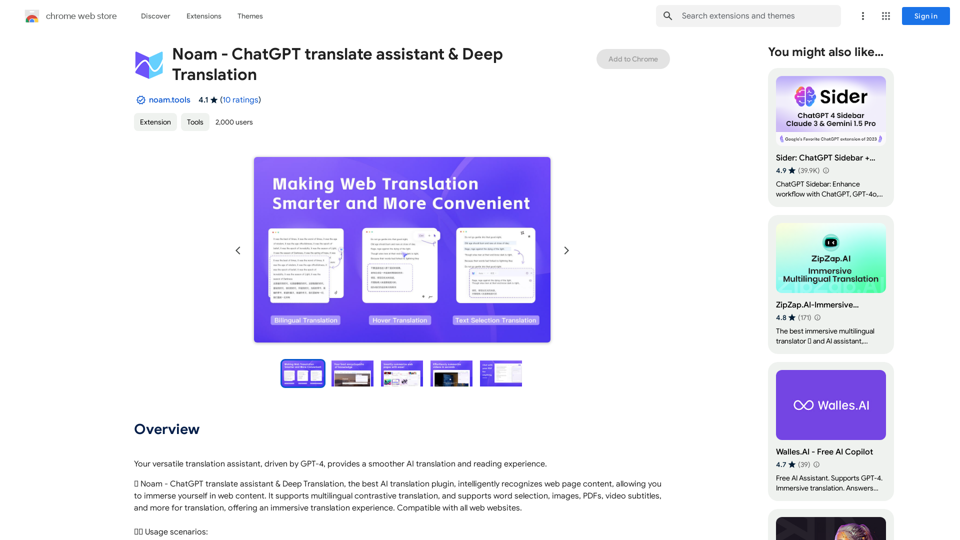
Noam 是一個 ChatGPT 翻譯助手和深度翻譯插件,可增強 AI 翻譯和閱讀體驗。它由 GPT-4 驅動,能智能識別網頁內容,讓用戶沉浸在外語內容中。Noam 提供智能內容區域識別、PDF 文檔翻譯、高效滑鼠懸停互動、圖像內容翻譯和內置 AI 詞典等功能。
諾姆 - ChatGPT 翻譯助手 & 深度翻譯
您的通用翻譯助手,由 GPT-4 驱動,提供更流暢的人工智慧翻譯和閱讀體驗。
介紹
功能
智能內容區域識別
Noam 翻譯網頁時不改變原始格式,保留原語言同時添加翻譯對比。這簡化了閱讀互動並提供沉浸式體驗。
PDF 文檔翻譯
用戶可以上傳 PDF 文檔進行雙語對比翻譯,無需更改文檔內容,實現沉浸式 PDF 閱讀。
高效滑鼠懸停互動
只需將滑鼠懸停在網頁上的任何外語段落上,即可獲得即時雙語對比翻譯。
一鍵圖像內容翻譯
Noam 支持一鍵翻譯圖像內容,使視覺內容更易理解。
內置 AI 詞典
集成的 AI 詞典允許隨時隨地方便查詢單詞。
快速入門指南
- 點擊「翻譯當前網站」進行 AI 驅動的沉浸式翻譯。
- 使用滑鼠懸停或懸停 + 快捷鍵實現沉浸式翻譯效果。
- 自動語言檢測和一鍵翻譯至目標語言。
- 使用內置 AI 詞典快速查詢單詞。
常見問題
如何開啟/關閉翻譯服務?
點擊網頁右側的插件圖標即可切換服務開啟或關閉。
插件的能力基於什麼?
Noam 的能力基於 AI 大型語言模型,與傳統機器翻譯相比,提供更符合上下文的準確翻譯。
權限問題如何?
Noam 需要讀取和更改網站數據的權限以提供翻譯服務。此權限僅用於翻譯目的,不用於任何其他活動。
如何聯繫 Noam 獲得支持或反饋?
您可以發送電子郵件至 [email protected] 或訪問官方網站 https://noam.tools 獲得客戶服務。
相關網站
```markdown ChatGPT Chat History You: Export chat history from ChatGPT website to normal format as Markdown, which can be opened via typora exactly. ChatGPT: ```markdown ChatGPT Chat History You: Export chat history from ChatGPT website to normal format as Markdown, which can be opened via typora exactly. ChatGPT: I can help you with that! Unfortunately, there's no direct way to export your chat history from the ChatGPT website in a format that's perfectly compatible with Typora. The website doesn't offer a dedicated download feature for chat logs. However, you can manually copy and paste your conversation into a Markdown file. Here's how: 1. Go to the ChatGPT website and log in to your account. 2. Navigate to the conversation you want to export. 3. Select all the text in the conversation window. 4. Copy the selected text (Ctrl+C or Cmd+C). 5. Open a new Markdown file in Typora. 6. Paste the copied text into the Typora file (Ctrl+V or Cmd+V). Keep in mind that this method might not preserve all formatting elements perfectly, especially if your conversation includes special characters or code blocks. ```
193.90 M