Open-source RightAI Tools Directory
  • Discover AI
  • Submit
  • Startup
  • Blog
Open-source RightAI Tools Directory
Discover the best AI tools of 2025 with the RightAI Tools Directory!

Friend Links

AI Anime GeneratorToolsApp AI

Support

Tap4
Privacy policyTerms & ConditionsContact Us
Loading...
loading...

BlacktoothAI - All-in-One AI Assistant

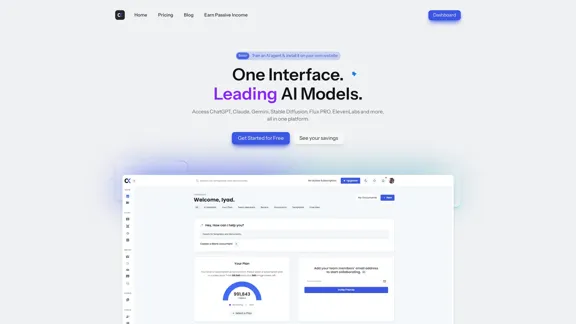
Blacktooth is a powerful AI platform for generating text, images, and more. Access ChatGPT, Claude, Gemini, Stable Diffusion, Flux PRO, ElevenLabs, and more.
Visit Website
BlacktoothAI - All-in-One AI Assistant
Visit Website

Introduction

BlacktoothAI is an all-in-one AI assistant designed to streamline productivity and creativity. It integrates multiple leading AI models, including ChatGPT, Claude, Gemini, and Stable Diffusion, into a single platform. Users can generate various types of content, from text and images to code, all while enjoying significant cost savings compared to using individual services.

Feature

  1. Multiple AI Tools

    Access a variety of AI models in one place, including ChatGPT, Claude, Gemini, and Stable Diffusion, allowing for diverse content generation.

  2. Cost Savings

    Users can save an average of $176+/month by utilizing BlacktoothAI instead of subscribing to multiple individual AI services.

  3. AI Generator

    Generate text, images, code, articles, and more with ease, enhancing productivity and creativity.

  4. Custom Templates

    A large library of templates and trained chatbots is available to help users kickstart their AI journey and save time.

  5. Multi-Lingual Support

    The platform can understand and generate content in various languages, catering to a global audience.

  6. Brand Voice Feature

    Maintain consistent messaging across all content with a customizable brand voice feature.

  7. Priority Support

    Users receive priority support to address any questions or issues promptly.

How to Use?

  1. Sign up for a free trial on the BlacktoothAI website.
  2. Explore the dashboard to familiarize yourself with the available tools.
  3. Utilize the custom templates to save time on content creation.
  4. Experiment with different AI models to find the best fit for your needs.
  5. Take advantage of the multi-lingual capabilities for diverse content generation.
  6. Use the brand voice feature to ensure consistency in messaging across all platforms.

FAQ

What is BlacktoothAI?

BlacktoothAI is an all-in-one AI assistant that integrates multiple leading AI models to help users generate various types of content efficiently.

How does BlacktoothAI save money?

By consolidating multiple AI tools into one platform, users can avoid the costs associated with individual subscriptions, leading to significant savings.

Can I customize the AI-generated content?

Yes, BlacktoothAI offers custom templates and a brand voice feature, allowing users to tailor the generated content to their specific needs.

Is there a free trial available?

Yes, BlacktoothAI provides a free trial with no credit card required, allowing users to explore the platform before committing to a subscription.

What types of content can I generate with BlacktoothAI?

Users can generate text, images, code, articles, and more, making it a versatile tool for various creative and professional needs.

Price

PlanMonthly Cost
Free Plan$0
Basic Plan$9.99
Growth Plan$19.99
Professional Plan$49.99
The price is for reference only, please refer to the latest official data for actual information.

Evaluation

  1. BlacktoothAI effectively consolidates multiple AI tools, making it a convenient option for users looking to streamline their workflow.
  2. The cost savings are significant compared to using individual subscriptions, making it an attractive choice for budget-conscious users.
  3. The platform's user-friendly interface enhances the overall experience, allowing for easy navigation and content generation.
  4. However, the reliance on multiple AI models may lead to inconsistencies in output quality, depending on the specific tool used.
  5. While the brand voice feature is beneficial, it may require additional customization to fully align with a user's unique identity.
  6. Overall, BlacktoothAI is a powerful tool for content creation, but users should be prepared to invest time in learning how to maximize its features effectively.

Latest Traffic Insights

  • Monthly Visits

    191

  • Bounce Rate

    40.15%

  • Pages Per Visit

    1.04

  • Time on Site(s)

    0.00

  • Global Rank

    -

  • Country Rank

    -

Recent Visits

Traffic Sources

  • Social Media:
    9.80%
  • Paid Referrals:
    1.51%
  • Email:
    0.20%
  • Referrals:
    12.75%
  • Search Engines:
    33.18%
  • Direct:
    41.71%
More Data

Related Websites

AiAssistWorks - AI for Google Sheets™ - GPT- Claude - Gemini - Llama, Mistral, OpenRouter, Groq.
View Detail

AiAssistWorks - AI for Google Sheets™ - GPT- Claude - Gemini - Llama, Mistral, OpenRouter, Groq.

AiAssistWorks - AI for Google Sheets™ - GPT- Claude - Gemini - Llama, Mistral, OpenRouter, Groq.

4.99 K
Sprout Social: Social Media Management Solutions
View Detail

Sprout Social: Social Media Management Solutions

Sprout Social: Social Media Management Solutions

Reimagine how social media can boost your business with Sprout Social. Experience our social media management tools firsthand. Begin your free trial today.

1.75 M
Copilot for Microsoft 365 – Microsoft Adoption

Copilot for Microsoft 365 is a powerful AI assistant that helps you work smarter and faster across Microsoft 365 apps and services. It combines the power of large language models (LLMs) with your organization's data in the Microsoft Graph and Microsoft 365 apps to turn your words into the most powerful productivity tool on the planet.

Copilot is designed to help you:

• Unleash creativity
• Unlock productivity
• Uplevel skills

Copilot is built on Microsoft's comprehensive approach to security, compliance, and privacy. Copilot in Microsoft 365 apps and services:

• Does not use your data to train the underlying LLM
• Does not replace human ingenuity and judgment
• Is designed to keep humans in the loop

Copilot is currently available in Word, Excel, PowerPoint, Outlook, Teams, and more.

Getting Started with Copilot

To get started with Copilot, follow these steps:

1. Check availability: Ensure your organization has access to Copilot.
2. Learn the basics: Familiarize yourself with Copilot's capabilities and how to use it effectively.
3. Explore use cases: Discover how Copilot can help you in your specific role and tasks.
4. Practice and refine: Use Copilot regularly and refine your prompts for better results.
5. Share and collaborate: Collaborate with colleagues using Copilot and share best practices.

Best Practices for Using Copilot

1. Be specific in your prompts
2. Provide context for better results
3. Review and edit Copilot's output
4. Use Copilot as a starting point, not a final product
5. Experiment with different approaches
6. Stay informed about new features and updates

Copilot in Different Microsoft 365 Apps

• Word: Draft, edit, summarize, and rewrite content
• Excel: Analyze data, create formulas, and generate insights
• PowerPoint: Create presentations, design slides, and generate content
• Outlook: Compose emails, summarize threads, and manage your inbox
• Teams: Summarize meetings, generate action items, and create meeting notes

Responsible AI and Copilot

Microsoft is committed to developing AI systems responsibly. When using Copilot, keep in mind:

• AI-generated content may contain biases or inaccuracies
• Always review and verify Copilot's output
• Use your judgment and expertise alongside Copilot's suggestions
• Be aware of your organization's policies regarding AI use

Conclusion

Copilot for Microsoft 365 is a powerful tool that can significantly enhance your productivity and creativity. By understanding its capabilities, following best practices, and using it responsibly, you can make the most of this AI assistant in your daily work.
View Detail

Copilot for Microsoft 365 – Microsoft Adoption Copilot for Microsoft 365 is a powerful AI assistant that helps you work smarter and faster across Microsoft 365 apps and services. It combines the power of large language models (LLMs) with your organization's data in the Microsoft Graph and Microsoft 365 apps to turn your words into the most powerful productivity tool on the planet. Copilot is designed to help you: • Unleash creativity • Unlock productivity • Uplevel skills Copilot is built on Microsoft's comprehensive approach to security, compliance, and privacy. Copilot in Microsoft 365 apps and services: • Does not use your data to train the underlying LLM • Does not replace human ingenuity and judgment • Is designed to keep humans in the loop Copilot is currently available in Word, Excel, PowerPoint, Outlook, Teams, and more. Getting Started with Copilot To get started with Copilot, follow these steps: 1. Check availability: Ensure your organization has access to Copilot. 2. Learn the basics: Familiarize yourself with Copilot's capabilities and how to use it effectively. 3. Explore use cases: Discover how Copilot can help you in your specific role and tasks. 4. Practice and refine: Use Copilot regularly and refine your prompts for better results. 5. Share and collaborate: Collaborate with colleagues using Copilot and share best practices. Best Practices for Using Copilot 1. Be specific in your prompts 2. Provide context for better results 3. Review and edit Copilot's output 4. Use Copilot as a starting point, not a final product 5. Experiment with different approaches 6. Stay informed about new features and updates Copilot in Different Microsoft 365 Apps • Word: Draft, edit, summarize, and rewrite content • Excel: Analyze data, create formulas, and generate insights • PowerPoint: Create presentations, design slides, and generate content • Outlook: Compose emails, summarize threads, and manage your inbox • Teams: Summarize meetings, generate action items, and create meeting notes Responsible AI and Copilot Microsoft is committed to developing AI systems responsibly. When using Copilot, keep in mind: • AI-generated content may contain biases or inaccuracies • Always review and verify Copilot's output • Use your judgment and expertise alongside Copilot's suggestions • Be aware of your organization's policies regarding AI use Conclusion Copilot for Microsoft 365 is a powerful tool that can significantly enhance your productivity and creativity. By understanding its capabilities, following best practices, and using it responsibly, you can make the most of this AI assistant in your daily work.

Copilot for Microsoft 365 – Microsoft Adoption Copilot for Microsoft 365 is a powerful AI assistant that helps you work smarter and faster across Microsoft 365 apps and services. It combines the power of large language models (LLMs) with your organization's data in the Microsoft Graph and Microsoft 365 apps to turn your words into the most powerful productivity tool on the planet. Copilot is designed to help you: • Unleash creativity • Unlock productivity • Uplevel skills Copilot is built on Microsoft's comprehensive approach to security, compliance, and privacy. Copilot in Microsoft 365 apps and services: • Does not use your data to train the underlying LLM • Does not replace human ingenuity and judgment • Is designed to keep humans in the loop Copilot is currently available in Word, Excel, PowerPoint, Outlook, Teams, and more. Getting Started with Copilot To get started with Copilot, follow these steps: 1. Check availability: Ensure your organization has access to Copilot. 2. Learn the basics: Familiarize yourself with Copilot's capabilities and how to use it effectively. 3. Explore use cases: Discover how Copilot can help you in your specific role and tasks. 4. Practice and refine: Use Copilot regularly and refine your prompts for better results. 5. Share and collaborate: Collaborate with colleagues using Copilot and share best practices. Best Practices for Using Copilot 1. Be specific in your prompts 2. Provide context for better results 3. Review and edit Copilot's output 4. Use Copilot as a starting point, not a final product 5. Experiment with different approaches 6. Stay informed about new features and updates Copilot in Different Microsoft 365 Apps • Word: Draft, edit, summarize, and rewrite content • Excel: Analyze data, create formulas, and generate insights • PowerPoint: Create presentations, design slides, and generate content • Outlook: Compose emails, summarize threads, and manage your inbox • Teams: Summarize meetings, generate action items, and create meeting notes Responsible AI and Copilot Microsoft is committed to developing AI systems responsibly. When using Copilot, keep in mind: • AI-generated content may contain biases or inaccuracies • Always review and verify Copilot's output • Use your judgment and expertise alongside Copilot's suggestions • Be aware of your organization's policies regarding AI use Conclusion Copilot for Microsoft 365 is a powerful tool that can significantly enhance your productivity and creativity. By understanding its capabilities, following best practices, and using it responsibly, you can make the most of this AI assistant in your daily work.

Microsoft Copilot combines the power of large language models (LLMs) with your organization's data to turn your words into one of the most powerful productivity tools on the planet.

608.60 K
Machine Translation - Amazon Translate - AWS

Amazon Translate is a neural machine translation service that delivers fast, high-quality, and affordable language translation. Amazon Translate allows you to localize content - such as websites and applications - for international users, and to easily translate large volumes of text efficiently.

How it works

1. Input text
2. Amazon Translate
3. Output text

Use cases

• Multilingual user experience
• Cross-lingual communication
• Content analysis in multiple languages

Benefits

• High-quality translations
• Easy to use
• Cost-effective
• Scalable
• Secure and compliant

Features

• Neural machine translation
• Custom terminology
• Batch translation
• Real-time translation
• Language detection
• Profanity filtering
View Detail

Machine Translation - Amazon Translate - AWS Amazon Translate is a neural machine translation service that delivers fast, high-quality, and affordable language translation. Amazon Translate allows you to localize content - such as websites and applications - for international users, and to easily translate large volumes of text efficiently. How it works 1. Input text 2. Amazon Translate 3. Output text Use cases • Multilingual user experience • Cross-lingual communication • Content analysis in multiple languages Benefits • High-quality translations • Easy to use • Cost-effective • Scalable • Secure and compliant Features • Neural machine translation • Custom terminology • Batch translation • Real-time translation • Language detection • Profanity filtering

Machine Translation - Amazon Translate - AWS Amazon Translate is a neural machine translation service that delivers fast, high-quality, and affordable language translation. Amazon Translate allows you to localize content - such as websites and applications - for international users, and to easily translate large volumes of text efficiently. How it works 1. Input text 2. Amazon Translate 3. Output text Use cases • Multilingual user experience • Cross-lingual communication • Content analysis in multiple languages Benefits • High-quality translations • Easy to use • Cost-effective • Scalable • Secure and compliant Features • Neural machine translation • Custom terminology • Batch translation • Real-time translation • Language detection • Profanity filtering

Amazon Translate, a neural machine translation service, uses deep learning to deliver more accurate and natural translation than traditional algorithms.

60.83 M
OdysseyGPT – Comprehend Your Documents
View Detail

OdysseyGPT – Comprehend Your Documents

OdysseyGPT – Comprehend Your Documents

OdysseyGPT reads and genuinely understands your documents, allowing you to search, summarize, and extract insights instantly.

0
Transcription Software | AI Transcription & Content Editor | Trint
View Detail

Transcription Software | AI Transcription & Content Editor | Trint

Transcription Software | AI Transcription & Content Editor | Trint

Trint's AI-powered software swiftly converts video and audio files into text. Transcribe, edit, share, and collaborate to boost your team's productivity.

399.58 K
Free Online Tool to Extract Domains
View Detail

Free Online Tool to Extract Domains

Free Online Tool to Extract Domains

Free online Domain Extractor tool to easily extract domain names from text or URLs. Extract domains quickly and efficiently.

0
metastory · Empowering Product Owner with AI
View Detail

metastory · Empowering Product Owner with AI

metastory · Empowering Product Owner with AI

Fastest tool for requirements gathering

309