Open-source RightAI Tools Directory
  • Discover AI
  • Submit
  • Startup
  • Blog
Open-source RightAI Tools Directory
Discover the best AI tools of 2025 with the RightAI Tools Directory!

Friend Links

AI Anime GeneratorToolsApp AI

Support

Tap4
Privacy policyTerms & ConditionsContact Us
Loading...
loading...

Playground AI - Find The Best AI Tools On The Web.

Discover Playground AI, your online hub for top AI tools and a vibrant community. Start exploring over 5000+ curated AI websites today at playgroundai.net.
Visit Website
Playground AI - Find The Best AI Tools On The Web.
Visit Website

Introduction

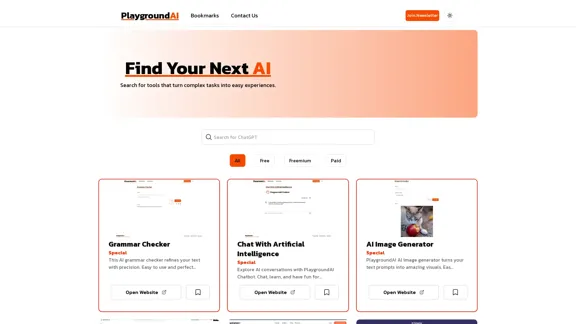
Playground AI is a comprehensive online platform that serves as a curated directory of artificial intelligence applications. It helps users discover and explore a wide range of AI tools available on the web, covering various categories and functionalities to meet diverse user needs. The platform offers an extensive collection of AI tools, user-friendly search functions, and clear categorization systems to enhance the user experience.

Feature

Extensive AI Tool Collection

Playground AI offers a diverse range of AI tools, including grammar checkers, AI chatbots, image generators, content detectors, plagiarism checkers, voice detectors, SEO tools, and writing assistants.

User-Friendly Search Function

Users can easily find specific AI tools using the search bar on the Playground AI website.

Categorization System

The platform categorizes tools based on their pricing models:

CategoryDescription
FreeTools that can be used without any cost
FreemiumTools offering basic features for free, with premium options available
PaidTools requiring payment for access

Pricing Information

Clear pricing details are provided for each tool, helping users quickly identify options that fit their budget.

Direct Access to Tools

Users can access desired tools directly by clicking the "Open Website" button on each tool's listing.

Newsletter Subscription

Playground AI offers a newsletter subscription for users to receive updates on new AI tools and features.

Theme Toggle

Users can switch between light and dark themes for comfortable browsing.

Bookmarks Feature

The platform allows users to save interesting tools for later reference using the bookmarks feature.

FAQ

What types of AI tools can I find on Playground AI?

Playground AI offers a diverse range of AI tools, including grammar checkers, AI chatbots, image generators, content detectors, plagiarism checkers, voice detectors, SEO tools, and writing assistants.

Are all the tools on Playground AI free to use?

No, Playground AI lists tools with various pricing models. They are categorized as Free, Freemium, or Paid to help users quickly identify tools that fit their budget.

How often is Playground AI updated with new tools?

While the exact update frequency isn't specified, Playground AI encourages users to join their newsletter, suggesting regular updates with new AI tools and features.

Can I submit my own AI tool to be listed on Playground AI?

The website doesn't explicitly mention a submission process. However, you can use the "Contact Us" link to inquire about listing your AI tool.

Is Playground AI affiliated with the AI tools it lists?

Playground AI appears to be an independent directory. It provides links to external websites for each tool, suggesting it's not directly affiliated with the listed AI applications.

Latest Traffic Insights

  • Monthly Visits

    2.31 K

  • Bounce Rate

    40.04%

  • Pages Per Visit

    1.18

  • Time on Site(s)

    6.19

  • Global Rank

    7821243

  • Country Rank

    Russia 772518

Recent Visits

Traffic Sources

  • Social Media:
    3.43%
  • Paid Referrals:
    0.94%
  • Email:
    0.57%
  • Referrals:
    13.60%
  • Search Engines:
    47.68%
  • Direct:
    33.25%
More Data

Related Websites

The AI Office Suite
View Detail

The AI Office Suite

The AI Office Suite

An office suite for the AI era. It's the best way to integrate AI into your work.

163.98 K
Filo - AI Email Client & To-Do
View Detail

Filo - AI Email Client & To-Do

Filo - AI Email Client & To-Do

Turn overwhelming emails into clear summaries, quick replies, and AI-generated to-dos in one second.

6.31 K
Augurisk: Explore Disaster and Crime risk in the US
View Detail

Augurisk: Explore Disaster and Crime risk in the US

Augurisk: Explore Disaster and Crime risk in the US

Here is the translation: Discover Natural Disaster and Crime risk for cities and counties in your state, including Flood, Hurricanes, Tornadoes, Wildfires, Drought and Earthquakes.

22.03 K
Flowith - AI for Deep Work
View Detail

Flowith - AI for Deep Work

Flowith - AI for Deep Work

Surpassing traditional chat-based tools, Flowith streamlines tasks on a multi-thread interface powered by a most advanced agent framework. The intuitive canvas and smart framework boost productivity, helping users stay in the flow.

13.71 K
Copilot for Microsoft 365 – Microsoft Adoption

Copilot for Microsoft 365 is a powerful AI assistant that helps you work smarter and faster across Microsoft 365 apps and services. It combines the power of large language models (LLMs) with your organization's data in the Microsoft Graph and Microsoft 365 apps to turn your words into the most powerful productivity tool on the planet.

Copilot is designed to help you:

• Unleash creativity
• Unlock productivity
• Uplevel skills

Copilot is built on Microsoft's comprehensive approach to security, compliance, and privacy. Copilot in Microsoft 365 apps and services:

• Does not use your data to train the underlying LLM
• Does not replace human ingenuity and judgment
• Is designed to keep humans in the loop

Copilot is currently available in Word, Excel, PowerPoint, Outlook, Teams, and more.

Getting Started with Copilot

To get started with Copilot, follow these steps:

1. Check availability: Ensure your organization has access to Copilot.
2. Learn the basics: Familiarize yourself with Copilot's capabilities and how to use it effectively.
3. Explore use cases: Discover how Copilot can help you in your specific role and tasks.
4. Practice and refine: Use Copilot regularly and refine your prompts for better results.
5. Share and collaborate: Collaborate with colleagues using Copilot and share best practices.

Best Practices for Using Copilot

1. Be specific in your prompts
2. Provide context for better results
3. Review and edit Copilot's output
4. Use Copilot as a starting point, not a final product
5. Experiment with different approaches
6. Stay informed about new features and updates

Copilot in Different Microsoft 365 Apps

• Word: Draft, edit, summarize, and rewrite content
• Excel: Analyze data, create formulas, and generate insights
• PowerPoint: Create presentations, design slides, and generate content
• Outlook: Compose emails, summarize threads, and manage your inbox
• Teams: Summarize meetings, generate action items, and create meeting notes

Responsible AI and Copilot

Microsoft is committed to developing AI systems responsibly. When using Copilot, keep in mind:

• AI-generated content may contain biases or inaccuracies
• Always review and verify Copilot's output
• Use your judgment and expertise alongside Copilot's suggestions
• Be aware of your organization's policies regarding AI use

Conclusion

Copilot for Microsoft 365 is a powerful tool that can significantly enhance your productivity and creativity. By understanding its capabilities, following best practices, and using it responsibly, you can make the most of this AI assistant in your daily work.
View Detail

Copilot for Microsoft 365 – Microsoft Adoption Copilot for Microsoft 365 is a powerful AI assistant that helps you work smarter and faster across Microsoft 365 apps and services. It combines the power of large language models (LLMs) with your organization's data in the Microsoft Graph and Microsoft 365 apps to turn your words into the most powerful productivity tool on the planet. Copilot is designed to help you: • Unleash creativity • Unlock productivity • Uplevel skills Copilot is built on Microsoft's comprehensive approach to security, compliance, and privacy. Copilot in Microsoft 365 apps and services: • Does not use your data to train the underlying LLM • Does not replace human ingenuity and judgment • Is designed to keep humans in the loop Copilot is currently available in Word, Excel, PowerPoint, Outlook, Teams, and more. Getting Started with Copilot To get started with Copilot, follow these steps: 1. Check availability: Ensure your organization has access to Copilot. 2. Learn the basics: Familiarize yourself with Copilot's capabilities and how to use it effectively. 3. Explore use cases: Discover how Copilot can help you in your specific role and tasks. 4. Practice and refine: Use Copilot regularly and refine your prompts for better results. 5. Share and collaborate: Collaborate with colleagues using Copilot and share best practices. Best Practices for Using Copilot 1. Be specific in your prompts 2. Provide context for better results 3. Review and edit Copilot's output 4. Use Copilot as a starting point, not a final product 5. Experiment with different approaches 6. Stay informed about new features and updates Copilot in Different Microsoft 365 Apps • Word: Draft, edit, summarize, and rewrite content • Excel: Analyze data, create formulas, and generate insights • PowerPoint: Create presentations, design slides, and generate content • Outlook: Compose emails, summarize threads, and manage your inbox • Teams: Summarize meetings, generate action items, and create meeting notes Responsible AI and Copilot Microsoft is committed to developing AI systems responsibly. When using Copilot, keep in mind: • AI-generated content may contain biases or inaccuracies • Always review and verify Copilot's output • Use your judgment and expertise alongside Copilot's suggestions • Be aware of your organization's policies regarding AI use Conclusion Copilot for Microsoft 365 is a powerful tool that can significantly enhance your productivity and creativity. By understanding its capabilities, following best practices, and using it responsibly, you can make the most of this AI assistant in your daily work.

Copilot for Microsoft 365 – Microsoft Adoption Copilot for Microsoft 365 is a powerful AI assistant that helps you work smarter and faster across Microsoft 365 apps and services. It combines the power of large language models (LLMs) with your organization's data in the Microsoft Graph and Microsoft 365 apps to turn your words into the most powerful productivity tool on the planet. Copilot is designed to help you: • Unleash creativity • Unlock productivity • Uplevel skills Copilot is built on Microsoft's comprehensive approach to security, compliance, and privacy. Copilot in Microsoft 365 apps and services: • Does not use your data to train the underlying LLM • Does not replace human ingenuity and judgment • Is designed to keep humans in the loop Copilot is currently available in Word, Excel, PowerPoint, Outlook, Teams, and more. Getting Started with Copilot To get started with Copilot, follow these steps: 1. Check availability: Ensure your organization has access to Copilot. 2. Learn the basics: Familiarize yourself with Copilot's capabilities and how to use it effectively. 3. Explore use cases: Discover how Copilot can help you in your specific role and tasks. 4. Practice and refine: Use Copilot regularly and refine your prompts for better results. 5. Share and collaborate: Collaborate with colleagues using Copilot and share best practices. Best Practices for Using Copilot 1. Be specific in your prompts 2. Provide context for better results 3. Review and edit Copilot's output 4. Use Copilot as a starting point, not a final product 5. Experiment with different approaches 6. Stay informed about new features and updates Copilot in Different Microsoft 365 Apps • Word: Draft, edit, summarize, and rewrite content • Excel: Analyze data, create formulas, and generate insights • PowerPoint: Create presentations, design slides, and generate content • Outlook: Compose emails, summarize threads, and manage your inbox • Teams: Summarize meetings, generate action items, and create meeting notes Responsible AI and Copilot Microsoft is committed to developing AI systems responsibly. When using Copilot, keep in mind: • AI-generated content may contain biases or inaccuracies • Always review and verify Copilot's output • Use your judgment and expertise alongside Copilot's suggestions • Be aware of your organization's policies regarding AI use Conclusion Copilot for Microsoft 365 is a powerful tool that can significantly enhance your productivity and creativity. By understanding its capabilities, following best practices, and using it responsibly, you can make the most of this AI assistant in your daily work.

Microsoft Copilot combines the power of large language models (LLMs) with your organization's data to turn your words into one of the most powerful productivity tools on the planet.

608.60 K
Tomat.AI - Data Analysis with AI
View Detail

Tomat.AI - Data Analysis with AI

Tomat.AI - Data Analysis with AI

Load CSV and analyze it in a visual step-by-step interface. Cleanup, extract, summarize, or make sentiment analysis with your personal AI agent.

5.64 K
Langtrace AI
View Detail

Langtrace AI

Langtrace AI

Discover Langtrace, the comprehensive tool for monitoring, evaluating, and optimizing large language models. Enhance your AI applications with real-time insights and detailed performance metrics.

15.51 K
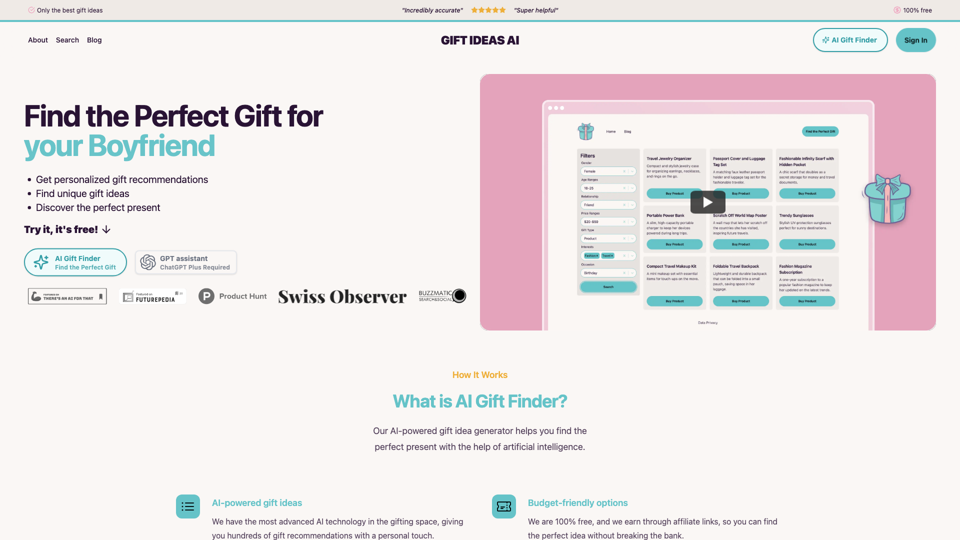
Gift Ideas AI: Free AI Gift Finder & Idea Generator
View Detail

Gift Ideas AI: Free AI Gift Finder & Idea Generator

Gift Ideas AI: Free AI Gift Finder & Idea Generator

Discover the ideal present for those dear to you with our AI-powered gift finder. Receive customized gift suggestions for any occasion.

3.60 K