Open-source RightAI Tools Directory
  • Discover AI
  • Submit
  • Startup
  • Blog
Open-source RightAI Tools Directory
Discover the best AI tools of 2025 with the RightAI Tools Directory!

Friend Links

AI Anime GeneratorToolsApp AI

Support

Tap4
Privacy policyTerms & ConditionsContact Us
Loading...
loading...

Ask Your Bookmarks

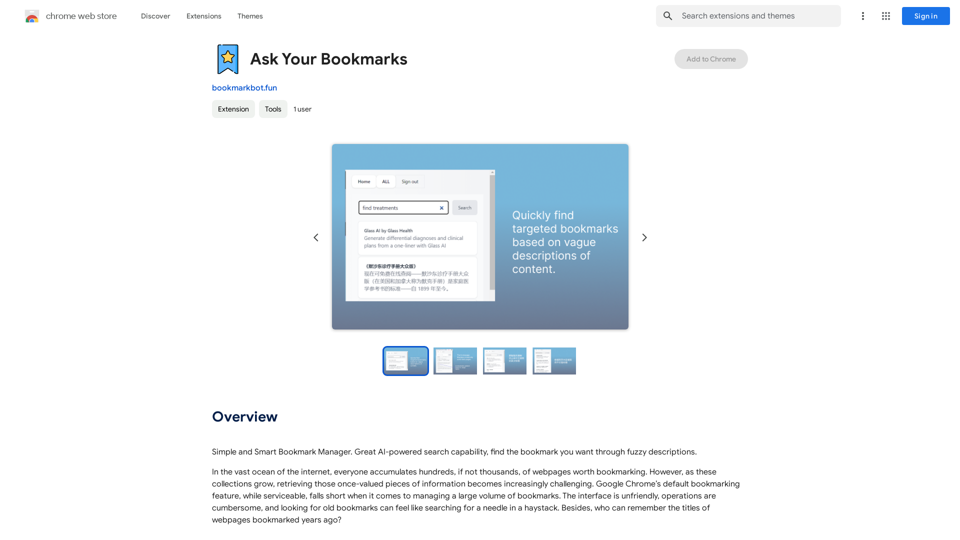
Simple and Smart Bookmark Manager. Great AI-powered search capability, find the bookmark you want with fuzzy descriptions.
Visit Website
Ask Your Bookmarks
Visit Website

Introduction

Ask Your Bookmarks is a Chrome extension that utilizes AI technology to help users find their bookmarks based on vague content descriptions. It offers smart search capabilities, personalized learning, and a user-friendly interface to enhance bookmark management and retrieval.

Feature

Smart Search

Ask Your Bookmarks employs AI technology to understand users' vague descriptions of webpage content, quickly helping them find desired bookmarks. Even with minimal remembered information, the extension can precisely match and retrieve old bookmarks.

Personalized Learning

The extension learns users' browsing habits over time, prioritizing frequently visited webpages on the homepage. This feature enhances the user experience by adapting to individual preferences.

User-Friendly Interface

A simplified user interface makes managing bookmarks easy and enjoyable, improving overall usability and user satisfaction.

Automatic Organization (In Development)

Leveraging AI technology, the extension will automatically categorize bookmarks and clean up dead links, maintaining a tidy and organized bookmark collection.

FAQ

How does Ask Your Bookmarks work?

The extension uses AI technology to understand vague descriptions of webpage content, quickly helping users find their desired bookmarks. Even with minimal remembered information, a simple input allows the extension to precisely match and retrieve old bookmarks.

Why should I install Ask Your Bookmarks?

Ask Your Bookmarks is more than just a tool; it's a powerful assistant for navigating the internet and managing information. It enhances your browser experience, whether you need to organize learning resources or efficiently manage daily browsing content.

How can I maximize my use of Ask Your Bookmarks?

Users can leverage the daily free uses of GPT-4o document reading and Dalle's image generation to explore a range of AI-powered tools supporting various tasks.

Will my information be used for training data?

User privacy is highly valued, and your data will not be used for any training purposes. Users can delete their accounts at any time, and all associated data will be removed.

When would I need a subscription?

If the 20 free GPT-4o conversations per day do not meet your needs and you heavily rely on GPT-4o, you may consider subscribing to the affordable products offered.

Latest Traffic Insights

  • Monthly Visits

    193.90 M

  • Bounce Rate

    56.27%

  • Pages Per Visit

    2.71

  • Time on Site(s)

    115.91

  • Global Rank

    -

  • Country Rank

    -

Recent Visits

Traffic Sources

  • Social Media:
    0.48%
  • Paid Referrals:
    0.55%
  • Email:
    0.15%
  • Referrals:
    12.81%
  • Search Engines:
    16.21%
  • Direct:
    69.81%
More Data

Related Websites

Free ChatGPT Omni (GPT4o) | gptomni.ai
View Detail

Free ChatGPT Omni (GPT4o) | gptomni.ai

Free ChatGPT Omni (GPT4o) | gptomni.ai

Free ChatGPT Omni: gptomni.ai offers a free, easy-to-use, web-based chat interface for conversations with the GPT4o AI model.

1.25 K
AI Photo Caption - Text Generator on the App Store
View Detail

AI Photo Caption - Text Generator on the App Store

AI Photo Caption - Text Generator on the App Store

Welcome to PhotoCaption AI – where your photos speak a thousand words in multiple languages! Do you often find yourself struggling to come up with the perfect caption for your amazing photos?

654.73 K
ChatGPT Keyboard Shortcuts

#Navigation

* Ctrl + β†’: Move to the next message
* Ctrl + ←: Move to the previous message
* Home: Move to the beginning of the conversation
* End: Move to the end of the conversation

#Editing

* Ctrl + A: Select all text
* Ctrl + C: Copy selected text
* Ctrl + X: Cut selected text
* Ctrl + V: Paste copied or cut text
* Ctrl + Z: Undo
* Ctrl + Y: Redo
* Ctrl + Shift + F: Format text as code

#Actions

* Enter: Send the message
* Shift + Enter: Insert a new line
* Ctrl + Shift + Enter: Send the message and insert a new line
* Esc: Cancel editing and close the message input field
* Ctrl + Shift + Space: Open the emoji picker
* Ctrl + Shift + /: Open the help menu

#Accessibility

* Ctrl + +: Increase font size
* Ctrl + -: Decrease font size
* Ctrl + 0: Reset font size to default
View Detail

ChatGPT Keyboard Shortcuts #Navigation * Ctrl + β†’: Move to the next message * Ctrl + ←: Move to the previous message * Home: Move to the beginning of the conversation * End: Move to the end of the conversation #Editing * Ctrl + A: Select all text * Ctrl + C: Copy selected text * Ctrl + X: Cut selected text * Ctrl + V: Paste copied or cut text * Ctrl + Z: Undo * Ctrl + Y: Redo * Ctrl + Shift + F: Format text as code #Actions * Enter: Send the message * Shift + Enter: Insert a new line * Ctrl + Shift + Enter: Send the message and insert a new line * Esc: Cancel editing and close the message input field * Ctrl + Shift + Space: Open the emoji picker * Ctrl + Shift + /: Open the help menu #Accessibility * Ctrl + +: Increase font size * Ctrl + -: Decrease font size * Ctrl + 0: Reset font size to default

ChatGPT Keyboard Shortcuts #Navigation * Ctrl + β†’: Move to the next message * Ctrl + ←: Move to the previous message * Home: Move to the beginning of the conversation * End: Move to the end of the conversation #Editing * Ctrl + A: Select all text * Ctrl + C: Copy selected text * Ctrl + X: Cut selected text * Ctrl + V: Paste copied or cut text * Ctrl + Z: Undo * Ctrl + Y: Redo * Ctrl + Shift + F: Format text as code #Actions * Enter: Send the message * Shift + Enter: Insert a new line * Ctrl + Shift + Enter: Send the message and insert a new line * Esc: Cancel editing and close the message input field * Ctrl + Shift + Space: Open the emoji picker * Ctrl + Shift + /: Open the help menu #Accessibility * Ctrl + +: Increase font size * Ctrl + -: Decrease font size * Ctrl + 0: Reset font size to default

Enhance your ChatGPT experience with easy-to-use keyboard shortcuts.

193.90 M
Hottalks.ai - Enjoy the Ultimate AI Girlfriend Experience
View Detail

Hottalks.ai - Enjoy the Ultimate AI Girlfriend Experience

Hottalks.ai - Enjoy the Ultimate AI Girlfriend Experience

Your dream companion awaits! Uncensored AI chat experience with NSFW AI images. Experience adaptive AI-driven role-plays today.

40.45 K
Universal Chat AI - Chat GPT 4 Turbo Accessible Across All Websites

With the advent of advanced language models, we are proud to introduce the Chat AI - Chat GPT 4 Turbo, a revolutionary AI-powered chatbot designed to provide seamless and intelligent conversations across all websites. This innovative technology enables users to engage with a highly advanced language model, offering unparalleled conversational experiences.

Key Features:

* Omnipresent Accessibility: Chat GPT 4 Turbo is accessible across all websites, allowing users to interact with the AI chatbot from anywhere, at any time.
* Enhanced Conversational Capabilities: Powered by cutting-edge language models, Chat GPT 4 Turbo understands and responds to user queries with unprecedented accuracy and context.
* Seamless Integration: Effortlessly integrate Chat GPT 4 Turbo into any website, ensuring a unified and engaging user experience.

Unlock the Power of Conversational AI:

Experience the future of chatbots today with Chat AI - Chat GPT 4 Turbo. Discover how this groundbreaking technology can transform the way you interact with websites, providing unparalleled convenience, efficiency, and personalized experiences.
View Detail

Universal Chat AI - Chat GPT 4 Turbo Accessible Across All Websites With the advent of advanced language models, we are proud to introduce the Chat AI - Chat GPT 4 Turbo, a revolutionary AI-powered chatbot designed to provide seamless and intelligent conversations across all websites. This innovative technology enables users to engage with a highly advanced language model, offering unparalleled conversational experiences. Key Features: * Omnipresent Accessibility: Chat GPT 4 Turbo is accessible across all websites, allowing users to interact with the AI chatbot from anywhere, at any time. * Enhanced Conversational Capabilities: Powered by cutting-edge language models, Chat GPT 4 Turbo understands and responds to user queries with unprecedented accuracy and context. * Seamless Integration: Effortlessly integrate Chat GPT 4 Turbo into any website, ensuring a unified and engaging user experience. Unlock the Power of Conversational AI: Experience the future of chatbots today with Chat AI - Chat GPT 4 Turbo. Discover how this groundbreaking technology can transform the way you interact with websites, providing unparalleled convenience, efficiency, and personalized experiences.

Universal Chat AI - Chat GPT 4 Turbo Accessible Across All Websites With the advent of advanced language models, we are proud to introduce the Chat AI - Chat GPT 4 Turbo, a revolutionary AI-powered chatbot designed to provide seamless and intelligent conversations across all websites. This innovative technology enables users to engage with a highly advanced language model, offering unparalleled conversational experiences. Key Features: * Omnipresent Accessibility: Chat GPT 4 Turbo is accessible across all websites, allowing users to interact with the AI chatbot from anywhere, at any time. * Enhanced Conversational Capabilities: Powered by cutting-edge language models, Chat GPT 4 Turbo understands and responds to user queries with unprecedented accuracy and context. * Seamless Integration: Effortlessly integrate Chat GPT 4 Turbo into any website, ensuring a unified and engaging user experience. Unlock the Power of Conversational AI: Experience the future of chatbots today with Chat AI - Chat GPT 4 Turbo. Discover how this groundbreaking technology can transform the way you interact with websites, providing unparalleled convenience, efficiency, and personalized experiences.

Chat AI will help you highlight summaries, create images, make better translations, fix errors, and more on any page on the web.

193.90 M
AutoMOT - Quick Access to MOT History
View Detail

AutoMOT - Quick Access to MOT History

AutoMOT - Quick Access to MOT History

This extension saves you time by automatically loading information about a vehicle's MOT history on autotrader.co.uk.

193.90 M
Mailpengu
View Detail

Mailpengu

Mailpengu

Mailpengu uses artificial intelligence to customize outgoing sales presentations with just one click.

193.90 M
Receipt & Invoice Capture, Match, Categorize
View Detail

Receipt & Invoice Capture, Match, Categorize

Receipt & Invoice Capture, Match, Categorize

Automatically manage your expenses by taking pictures of your receipts and invoices online. They will then be automatically matched with transactions on any of your credit cards or bank accounts!

193.90 M