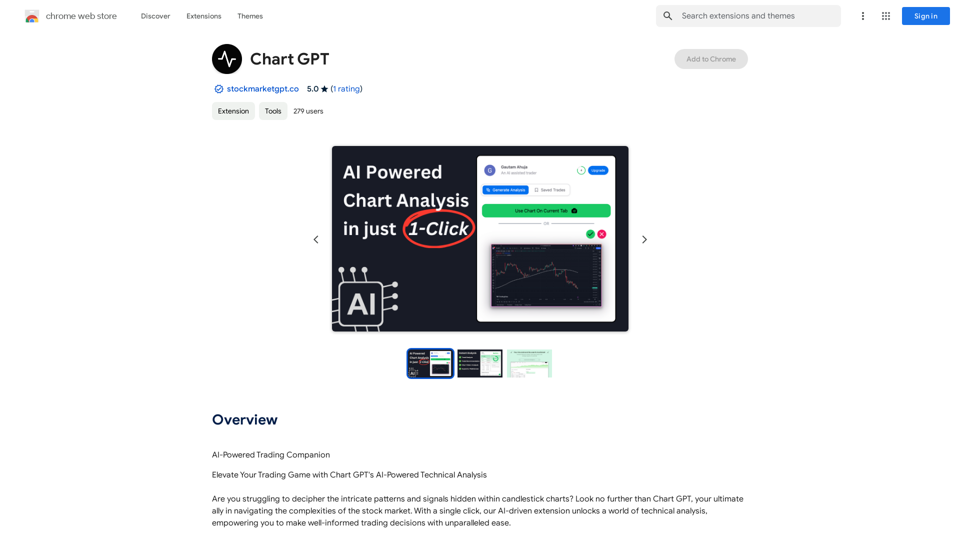
Chart GPT is an AI-powered trading companion that revolutionizes stock market analysis. It offers advanced technical analysis, trend identification, and entry/exit point suggestions, making it an invaluable tool for traders of all levels. By leveraging artificial intelligence, Chart GPT simplifies complex market data, enabling users to make informed decisions and navigate the stock market with confidence.
Chart GPT
AI-Powered Trading Companion
Introduction
Feature
AI-Driven Market Analysis
Chart GPT employs sophisticated AI algorithms to:
- Analyze complex candlestick charts
- Identify market trends
- Determine support and resistance levels
- Suggest optimal entry and exit points
Comprehensive Chart Breakdown
The tool provides detailed market insights, including:
- Trade recommendations
- Stop-loss levels
- Confidence ratings
Trend Detection
Chart GPT excels in:
- Identifying bearish and bullish trends
- Enabling users to capitalize on market movements early
Support/Resistance Level Identification
The AI accurately pinpoints:
- Critical support levels
- Key resistance levels
Multi-Market Compatibility
Chart GPT adapts to various market environments, serving as a universal analysis companion.
Risk Management
The tool enhances risk management by:
- Suggesting stop-loss points
- Identifying support and resistance levels
Time-Saving Efficiency
Chart GPT streamlines the analysis process, providing:
- Instant assessments
- Accurate market insights
Opportunity Discovery
By leveraging advanced pattern recognition, Chart GPT helps uncover hidden market opportunities.
FAQ
What is Chart GPT?
Chart GPT is an AI-powered trading companion that provides advanced technical analysis and insights for the stock market. It analyzes candlestick charts, identifies trends, and suggests entry/exit points to help traders make informed decisions.
How does Chart GPT work?
Chart GPT utilizes advanced AI algorithms to analyze candlestick charts, identify market trends, determine support and resistance levels, and suggest optimal entry and exit points. It provides a comprehensive breakdown of market data, including trade recommendations and confidence ratings.
What are the benefits of using Chart GPT?
The benefits of using Chart GPT include:
- Informed decision-making based on AI-driven insights
- Time-saving efficiency through instant, accurate assessments
- Improved risk management with stop-loss suggestions
- Discovery of hidden market opportunities
- Multi-market compatibility for diverse trading environments
How do I get started with Chart GPT?
To get started with Chart GPT:
- Download the Chart GPT extension
- Follow the provided instructions for installation
- Begin using the tool to analyze charts and receive AI-driven insights
Is there a free version of Chart GPT available?
Yes, Chart GPT offers a free version with limited features. There is also a paid subscription available that provides additional benefits and extended access to the tool's capabilities.
Related Websites
![Searching for ChatGPT Plugins
Searching for ChatGPT plugins can be an exciting experience, as it allows you to explore and discover new features and functionalities to enhance your conversational AI model. Here are some ways to search for ChatGPT plugins:
Official Plugin Directory
The official ChatGPT plugin directory is a great place to start your search. This directory provides a curated list of plugins that are compatible with ChatGPT, along with their descriptions, features, and installation instructions.
GitHub and Open-Source Repositories
GitHub and other open-source repositories are treasure troves for ChatGPT plugins. You can search for plugins using keywords like "ChatGPT plugin" or "conversational AI plugin" to find relevant repositories. You can also explore popular open-source repositories like the ChatGPT community repository.
Plugin Marketplaces
Some plugin marketplaces, like the ChatGPT Marketplace, offer a wide range of plugins for ChatGPT. These marketplaces often provide user reviews, ratings, and descriptions to help you make informed decisions.
Forums and Communities
ChatGPT forums and communities are great places to ask for plugin recommendations or search for plugins. You can ask other users about their favorite plugins or search for threads related to specific plugin categories.
Search Engines
Finally, you can use search engines like Google to search for ChatGPT plugins. Use specific keywords like "ChatGPT plugin for [specific feature]" or "best ChatGPT plugins" to get relevant results.
Remember to always evaluate the plugins you find based on their compatibility, features, and user reviews before installing them. Happy searching!](https://static.right-ai.com/tools/2024/7/3/chromewebstore-google-com-detail-chatgpt-plugin-search-hjdhbhggcljjjfenfbdbbhhngmkglpkl-thumbnail-1720045154.png "Searching for ChatGPT Plugins
Searching for ChatGPT plugins can be an exciting experience, as it allows you to explore and discover new features and functionalities to enhance your conversational AI model. Here are some ways to search for ChatGPT plugins:
Official Plugin Directory
The official ChatGPT plugin directory is a great place to start your search. This directory provides a curated list of plugins that are compatible with ChatGPT, along with their descriptions, features, and installation instructions.
GitHub and Open-Source Repositories
GitHub and other open-source repositories are treasure troves for ChatGPT plugins. You can search for plugins using keywords like \"ChatGPT plugin\" or \"conversational AI plugin\" to find relevant repositories. You can also explore popular open-source repositories like the ChatGPT community repository.
Plugin Marketplaces
Some plugin marketplaces, like the ChatGPT Marketplace, offer a wide range of plugins for ChatGPT. These marketplaces often provide user reviews, ratings, and descriptions to help you make informed decisions.
Forums and Communities
ChatGPT forums and communities are great places to ask for plugin recommendations or search for plugins. You can ask other users about their favorite plugins or search for threads related to specific plugin categories.
Search Engines
Finally, you can use search engines like Google to search for ChatGPT plugins. Use specific keywords like \"ChatGPT plugin for [specific feature]\" or \"best ChatGPT plugins\" to get relevant results.
Remember to always evaluate the plugins you find based on their compatibility, features, and user reviews before installing them. Happy searching!")
Searching for ChatGPT Plugins Searching for ChatGPT plugins can be an exciting experience, as it allows you to explore and discover new features and functionalities to enhance your conversational AI model. Here are some ways to search for ChatGPT plugins: Official Plugin Directory The official ChatGPT plugin directory is a great place to start your search. This directory provides a curated list of plugins that are compatible with ChatGPT, along with their descriptions, features, and installation instructions. GitHub and Open-Source Repositories GitHub and other open-source repositories are treasure troves for ChatGPT plugins. You can search for plugins using keywords like "ChatGPT plugin" or "conversational AI plugin" to find relevant repositories. You can also explore popular open-source repositories like the ChatGPT community repository. Plugin Marketplaces Some plugin marketplaces, like the ChatGPT Marketplace, offer a wide range of plugins for ChatGPT. These marketplaces often provide user reviews, ratings, and descriptions to help you make informed decisions. Forums and Communities ChatGPT forums and communities are great places to ask for plugin recommendations or search for plugins. You can ask other users about their favorite plugins or search for threads related to specific plugin categories. Search Engines Finally, you can use search engines like Google to search for ChatGPT plugins. Use specific keywords like "ChatGPT plugin for [specific feature]" or "best ChatGPT plugins" to get relevant results. Remember to always evaluate the plugins you find based on their compatibility, features, and user reviews before installing them. Happy searching!
Searching for ChatGPT Plugins Searching for ChatGPT plugins can be an exciting experience, as it allows you to explore and discover new features and functionalities to enhance your conversational AI model. Here are some ways to search for ChatGPT plugins: Official Plugin Directory The official ChatGPT plugin directory is a great place to start your search. This directory provides a curated list of plugins that are compatible with ChatGPT, along with their descriptions, features, and installation instructions. GitHub and Open-Source Repositories GitHub and other open-source repositories are treasure troves for ChatGPT plugins. You can search for plugins using keywords like "ChatGPT plugin" or "conversational AI plugin" to find relevant repositories. You can also explore popular open-source repositories like the ChatGPT community repository. Plugin Marketplaces Some plugin marketplaces, like the ChatGPT Marketplace, offer a wide range of plugins for ChatGPT. These marketplaces often provide user reviews, ratings, and descriptions to help you make informed decisions. Forums and Communities ChatGPT forums and communities are great places to ask for plugin recommendations or search for plugins. You can ask other users about their favorite plugins or search for threads related to specific plugin categories. Search Engines Finally, you can use search engines like Google to search for ChatGPT plugins. Use specific keywords like "ChatGPT plugin for [specific feature]" or "best ChatGPT plugins" to get relevant results. Remember to always evaluate the plugins you find based on their compatibility, features, and user reviews before installing them. Happy searching!Here are some of the best, top, and popular ChatGPT plugins: 1. WebChat: A plugin that allows users to interact with ChatGPT through a web interface. 2. ChatGPT Writer: A plugin that helps users generate high-quality content, such as articles, stories, and emails, using ChatGPT's language generation capabilities. 3. ChatGPT Code Interpreter: A plugin that enables users to write code in various programming languages and have ChatGPT interpret and execute it. 4. ChatGPT Conversational AI: A plugin that allows users to create conversational AI models using ChatGPT's language understanding capabilities. 5. ChatGPT Language Translator: A plugin that enables users to translate text from one language to another using ChatGPT's language translation capabilities. 6. ChatGPT Summarizer: A plugin that helps users summarize long pieces of text, such as articles or documents, into concise summaries using ChatGPT's text summarization capabilities. 7. ChatGPT Q&A: A plugin that enables users to ask questions and receive answers from ChatGPT on a wide range of topics. 8. ChatGPT Creative Writing: A plugin that helps users generate creative writing, such as poetry, stories, and dialogues, using ChatGPT's language generation capabilities. 9. ChatGPT Dialogue System: A plugin that enables users to create conversational dialogue systems using ChatGPT's language understanding capabilities. 10. ChatGPT Sentiment Analyzer: A plugin that helps users analyze the sentiment of text, such as determining whether a piece of text is positive, negative, or neutral, using ChatGPT's sentiment analysis capabilities.
193.90 M

Xmate: AI Girlfriend for Adults & Porn Chat & More
Xmate: AI Girlfriend for Adults & Porn Chat & MoreExperience the ultimate thrill with NSFW Character AI Roleplay, where boundaries disappear. Engage in unrestricted AI conversations and uncensored NSFW AI interactions, and even request images from your virtual partner.
886
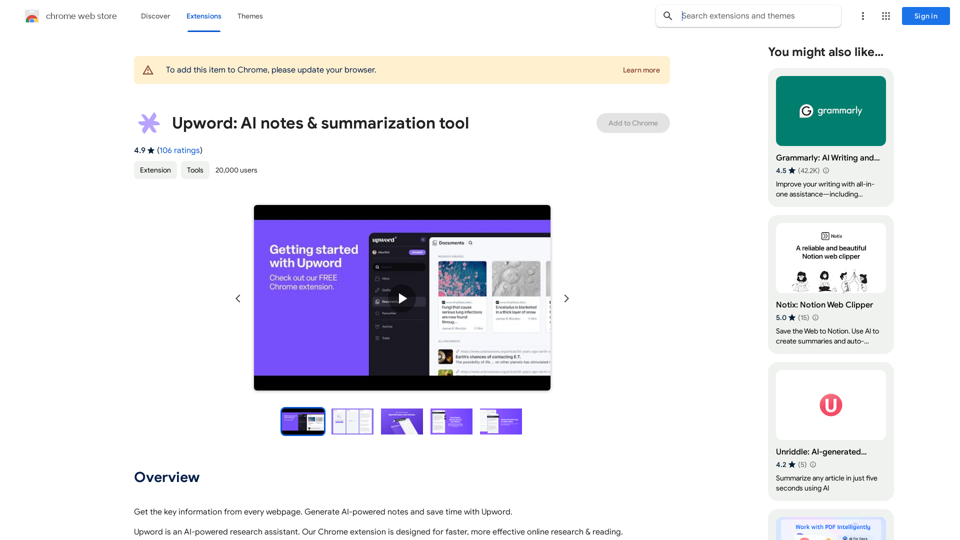
Get the key information from every webpage. Generate AI-powered notes and save time with Upword.
193.90 M
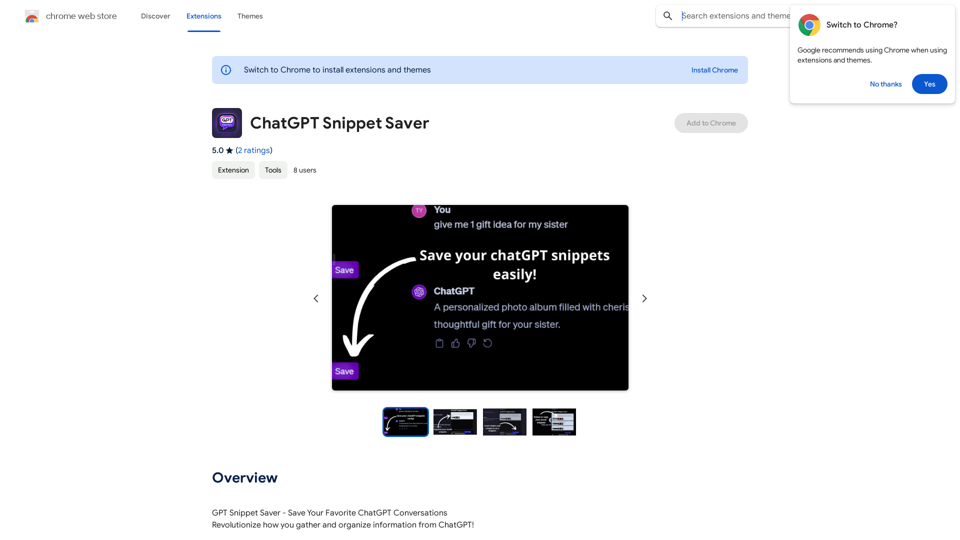
ChatGPT Snippet Saver This is a simple tool to save snippets from your ChatGPT conversations. How to Use: 1. Copy the text snippet you want to save from your ChatGPT conversation. 2. Paste the text into the input box below. 3. Click the "Save Snippet" button. Your snippet will be saved to your local storage. You can access your saved snippets later by clicking the "View Saved Snippets" button.
ChatGPT Snippet Saver This is a simple tool to save snippets from your ChatGPT conversations. How to Use: 1. Copy the text snippet you want to save from your ChatGPT conversation. 2. Paste the text into the input box below. 3. Click the "Save Snippet" button. Your snippet will be saved to your local storage. You can access your saved snippets later by clicking the "View Saved Snippets" button.GPT Snippet Saver - Save Your Favorite ChatGPT Conversations Revolutionize how you gather and organize information from ChatGPT! - Effortlessly capture and store your most valuable ChatGPT interactions. - Organize your saved conversations by topic, date, or any custom tag. - Easily search and retrieve specific snippets from your saved history. - Share your favorite ChatGPT insights with others. - Never lose track of a brilliant idea or helpful response again.
193.90 M

An AI translation engine that understands context will provide a more user-friendly translation for websites, allowing everyone to have a reading experience in their native language.
193.90 M