Open-source RightAI Tools Directory
  • Discover AI
  • Submit
  • Startup
  • Blog
Open-source RightAI Tools Directory
Discover the best AI tools of 2025 with the RightAI Tools Directory!

Friend Links

AI Anime GeneratorToolsApp AI

Support

Tap4
Privacy policyTerms & ConditionsContact Us
Loading...
loading...

GrammaticGenius™

Your English Co-Pilot, Right in Your Browser
Visit Website
GrammaticGenius™
Visit Website

Introduction

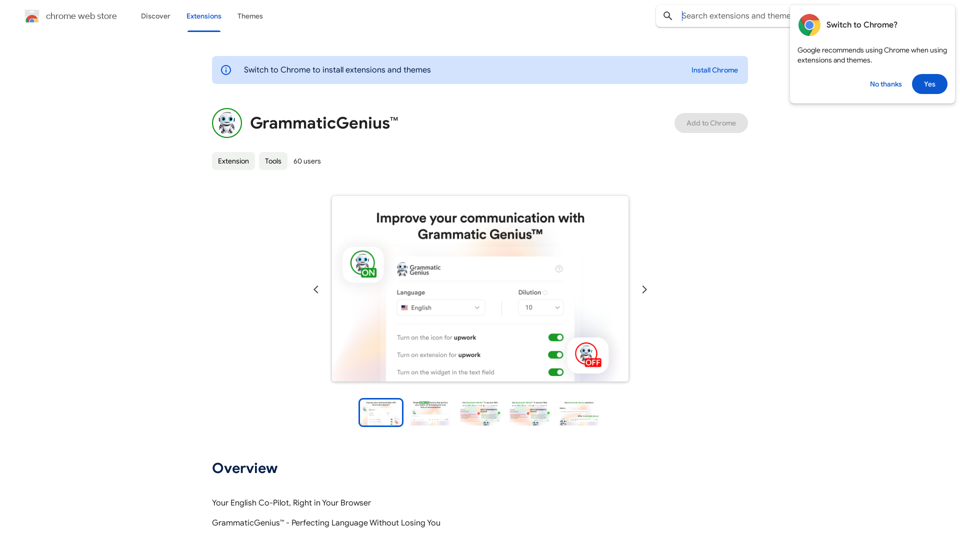
GrammaticGenius™ is an innovative Chrome extension designed to enhance your writing experience. It seamlessly integrates into any text-input field, allowing users to improve their text quality with a simple keyboard shortcut. The tool goes beyond basic error correction, focusing on amplifying the user's authentic voice and ensuring impactful communication.

Feature

Instant Text Enhancement

GrammaticGenius™ elevates your writing from good to outstanding with a simple 'ctrl + y' keyboard shortcut, integrating directly within any text-input field.

Native-Level Communication

Helps users communicate with the proficiency of a native English speaker, boosting credibility and opening up new opportunities in professional settings.

Streamlined Workflow

Eliminates the need for copy-pasting from ChatGPT, offering a dedicated button within every text field for quick and efficient writing improvement.

Customizable Formality

Users can adjust the level of formality on a scale of 1-10, allowing for supreme accuracy and formality or preserving more of the user's inherent style.

Voice Preservation

Powered by the GPT API, GrammaticGenius™ refines text while maintaining the user's unique voice and style.

Flexible Usage

Offers customization options, including the ability to enable or disable the extension on specific platforms like Upwork.

Multilingual Support

While primarily designed for English, the tool caters to writers worldwide.

FAQ

What is GrammaticGenius™?

GrammaticGenius™ is a Chrome extension that integrates into text-input fields, enhancing writing quality with a simple keyboard shortcut. It focuses on amplifying the user's authentic voice and ensuring impactful communication.

What are the main features of GrammaticGenius™?

The main features include:

  • Native-level communication enhancement
  • Direct integration with text fields
  • Customizable formality levels
  • Preservation of the user's authentic voice
  • User-centric interface with platform-specific customization

How can I maximize my use of GrammaticGenius™?

To maximize use, leverage the GPT API-powered fine-tuning while preserving your unique voice. Take advantage of the free access during the beta test period to explore all features and improve your writing across various platforms.

How much does GrammaticGenius™ cost?

GrammaticGenius™ is currently free to use as part of a limited-time lifetime free access beta test offer.

Related Websites
Linkboost - LinkedIn with AI-powered Chat GPT
View Detail

Linkboost - LinkedIn with AI-powered Chat GPT

Linkboost - LinkedIn with AI-powered Chat GPT

Easily Skyrocket Your LinkedIn Reach with the Power of AI - ChatGPT Let's face it, standing out on LinkedIn can be tough. But what if you could leverage the incredible power of AI to supercharge your profile and connections? That's where ChatGPT comes in. This revolutionary AI tool can help you: * Craft compelling content: Say goodbye to writer's block! ChatGPT can help you generate engaging posts, articles, and even personalized messages that resonate with your audience. * Optimize your profile: Make sure your LinkedIn profile shines! ChatGPT can suggest improvements to your headline, summary, and experience descriptions, helping you attract more views and connections. * Automate your outreach: Spend less time manually sending messages and more time building relationships. ChatGPT can help you draft personalized connection requests and follow-up messages that get results. * Unlock valuable insights: Gain a deeper understanding of your network and industry trends. ChatGPT can analyze your connections and content performance, providing actionable insights to improve your strategy. Ready to take your LinkedIn game to the next level? ChatGPT is your secret weapon.

193.90 M
hyperDart Search
View Detail

hyperDart Search

hyperDart Search

Federated search platform

193.90 M
Open ChatGPT in a New Tab

You can open ChatGPT in a new tab by following these steps:

#Method 1: Using the Browser's Context Menu

1. Right-click on the ChatGPT link or button.
2. Select "Open in new tab" or "Open link in new tab" from the context menu.

#Method 2: Using the Keyboard Shortcut

1. Press `Ctrl + Click` (Windows/Linux) or `Cmd + Click` (Mac) on the ChatGPT link or button.

#Method 3: Using the Browser's Toolbar

1. Click on the ChatGPT link or button while holding down the `Ctrl` key (Windows/Linux) or `Cmd` key (Mac).
2. Release the key after the new tab is opened.

By following these methods, you can easily open ChatGPT in a new tab and start chatting without leaving your current page.
View Detail

Open ChatGPT in a New Tab You can open ChatGPT in a new tab by following these steps: #Method 1: Using the Browser's Context Menu 1. Right-click on the ChatGPT link or button. 2. Select "Open in new tab" or "Open link in new tab" from the context menu. #Method 2: Using the Keyboard Shortcut 1. Press `Ctrl + Click` (Windows/Linux) or `Cmd + Click` (Mac) on the ChatGPT link or button. #Method 3: Using the Browser's Toolbar 1. Click on the ChatGPT link or button while holding down the `Ctrl` key (Windows/Linux) or `Cmd` key (Mac). 2. Release the key after the new tab is opened. By following these methods, you can easily open ChatGPT in a new tab and start chatting without leaving your current page.

Open ChatGPT in a New Tab You can open ChatGPT in a new tab by following these steps: #Method 1: Using the Browser's Context Menu 1. Right-click on the ChatGPT link or button. 2. Select "Open in new tab" or "Open link in new tab" from the context menu. #Method 2: Using the Keyboard Shortcut 1. Press `Ctrl + Click` (Windows/Linux) or `Cmd + Click` (Mac) on the ChatGPT link or button. #Method 3: Using the Browser's Toolbar 1. Click on the ChatGPT link or button while holding down the `Ctrl` key (Windows/Linux) or `Cmd` key (Mac). 2. Release the key after the new tab is opened. By following these methods, you can easily open ChatGPT in a new tab and start chatting without leaving your current page.

New Tab with Quick ChatGPT Access

193.90 M
Youtube VideoSynth: Summarize Youtube Videos

This tool uses artificial intelligence to create short summaries of YouTube videos. 

Simply paste the YouTube video URL into the input field, and VideoSynth will generate a concise summary of the video's content.
View Detail

Youtube VideoSynth: Summarize Youtube Videos This tool uses artificial intelligence to create short summaries of YouTube videos. Simply paste the YouTube video URL into the input field, and VideoSynth will generate a concise summary of the video's content.

Youtube VideoSynth: Summarize Youtube Videos This tool uses artificial intelligence to create short summaries of YouTube videos. Simply paste the YouTube video URL into the input field, and VideoSynth will generate a concise summary of the video's content.

Summarize YouTube Video Transcripts Using AI This is a powerful tool for quickly understanding the main points of long videos. Here's how it works: 1. Get the Transcript: You'll need a text transcript of the YouTube video. Many videos have automatic captions, or you can use a transcription service. 2. Choose an AI Summarizer: There are many free and paid AI summarization tools available online. Some popular options include: * OpenAI's GPT-3: A powerful language model that can generate high-quality summaries. * Google Cloud AI Platform: Offers a variety of AI services, including text summarization. * Hugging Face Transformers: An open-source library with pre-trained summarization models. 3. Input the Transcript: Paste the transcript into the AI summarizer. 4. Generate the Summary: The AI will analyze the text and generate a concise summary of the video's main points. 5. Review and Edit: Read through the AI-generated summary and make any necessary edits to ensure accuracy and clarity. Let me know if you'd like more details on any of these steps!

193.90 M
SafeGPT
===============

SafeGPT is an AI model designed to generate human-like text while avoiding harmful or toxic content. It is trained on a massive dataset of text from the internet and can understand and respond to user input in a conversational manner. SafeGPT is capable of generating text on a wide range of topics, from simple questions to complex discussions, and can even create stories, dialogues, and more.

Key Features:

* Harmless responses: SafeGPT is designed to avoid generating harmful or toxic content, making it a safe and reliable tool for users of all ages.
* Conversational understanding: SafeGPT can understand and respond to user input in a conversational manner, making it feel more like a human-like interaction.
* Creative freedom: SafeGPT can generate text on a wide range of topics, from simple questions to complex discussions, and can even create stories, dialogues, and more.
* Continuous learning: SafeGPT is constantly learning and improving its responses based on user feedback, ensuring that it becomes more accurate and helpful over time.

Use Cases:

* Chatbots and virtual assistants: SafeGPT can be used to power chatbots and virtual assistants, providing users with a safe and reliable way to interact with machines.
* Content generation: SafeGPT can be used to generate content for websites, social media, and other platforms, helping to reduce the workload of content creators.
* Language learning: SafeGPT can be used to help language learners practice their conversational skills, providing them with a safe and interactive way to improve their language abilities.

Benefits:

* Improved safety: SafeGPT's ability to avoid generating harmful or toxic content makes it a safer tool for users of all ages.
* Increased creativity: SafeGPT's ability to generate text on a wide range of topics and in various styles makes it a valuable tool for content creators and language learners.
* Enhanced user experience: SafeGPT's conversational understanding and ability to respond in a human-like manner make it a more enjoyable and interactive tool for users.
View Detail

SafeGPT =============== SafeGPT is an AI model designed to generate human-like text while avoiding harmful or toxic content. It is trained on a massive dataset of text from the internet and can understand and respond to user input in a conversational manner. SafeGPT is capable of generating text on a wide range of topics, from simple questions to complex discussions, and can even create stories, dialogues, and more. Key Features: * Harmless responses: SafeGPT is designed to avoid generating harmful or toxic content, making it a safe and reliable tool for users of all ages. * Conversational understanding: SafeGPT can understand and respond to user input in a conversational manner, making it feel more like a human-like interaction. * Creative freedom: SafeGPT can generate text on a wide range of topics, from simple questions to complex discussions, and can even create stories, dialogues, and more. * Continuous learning: SafeGPT is constantly learning and improving its responses based on user feedback, ensuring that it becomes more accurate and helpful over time. Use Cases: * Chatbots and virtual assistants: SafeGPT can be used to power chatbots and virtual assistants, providing users with a safe and reliable way to interact with machines. * Content generation: SafeGPT can be used to generate content for websites, social media, and other platforms, helping to reduce the workload of content creators. * Language learning: SafeGPT can be used to help language learners practice their conversational skills, providing them with a safe and interactive way to improve their language abilities. Benefits: * Improved safety: SafeGPT's ability to avoid generating harmful or toxic content makes it a safer tool for users of all ages. * Increased creativity: SafeGPT's ability to generate text on a wide range of topics and in various styles makes it a valuable tool for content creators and language learners. * Enhanced user experience: SafeGPT's conversational understanding and ability to respond in a human-like manner make it a more enjoyable and interactive tool for users.

SafeGPT =============== SafeGPT is an AI model designed to generate human-like text while avoiding harmful or toxic content. It is trained on a massive dataset of text from the internet and can understand and respond to user input in a conversational manner. SafeGPT is capable of generating text on a wide range of topics, from simple questions to complex discussions, and can even create stories, dialogues, and more. Key Features: * Harmless responses: SafeGPT is designed to avoid generating harmful or toxic content, making it a safe and reliable tool for users of all ages. * Conversational understanding: SafeGPT can understand and respond to user input in a conversational manner, making it feel more like a human-like interaction. * Creative freedom: SafeGPT can generate text on a wide range of topics, from simple questions to complex discussions, and can even create stories, dialogues, and more. * Continuous learning: SafeGPT is constantly learning and improving its responses based on user feedback, ensuring that it becomes more accurate and helpful over time. Use Cases: * Chatbots and virtual assistants: SafeGPT can be used to power chatbots and virtual assistants, providing users with a safe and reliable way to interact with machines. * Content generation: SafeGPT can be used to generate content for websites, social media, and other platforms, helping to reduce the workload of content creators. * Language learning: SafeGPT can be used to help language learners practice their conversational skills, providing them with a safe and interactive way to improve their language abilities. Benefits: * Improved safety: SafeGPT's ability to avoid generating harmful or toxic content makes it a safer tool for users of all ages. * Increased creativity: SafeGPT's ability to generate text on a wide range of topics and in various styles makes it a valuable tool for content creators and language learners. * Enhanced user experience: SafeGPT's conversational understanding and ability to respond in a human-like manner make it a more enjoyable and interactive tool for users.

Safe Web Co-pilot

193.90 M
GrammaticGenius™
View Detail

GrammaticGenius™

GrammaticGenius™

Your English Co-Pilot, Right in Your Browser

193.90 M
Transifii - Effortlessly import products
View Detail

Transifii - Effortlessly import products

Transifii - Effortlessly import products

Effortlessly import products with SEO-optimized content to your stores. We support Amazon, Tmall, Aliexpress, Alibaba, and more.

193.90 M
Alfred: AI Assistant for Modern Developer Portals
View Detail

Alfred: AI Assistant for Modern Developer Portals

Alfred: AI Assistant for Modern Developer Portals

Transform your developer portal by automating manual workflows with Alfred AI as a service. Drive 10x faster API integrations and enhance developer experience by letting AI do the heavy lifting.

67.31 K