Open-source RightAI Tools Directory
  • Discover AI
  • Submit
  • Startup
  • Blog
Open-source RightAI Tools Directory
Discover the best AI tools of 2025 with the RightAI Tools Directory!

Friend Links

AI Anime GeneratorToolsApp AI

Support

Tap4
Privacy policyTerms & ConditionsContact Us
Loading...
loading...

Homes Like This

Find Homes Visually
Visit Website
Homes Like This
Visit Website

Introduction

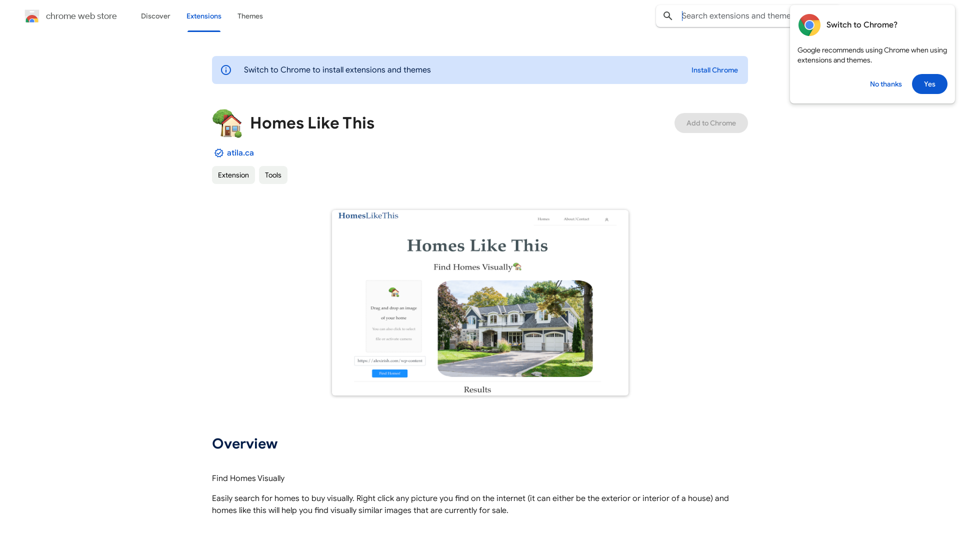
Find Homes Visually is a Chrome extension designed to simplify the process of finding homes for sale based on visual similarities. Created by the owner of atila.ca, this tool allows users to search for properties by right-clicking on any image of a house they find online. The extension then finds visually similar homes currently on the market, making house hunting more intuitive and visually-driven.

Feature

Visual Property Search

Right-click on any image of a house (exterior or interior) found on the internet to initiate a search for visually similar properties currently for sale.

User-Friendly Interface

The extension integrates seamlessly with Chrome, allowing for easy access and use directly from the browser's context menu.

Versatile Search Capabilities

Find Homes Visually can be used to search for various types of properties, including residential homes, commercial properties, and apartments.

Free to Use

The extension is available for free download and use, making it accessible to all users interested in visual property searches.

Compatibility with Public Images

The tool is designed to work with publicly available images of properties, ensuring ethical use of visual data.

FAQ

How do I use Find Homes Visually?

  1. Install the extension from the Chrome Web Store.
  2. Right-click on any picture of a house you find on the internet.
  3. Select "Find Homes Visually" from the context menu to search for visually similar properties currently for sale.

Is Find Homes Visually compatible with all images?

The extension may not work with all types of images. If it doesn't work with one picture, try using different images of properties.

Can I use Find Homes Visually for commercial properties?

Yes, the extension can be used to find similar images of commercial properties and apartments, in addition to residential homes.

Is there any information about data collection and usage?

The developer has not provided specific information about data collection or usage practices for this extension.

Related Websites

Smart Scholar
View Detail

Smart Scholar

Smart Scholar

Finding relevant articles can be a tedious and time-consuming task. Smart Scholar simplifies your search by personalizing search results based on your interests and preferences.

193.90 M
Gmail Bot
View Detail

Gmail Bot

Gmail Bot

Ask ChatGPT about your Gmail messages

193.90 M
Show GPT Chats and More
View Detail

Show GPT Chats and More

Show GPT Chats and More

See GPT's conversations and extra details when you visit the GPT store.

193.90 M
No CAPTCHA Solver
View Detail

No CAPTCHA Solver

No CAPTCHA Solver

Solve CAPTCHA challenges, such as reCAPTCHA and hCAPTCHA.

193.90 M
Flockjay
View Detail

Flockjay

Flockjay

Chrome extension for the Flockjay Sales Elevation Platform

193.90 M
Talkative
View Detail

Talkative

Talkative

Chat with Web-LLM Models in the Browser You can interact with Web-LLM models directly in your web browser without requiring any additional setup or installation. This allows you to easily experiment with and explore the capabilities of these models. Getting Started To get started, simply open a web browser and navigate to the Web-LLM model's website or platform. Once you're on the website, you can usually find a chat interface or text input field where you can enter your prompts or questions. How it Works When you enter a prompt or question, the Web-LLM model processes your input and generates a response. This response is then displayed in the chat interface or output field, allowing you to read and interact with the model's output. Benefits The benefits of chatting with Web-LLM models in the browser include: * Convenience: No need to install any software or set up any development environments. * Accessibility: Anyone with a web browser can interact with the model, regardless of their technical expertise. * Ease of use: The chat interface provides a user-friendly way to interact with the model, making it easy to experiment and explore its capabilities. Use Cases Some potential use cases for chatting with Web-LLM models in the browser include: * Research and development: Quickly experiment with different models and prompts to explore their capabilities and limitations. * Education and learning: Use the chat interface to teach students about AI and language models, or to provide interactive learning experiences. * Creative writing and ideation: Use the model as a tool to generate ideas, write stories, or create poetry. Overall, chatting with Web-LLM models in the browser provides a convenient and accessible way to interact with these powerful language models, and can be a valuable tool for a wide range of applications.

2.59 K
Speech to Text using cantonese.ai
View Detail

Speech to Text using cantonese.ai

Speech to Text using cantonese.ai

The extension lets you turn WhatsApp audio messages into text, saving you time and boosting your productivity!

193.90 M
ChatTuesday.com - Customized Data. Empower with Gen-AI Platform
View Detail

ChatTuesday.com - Customized Data. Empower with Gen-AI Platform

ChatTuesday.com - Customized Data. Empower with Gen-AI Platform

Unlock the full power of a custom-made chatbot, just like ChatGPT, perfectly combined with your unique information.

193.90 M