Open-source RightAI Tools Directory
  • Discover AI
  • Submit
  • Startup
  • Blog
Open-source RightAI Tools Directory
Discover the best AI tools of 2025 with the RightAI Tools Directory!

Friend Links

AI Anime GeneratorToolsApp AI

Support

Tap4
Privacy policyTerms & ConditionsContact Us
Loading...
loading...

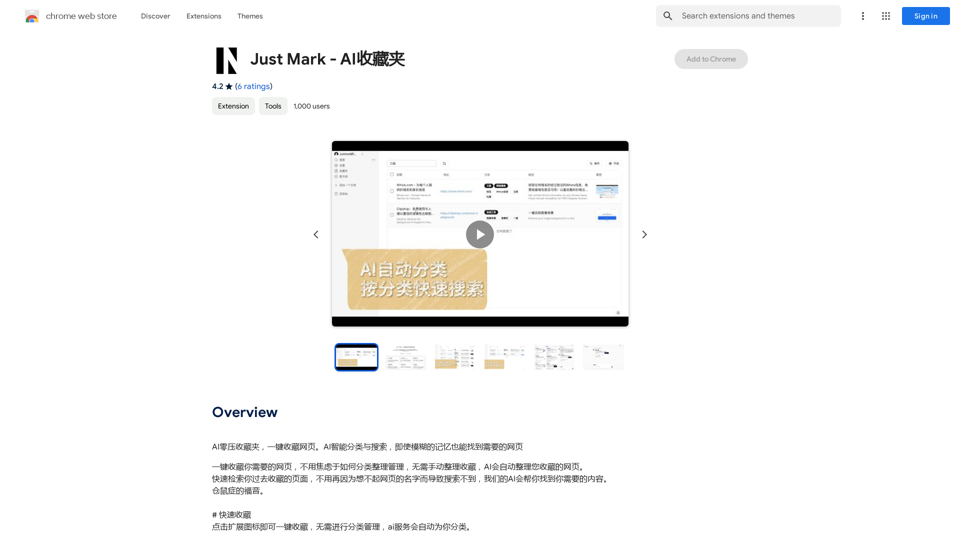
Just Mark - AI Favorites Folder

AI Zero-Pressure Bookmark Folder, one-click to collect web pages. AI intelligent classification and search, even with vague memories, you can find the web pages you need.
Visit Website
Just Mark - AI Favorites Folder
Visit Website

Introduction

Just Mark - AI Bookmark Collection is an innovative Chrome extension that revolutionizes bookmarking with AI-powered features. This tool simplifies the process of collecting and organizing web pages, making it effortless for users to manage their digital content. With intelligent categorization, quick bookmarking, and a user-friendly interface, Just Mark - AI Bookmark Collection offers a seamless experience for both casual and power users.

Feature

Quick Bookmarking

One-click bookmarking functionality allows users to save web pages instantly without manual categorization.

AI-powered Categorization

Utilizes artificial intelligence to automatically categorize bookmarks, enhancing organization and accessibility.

English Website Translation

Offers translation of English websites into Chinese, improving comprehension for non-native English speakers.

Automatic Screenshot

Captures a screenshot of the bookmarked page, providing a visual preview for easy recognition.

Address Bar Search

Enables users to search their bookmarks directly from the Chrome address bar for quick access.

Customizable Labels

Allows creation of personalized labels and categories, tailoring the bookmarking experience to individual needs.

Conversational Interface

Implements natural language interaction for effortless bookmark retrieval and management.

FAQ

How can I maximize my use of Just Mark - AI Bookmark Collection?

  • Leverage the AI-powered categorization for efficient organization
  • Create custom labels to suit your specific needs
  • Utilize the conversational interface for natural bookmark interaction
  • Take advantage of automatic screenshots for quick visual reference

What are the benefits of using Just Mark - AI Bookmark Collection?

  • Convenience in collecting and organizing web pages
  • Customization options for personalized experience
  • AI-powered categorization for efficient bookmark management
  • Natural language interface for intuitive interaction

Is Just Mark - AI Bookmark Collection free?

Yes, the extension is free to download and use. However, a subscription option is available for access to additional features and support.

How does the AI-powered Categorization work?

The extension employs artificial intelligence to analyze bookmark content and automatically categorize them based on relevance and subject matter.

Related Websites

Bing AI Anywhere - GPT 4

Bing AI Anywhere is a cutting-edge technology that integrates the power of artificial intelligence into various aspects of our daily lives. With the latest GPT-4 model, this innovative platform is poised to revolutionize the way we interact, work, and live.

What is GPT-4?

GPT-4 is the fourth generation of the Generative Pre-trained Transformer (GPT) model, a type of artificial intelligence language model developed by OpenAI. This advanced language model is trained on a massive dataset of text from the internet and can generate human-like language, making it an ideal tool for a wide range of applications.

Key Features of Bing AI Anywhere with GPT-4

* Conversational AI: Engage in natural-sounding conversations with Bing AI Anywhere, which can understand and respond to voice or text inputs.
* Contextual Understanding: GPT-4's advanced language model enables Bing AI Anywhere to comprehend context, nuances, and subtleties of language, making interactions more human-like.
* Multitasking: This technology can handle multiple tasks simultaneously, making it an efficient and productive tool for various industries and applications.
* Personalization: Bing AI Anywhere with GPT-4 can learn and adapt to individual preferences, providing a tailored experience for each user.

Potential Applications of Bing AI Anywhere with GPT-4

* Virtual Assistants: Integrate Bing AI Anywhere into virtual assistants to create more conversational and helpful AI-powered companions.
* Customer Service: Implement this technology in customer service platforms to provide 24/7 support and improve customer satisfaction.
* Healthcare: Utilize Bing AI Anywhere with GPT-4 to develop AI-powered chatbots that can assist with medical inquiries, appointments, and more.
* Education: Create interactive and engaging educational tools that can provide personalized learning experiences for students.

The Future of AI with Bing AI Anywhere and GPT-4

As Bing AI Anywhere continues to evolve with the power of GPT-4, we can expect to see even more innovative applications and use cases emerge. This technology has the potential to transform industries, revolutionize the way we work and live, and bring us closer to a future where humans and AI collaborate seamlessly.
View Detail

Bing AI Anywhere - GPT 4 Bing AI Anywhere is a cutting-edge technology that integrates the power of artificial intelligence into various aspects of our daily lives. With the latest GPT-4 model, this innovative platform is poised to revolutionize the way we interact, work, and live. What is GPT-4? GPT-4 is the fourth generation of the Generative Pre-trained Transformer (GPT) model, a type of artificial intelligence language model developed by OpenAI. This advanced language model is trained on a massive dataset of text from the internet and can generate human-like language, making it an ideal tool for a wide range of applications. Key Features of Bing AI Anywhere with GPT-4 * Conversational AI: Engage in natural-sounding conversations with Bing AI Anywhere, which can understand and respond to voice or text inputs. * Contextual Understanding: GPT-4's advanced language model enables Bing AI Anywhere to comprehend context, nuances, and subtleties of language, making interactions more human-like. * Multitasking: This technology can handle multiple tasks simultaneously, making it an efficient and productive tool for various industries and applications. * Personalization: Bing AI Anywhere with GPT-4 can learn and adapt to individual preferences, providing a tailored experience for each user. Potential Applications of Bing AI Anywhere with GPT-4 * Virtual Assistants: Integrate Bing AI Anywhere into virtual assistants to create more conversational and helpful AI-powered companions. * Customer Service: Implement this technology in customer service platforms to provide 24/7 support and improve customer satisfaction. * Healthcare: Utilize Bing AI Anywhere with GPT-4 to develop AI-powered chatbots that can assist with medical inquiries, appointments, and more. * Education: Create interactive and engaging educational tools that can provide personalized learning experiences for students. The Future of AI with Bing AI Anywhere and GPT-4 As Bing AI Anywhere continues to evolve with the power of GPT-4, we can expect to see even more innovative applications and use cases emerge. This technology has the potential to transform industries, revolutionize the way we work and live, and bring us closer to a future where humans and AI collaborate seamlessly.

Bing AI Anywhere - GPT 4 Bing AI Anywhere is a cutting-edge technology that integrates the power of artificial intelligence into various aspects of our daily lives. With the latest GPT-4 model, this innovative platform is poised to revolutionize the way we interact, work, and live. What is GPT-4? GPT-4 is the fourth generation of the Generative Pre-trained Transformer (GPT) model, a type of artificial intelligence language model developed by OpenAI. This advanced language model is trained on a massive dataset of text from the internet and can generate human-like language, making it an ideal tool for a wide range of applications. Key Features of Bing AI Anywhere with GPT-4 * Conversational AI: Engage in natural-sounding conversations with Bing AI Anywhere, which can understand and respond to voice or text inputs. * Contextual Understanding: GPT-4's advanced language model enables Bing AI Anywhere to comprehend context, nuances, and subtleties of language, making interactions more human-like. * Multitasking: This technology can handle multiple tasks simultaneously, making it an efficient and productive tool for various industries and applications. * Personalization: Bing AI Anywhere with GPT-4 can learn and adapt to individual preferences, providing a tailored experience for each user. Potential Applications of Bing AI Anywhere with GPT-4 * Virtual Assistants: Integrate Bing AI Anywhere into virtual assistants to create more conversational and helpful AI-powered companions. * Customer Service: Implement this technology in customer service platforms to provide 24/7 support and improve customer satisfaction. * Healthcare: Utilize Bing AI Anywhere with GPT-4 to develop AI-powered chatbots that can assist with medical inquiries, appointments, and more. * Education: Create interactive and engaging educational tools that can provide personalized learning experiences for students. The Future of AI with Bing AI Anywhere and GPT-4 As Bing AI Anywhere continues to evolve with the power of GPT-4, we can expect to see even more innovative applications and use cases emerge. This technology has the potential to transform industries, revolutionize the way we work and live, and bring us closer to a future where humans and AI collaborate seamlessly.

This extension helps you use Bing AI on Chrome with a popup and website.

193.90 M
Coursera Summary with ChatGPT and Take Notes
=====================================================

What is Coursera?

Coursera is an online learning platform that partners with top universities and organizations to offer courses and degree programs in a wide range of fields.

What is ChatGPT?

ChatGPT is a conversational AI tool that can understand and respond to human input in a human-like way. It can be used to generate text, answer questions, and even create content.

How to Use ChatGPT for Coursera Summary?

You can use ChatGPT to summarize Coursera courses by:

* Providing the course material or lecture notes to ChatGPT
* Asking ChatGPT to summarize the key points or main ideas
* Reviewing and editing the summary generated by ChatGPT

Benefits of Using ChatGPT for Coursera Summary

Using ChatGPT for Coursera summary can help you:

* Save time by automating the summarization process
* Improve understanding and retention of course material
* Focus on key concepts and ideas
* Enhance learning experience

How to Take Notes with ChatGPT?

You can use ChatGPT to take notes by:

* Providing the course material or lecture notes to ChatGPT
* Asking ChatGPT to generate notes or key points
* Reviewing and editing the notes generated by ChatGPT
* Organizing and structuring the notes for easy reference

Benefits of Using ChatGPT for Taking Notes

Using ChatGPT for taking notes can help you:

* Save time by automating the note-taking process
* Improve organization and structure of notes
* Enhance understanding and retention of course material
* Focus on key concepts and ideas
View Detail

Coursera Summary with ChatGPT and Take Notes ===================================================== What is Coursera? Coursera is an online learning platform that partners with top universities and organizations to offer courses and degree programs in a wide range of fields. What is ChatGPT? ChatGPT is a conversational AI tool that can understand and respond to human input in a human-like way. It can be used to generate text, answer questions, and even create content. How to Use ChatGPT for Coursera Summary? You can use ChatGPT to summarize Coursera courses by: * Providing the course material or lecture notes to ChatGPT * Asking ChatGPT to summarize the key points or main ideas * Reviewing and editing the summary generated by ChatGPT Benefits of Using ChatGPT for Coursera Summary Using ChatGPT for Coursera summary can help you: * Save time by automating the summarization process * Improve understanding and retention of course material * Focus on key concepts and ideas * Enhance learning experience How to Take Notes with ChatGPT? You can use ChatGPT to take notes by: * Providing the course material or lecture notes to ChatGPT * Asking ChatGPT to generate notes or key points * Reviewing and editing the notes generated by ChatGPT * Organizing and structuring the notes for easy reference Benefits of Using ChatGPT for Taking Notes Using ChatGPT for taking notes can help you: * Save time by automating the note-taking process * Improve organization and structure of notes * Enhance understanding and retention of course material * Focus on key concepts and ideas

Coursera Summary with ChatGPT and Take Notes ===================================================== What is Coursera? Coursera is an online learning platform that partners with top universities and organizations to offer courses and degree programs in a wide range of fields. What is ChatGPT? ChatGPT is a conversational AI tool that can understand and respond to human input in a human-like way. It can be used to generate text, answer questions, and even create content. How to Use ChatGPT for Coursera Summary? You can use ChatGPT to summarize Coursera courses by: * Providing the course material or lecture notes to ChatGPT * Asking ChatGPT to summarize the key points or main ideas * Reviewing and editing the summary generated by ChatGPT Benefits of Using ChatGPT for Coursera Summary Using ChatGPT for Coursera summary can help you: * Save time by automating the summarization process * Improve understanding and retention of course material * Focus on key concepts and ideas * Enhance learning experience How to Take Notes with ChatGPT? You can use ChatGPT to take notes by: * Providing the course material or lecture notes to ChatGPT * Asking ChatGPT to generate notes or key points * Reviewing and editing the notes generated by ChatGPT * Organizing and structuring the notes for easy reference Benefits of Using ChatGPT for Taking Notes Using ChatGPT for taking notes can help you: * Save time by automating the note-taking process * Improve organization and structure of notes * Enhance understanding and retention of course material * Focus on key concepts and ideas

Automate Your Learning: Coursera Videos Transcript and Summary with ChatGPT ============================================================ Are you tired of manually taking notes while watching Coursera videos? Do you wish you had a summary of the video to review later? Look no further! With the power of ChatGPT, you can now generate transcripts and summaries of Coursera videos with ease. How it Works --------------- 1. Transcribe the Video: Use a transcription tool to convert the audio from the Coursera video into text. 2. Feed it to ChatGPT: Input the transcript into ChatGPT, and it will generate a concise summary of the video. 3. Review and Refine: Review the summary, refine it as needed, and you're good to go! Benefits ------------ * Save Time: No more manual note-taking or re-watching videos to understand the content. * Improve Retention: A summary of the video helps you retain information better and review it quickly. * Enhance Learning: Focus on understanding the concepts rather than taking notes. Get Started -------------- Try it out today and take your learning to the next level!

193.90 M
Reliv
View Detail

Reliv

Reliv

Automate QA Tests in Just 5 Minutes

0
Synopify
View Detail

Synopify

Synopify

Concise summaries and breakdowns of any web page and the company behind it with our AI web assistant

193.90 M
AI ABSOLUT: Prompts, Chat Popup, Select & Chat, +!
View Detail

AI ABSOLUT: Prompts, Chat Popup, Select & Chat, +!

AI ABSOLUT: Prompts, Chat Popup, Select & Chat, +!

AI Lover's Essential Partner! AI Chat Popup From Any Page, Prompt Master List For Any Need, 1 Click Chat To Any Text & More!

193.90 M
AI Deer: AI Korean Sentence Correction Solution
View Detail

AI Deer: AI Korean Sentence Correction Solution

AI Deer: AI Korean Sentence Correction Solution

AI Deer will help you turn your great inspiration into a wonderful piece of writing!

193.90 M
Overcome Copilot AI Message Limit, Export Chats to JSON File: TopicsGPT

This is a tool to help you work around the message limit in Copilot AI and export your conversations to a JSON file. 

Here's how it works:

* Extend Your Conversations: TopicsGPT allows you to continue your conversations with Copilot AI beyond the usual message limit. 

* Save Your History: Export your entire chat history with Copilot AI as a structured JSON file. This makes it easy to review past interactions, analyze your conversations, or even use the data for other purposes.

Benefits:

* No More Interruptions: Keep your creative flow going without worrying about hitting the message limit.
* Organized Data:  Have a clear and organized record of your conversations with Copilot AI.
* Flexibility: Use the exported JSON data for your own projects or analysis. 


Let me know if you have any questions!
View Detail

Overcome Copilot AI Message Limit, Export Chats to JSON File: TopicsGPT This is a tool to help you work around the message limit in Copilot AI and export your conversations to a JSON file. Here's how it works: * Extend Your Conversations: TopicsGPT allows you to continue your conversations with Copilot AI beyond the usual message limit. * Save Your History: Export your entire chat history with Copilot AI as a structured JSON file. This makes it easy to review past interactions, analyze your conversations, or even use the data for other purposes. Benefits: * No More Interruptions: Keep your creative flow going without worrying about hitting the message limit. * Organized Data: Have a clear and organized record of your conversations with Copilot AI. * Flexibility: Use the exported JSON data for your own projects or analysis. Let me know if you have any questions!

Overcome Copilot AI Message Limit, Export Chats to JSON File: TopicsGPT This is a tool to help you work around the message limit in Copilot AI and export your conversations to a JSON file. Here's how it works: * Extend Your Conversations: TopicsGPT allows you to continue your conversations with Copilot AI beyond the usual message limit. * Save Your History: Export your entire chat history with Copilot AI as a structured JSON file. This makes it easy to review past interactions, analyze your conversations, or even use the data for other purposes. Benefits: * No More Interruptions: Keep your creative flow going without worrying about hitting the message limit. * Organized Data: Have a clear and organized record of your conversations with Copilot AI. * Flexibility: Use the exported JSON data for your own projects or analysis. Let me know if you have any questions!

Bypass Copilot's Message Limit and Move Conversations * Get around the message limit in Microsoft's Copilot: Find ways to exceed the character or message count restrictions within Copilot. * Transfer conversations to new chats: Move existing conversations from one chat space to another. Export AI Chat Histories * Download chat history from any AI platform: Save your conversations with various AI systems as JSON files.

193.90 M
Chrome Web Store
View Detail

Chrome Web Store

Chrome Web Store

Enhance your browser with new features and customize your browsing experience.

193.90 M