Open-source RightAI Tools Directory
  • Discover AI
  • Submit
  • Startup
  • Blog
Open-source RightAI Tools Directory
Discover the best AI tools of 2025 with the RightAI Tools Directory!

Friend Links

AI Anime GeneratorToolsApp AI

Support

Tap4
Privacy policyTerms & ConditionsContact Us
Loading...
loading...

PageSage

AI Webpage Answer Finder
Visit Website
PageSage
Visit Website

Introduction

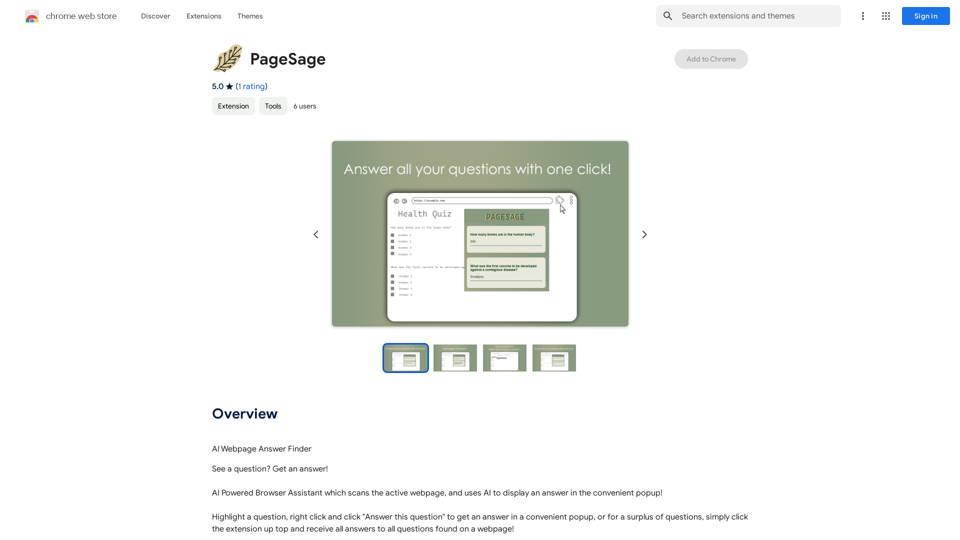
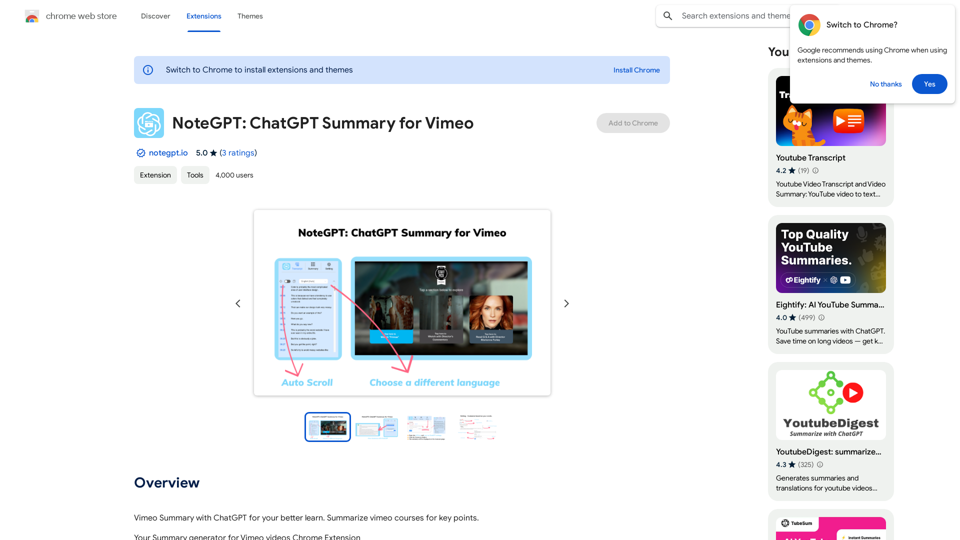
PageSage is an AI-powered browser assistant that simplifies web browsing by providing instant answers to questions about webpage content. This user-friendly extension scans the active webpage and displays answers in a convenient popup, making information retrieval quick and effortless.

Feature

AI-powered Answer Finder

PageSage utilizes advanced AI technology to scan webpages and locate answers to user questions, enhancing the browsing experience with intelligent information retrieval.

Convenient Popup Display

Answers are presented in a user-friendly popup format, ensuring easy access to information without disrupting the browsing flow.

Simple and Intuitive Usage

With no complex setup required, PageSage offers a straightforward user experience:

  1. Highlight a question on the webpage
  2. Click "Answer this question" button
  3. View the answer in a popup

Multiple Question Handling

For pages with numerous questions, users can click the extension icon to receive answers to all questions found on the webpage simultaneously.

Free to Use

PageSage is offered as a free extension, with no subscription or payment required, making it accessible to all users.

Expanding Compatibility

While PageSage may not function perfectly on all websites initially, future updates are expected to broaden webpage support, enhancing its versatility.

FAQ

Is PageSage completely free to use?

Yes, PageSage is a free extension with no subscription or payment required.

How do I get started with PageSage?

To use PageSage:

  1. Highlight a question on the webpage
  2. Click the "Answer this question" button
  3. View the answer in the popup

Will PageSage work on all websites?

PageSage may not work flawlessly on all websites initially. However, expanded webpage support is anticipated in future updates to improve compatibility.

How can I contact the developer if I have questions or issues?

For any questions or issues, you can contact the developer directly at [email protected].

Latest Traffic Insights

  • Monthly Visits

    193.90 M

  • Bounce Rate

    56.27%

  • Pages Per Visit

    2.71

  • Time on Site(s)

    115.91

  • Global Rank

    -

  • Country Rank

    -

Recent Visits

Traffic Sources

  • Social Media:
    0.48%
  • Paid Referrals:
    0.55%
  • Email:
    0.15%
  • Referrals:
    12.81%
  • Search Engines:
    16.21%
  • Direct:
    69.81%
More Data

Related Websites

I Listen AI
View Detail

I Listen AI

I Listen AI

I Listen AI

193.90 M
SliceX AI Tweet Analyzer
View Detail

SliceX AI Tweet Analyzer

SliceX AI Tweet Analyzer

Search for tweets and get real-time statistics: general sentiment, toxicity levels, and emotions expressed.

193.90 M
Circle to Search - Circle it, Find it
View Detail

Circle to Search - Circle it, Find it

Circle to Search - Circle it, Find it

Enhance your search experience with AI, from curiosity to insight, just one drag away!

193.90 M
AI Quick Links
View Detail

AI Quick Links

AI Quick Links

Ai Quick Links is a collection of AI tools for your new tab page, which also includes a Bing search bar.

193.90 M
Quick Action
View Detail

Quick Action

Quick Action

A secure layer connecting to the latest GPT-4 32k model hosted in an encrypted environment.

193.90 M
Overcome Copilot AI Message Limit, Export Chats to JSON File: TopicsGPT

This is a tool to help you work around the message limit in Copilot AI and export your conversations to a JSON file. 

Here's how it works:

* Extend Your Conversations: TopicsGPT allows you to continue your conversations with Copilot AI beyond the usual message limit. 

* Save Your History: Export your entire chat history with Copilot AI as a structured JSON file. This makes it easy to review past interactions, analyze your conversations, or even use the data for other purposes.

Benefits:

* No More Interruptions: Keep your creative flow going without worrying about hitting the message limit.
* Organized Data:  Have a clear and organized record of your conversations with Copilot AI.
* Flexibility: Use the exported JSON data for your own projects or analysis. 


Let me know if you have any questions!
View Detail

Overcome Copilot AI Message Limit, Export Chats to JSON File: TopicsGPT This is a tool to help you work around the message limit in Copilot AI and export your conversations to a JSON file. Here's how it works: * Extend Your Conversations: TopicsGPT allows you to continue your conversations with Copilot AI beyond the usual message limit. * Save Your History: Export your entire chat history with Copilot AI as a structured JSON file. This makes it easy to review past interactions, analyze your conversations, or even use the data for other purposes. Benefits: * No More Interruptions: Keep your creative flow going without worrying about hitting the message limit. * Organized Data: Have a clear and organized record of your conversations with Copilot AI. * Flexibility: Use the exported JSON data for your own projects or analysis. Let me know if you have any questions!

Overcome Copilot AI Message Limit, Export Chats to JSON File: TopicsGPT This is a tool to help you work around the message limit in Copilot AI and export your conversations to a JSON file. Here's how it works: * Extend Your Conversations: TopicsGPT allows you to continue your conversations with Copilot AI beyond the usual message limit. * Save Your History: Export your entire chat history with Copilot AI as a structured JSON file. This makes it easy to review past interactions, analyze your conversations, or even use the data for other purposes. Benefits: * No More Interruptions: Keep your creative flow going without worrying about hitting the message limit. * Organized Data: Have a clear and organized record of your conversations with Copilot AI. * Flexibility: Use the exported JSON data for your own projects or analysis. Let me know if you have any questions!

Bypass Copilot's Message Limit and Move Conversations * Get around the message limit in Microsoft's Copilot: Find ways to exceed the character or message count restrictions within Copilot. * Transfer conversations to new chats: Move existing conversations from one chat space to another. Export AI Chat Histories * Download chat history from any AI platform: Save your conversations with various AI systems as JSON files.

193.90 M
Searchable ChatGPT: Search GPT Conversation History

With the rapid development of artificial intelligence technology, ChatGPT has become an essential tool for people to communicate and interact with AI. However, as the conversation history grows, it becomes increasingly difficult to find specific conversations or topics. To address this issue, we propose the concept of Searchable ChatGPT, which enables users to search their GPT conversation history efficiently.

Key Features

1. Keyword Search

Users can input specific keywords or phrases to search for relevant conversations in their chat history. The system will then display a list of conversations that match the search criteria, allowing users to quickly find the information they need.

2. Contextual Search

In addition to keyword search, users can also search for conversations based on context. For example, they can search for conversations related to a specific topic, such as "travel" or "cooking." The system will then display a list of conversations that are relevant to the specified context.

3. Conversation Filtering

To further refine the search results, users can apply filters to narrow down the list of conversations. For instance, they can filter conversations by date, time, or even the emotions expressed during the conversation.

4. Conversation Analytics

Searchable ChatGPT also provides users with conversation analytics, which offer insights into their conversation patterns and preferences. This feature can help users identify areas for improvement and optimize their communication with ChatGPT.

Benefits

1. Improved Productivity

Searchable ChatGPT saves users time and effort by allowing them to quickly find specific conversations or topics in their chat history.

2. Enhanced User Experience

By providing users with a more efficient way to search and analyze their conversations, Searchable ChatGPT enhances the overall user experience and encourages more effective communication with ChatGPT.

3. Better Decision Making

With access to conversation analytics, users can make more informed decisions by identifying patterns and trends in their conversations with ChatGPT.

Conclusion

Searchable ChatGPT is a powerful tool that revolutionizes the way users interact with ChatGPT. By providing a robust search function, contextual search, conversation filtering, and conversation analytics, Searchable ChatGPT improves productivity, enhances the user experience, and enables better decision making.
View Detail

Searchable ChatGPT: Search GPT Conversation History With the rapid development of artificial intelligence technology, ChatGPT has become an essential tool for people to communicate and interact with AI. However, as the conversation history grows, it becomes increasingly difficult to find specific conversations or topics. To address this issue, we propose the concept of Searchable ChatGPT, which enables users to search their GPT conversation history efficiently. Key Features 1. Keyword Search Users can input specific keywords or phrases to search for relevant conversations in their chat history. The system will then display a list of conversations that match the search criteria, allowing users to quickly find the information they need. 2. Contextual Search In addition to keyword search, users can also search for conversations based on context. For example, they can search for conversations related to a specific topic, such as "travel" or "cooking." The system will then display a list of conversations that are relevant to the specified context. 3. Conversation Filtering To further refine the search results, users can apply filters to narrow down the list of conversations. For instance, they can filter conversations by date, time, or even the emotions expressed during the conversation. 4. Conversation Analytics Searchable ChatGPT also provides users with conversation analytics, which offer insights into their conversation patterns and preferences. This feature can help users identify areas for improvement and optimize their communication with ChatGPT. Benefits 1. Improved Productivity Searchable ChatGPT saves users time and effort by allowing them to quickly find specific conversations or topics in their chat history. 2. Enhanced User Experience By providing users with a more efficient way to search and analyze their conversations, Searchable ChatGPT enhances the overall user experience and encourages more effective communication with ChatGPT. 3. Better Decision Making With access to conversation analytics, users can make more informed decisions by identifying patterns and trends in their conversations with ChatGPT. Conclusion Searchable ChatGPT is a powerful tool that revolutionizes the way users interact with ChatGPT. By providing a robust search function, contextual search, conversation filtering, and conversation analytics, Searchable ChatGPT improves productivity, enhances the user experience, and enables better decision making.

Searchable ChatGPT: Search GPT Conversation History With the rapid development of artificial intelligence technology, ChatGPT has become an essential tool for people to communicate and interact with AI. However, as the conversation history grows, it becomes increasingly difficult to find specific conversations or topics. To address this issue, we propose the concept of Searchable ChatGPT, which enables users to search their GPT conversation history efficiently. Key Features 1. Keyword Search Users can input specific keywords or phrases to search for relevant conversations in their chat history. The system will then display a list of conversations that match the search criteria, allowing users to quickly find the information they need. 2. Contextual Search In addition to keyword search, users can also search for conversations based on context. For example, they can search for conversations related to a specific topic, such as "travel" or "cooking." The system will then display a list of conversations that are relevant to the specified context. 3. Conversation Filtering To further refine the search results, users can apply filters to narrow down the list of conversations. For instance, they can filter conversations by date, time, or even the emotions expressed during the conversation. 4. Conversation Analytics Searchable ChatGPT also provides users with conversation analytics, which offer insights into their conversation patterns and preferences. This feature can help users identify areas for improvement and optimize their communication with ChatGPT. Benefits 1. Improved Productivity Searchable ChatGPT saves users time and effort by allowing them to quickly find specific conversations or topics in their chat history. 2. Enhanced User Experience By providing users with a more efficient way to search and analyze their conversations, Searchable ChatGPT enhances the overall user experience and encourages more effective communication with ChatGPT. 3. Better Decision Making With access to conversation analytics, users can make more informed decisions by identifying patterns and trends in their conversations with ChatGPT. Conclusion Searchable ChatGPT is a powerful tool that revolutionizes the way users interact with ChatGPT. By providing a robust search function, contextual search, conversation filtering, and conversation analytics, Searchable ChatGPT improves productivity, enhances the user experience, and enables better decision making.

Search ChatGPT conversation history instantly. Fully local and private. Press sidebar button or hotkey

193.90 M
XOR Extension RU
View Detail

XOR Extension RU

XOR Extension RU

XOR Extension helps recruiters communicate with candidates from ATS, job boards, or LinkedIn.

193.90 M