Open-source RightAI Tools Directory
  • Discover AI
  • Submit
  • Startup
  • Blog
Open-source RightAI Tools Directory
Discover the best AI tools of 2025 with the RightAI Tools Directory!

Friend Links

AI Anime GeneratorToolsApp AI

Support

Tap4
Privacy policyTerms & ConditionsContact Us
Loading...
loading...

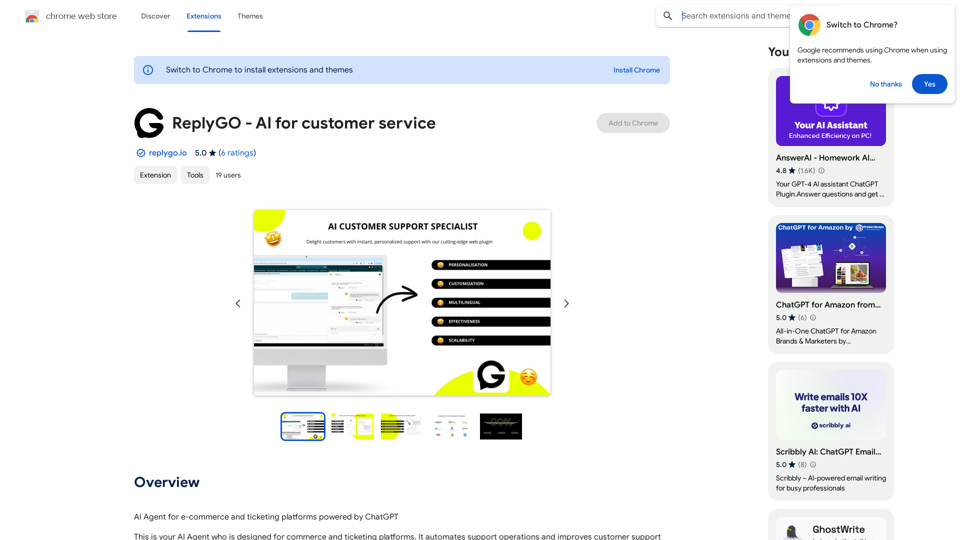
ReplyGO - AI for Customer Service

AI Agent for e-commerce and ticketing platforms powered by ChatGPT
Visit Website
ReplyGO - AI for Customer Service
Visit Website

Introduction

ReplyGO is an AI-powered customer service platform designed for e-commerce and ticketing platforms. It utilizes ChatGPT technology to automate support operations, enhancing customer support productivity and efficiency. ReplyGO simplifies customer interactions on platforms like Amazon, Etsy, Zendesk, Gmail, and Meta Business Suite, providing personalized answers based on client information and brand tone.

Feature

AI Agent for E-commerce and Ticketing Platforms

ReplyGO's AI agent simplifies customer problems and questions on existing e-commerce and ticketing platforms, including Amazon, Etsy, Zendesk, Gmail, and Meta Business Suite.

Personalized Answers

The AI agent provides tailored responses to customer inquiries based on client information, chat history, language, brand tone, and other factors, mimicking human-to-human communication for an excellent customer experience.

Easy Installation and Customization

Installing ReplyGO is straightforward:

  1. Install it in your Chrome browser
  2. Log in to your account
  3. Customize your agent
  4. Start using it on your platform

Automated Support Operations

ReplyGO's AI-powered technology automates support operations, improving customer support productivity and efficiency while enhancing the overall customer experience.

Flexible Pricing

ReplyGO offers in-app purchases, allowing users to customize their subscription plan according to their specific needs and requirements.

FAQ

What platforms does ReplyGO support?

ReplyGO supports e-commerce and ticketing platforms like Amazon, Etsy, Zendesk, Gmail, and Meta Business Suite.

How does ReplyGO's AI agent work?

The AI agent uses ChatGPT technology to identify customer problems and suggest personalized answers based on client information, chat history, language, brand tone, and other factors.

Is ReplyGO secure?

ReplyGO handles personally identifiable information, authentication information, personal communications, and website content. The company declares that user data is not being sold to third parties or used for purposes unrelated to the item's core functionality.

Related Websites

AI Voice Over for YouTube 

This is a guide to using AI voice over for your YouTube videos. 

Why Use AI Voice Over?

* Cost-Effective: AI voice over is much cheaper than hiring a professional voice actor.
* Time-Saving: You can generate voice over quickly and easily, without needing to schedule recording sessions.
* Variety of Voices: Choose from a wide range of AI voices, including male, female, and even robotic voices.
* Accessibility: Make your videos accessible to viewers who are deaf or hard of hearing by adding captions generated by AI.

How to Use AI Voice Over

1. Choose a Platform: There are many different platforms that offer AI voice over services, such as:
    * Google Cloud Text-to-Speech
    * Amazon Polly
    * Microsoft Azure Text to Speech
    * Murf.ai
    * NaturalReader
2. Write Your Script:  Write a clear and concise script for your video.
3. Upload Your Script:  Upload your script to the chosen platform.
4. Select a Voice: Choose the voice that best suits your video.
5. Adjust Settings:  Adjust settings such as speed, pitch, and volume.
6. Generate Voice Over:  Click the "Generate" button to create your voice over.
7. Download and Edit: Download the generated voice over file and edit it as needed.
8. Add to Your Video:  Add the voice over to your YouTube video.

Tips for Using AI Voice Over

* Use Natural Language:  Write your script as if you were speaking naturally.
* Vary Your Tone:  Use different tones of voice to keep your viewers engaged.
* Add Pauses:  Include pauses in your script to allow viewers to process information.
* Proofread Carefully:  Always proofread your script before generating the voice over.
* Experiment:  Try different voices, settings, and styles to find what works best for you.
View Detail

AI Voice Over for YouTube This is a guide to using AI voice over for your YouTube videos. Why Use AI Voice Over? * Cost-Effective: AI voice over is much cheaper than hiring a professional voice actor. * Time-Saving: You can generate voice over quickly and easily, without needing to schedule recording sessions. * Variety of Voices: Choose from a wide range of AI voices, including male, female, and even robotic voices. * Accessibility: Make your videos accessible to viewers who are deaf or hard of hearing by adding captions generated by AI. How to Use AI Voice Over 1. Choose a Platform: There are many different platforms that offer AI voice over services, such as: * Google Cloud Text-to-Speech * Amazon Polly * Microsoft Azure Text to Speech * Murf.ai * NaturalReader 2. Write Your Script: Write a clear and concise script for your video. 3. Upload Your Script: Upload your script to the chosen platform. 4. Select a Voice: Choose the voice that best suits your video. 5. Adjust Settings: Adjust settings such as speed, pitch, and volume. 6. Generate Voice Over: Click the "Generate" button to create your voice over. 7. Download and Edit: Download the generated voice over file and edit it as needed. 8. Add to Your Video: Add the voice over to your YouTube video. Tips for Using AI Voice Over * Use Natural Language: Write your script as if you were speaking naturally. * Vary Your Tone: Use different tones of voice to keep your viewers engaged. * Add Pauses: Include pauses in your script to allow viewers to process information. * Proofread Carefully: Always proofread your script before generating the voice over. * Experiment: Try different voices, settings, and styles to find what works best for you.

AI Voice Over for YouTube This is a guide to using AI voice over for your YouTube videos. Why Use AI Voice Over? * Cost-Effective: AI voice over is much cheaper than hiring a professional voice actor. * Time-Saving: You can generate voice over quickly and easily, without needing to schedule recording sessions. * Variety of Voices: Choose from a wide range of AI voices, including male, female, and even robotic voices. * Accessibility: Make your videos accessible to viewers who are deaf or hard of hearing by adding captions generated by AI. How to Use AI Voice Over 1. Choose a Platform: There are many different platforms that offer AI voice over services, such as: * Google Cloud Text-to-Speech * Amazon Polly * Microsoft Azure Text to Speech * Murf.ai * NaturalReader 2. Write Your Script: Write a clear and concise script for your video. 3. Upload Your Script: Upload your script to the chosen platform. 4. Select a Voice: Choose the voice that best suits your video. 5. Adjust Settings: Adjust settings such as speed, pitch, and volume. 6. Generate Voice Over: Click the "Generate" button to create your voice over. 7. Download and Edit: Download the generated voice over file and edit it as needed. 8. Add to Your Video: Add the voice over to your YouTube video. Tips for Using AI Voice Over * Use Natural Language: Write your script as if you were speaking naturally. * Vary Your Tone: Use different tones of voice to keep your viewers engaged. * Add Pauses: Include pauses in your script to allow viewers to process information. * Proofread Carefully: Always proofread your script before generating the voice over. * Experiment: Try different voices, settings, and styles to find what works best for you.

Watch foreign language YouTube videos in your own language.

193.90 M
AutoVerify
View Detail

AutoVerify

AutoVerify

Fully automatic, high-precision CAPTCHA recognition and filling solution. Improve your work efficiency and free your hands.

193.90 M
Musemind
View Detail

Musemind

Musemind

Improve your social media posts on platforms like Twitter, Facebook, LinkedIn, and Gmail with customized replies.

193.90 M
Kuakua - Psychology and AI Tools for Well-Being
View Detail

Kuakua - Psychology and AI Tools for Well-Being

Kuakua - Psychology and AI Tools for Well-Being

Explore psychology, AI tools, mindfulness, lifestyle, and therapy resources. Find happy languages, tasks, websites, and apps to boost your well-being and happiness.

0
ChatDev IDE: Building Your AI Agent
View Detail

ChatDev IDE: Building Your AI Agent

ChatDev IDE: Building Your AI Agent

Personalize your AI Town and build your GPTs with PromptIDE.

193.90 M
Free AI Face Swap - Photo & Video
View Detail

Free AI Face Swap - Photo & Video

Free AI Face Swap - Photo & Video

Free AI Face Swapper supports single photo face swaps, multiple photo face swaps, and video face swaps!

193.90 M
Aria - AI Chat&Speak Assistant on the App Store
View Detail

Aria - AI Chat&Speak Assistant on the App Store

Aria - AI Chat&Speak Assistant on the App Store

I'm Aria, your voice-activated AI chatbot assistant, here to transform how you interact with your digital world using the power of speech. With a vast array of…

124.77 M
Podly - AI Toolset for Merch By Amazon
View Detail

Podly - AI Toolset for Merch By Amazon

Podly - AI Toolset for Merch By Amazon

Introducing AI Listing Creator by Podly, a revolutionary tool that uses artificial intelligence technology to help Merch by Amazon sellers create high-quality product listings quickly and efficiently.

193.90 M