Open-source RightAI Tools Directory
  • Discover AI
  • Submit
  • Startup
  • Blog
Open-source RightAI Tools Directory
Discover the best AI tools of 2025 with the RightAI Tools Directory!

Friend Links

AI Anime GeneratorToolsApp AI

Support

Tap4
Privacy policyTerms & ConditionsContact Us
Loading...
loading...

VMX – Powered by LotLinx

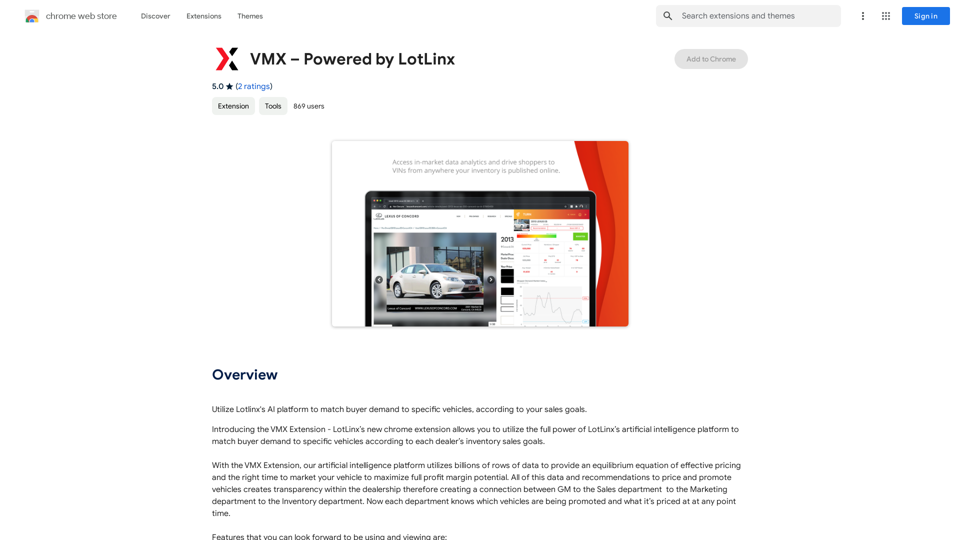
Utilize Lotlinx's AI platform to match buyer demand to specific vehicles, according to your sales goals.
Visit Website
VMX – Powered by LotLinx
Visit Website

Introduction

VMX is a Chrome extension powered by LotLinx, an AI-driven platform for the automotive industry. It leverages billions of data points to optimize vehicle pricing and marketing timing, aiming to maximize profit margins for dealerships. VMX offers a suite of features designed to enhance vehicle sales strategies through data-driven insights and AI-powered recommendations.

Feature

AI-Powered Boosting

VMX's AI platform recommends optimal times to promote vehicles, a feature called "Boost". This function utilizes LotLinx's machine learning omnichannel platform to drive potential buyers to Vehicle Detail Pages (VDPs).

Intelligent Price Recommendation

The extension provides price recommendations based on LotLinx's proprietary shopper and market data. This feature allows dealers to compare their current listing prices with AI-suggested prices, offering a competitive edge beyond simple discounting.

Shopper Demand Analysis

VMX includes a proprietary Shopper Demand Market Index, displaying the number of shoppers and rated demand in the dealer's market area for specific vehicles. This data is presented in an easy-to-understand graph showing high or low demand.

VDP and Price Correlation

A graph feature correlates Google Analytics VDP data with pricing information, providing insights into the relationship between a vehicle's price and its VDP views over time.

Third-Party Listing Integration

VMX compiles badges and rankings from major listing portals (CarGurus, Autotrader, and Cars.com) for each vehicle, offering context on current pricing in relation to these platforms.

FAQ

What is the primary purpose of VMX?

VMX is designed to help automotive dealers optimize their vehicle pricing and marketing strategies using AI-driven insights and recommendations.

How does the Boosting feature work?

The Boosting feature uses AI to recommend the best times to promote a vehicle, effectively advertising it through LotLinx's platform to drive potential buyers to the dealer's VDPs.

Can VMX help with pricing strategies?

Yes, VMX offers a Price Recommendation feature that compares current listing prices with AI-suggested prices based on market data and shopper demand.

Does VMX provide information on market demand?

VMX includes a Shopper Demand Market Index that shows the number of shoppers and rated demand for specific vehicles in the dealer's market area.

How does VMX integrate with third-party listing sites?

VMX compiles badges and rankings from CarGurus, Autotrader, and Cars.com, providing context on how a vehicle's current price compares on these platforms.

Related Websites

GPT Chinese Station - Experience the Official Chinese Website of ChatGPT, GPT-4, Midjourney AI Painting, AI Programming, AI Translation, and AI Creation.
View Detail

GPT Chinese Station - Experience the Official Chinese Website of ChatGPT, GPT-4, Midjourney AI Painting, AI Programming, AI Translation, and AI Creation.

GPT Chinese Station - Experience the Official Chinese Website of ChatGPT, GPT-4, Midjourney AI Painting, AI Programming, AI Translation, and AI Creation.

Experience the Chinese official website of ChatGPT, GPT-4, Midjourney AI painting, AI programming, AI translation, and AI creation.

1.25 K
Scrape G2 Reviews and Download to Excel - Extract G2 Reviews Data Easily
View Detail

Scrape G2 Reviews and Download to Excel - Extract G2 Reviews Data Easily

Scrape G2 Reviews and Download to Excel - Extract G2 Reviews Data Easily

Instantly download G2 product reviews

193.90 M
Visual Search
View Detail

Visual Search

Visual Search

This extension connects Flickr Explore with EyeRecognize's image search feature.

193.90 M
LogoAI.ai: Free Online AI Logo Creator
View Detail

LogoAI.ai: Free Online AI Logo Creator

LogoAI.ai: Free Online AI Logo Creator

Create unique and professional logos effortlessly with LogoAI.ai's AI logo maker. Enjoy free online access, advanced customization, watermark-free logos, and secure design.

129.09 K
Journey ArtPrompt with Midjourney

This guide will walk you through creating stunning artwork using Midjourney, a powerful AI art generator. 

1. Accessing Midjourney

* You'll need a Discord account to use Midjourney. 
* Join the official Midjourney server: [https://discord.gg/midjourney](https://discord.gg/midjourney)

2. Understanding the Basics

* `/imagine` Command: This is the core command for generating images.
* Prompt:  A text description of the artwork you want to create. Be specific and descriptive!
* Parameters: Options that control aspects like image size, aspect ratio, and style.

3. Crafting Your Journey Prompt

Think about the story you want to tell with your artwork.  

* Setting: Where does your journey take place? (e.g., a mystical forest, a futuristic city, a desolate wasteland)
* Characters: Who is on this journey? (e.g., a lone traveler, a group of adventurers, mythical creatures)
* Mood: What feeling do you want to evoke? (e.g., adventurous, mysterious, hopeful, melancholic)
* Style: What artistic style appeals to you? (e.g., photorealistic, painterly, abstract)

4. Putting it Together

Combine these elements into a clear and concise prompt. 

Example:

`/imagine A lone traveler journeys through a mystical forest at sunset, bathed in golden light. The path ahead is shrouded in mist, hinting at unknown wonders. Style: painterly, ethereal`

5. Experiment and Refine

* Midjourney is all about experimentation! Try different prompts, parameters, and styles.
* Use the "upscale" command to enlarge your favorite images and reveal more detail.
* Don't be afraid to iterate and refine your prompts based on the results.
View Detail

Journey ArtPrompt with Midjourney This guide will walk you through creating stunning artwork using Midjourney, a powerful AI art generator. 1. Accessing Midjourney * You'll need a Discord account to use Midjourney. * Join the official Midjourney server: [https://discord.gg/midjourney](https://discord.gg/midjourney) 2. Understanding the Basics * `/imagine` Command: This is the core command for generating images. * Prompt: A text description of the artwork you want to create. Be specific and descriptive! * Parameters: Options that control aspects like image size, aspect ratio, and style. 3. Crafting Your Journey Prompt Think about the story you want to tell with your artwork. * Setting: Where does your journey take place? (e.g., a mystical forest, a futuristic city, a desolate wasteland) * Characters: Who is on this journey? (e.g., a lone traveler, a group of adventurers, mythical creatures) * Mood: What feeling do you want to evoke? (e.g., adventurous, mysterious, hopeful, melancholic) * Style: What artistic style appeals to you? (e.g., photorealistic, painterly, abstract) 4. Putting it Together Combine these elements into a clear and concise prompt. Example: `/imagine A lone traveler journeys through a mystical forest at sunset, bathed in golden light. The path ahead is shrouded in mist, hinting at unknown wonders. Style: painterly, ethereal` 5. Experiment and Refine * Midjourney is all about experimentation! Try different prompts, parameters, and styles. * Use the "upscale" command to enlarge your favorite images and reveal more detail. * Don't be afraid to iterate and refine your prompts based on the results.

Journey ArtPrompt with Midjourney This guide will walk you through creating stunning artwork using Midjourney, a powerful AI art generator. 1. Accessing Midjourney * You'll need a Discord account to use Midjourney. * Join the official Midjourney server: [https://discord.gg/midjourney](https://discord.gg/midjourney) 2. Understanding the Basics * `/imagine` Command: This is the core command for generating images. * Prompt: A text description of the artwork you want to create. Be specific and descriptive! * Parameters: Options that control aspects like image size, aspect ratio, and style. 3. Crafting Your Journey Prompt Think about the story you want to tell with your artwork. * Setting: Where does your journey take place? (e.g., a mystical forest, a futuristic city, a desolate wasteland) * Characters: Who is on this journey? (e.g., a lone traveler, a group of adventurers, mythical creatures) * Mood: What feeling do you want to evoke? (e.g., adventurous, mysterious, hopeful, melancholic) * Style: What artistic style appeals to you? (e.g., photorealistic, painterly, abstract) 4. Putting it Together Combine these elements into a clear and concise prompt. Example: `/imagine A lone traveler journeys through a mystical forest at sunset, bathed in golden light. The path ahead is shrouded in mist, hinting at unknown wonders. Style: painterly, ethereal` 5. Experiment and Refine * Midjourney is all about experimentation! Try different prompts, parameters, and styles. * Use the "upscale" command to enlarge your favorite images and reveal more detail. * Don't be afraid to iterate and refine your prompts based on the results.

New backgrounds with Midjourney on new tabs

193.90 M
AI Powered Image Generator for Unique and Custom Images
View Detail

AI Powered Image Generator for Unique and Custom Images

AI Powered Image Generator for Unique and Custom Images

Create unique and custom images effortlessly with iPic.Ai - the AI-powered image generator.

68.28 K
Alt Text Generator for Webflow 

This tool helps you generate descriptive alt text for your Webflow images. 

Why is Alt Text Important?

* Accessibility: Alt text allows screen readers to describe images to visually impaired users.
* SEO: Search engines use alt text to understand the content of your images, improving your website's ranking.

How to Use:

1. Paste your image URL: Enter the URL of the image you want to generate alt text for.
2. Click "Generate Alt Text": The tool will analyze the image and suggest relevant alt text.
3. Review and Edit:  Read the generated alt text and make any necessary changes to ensure it accurately describes the image.

Example:

Image URL: https://www.example.com/image.jpg

Generated Alt Text: A photo of a smiling woman holding a cup of coffee.

Remember:

* Keep alt text concise and descriptive.
* Use keywords that accurately reflect the image content.
* Avoid using generic phrases like "image" or "picture."
View Detail

Alt Text Generator for Webflow This tool helps you generate descriptive alt text for your Webflow images. Why is Alt Text Important? * Accessibility: Alt text allows screen readers to describe images to visually impaired users. * SEO: Search engines use alt text to understand the content of your images, improving your website's ranking. How to Use: 1. Paste your image URL: Enter the URL of the image you want to generate alt text for. 2. Click "Generate Alt Text": The tool will analyze the image and suggest relevant alt text. 3. Review and Edit: Read the generated alt text and make any necessary changes to ensure it accurately describes the image. Example: Image URL: https://www.example.com/image.jpg Generated Alt Text: A photo of a smiling woman holding a cup of coffee. Remember: * Keep alt text concise and descriptive. * Use keywords that accurately reflect the image content. * Avoid using generic phrases like "image" or "picture."

Alt Text Generator for Webflow This tool helps you generate descriptive alt text for your Webflow images. Why is Alt Text Important? * Accessibility: Alt text allows screen readers to describe images to visually impaired users. * SEO: Search engines use alt text to understand the content of your images, improving your website's ranking. How to Use: 1. Paste your image URL: Enter the URL of the image you want to generate alt text for. 2. Click "Generate Alt Text": The tool will analyze the image and suggest relevant alt text. 3. Review and Edit: Read the generated alt text and make any necessary changes to ensure it accurately describes the image. Example: Image URL: https://www.example.com/image.jpg Generated Alt Text: A photo of a smiling woman holding a cup of coffee. Remember: * Keep alt text concise and descriptive. * Use keywords that accurately reflect the image content. * Avoid using generic phrases like "image" or "picture."

Big update! Reconfigured the API to get rid of cold starts. What does this mean? Faster alt text generation! Completely redesigned...

193.90 M
Launch Your App in Days, Not Weeks | ShipAppFast
View Detail

Launch Your App in Days, Not Weeks | ShipAppFast

Launch Your App in Days, Not Weeks | ShipAppFast

The Swift boilerplate with all the necessary elements to bring your product to customers. From concept to production in just 5 minutes.

0