Open-source RightAI Tools Directory
  • Discover AI
  • Submit
  • Startup
  • Blog
Open-source RightAI Tools Directory
Discover the best AI tools of 2025 with the RightAI Tools Directory!

Friend Links

AI Anime GeneratorToolsApp AI

Support

Tap4
Privacy policyTerms & ConditionsContact Us
Loading...
loading...

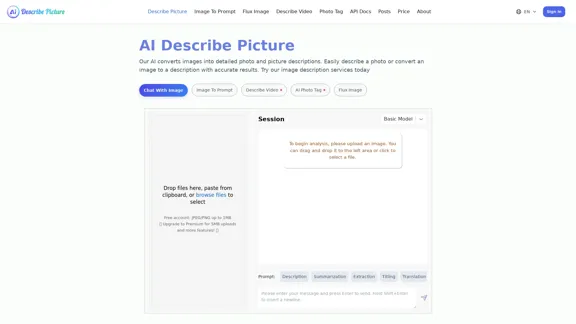
AI Image Description, Markdown, and Text Converter

Explore AI-powered image descriptions with Describe Picture. Get instant insights and connect with visuals in new ways. Join us now!
Visit Website
AI Image Description, Markdown, and Text Converter
Visit Website

Introduction

Describe Image & Picture is an AI-powered platform that converts images into detailed descriptions, making image processing efficient and accessible. Users can easily upload images and receive accurate descriptions, markdown content, and even coding outputs. The service is designed for various applications, from social media to professional documentation, enhancing productivity and creativity.

Feature

  1. Image Description

    The AI accurately describes images, providing detailed and contextual information that can be used for various purposes.

  2. Text Extraction

    It can recognize and extract text from images, converting it into an editable format quickly and precisely.

  3. Markdown Content Extraction

    Users can convert content from images into markdown format, making it easy to integrate into documents or web pages.

  4. Web Screenshot to Code

    The platform can analyze web page screenshots and convert them into HTML, CSS, or JavaScript code, streamlining web development processes.

  5. User-Friendly Interface

    The service features a simple interface that allows users to upload images and receive outputs with minimal effort.

  6. Customization Options

    Users can create personalized content based on their specific requirements, enhancing the creative process.

How to Use?

  1. Visit the Describe Image & Picture website and sign in to your account.
  2. Upload your image by dragging and dropping it into the designated area or selecting it from your files.
  3. Choose the desired output type (description, markdown, or code) based on your needs.
  4. Review the generated content and make any necessary adjustments.
  5. Download or copy the output for use in your projects.

FAQ

What is Describe Image & Picture?

Describe Image & Picture is an AI tool that converts images into detailed descriptions and other formats, enhancing image processing efficiency.

How does the image description feature work?

Users upload an image, and the AI analyzes it to generate a detailed description based on its content.

Can I extract text from images?

Yes, the platform can accurately recognize and extract text from images, converting it into an editable format.

Is the markdown content extraction feature easy to use?

Absolutely, users can quickly convert image content into markdown format with just a few clicks.

What types of images can I use with this tool?

The tool is suitable for various image types, including scanned documents, infographics, and photographs.

Price

PlanPrice
Free Account$0/month
Premium Plan$9.99/month
Standard Plan$19.99/month
Professional Plan$49.99/month
The price is for reference only, please refer to the latest official data for actual information.

Evaluation

  1. The platform excels in providing accurate and detailed descriptions, making it a valuable tool for users needing quick image analysis.
  2. The text extraction feature is efficient, saving time on manual transcription tasks.
  3. The markdown content extraction is a significant advantage for users who need to integrate image content into documents seamlessly.
  4. However, the platform could improve by offering more advanced customization options for users with specific needs.
  5. The pricing structure may be a barrier for some users, particularly those who only require occasional use of the service.
  6. Overall, Describe Image & Picture is a powerful tool for enhancing productivity in image processing, but it could benefit from additional features and a more flexible pricing model.

Related Websites
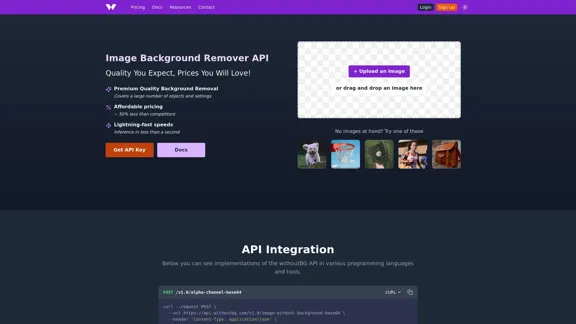
Instant Background Remover
View Detail

Instant Background Remover

Instant Background Remover

Easily remove image backgrounds from any website with just two clicks!🚀

193.90 M
Cloudbooklet AI Tools, AI News & More
View Detail

Cloudbooklet AI Tools, AI News & More

Cloudbooklet AI Tools, AI News & More

Cloudbooklet AI is the free and most popular source to find and use all the artificial intelligence tools and AI news. Follow us to stay updated in AI.

167.63 K
Nude AI Generator – Uncensored AI Image Generator
View Detail

Nude AI Generator – Uncensored AI Image Generator

Nude AI Generator – Uncensored AI Image Generator

Nude AI Generator is an advanced tool designed to create custom adult artwork using artificial intelligence.

11.06 K
Toucu AI Directory | Curated List of over 8,000 AI Tools in 2024
View Detail

Toucu AI Directory | Curated List of over 8,000 AI Tools in 2024

Toucu AI Directory | Curated List of over 8,000 AI Tools in 2024

Toucu AI Directory is a curated list of over 8,000 AI tools in 2024, providing access to a wide variety of AI technologies for different purposes.

585
NovelAI Auto Button Clicker 

This is a tool designed to automate button clicks within the NovelAI web application. 

It can be used to:

* Speed up repetitive tasks:  Such as generating multiple story continuations or iterating through different story options.
* Free up your time:  Allow you to focus on other aspects of your writing process while the tool handles the clicking.
* Improve efficiency:  Reduce the amount of time and effort required to complete certain tasks in NovelAI.


Disclaimer:

This tool is intended for personal use only and should not be used to violate NovelAI's terms of service.
View Detail

NovelAI Auto Button Clicker This is a tool designed to automate button clicks within the NovelAI web application. It can be used to: * Speed up repetitive tasks: Such as generating multiple story continuations or iterating through different story options. * Free up your time: Allow you to focus on other aspects of your writing process while the tool handles the clicking. * Improve efficiency: Reduce the amount of time and effort required to complete certain tasks in NovelAI. Disclaimer: This tool is intended for personal use only and should not be used to violate NovelAI's terms of service.

NovelAI Auto Button Clicker This is a tool designed to automate button clicks within the NovelAI web application. It can be used to: * Speed up repetitive tasks: Such as generating multiple story continuations or iterating through different story options. * Free up your time: Allow you to focus on other aspects of your writing process while the tool handles the clicking. * Improve efficiency: Reduce the amount of time and effort required to complete certain tasks in NovelAI. Disclaimer: This tool is intended for personal use only and should not be used to violate NovelAI's terms of service.

This is an extension that automatically clicks the generate button when creating images in NovelAI. This feature allows you to generate a specified number of images in the background, allowing you to work on other tasks while the images are being created. 【Target Users】 ・NovelAI…

193.90 M
Simplified Chrome Extension

This is a basic Chrome extension designed to be easy to understand and modify. 

Manifest File (manifest.json):

```json
{
  "manifest_version": 3,
  "name": "Simplified Extension",
  "version": "1.0",
  "description": "A simple Chrome extension example.",
  "permissions": [
    "activeTab"
  ],
  "action": {
    "default_popup": "popup.html"
  }
}
```

Popup HTML (popup.html):

```html
<!DOCTYPE html>
<html>
<head>
  <title>Simplified Extension</title>
</head>
<body>
  <h1>Hello from the extension!</h1>
  <p>This is a simple popup.</p>
</body>
</html>
```

Explanation:

* manifest.json: This file tells Chrome what your extension does.
    * `manifest_version`: Specifies the version of the manifest file format.
    * `name`: The name of your extension.
    * `version`: The current version of your extension.
    * `description`: A brief description of your extension.
    * `permissions`: Lists the permissions your extension needs to function. Here, it needs access to the active tab.
    * `action`: Defines the popup that appears when the extension icon is clicked.

* popup.html: This file contains the HTML code for the popup window.

How it works:

1. When you install the extension, Chrome reads the `manifest.json` file.
2. When you click the extension icon, Chrome opens the `popup.html` file in a new window.
3. The popup displays the "Hello from the extension!" message.
View Detail

Simplified Chrome Extension This is a basic Chrome extension designed to be easy to understand and modify. Manifest File (manifest.json): ```json { "manifest_version": 3, "name": "Simplified Extension", "version": "1.0", "description": "A simple Chrome extension example.", "permissions": [ "activeTab" ], "action": { "default_popup": "popup.html" } } ``` Popup HTML (popup.html): ```html <!DOCTYPE html> <html> <head> <title>Simplified Extension</title> </head> <body> <h1>Hello from the extension!</h1> <p>This is a simple popup.</p> </body> </html> ``` Explanation: * manifest.json: This file tells Chrome what your extension does. * `manifest_version`: Specifies the version of the manifest file format. * `name`: The name of your extension. * `version`: The current version of your extension. * `description`: A brief description of your extension. * `permissions`: Lists the permissions your extension needs to function. Here, it needs access to the active tab. * `action`: Defines the popup that appears when the extension icon is clicked. * popup.html: This file contains the HTML code for the popup window. How it works: 1. When you install the extension, Chrome reads the `manifest.json` file. 2. When you click the extension icon, Chrome opens the `popup.html` file in a new window. 3. The popup displays the "Hello from the extension!" message.

Simplified Chrome Extension This is a basic Chrome extension designed to be easy to understand and modify. Manifest File (manifest.json): ```json { "manifest_version": 3, "name": "Simplified Extension", "version": "1.0", "description": "A simple Chrome extension example.", "permissions": [ "activeTab" ], "action": { "default_popup": "popup.html" } } ``` Popup HTML (popup.html): ```html <!DOCTYPE html> <html> <head> <title>Simplified Extension</title> </head> <body> <h1>Hello from the extension!</h1> <p>This is a simple popup.</p> </body> </html> ``` Explanation: * manifest.json: This file tells Chrome what your extension does. * `manifest_version`: Specifies the version of the manifest file format. * `name`: The name of your extension. * `version`: The current version of your extension. * `description`: A brief description of your extension. * `permissions`: Lists the permissions your extension needs to function. Here, it needs access to the active tab. * `action`: Defines the popup that appears when the extension icon is clicked. * popup.html: This file contains the HTML code for the popup window. How it works: 1. When you install the extension, Chrome reads the `manifest.json` file. 2. When you click the extension icon, Chrome opens the `popup.html` file in a new window. 3. The popup displays the "Hello from the extension!" message.

Design & Collaborate Marketing made easy #Simplified

193.90 M
Alt Text Generator for Webflow 

This tool helps you generate descriptive alt text for your Webflow images. 

Why is Alt Text Important?

* Accessibility: Alt text allows screen readers to describe images to visually impaired users.
* SEO: Search engines use alt text to understand the content of your images, improving your website's ranking.

How to Use:

1. Paste your image URL: Enter the URL of the image you want to generate alt text for.
2. Click "Generate Alt Text": The tool will analyze the image and suggest relevant alt text.
3. Review and Edit:  Read the generated alt text and make any necessary changes to ensure it accurately describes the image.

Example:

Image URL: https://www.example.com/image.jpg

Generated Alt Text: A photo of a smiling woman holding a cup of coffee.

Remember:

* Keep alt text concise and descriptive.
* Use keywords that accurately reflect the image content.
* Avoid using generic phrases like "image" or "picture."
View Detail

Alt Text Generator for Webflow This tool helps you generate descriptive alt text for your Webflow images. Why is Alt Text Important? * Accessibility: Alt text allows screen readers to describe images to visually impaired users. * SEO: Search engines use alt text to understand the content of your images, improving your website's ranking. How to Use: 1. Paste your image URL: Enter the URL of the image you want to generate alt text for. 2. Click "Generate Alt Text": The tool will analyze the image and suggest relevant alt text. 3. Review and Edit: Read the generated alt text and make any necessary changes to ensure it accurately describes the image. Example: Image URL: https://www.example.com/image.jpg Generated Alt Text: A photo of a smiling woman holding a cup of coffee. Remember: * Keep alt text concise and descriptive. * Use keywords that accurately reflect the image content. * Avoid using generic phrases like "image" or "picture."

Alt Text Generator for Webflow This tool helps you generate descriptive alt text for your Webflow images. Why is Alt Text Important? * Accessibility: Alt text allows screen readers to describe images to visually impaired users. * SEO: Search engines use alt text to understand the content of your images, improving your website's ranking. How to Use: 1. Paste your image URL: Enter the URL of the image you want to generate alt text for. 2. Click "Generate Alt Text": The tool will analyze the image and suggest relevant alt text. 3. Review and Edit: Read the generated alt text and make any necessary changes to ensure it accurately describes the image. Example: Image URL: https://www.example.com/image.jpg Generated Alt Text: A photo of a smiling woman holding a cup of coffee. Remember: * Keep alt text concise and descriptive. * Use keywords that accurately reflect the image content. * Avoid using generic phrases like "image" or "picture."

Big update! Reconfigured the API to get rid of cold starts. What does this mean? Faster alt text generation! Completely redesigned...

193.90 M
PS2 Filter AI - Convert Photo to PS2 Video Game Style Online With AI, Free Trial
View Detail

PS2 Filter AI - Convert Photo to PS2 Video Game Style Online With AI, Free Trial

PS2 Filter AI - Convert Photo to PS2 Video Game Style Online With AI, Free Trial

PS2 Filter AI transforms your photos into iconic PlayStation 2 style graphics. 🎮

7