Open-source RightAI Tools Directory
  • Discover AI
  • Submit
  • Startup
  • Blog
Open-source RightAI Tools Directory
Discover the best AI tools of 2025 with the RightAI Tools Directory!

Friend Links

AI Anime GeneratorToolsApp AI

Support

Tap4
Privacy policyTerms & ConditionsContact Us
Loading...
loading...

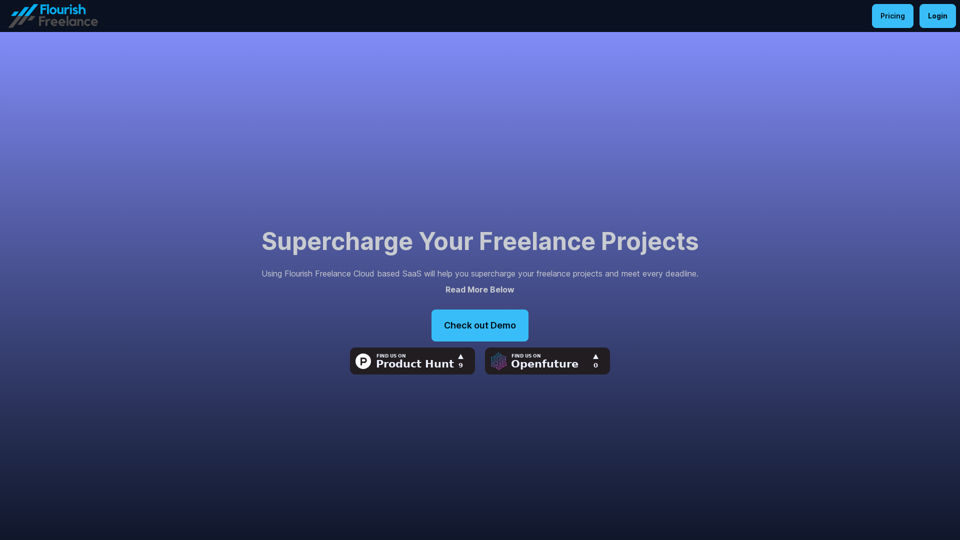
Thrive as a Freelancer

Your all-in-one solution for maximizing efficiency and income
Visit Website
Thrive as a Freelancer
Visit Website

Introduction

Flourish Freelance is a cloud-based SaaS platform designed to empower freelance professionals in managing their projects efficiently. It offers innovative AI-powered tools to streamline project management, ensuring timely task completion and optimal client value. The platform's key features include task management, AI-powered task generation, project management, and time tracking with billing capabilities.

Feature

Task Management

  • Break down projects into manageable tasks
  • Set task due dates and priorities
  • Track time spent on tasks and calculate billable hours

AI-Powered Task Generation

  • Utilize GPT-4o AI to generate to-do tasks
  • Create key project features using advanced AI technology
  • Automatically set task priorities for efficient workflow

Project Management

  • Manage multiple projects in a centralized platform
  • Create unlimited projects (available in Standard Tier)
  • Stay organized and meet deadlines consistently

Time Tracking and Billing

  • Monitor time spent on individual tasks
  • Calculate billable hours accurately
  • Import client descriptions for precise project scoping

Cloud-Based Accessibility

  • Access your account from anywhere, at any time
  • User-friendly interface for easy project and task management

Flexible Pricing Plans

TierPriceFeatures
Basic£3.99/monthCreate up to 15 projects
Standard£5.99/monthAll Basic features + Unlimited projects

FAQ

Is there a free trial available for Flourish Freelance?

Yes, you can try Flourish Freelance for 10 days at no cost before committing to a subscription.

How many projects can I create with the Basic Tier?

The Basic Tier allows you to create up to 15 projects.

Can I cancel my subscription at any time?

Yes, you have the flexibility to cancel your subscription whenever you choose.

Related Websites
PlutoAI - AI Bookmarks and Tabs Manager
View Detail

PlutoAI - AI Bookmarks and Tabs Manager

PlutoAI - AI Bookmarks and Tabs Manager

An AI-powered bookmarking assistant that lets you quickly save, highlight, add notes to, and find web pages.

193.90 M
ChatGPT Learning
View Detail

ChatGPT Learning

ChatGPT Learning

Welcome to join us in learning about ChatGPT!

193.90 M
Chat-GPT PDF

What is Chat-GPT PDF?

Chat-GPT PDF is a tool that allows users to generate PDF files from Chat-GPT conversations. This innovative tool enables users to save and share their conversations in a more organized and visually appealing format.

How does Chat-GPT PDF work?

The process is simple and straightforward. Here's a step-by-step guide:

1. Copy the conversation: Copy the entire conversation from the Chat-GPT platform.
2. Paste the conversation: Paste the copied conversation into the Chat-GPT PDF tool.
3. Customize the layout: Customize the layout, font, and design of the PDF file according to your preferences.
4. Generate the PDF: Click the "Generate PDF" button to create a downloadable PDF file.

Features of Chat-GPT PDF

Chat-GPT PDF offers several features that make it an essential tool for users:

* Customizable layout: Customize the layout, font, and design of the PDF file to suit your needs.
* Easy sharing: Share the PDF file with others via email, social media, or messaging apps.
* Offline access: Access your conversations offline, even without an internet connection.
* Organization: Organize your conversations in a neat and tidy format, making it easier to review and reference.

Benefits of Chat-GPT PDF

The benefits of using Chat-GPT PDF are numerous:

* Improved productivity: Save time and increase productivity by having all your conversations in one place.
* Enhanced collaboration: Collaborate with others more effectively by sharing conversations in a clear and concise format.
* Better organization: Keep your conversations organized, making it easier to review and reference them later.

Conclusion

Chat-GPT PDF is a game-changer for anyone who uses Chat-GPT regularly. With its ease of use, customization options, and benefits, it's an essential tool for anyone looking to get the most out of their conversations.
View Detail

Chat-GPT PDF What is Chat-GPT PDF? Chat-GPT PDF is a tool that allows users to generate PDF files from Chat-GPT conversations. This innovative tool enables users to save and share their conversations in a more organized and visually appealing format. How does Chat-GPT PDF work? The process is simple and straightforward. Here's a step-by-step guide: 1. Copy the conversation: Copy the entire conversation from the Chat-GPT platform. 2. Paste the conversation: Paste the copied conversation into the Chat-GPT PDF tool. 3. Customize the layout: Customize the layout, font, and design of the PDF file according to your preferences. 4. Generate the PDF: Click the "Generate PDF" button to create a downloadable PDF file. Features of Chat-GPT PDF Chat-GPT PDF offers several features that make it an essential tool for users: * Customizable layout: Customize the layout, font, and design of the PDF file to suit your needs. * Easy sharing: Share the PDF file with others via email, social media, or messaging apps. * Offline access: Access your conversations offline, even without an internet connection. * Organization: Organize your conversations in a neat and tidy format, making it easier to review and reference. Benefits of Chat-GPT PDF The benefits of using Chat-GPT PDF are numerous: * Improved productivity: Save time and increase productivity by having all your conversations in one place. * Enhanced collaboration: Collaborate with others more effectively by sharing conversations in a clear and concise format. * Better organization: Keep your conversations organized, making it easier to review and reference them later. Conclusion Chat-GPT PDF is a game-changer for anyone who uses Chat-GPT regularly. With its ease of use, customization options, and benefits, it's an essential tool for anyone looking to get the most out of their conversations.

Chat-GPT PDF What is Chat-GPT PDF? Chat-GPT PDF is a tool that allows users to generate PDF files from Chat-GPT conversations. This innovative tool enables users to save and share their conversations in a more organized and visually appealing format. How does Chat-GPT PDF work? The process is simple and straightforward. Here's a step-by-step guide: 1. Copy the conversation: Copy the entire conversation from the Chat-GPT platform. 2. Paste the conversation: Paste the copied conversation into the Chat-GPT PDF tool. 3. Customize the layout: Customize the layout, font, and design of the PDF file according to your preferences. 4. Generate the PDF: Click the "Generate PDF" button to create a downloadable PDF file. Features of Chat-GPT PDF Chat-GPT PDF offers several features that make it an essential tool for users: * Customizable layout: Customize the layout, font, and design of the PDF file to suit your needs. * Easy sharing: Share the PDF file with others via email, social media, or messaging apps. * Offline access: Access your conversations offline, even without an internet connection. * Organization: Organize your conversations in a neat and tidy format, making it easier to review and reference. Benefits of Chat-GPT PDF The benefits of using Chat-GPT PDF are numerous: * Improved productivity: Save time and increase productivity by having all your conversations in one place. * Enhanced collaboration: Collaborate with others more effectively by sharing conversations in a clear and concise format. * Better organization: Keep your conversations organized, making it easier to review and reference them later. Conclusion Chat-GPT PDF is a game-changer for anyone who uses Chat-GPT regularly. With its ease of use, customization options, and benefits, it's an essential tool for anyone looking to get the most out of their conversations.

Exporting Chat History to PDF You can export your chat history with Chat-GPT to a PDF file using the following methods: #Method 1: Browser Print Function 1. Open your chat conversation with Chat-GPT in a web browser. 2. Press `Ctrl + P` (Windows) or `Cmd + P` (Mac) to open the print dialog box. 3. Select "Save as PDF" as the printer destination. 4. Choose a location to save the PDF file and set the file name. 5. Click "Save" to export the chat history to a PDF file. #Method 2: Online PDF Conversion Tools 1. Copy the entire chat conversation by pressing `Ctrl + A` (Windows) or `Cmd + A` (Mac) and then `Ctrl + C` (Windows) or `Cmd + C` (Mac). 2. Go to an online PDF conversion tool, such as SmallPDF or Convertio. 3. Paste the chat conversation into the conversion tool's text box. 4. Select the PDF format and click "Convert" to generate the PDF file. 5. Download the PDF file to your computer. #Method 3: Browser Extensions 1. Install a browser extension, such as Print Friendly & PDF or FireShot, that allows you to save web pages as PDF files. 2. Open your chat conversation with Chat-GPT in a web browser. 3. Click the browser extension's icon in the toolbar. 4. Select the "Save as PDF" option and choose a location to save the file. 5. Click "Save" to export the chat history to a PDF file. By following these methods, you can easily export your chat history with Chat-GPT to a PDF file for future reference or sharing.

193.90 M
Top News - DeepNewz
View Detail

Top News - DeepNewz

Top News - DeepNewz

Find the latest top stories spanning all industries, from technology giants like OpenAI and Nvidia to pop culture updates featuring Taylor Swift and Ice Spice, alongside coverage of political figures like Joe Biden and Donald Trump and economic insights on major companies such as Facebook, Apple, and Google.

38.98 K
Work Hunty
View Detail

Work Hunty

Work Hunty

Easily track the jobs you are applying for.

193.90 M
French Fry AI
View Detail

French Fry AI

French Fry AI

French Fry AI

193.90 M
Knowyoursnack - Discover What’s Inside Your Snacks
View Detail

Knowyoursnack - Discover What’s Inside Your Snacks

Knowyoursnack - Discover What’s Inside Your Snacks

KnowYourSnack is your personal guide to understanding snack ingredients. Simply snap a photo of the ingredients list on any snack package, and our AI-powered app will identify harmful substances, provide detailed information, and help you make healthier choices.

0
Knowz AI Search Engine: A New Era of Online Searching Experience
View Detail

Knowz AI Search Engine: A New Era of Online Searching Experience

Knowz AI Search Engine: A New Era of Online Searching Experience

Discover the power of Knowz, a free AI search designed to deliver fast, accurate, and clutter-free answers, revolutionizing your online searches.

270