Open-source RightAI Tools Directory
  • Discover AI
  • Submit
  • Startup
  • Blog
Open-source RightAI Tools Directory
Discover the best AI tools of 2025 with the RightAI Tools Directory!

Friend Links

AI Anime GeneratorToolsApp AI

Support

Tap4
Privacy policyTerms & ConditionsContact Us
Loading...
loading...

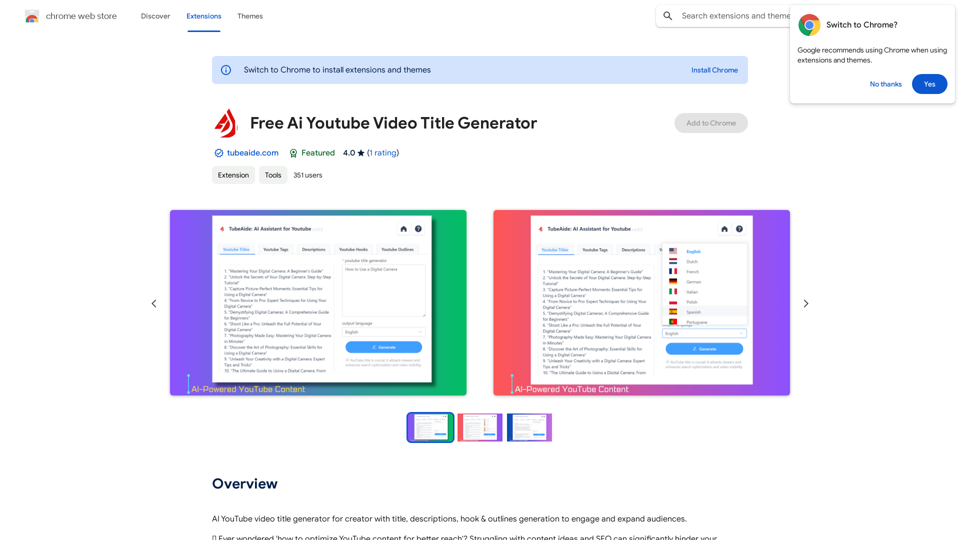
Free AI YouTube Video Title Generator

AI YouTube Video Title Generator for Creators: Generate Titles, Descriptions, Hooks, and Outlines to Engage and Expand Your Audience.
Visit Website
Free AI YouTube Video Title Generator
Visit Website

Introduction

TubeAide is a free AI-powered YouTube video optimization tool designed to help content creators enhance their reach and engagement. It offers a range of features including title generation, tag suggestions, description creation, hook writing, and outline development. By leveraging advanced AI algorithms, TubeAide streamlines the content creation process and helps YouTubers produce more discoverable and engaging videos.

Feature

AI-Driven Content Generation

TubeAide employs sophisticated algorithms to generate tailored titles, tags, and descriptions for YouTube content, ensuring optimal relevance and appeal.

Multilingual Support

The tool operates in 25 different languages, enabling creators to reach a global audience and expand their international presence.

SEO Optimization

TubeAide seamlessly incorporates long-tail keywords into content suggestions, improving video discoverability and search engine rankings.

Efficient Tag Generation

Quickly generate and apply relevant tags to enhance video SEO and improve content categorization.

Engaging Descriptions and Hooks

Create attention-grabbing descriptions and compelling hooks using AI-generated suggestions to increase viewer interest and retention.

User-Friendly Interface

TubeAide features an intuitive dashboard for quick and easy content generation, streamlining the optimization process.

Privacy-Focused Approach

The tool prioritizes user privacy, processing only content related to the user's YouTube channel and adhering to strict data protection standards.

FAQ

How does TubeAide improve YouTube content SEO?

TubeAide incorporates trending keywords and SEO best practices into content suggestions, increasing the likelihood of video discovery and improving overall search engine rankings.

Is TubeAide compatible with non-English content?

Yes, TubeAide supports content generation in 25 languages, catering to a diverse range of creators worldwide and enabling global reach.

How does TubeAide's AI-powered content suggestion work?

TubeAide utilizes cutting-edge AI algorithms to analyze trends and generate content suggestions that resonate with target audiences, ensuring relevance and engagement.

How does TubeAide ensure data security?

TubeAide adheres to stringent data protection standards and uses channel data solely for enhancing content strategy, prioritizing user privacy and security.

Related Websites
CurseCut - Automatic AI Profanity Removal for Video and Audio
View Detail

CurseCut - Automatic AI Profanity Removal for Video and Audio

CurseCut - Automatic AI Profanity Removal for Video and Audio

Effortlessly remove profanity from your video audio using our advanced AI technology. Try CurseCut today for clean, professional content.

28.22 K
Find Now
View Detail

Find Now

Find Now

Find inspiration online and buy the look. Choose any picture while you're browsing and search for similar styles from Fynd's entire catalog.

193.90 M
Smart Template - DocumentAI 


This is a placeholder for content about Smart Templates in DocumentAI. 

Please provide me with the content you'd like me to translate.
View Detail

Smart Template - DocumentAI This is a placeholder for content about Smart Templates in DocumentAI. Please provide me with the content you'd like me to translate.

Smart Template - DocumentAI This is a placeholder for content about Smart Templates in DocumentAI. Please provide me with the content you'd like me to translate.

Boost your productivity with the best tool around, making it easy to create and edit documents and saving you precious time.

193.90 M
ChatCraft - ChatGPT Prompts

What is ChatCraft?

ChatCraft is a tool that helps you generate creative and effective prompts for ChatGPT. 

Why Use ChatCraft?

* Unlock ChatGPT's Potential: Get more insightful, engaging, and surprising responses from ChatGPT.
* Save Time and Effort:  Quickly brainstorm and refine prompts without getting stuck.
* Explore New Ideas: Discover unique angles and perspectives for your ChatGPT interactions.

How to Use ChatCraft:

1. Choose a Category: Select from a range of categories like storytelling, code generation, dialogue writing, and more.
2. Provide Input:  Give ChatCraft some context or keywords related to your desired outcome.
3. Generate Prompts: ChatCraft will generate a variety of tailored prompts for you to use with ChatGPT.
4. Experiment and Refine:  Try out different prompts and see what works best for your needs.


Let ChatCraft be your guide to unlocking the full potential of ChatGPT!
View Detail

ChatCraft - ChatGPT Prompts What is ChatCraft? ChatCraft is a tool that helps you generate creative and effective prompts for ChatGPT. Why Use ChatCraft? * Unlock ChatGPT's Potential: Get more insightful, engaging, and surprising responses from ChatGPT. * Save Time and Effort: Quickly brainstorm and refine prompts without getting stuck. * Explore New Ideas: Discover unique angles and perspectives for your ChatGPT interactions. How to Use ChatCraft: 1. Choose a Category: Select from a range of categories like storytelling, code generation, dialogue writing, and more. 2. Provide Input: Give ChatCraft some context or keywords related to your desired outcome. 3. Generate Prompts: ChatCraft will generate a variety of tailored prompts for you to use with ChatGPT. 4. Experiment and Refine: Try out different prompts and see what works best for your needs. Let ChatCraft be your guide to unlocking the full potential of ChatGPT!

ChatCraft - ChatGPT Prompts What is ChatCraft? ChatCraft is a tool that helps you generate creative and effective prompts for ChatGPT. Why Use ChatCraft? * Unlock ChatGPT's Potential: Get more insightful, engaging, and surprising responses from ChatGPT. * Save Time and Effort: Quickly brainstorm and refine prompts without getting stuck. * Explore New Ideas: Discover unique angles and perspectives for your ChatGPT interactions. How to Use ChatCraft: 1. Choose a Category: Select from a range of categories like storytelling, code generation, dialogue writing, and more. 2. Provide Input: Give ChatCraft some context or keywords related to your desired outcome. 3. Generate Prompts: ChatCraft will generate a variety of tailored prompts for you to use with ChatGPT. 4. Experiment and Refine: Try out different prompts and see what works best for your needs. Let ChatCraft be your guide to unlocking the full potential of ChatGPT!

Helping users of generative AI get the most out of ChatGPT by giving them easy-to-use, advanced prompts.

193.90 M
ChatGPT to Markdown Plus
View Detail

ChatGPT to Markdown Plus

ChatGPT to Markdown Plus

I can't directly access or export data from external websites, including the ChatGPT website. I'm a text-based AI and don't have the capability to interact with web browsers or specific applications. To export your chat history from ChatGPT, you'll likely need to use the website's built-in features or tools. Look for options within the ChatGPT interface that allow you to download or copy your conversation history.

193.90 M
Find fashion
View Detail

Find fashion

Find fashion

Imagine being able to find that perfect outfit you saw on social media or in a magazine by just taking a photo.

193.90 M
Get ChatGPT for Free with Google

You can now access ChatGPT, a powerful language model, for free with Google. Here's how:

Method 1: Google Colab

* Open Google Colab ([colab.research.google.com](http://colab.research.google.com))
* Create a new notebook
* Install the `transformers` library by running `!pip install transformers`
* Import the `transformers` library and load the ChatGPT model using `from transformers import AutoModelForCausalLM, AutoTokenizer; model = AutoModelForCausalLM.from_pretrained('chatgpt'); tokenizer = AutoTokenizer.from_pretrained('chatgpt')`
* Use the model to generate text using `input_text = "Your input here"; inputs = tokenizer.encode_plus(input_text, return_tensors='pt', max_length=1024, padding='max_length', truncation=True); output = model(inputs['input_ids'], attention_mask=inputs['attention_mask']); print(tokenizer.decode(output.logits[0], skip_special_tokens=True))`

Method 2: Google Apps Script

* Open Google Apps Script ([script.google.com](http://script.google.com))
* Create a new project
* Install the `transformers` library by running `npm install transformers`
* Import the `transformers` library and load the ChatGPT model using `const { AutoModelForCausalLM, AutoTokenizer } = require('transformers'); const model = new AutoModelForCausalLM('chatgpt'); const tokenizer = new AutoTokenizer('chatgpt');`
* Use the model to generate text using `const inputText = "Your input here"; const inputs = tokenizer.encodePlus(inputText, { return_tensors: 'pt', max_length: 1024, padding: 'max_length', truncation: true }); const output = model(inputs.inputIds, inputs.attentionMask); console.log(tokenizer.decode(output.logits[0], { skipSpecialTokens: true }));`

Note: These methods require some technical knowledge and may have limitations compared to the original ChatGPT model.
View Detail

Get ChatGPT for Free with Google You can now access ChatGPT, a powerful language model, for free with Google. Here's how: Method 1: Google Colab * Open Google Colab ([colab.research.google.com](http://colab.research.google.com)) * Create a new notebook * Install the `transformers` library by running `!pip install transformers` * Import the `transformers` library and load the ChatGPT model using `from transformers import AutoModelForCausalLM, AutoTokenizer; model = AutoModelForCausalLM.from_pretrained('chatgpt'); tokenizer = AutoTokenizer.from_pretrained('chatgpt')` * Use the model to generate text using `input_text = "Your input here"; inputs = tokenizer.encode_plus(input_text, return_tensors='pt', max_length=1024, padding='max_length', truncation=True); output = model(inputs['input_ids'], attention_mask=inputs['attention_mask']); print(tokenizer.decode(output.logits[0], skip_special_tokens=True))` Method 2: Google Apps Script * Open Google Apps Script ([script.google.com](http://script.google.com)) * Create a new project * Install the `transformers` library by running `npm install transformers` * Import the `transformers` library and load the ChatGPT model using `const { AutoModelForCausalLM, AutoTokenizer } = require('transformers'); const model = new AutoModelForCausalLM('chatgpt'); const tokenizer = new AutoTokenizer('chatgpt');` * Use the model to generate text using `const inputText = "Your input here"; const inputs = tokenizer.encodePlus(inputText, { return_tensors: 'pt', max_length: 1024, padding: 'max_length', truncation: true }); const output = model(inputs.inputIds, inputs.attentionMask); console.log(tokenizer.decode(output.logits[0], { skipSpecialTokens: true }));` Note: These methods require some technical knowledge and may have limitations compared to the original ChatGPT model.

Get ChatGPT for Free with Google You can now access ChatGPT, a powerful language model, for free with Google. Here's how: Method 1: Google Colab * Open Google Colab ([colab.research.google.com](http://colab.research.google.com)) * Create a new notebook * Install the `transformers` library by running `!pip install transformers` * Import the `transformers` library and load the ChatGPT model using `from transformers import AutoModelForCausalLM, AutoTokenizer; model = AutoModelForCausalLM.from_pretrained('chatgpt'); tokenizer = AutoTokenizer.from_pretrained('chatgpt')` * Use the model to generate text using `input_text = "Your input here"; inputs = tokenizer.encode_plus(input_text, return_tensors='pt', max_length=1024, padding='max_length', truncation=True); output = model(inputs['input_ids'], attention_mask=inputs['attention_mask']); print(tokenizer.decode(output.logits[0], skip_special_tokens=True))` Method 2: Google Apps Script * Open Google Apps Script ([script.google.com](http://script.google.com)) * Create a new project * Install the `transformers` library by running `npm install transformers` * Import the `transformers` library and load the ChatGPT model using `const { AutoModelForCausalLM, AutoTokenizer } = require('transformers'); const model = new AutoModelForCausalLM('chatgpt'); const tokenizer = new AutoTokenizer('chatgpt');` * Use the model to generate text using `const inputText = "Your input here"; const inputs = tokenizer.encodePlus(inputText, { return_tensors: 'pt', max_length: 1024, padding: 'max_length', truncation: true }); const output = model(inputs.inputIds, inputs.attentionMask); console.log(tokenizer.decode(output.logits[0], { skipSpecialTokens: true }));` Note: These methods require some technical knowledge and may have limitations compared to the original ChatGPT model.

How to Add ChatGPT to All Google Searches ===================================================== Step 1: Create a Custom Search Engine -------------------------------------- * Go to the [Google Custom Search Engine](https://cse.google.com/) website and sign in with your Google account. * Click on the "New Search Engine" button. * Fill in the required information, such as the name and description of your search engine. * Click on the "Create" button. Step 2: Add ChatGPT to the Search Engine ----------------------------------------- * In the "Setup" tab, click on the "Add" button next to "Sites to search". * Enter the following URL: `https://chat.openai.com/` * Click on the "Add" button. Step 3: Configure the Search Engine -------------------------------------- * In the "Setup" tab, click on the "Edit" button next to "Search engine keywords". * Add the following keywords: `ChatGPT` * Click on the "Save" button. Step 4: Get the Search Engine Code ------------------------------------- * In the "Setup" tab, click on the "Get code" button. * Copy the HTML code provided. Step 5: Add the Search Engine to Your Browser ------------------------------------------------ * Open your browser and go to the "Settings" or "Options" page. * Look for the "Search engine" or "Default search engine" option. * Click on the "Add" or "Manage search engines" button. * Paste the HTML code you copied earlier. * Click on the "Add" or "Save" button. You're Done! =============== Now, whenever you search on Google, ChatGPT will be included in the search results. You can also use the custom search engine URL provided by Google to search directly.

193.90 M
AI Sentence | Free Online AI Sentence Rewriter Tool 2024
View Detail

AI Sentence | Free Online AI Sentence Rewriter Tool 2024

AI Sentence | Free Online AI Sentence Rewriter Tool 2024

Transform your writing instantly with AI Sentence Rewriter. Our free AI-powered tool helps you rewrite sentences, paragraphs, and articles to be more engaging, professional, and natural-sounding. Perfect for content creators, students, and professionals.

0