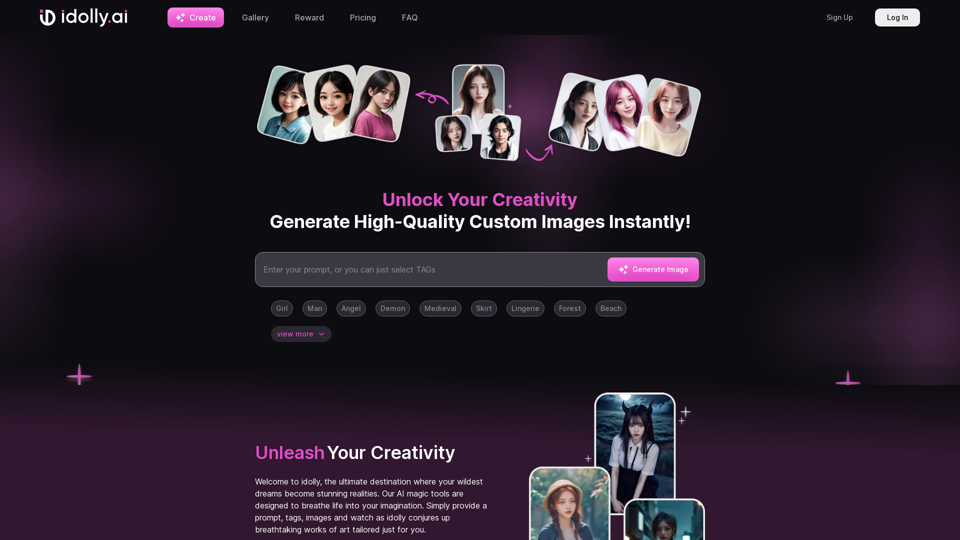
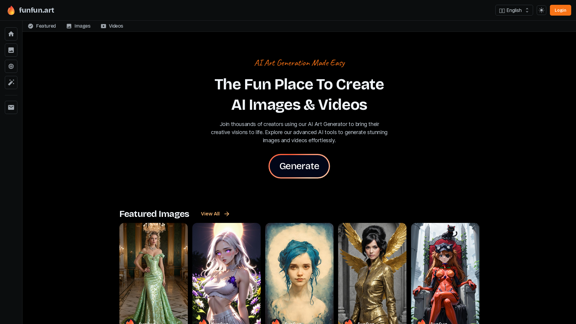
FunFun.art is a cutting-edge AI art generation platform that empowers users to create stunning images and videos using advanced artificial intelligence tools. The platform caters to creators of all skill levels, offering a user-friendly interface and a wide range of features to bring artistic visions to life effortlessly.
The Exciting Destination for Generating AI Images & Videos
Join thousands of creators using our AI Art Generator to bring their creative visions to life. Explore our advanced AI tools to generate stunning images and videos effortlessly.
Introduction
Feature
AI Image Generation
Transform ideas into captivating visuals using state-of-the-art AI technology. Create unique artwork, illustrations, and designs with just a few clicks.
AI Video Creation
Generate AI-powered videos to bring stories to life with dynamic, animated content that captivates audiences.
Featured Gallery
Explore a curated collection of user-generated AI art in the Featured Images and Featured Videos sections, providing inspiration and showcasing community creativity.
User-Friendly Interface
Intuitive platform design makes AI art creation accessible to everyone, regardless of technical expertise.
Multilingual Support
Enjoy the platform in multiple languages, including English, Deutsch, Français, Italiano, Español, and more.
Vibrant Community
Join thousands of creators pushing the boundaries of AI-generated art, fostering collaboration and inspiration.
Affiliate Program
Partner with FunFun.art to grow together and expand the reach of AI-generated art.
FAQ
What is FunFun.art?
FunFun.art is an AI-powered platform for creating stunning images and videos using advanced artificial intelligence tools. It caters to creators of all skill levels, from professional artists to curious beginners.
What types of AI-generated content can I create on FunFun.art?
Users can create:
- AI-generated images (artwork, illustrations, designs)
- AI-powered videos (animated content, dynamic visuals)
How does FunFun.art support different languages?
The platform offers multilingual support, including:
| Languages |
|---|
| English |
| Deutsch |
| Français |
| Italiano |
| Español |
| And more |
How can I connect with the FunFun.art community?
You can connect through:
- Email: [email protected]
- Discord: Join the community for discussions and support
- Affiliate Program: Partner with FunFun.art for mutual growth
What additional resources does FunFun.art offer?
FunFun.art provides:
- AI Tools Directory
- AI Characters
- Privacy Policy
Related Websites
Describe Picture: AI-Generated Image Descriptions for Enhanced Accessibility and SEO
Describe Picture: AI-Generated Image Descriptions for Enhanced Accessibility and SEODescribe Picture is an AI-driven platform that generates detailed descriptions of your images, enhancing accessibility, SEO, and content creation. Upload your images and let our AI provide accurate and editable descriptions to improve your digital content.
10.10 K
ScreenRedact on the Mac App Store #Description ScreenRedact is a powerful and easy-to-use screenshot editing tool that allows you to quickly and easily remove sensitive information from your screenshots. With its intuitive interface and advanced features, ScreenRedact is the perfect solution for anyone who needs to share screenshots online or with others. #Features * Easy to use: ScreenRedact's intuitive interface makes it easy to get started, even if you're not tech-savvy. * Advanced editing tools: ScreenRedact offers a range of advanced editing tools, including blur, pixelate, and redact, to help you remove sensitive information from your screenshots. * Customizable: ScreenRedact allows you to customize the appearance of your redactions, including the color, opacity, and style. * Support for multiple file formats: ScreenRedact supports a range of file formats, including JPEG, PNG, and TIFF. * Share easily: ScreenRedact makes it easy to share your edited screenshots with others, either by saving them to your computer or sharing them directly to social media or email. #What's New * Improved performance: ScreenRedact is now faster and more efficient, making it easier to edit your screenshots. * New editing tools: ScreenRedact now includes new editing tools, including a magic wand and a lasso tool, to make it even easier to remove sensitive information from your screenshots. * Enhanced customization options: ScreenRedact now offers even more customization options, including the ability to change the color and opacity of your redactions. #Ratings and Reviews * 4.5/5 stars: ScreenRedact has an average rating of 4.5 out of 5 stars on the Mac App Store. * "Easy to use and effective": One reviewer praised ScreenRedact's ease of use and effectiveness, saying "I was able to quickly and easily remove sensitive information from my screenshots." * "A must-have for anyone who shares screenshots online": Another reviewer called ScreenRedact "a must-have for anyone who shares screenshots online," citing its ease of use and advanced features.
ScreenRedact on the Mac App Store #Description ScreenRedact is a powerful and easy-to-use screenshot editing tool that allows you to quickly and easily remove sensitive information from your screenshots. With its intuitive interface and advanced features, ScreenRedact is the perfect solution for anyone who needs to share screenshots online or with others. #Features * Easy to use: ScreenRedact's intuitive interface makes it easy to get started, even if you're not tech-savvy. * Advanced editing tools: ScreenRedact offers a range of advanced editing tools, including blur, pixelate, and redact, to help you remove sensitive information from your screenshots. * Customizable: ScreenRedact allows you to customize the appearance of your redactions, including the color, opacity, and style. * Support for multiple file formats: ScreenRedact supports a range of file formats, including JPEG, PNG, and TIFF. * Share easily: ScreenRedact makes it easy to share your edited screenshots with others, either by saving them to your computer or sharing them directly to social media or email. #What's New * Improved performance: ScreenRedact is now faster and more efficient, making it easier to edit your screenshots. * New editing tools: ScreenRedact now includes new editing tools, including a magic wand and a lasso tool, to make it even easier to remove sensitive information from your screenshots. * Enhanced customization options: ScreenRedact now offers even more customization options, including the ability to change the color and opacity of your redactions. #Ratings and Reviews * 4.5/5 stars: ScreenRedact has an average rating of 4.5 out of 5 stars on the Mac App Store. * "Easy to use and effective": One reviewer praised ScreenRedact's ease of use and effectiveness, saying "I was able to quickly and easily remove sensitive information from my screenshots." * "A must-have for anyone who shares screenshots online": Another reviewer called ScreenRedact "a must-have for anyone who shares screenshots online," citing its ease of use and advanced features.ScreenRedact allows you to remove sensitive text from an image by utilizing Apple's on-device machine learning model, which identifies text within an image and enables you to redact it with ease.
124.77 M
Unleash your creativity with ArtiverseHub's online AI art generator. Enjoy support for multiple platforms including DALL-E (ChatGPT), Leonardo.ai, Stability.ai, and several others.
823
Get instant AI-powered recommendations to improve your images and graphics, so you can display your best visuals online.
193.90 M
Stock Photos, Vectors and Royalty Free Images from 123RF
Stock Photos, Vectors and Royalty Free Images from 123RFSearch and download from millions of HD stock photos, royalty-free images, clipart, vectors, and illustrations
9.66 M
Socratic Lab is your AI-powered community for learning and sharing knowledge. Ask anything you're curious about, connect with like-minded individuals, and join in-depth discussions.
2.71 K