Open-source RightAI Tools Directory
  • Discover AI
  • Submit
  • Startup
  • Blog
Open-source RightAI Tools Directory
Discover the best AI tools of 2025 with the RightAI Tools Directory!

Friend Links

AI Anime GeneratorToolsApp AI

Support

Tap4
Privacy policyTerms & ConditionsContact Us
Loading...
loading...

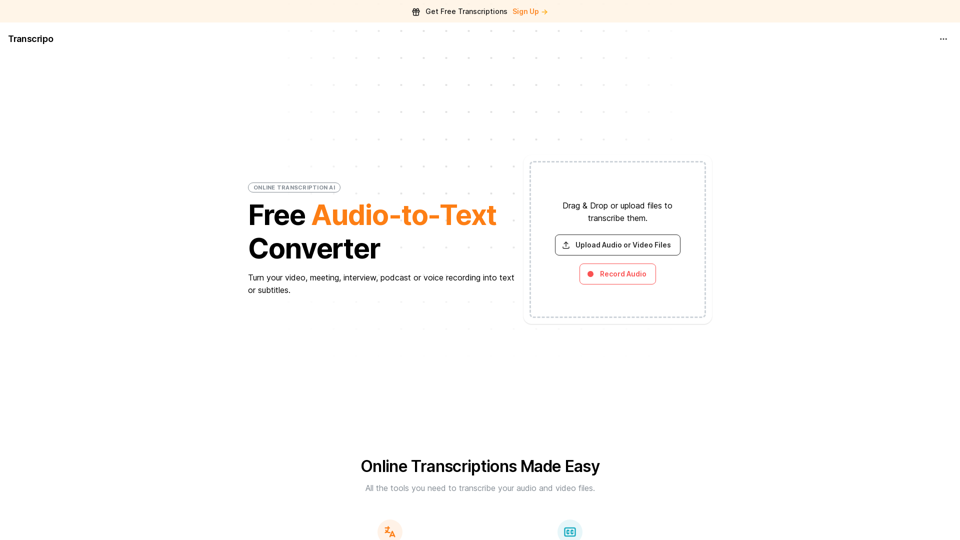
Transcripo - Free Audio-to-Text Converter

Transcription AI that turns your audio and video files into text or subtitles. It is fast, easy to use, and free to try. Easily summarize your files with our AI.
Visit Website
Transcripo - Free Audio-to-Text Converter
Visit Website

Introduction

Transcribo is a free online audio-to-text converter that transforms audio and video files into text or subtitles. It offers a user-friendly interface for easy file uploading and transcription. The platform supports over 100 languages, provides AI-powered summaries, and allows subtitle generation. Transcribo caters to diverse users with its simple and affordable pricing structure, including a free plan and various paid options.

Feature

Multilingual Support

Transcribo supports over 100 languages, making it a versatile tool for users from diverse linguistic backgrounds.

AI-Powered Summaries

The platform offers intelligent summaries of transcriptions, enabling users to quickly grasp the main points of conversations or meetings.

Subtitle Generation

Users can export transcriptions in subtitle formats, facilitating easy caption addition to videos.

Flexible File Input

Transcribo accepts both audio and video files for transcription. Users can upload files, use drag-and-drop functionality, or record audio directly on the platform.

Tiered Pricing Structure

PlanPriceFeatures
Free$03 files per month, max 30 minutes each
Monthly$9.90/month30 hours of speech-to-text per month
Annual (Basic)$14.90/month80 hours of speech-to-text per month, 50% savings
Annual (Pro)$19.90/month160 hours of speech-to-text per month, 50% savings

User Privacy

Transcribo prioritizes user privacy and does not use customer data for training purposes.

Commercial Use

The platform allows commercial use, subject to terms and conditions review.

FAQ

How do I get started with Transcribo?

To begin using Transcribo, visit the website and explore its features. You can start with the free plan, which allows you to transcribe up to 3 files per month, with a maximum duration of 30 minutes each. No credit card is required for the free plan.

What file formats does Transcribo support?

Transcribo supports both audio and video file formats for transcription. Users can upload these files directly or use the drag-and-drop feature to begin the transcription process.

Can I use Transcribo for commercial purposes?

Yes, Transcribo allows commercial use of its services. However, it's recommended to review the platform's terms and conditions before using it for commercial purposes to ensure compliance with their policies.

How accurate are the AI-generated summaries?

While specific accuracy rates aren't provided, Transcribo's AI-powered summaries are designed to capture the main points of conversations or meetings efficiently. The accuracy may vary depending on factors such as audio quality and complexity of the content.

Related Websites
Audimee - Unlimited Vocals, Unlimited Creative Freedom
View Detail

Audimee - Unlimited Vocals, Unlimited Creative Freedom

Audimee - Unlimited Vocals, Unlimited Creative Freedom

Convert your vocals with our royalty-free voices, train your own voices, create copyright-free cover vocals, and much more.

489.79 K
VNEdu Tool
View Detail

VNEdu Tool

VNEdu Tool

VNEDU Data Processing Tool

193.90 M
Notion AI Pro
View Detail

Notion AI Pro

Notion AI Pro

The Best Alternative to a Notion AI Subscription.

193.90 M
Chrome Web Store
View Detail

Chrome Web Store

Chrome Web Store

Enhance your browser with new features and customize your browsing experience.

193.90 M
TubeSumma: YouTube Summarizer
View Detail

TubeSumma: YouTube Summarizer

TubeSumma: YouTube Summarizer

TubeSumma lets you quickly summarize YouTube videos, grabbing the main points without having to watch the entire thing.

193.90 M
ChatGPT for Google Search
View Detail

ChatGPT for Google Search

ChatGPT for Google Search

Show the ChatGPT response next to the search engine results.

193.90 M
Google for Jobs Structured Data by Tarta.ai
View Detail

Google for Jobs Structured Data by Tarta.ai

Google for Jobs Structured Data by Tarta.ai

SEO Job Postings Structured Data by Tarta.ai is an AI-driven platform that enhances job postings with structured data for improved search engine optimization.

193.90 M
ChatGPT Keyboard Shortcuts

#Navigation

* Ctrl + →: Move to the next message
* Ctrl + ←: Move to the previous message
* Home: Move to the beginning of the conversation
* End: Move to the end of the conversation

#Editing

* Ctrl + A: Select all text
* Ctrl + C: Copy selected text
* Ctrl + X: Cut selected text
* Ctrl + V: Paste copied or cut text
* Ctrl + Z: Undo
* Ctrl + Y: Redo
* Ctrl + Shift + F: Format text as code

#Actions

* Enter: Send the message
* Shift + Enter: Insert a new line
* Ctrl + Shift + Enter: Send the message and insert a new line
* Esc: Cancel editing and close the message input field
* Ctrl + Shift + Space: Open the emoji picker
* Ctrl + Shift + /: Open the help menu

#Accessibility

* Ctrl + +: Increase font size
* Ctrl + -: Decrease font size
* Ctrl + 0: Reset font size to default
View Detail

ChatGPT Keyboard Shortcuts #Navigation * Ctrl + →: Move to the next message * Ctrl + ←: Move to the previous message * Home: Move to the beginning of the conversation * End: Move to the end of the conversation #Editing * Ctrl + A: Select all text * Ctrl + C: Copy selected text * Ctrl + X: Cut selected text * Ctrl + V: Paste copied or cut text * Ctrl + Z: Undo * Ctrl + Y: Redo * Ctrl + Shift + F: Format text as code #Actions * Enter: Send the message * Shift + Enter: Insert a new line * Ctrl + Shift + Enter: Send the message and insert a new line * Esc: Cancel editing and close the message input field * Ctrl + Shift + Space: Open the emoji picker * Ctrl + Shift + /: Open the help menu #Accessibility * Ctrl + +: Increase font size * Ctrl + -: Decrease font size * Ctrl + 0: Reset font size to default

ChatGPT Keyboard Shortcuts #Navigation * Ctrl + →: Move to the next message * Ctrl + ←: Move to the previous message * Home: Move to the beginning of the conversation * End: Move to the end of the conversation #Editing * Ctrl + A: Select all text * Ctrl + C: Copy selected text * Ctrl + X: Cut selected text * Ctrl + V: Paste copied or cut text * Ctrl + Z: Undo * Ctrl + Y: Redo * Ctrl + Shift + F: Format text as code #Actions * Enter: Send the message * Shift + Enter: Insert a new line * Ctrl + Shift + Enter: Send the message and insert a new line * Esc: Cancel editing and close the message input field * Ctrl + Shift + Space: Open the emoji picker * Ctrl + Shift + /: Open the help menu #Accessibility * Ctrl + +: Increase font size * Ctrl + -: Decrease font size * Ctrl + 0: Reset font size to default

Enhance your ChatGPT experience with easy-to-use keyboard shortcuts.

193.90 M