Open-source RightAI Tools Directory
  • Discover AI
  • Submit
  • Startup
  • Blog
Open-source RightAI Tools Directory
Discover the best AI tools of 2025 with the RightAI Tools Directory!

Friend Links

AI Anime GeneratorToolsApp AI

Support

Tap4
Privacy policyTerms & ConditionsContact Us
Loading...
loading...

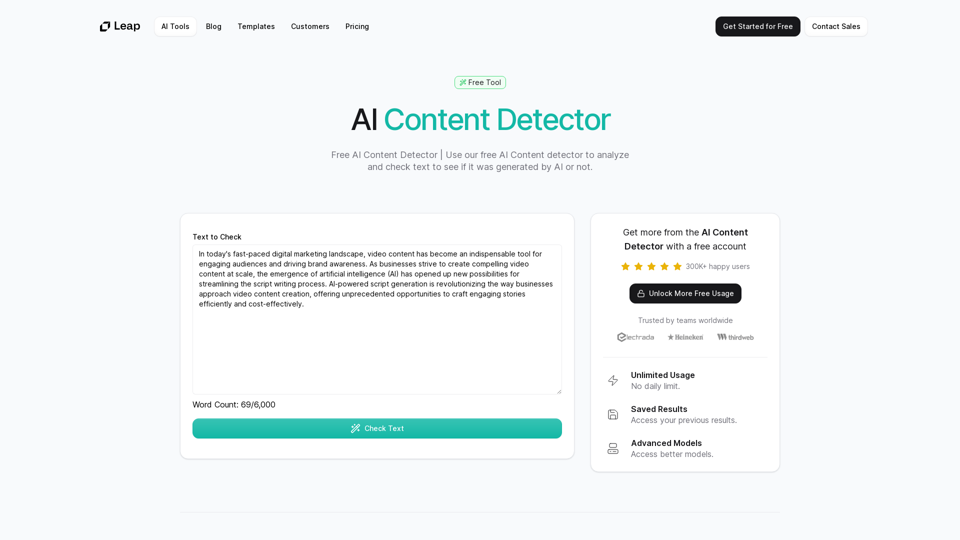
AI Content Detector | GPT-4o, Anthropic, & ChatGPT This AI content detector is designed to identify text generated by popular AI models, including GPT-4o, Anthropic, and ChatGPT.

Free AI Content Detector | 使用我们的免费AI内容检测器来分析和检查文本,以查看它是否由AI生成。
Visit Website
AI Content Detector | GPT-4o, Anthropic, & ChatGPT

This AI content detector is designed to identify text generated by popular AI models, including GPT-4o, Anthropic, and ChatGPT.
Visit Website

Introduction

AI Content Detector is a free tool powered by advanced AI technology that analyzes text to determine if it was generated by artificial intelligence. Using state-of-the-art LLM models, this tool offers precise and accurate identification of AI-generated content, making it an invaluable resource for educators, content creators, and professionals who need reliable AI content detection.

Feature

Advanced LLM Models

The AI Content Detector employs cutting-edge Large Language Models (LLM) to accurately analyze and identify AI-generated content, ensuring high precision in detection.

Unlimited Free Usage

Users can access the AI Content Detector without any daily limits or restrictions, making it freely available to everyone who needs to verify content authenticity.

Result History

The tool allows users to access and track their previous analysis results, enabling them to maintain a history of their content checks.

Simple 3-Step Process

  1. Input text into the provided box
  2. Click 'Check Text' to initiate analysis
  3. View comprehensive results of the AI content detection

Multi-Language Support

While specific language support is not mentioned, the tool likely accommodates various languages to cater to a global user base.

FAQ

How does an AI Content Detector work?

AI Content Detectors use advanced language models to analyze text patterns, structure, and characteristics that are typical of AI-generated content. These tools compare the input text against known patterns of human and AI writing to determine the likelihood of AI generation.

How accurate are AI Content Detectors?

The accuracy of AI Content Detectors can vary, but advanced tools like this one use the latest LLM models to ensure high precision. However, as AI technology evolves, these tools continually adapt to maintain accuracy.

Why do I need to use AI Content Detectors?

AI Content Detectors help maintain content integrity and authenticity. They are particularly useful for educators checking student work, content creators ensuring originality, and professionals verifying the source of information.

Can AI Content Detectors distinguish between different AI writing styles?

Advanced AI Content Detectors can often identify various AI writing styles, as they are trained on diverse datasets. However, the specific capabilities may vary between different tools.

Is the AI Content Detector free?

Yes, this AI Content Detector is completely free to use, with no usage limits or restrictions.

Related Websites

Genius PT
View Detail

Genius PT

Genius PT

Genius PT Extension.

193.90 M
 WriteFastAI-ChatGPT on Demand, on Any Website 

This is a powerful idea! Imagine being able to seamlessly integrate the capabilities of both FastAI and ChatGPT directly into any website. 

Here's a breakdown of what this could mean:

* On-Demand AI Assistance: Users could access powerful AI tools like text generation, summarization, question answering, and more, right from the website they're already using.
* Personalized Experiences: Websites could leverage AI to tailor content and interactions to individual user preferences, creating a more engaging and relevant experience.
* Increased Efficiency: Businesses could automate tasks, generate reports, and analyze data faster and more accurately with the help of AI.

Making it a Reality:

This vision requires a combination of:

* API Integration:  FastAI and ChatGPT both offer APIs that allow developers to integrate their functionalities into applications.
* Web Development Expertise:  Developers would need to build the necessary infrastructure to connect the APIs to the website and handle user interactions.
* Data Management:  Websites would need to manage and secure the data used by the AI models.

Potential Applications:

The possibilities are endless! Here are just a few examples:

* E-commerce:  AI-powered chatbots could provide personalized product recommendations and customer support.
* Education:  Websites could offer interactive learning experiences with AI-powered tutors and personalized feedback.
* News and Media:  AI could be used to generate summaries of articles, create personalized news feeds, and even write original content.


Let me know if you'd like to explore any of these applications in more detail!
View Detail

WriteFastAI-ChatGPT on Demand, on Any Website This is a powerful idea! Imagine being able to seamlessly integrate the capabilities of both FastAI and ChatGPT directly into any website. Here's a breakdown of what this could mean: * On-Demand AI Assistance: Users could access powerful AI tools like text generation, summarization, question answering, and more, right from the website they're already using. * Personalized Experiences: Websites could leverage AI to tailor content and interactions to individual user preferences, creating a more engaging and relevant experience. * Increased Efficiency: Businesses could automate tasks, generate reports, and analyze data faster and more accurately with the help of AI. Making it a Reality: This vision requires a combination of: * API Integration: FastAI and ChatGPT both offer APIs that allow developers to integrate their functionalities into applications. * Web Development Expertise: Developers would need to build the necessary infrastructure to connect the APIs to the website and handle user interactions. * Data Management: Websites would need to manage and secure the data used by the AI models. Potential Applications: The possibilities are endless! Here are just a few examples: * E-commerce: AI-powered chatbots could provide personalized product recommendations and customer support. * Education: Websites could offer interactive learning experiences with AI-powered tutors and personalized feedback. * News and Media: AI could be used to generate summaries of articles, create personalized news feeds, and even write original content. Let me know if you'd like to explore any of these applications in more detail!

WriteFastAI-ChatGPT on Demand, on Any Website This is a powerful idea! Imagine being able to seamlessly integrate the capabilities of both FastAI and ChatGPT directly into any website. Here's a breakdown of what this could mean: * On-Demand AI Assistance: Users could access powerful AI tools like text generation, summarization, question answering, and more, right from the website they're already using. * Personalized Experiences: Websites could leverage AI to tailor content and interactions to individual user preferences, creating a more engaging and relevant experience. * Increased Efficiency: Businesses could automate tasks, generate reports, and analyze data faster and more accurately with the help of AI. Making it a Reality: This vision requires a combination of: * API Integration: FastAI and ChatGPT both offer APIs that allow developers to integrate their functionalities into applications. * Web Development Expertise: Developers would need to build the necessary infrastructure to connect the APIs to the website and handle user interactions. * Data Management: Websites would need to manage and secure the data used by the AI models. Potential Applications: The possibilities are endless! Here are just a few examples: * E-commerce: AI-powered chatbots could provide personalized product recommendations and customer support. * Education: Websites could offer interactive learning experiences with AI-powered tutors and personalized feedback. * News and Media: AI could be used to generate summaries of articles, create personalized news feeds, and even write original content. Let me know if you'd like to explore any of these applications in more detail!

A better way to use ChatGPT right from the website you are on. You can comment, explain, summarize, reword, copywrite, and reply.

193.90 M
AI for Auto Applicants
View Detail

AI for Auto Applicants

AI for Auto Applicants

Automatically Apply for Jobs Using AI Imagine a world where you can apply for jobs with just a few clicks, powered by the intelligence of artificial intelligence. That's the promise of AI-powered job application tools. These tools can: * Scan your resume and identify relevant jobs: AI algorithms can analyze your skills and experience to match you with suitable opportunities. * Customize your cover letter for each application: Say goodbye to generic cover letters! AI can tailor your message to highlight the specific requirements of each job description. * Automate the application process: From filling out forms to submitting your documents, AI can handle the tedious tasks, saving you time and effort. * Track your applications and provide insights: Stay informed about the status of your applications and receive valuable feedback on your performance. By leveraging the power of AI, you can streamline your job search, increase your chances of getting noticed, and focus on what matters most: landing your dream job.

193.90 M
Smart Template - DocumentAI 


This is a placeholder for content about Smart Templates in DocumentAI. 

Please provide me with the content you'd like me to translate.
View Detail

Smart Template - DocumentAI This is a placeholder for content about Smart Templates in DocumentAI. Please provide me with the content you'd like me to translate.

Smart Template - DocumentAI This is a placeholder for content about Smart Templates in DocumentAI. Please provide me with the content you'd like me to translate.

Boost your productivity with the best tool around, making it easy to create and edit documents and saving you precious time.

193.90 M
Adot AI: ChatGPT-powered Web3 Search Engine
View Detail

Adot AI: ChatGPT-powered Web3 Search Engine

Adot AI: ChatGPT-powered Web3 Search Engine

Explore the Web3 space with Adot AI, the AI search tool tailored by keywords.

193.90 M
Open ChatGPT in a New Tab

You can open ChatGPT in a new tab by following these steps:

#Method 1: Using the Browser's Context Menu

1. Right-click on the ChatGPT link or button.
2. Select "Open in new tab" or "Open link in new tab" from the context menu.

#Method 2: Using the Keyboard Shortcut

1. Press `Ctrl + Click` (Windows/Linux) or `Cmd + Click` (Mac) on the ChatGPT link or button.

#Method 3: Using the Browser's Toolbar

1. Click on the ChatGPT link or button while holding down the `Ctrl` key (Windows/Linux) or `Cmd` key (Mac).
2. Release the key after the new tab is opened.

By following these methods, you can easily open ChatGPT in a new tab and start chatting without leaving your current page.
View Detail

Open ChatGPT in a New Tab You can open ChatGPT in a new tab by following these steps: #Method 1: Using the Browser's Context Menu 1. Right-click on the ChatGPT link or button. 2. Select "Open in new tab" or "Open link in new tab" from the context menu. #Method 2: Using the Keyboard Shortcut 1. Press `Ctrl + Click` (Windows/Linux) or `Cmd + Click` (Mac) on the ChatGPT link or button. #Method 3: Using the Browser's Toolbar 1. Click on the ChatGPT link or button while holding down the `Ctrl` key (Windows/Linux) or `Cmd` key (Mac). 2. Release the key after the new tab is opened. By following these methods, you can easily open ChatGPT in a new tab and start chatting without leaving your current page.

Open ChatGPT in a New Tab You can open ChatGPT in a new tab by following these steps: #Method 1: Using the Browser's Context Menu 1. Right-click on the ChatGPT link or button. 2. Select "Open in new tab" or "Open link in new tab" from the context menu. #Method 2: Using the Keyboard Shortcut 1. Press `Ctrl + Click` (Windows/Linux) or `Cmd + Click` (Mac) on the ChatGPT link or button. #Method 3: Using the Browser's Toolbar 1. Click on the ChatGPT link or button while holding down the `Ctrl` key (Windows/Linux) or `Cmd` key (Mac). 2. Release the key after the new tab is opened. By following these methods, you can easily open ChatGPT in a new tab and start chatting without leaving your current page.

New Tab with Quick ChatGPT Access

193.90 M
Leisure
View Detail

Leisure

Leisure

Your personal librarian for the internet

193.90 M
Aiapp.gg Web Extension
View Detail

Aiapp.gg Web Extension

Aiapp.gg Web Extension

This plugin, part of aiapp.gg, enhances your online writing.

193.90 M