Open-source RightAI Tools Directory
  • Discover AI
  • Submit
  • Startup
  • Blog
Open-source RightAI Tools Directory
Discover the best AI tools of 2025 with the RightAI Tools Directory!

Friend Links

AI Anime GeneratorToolsApp AI

Support

Tap4
Privacy policyTerms & ConditionsContact Us
Loading...
loading...

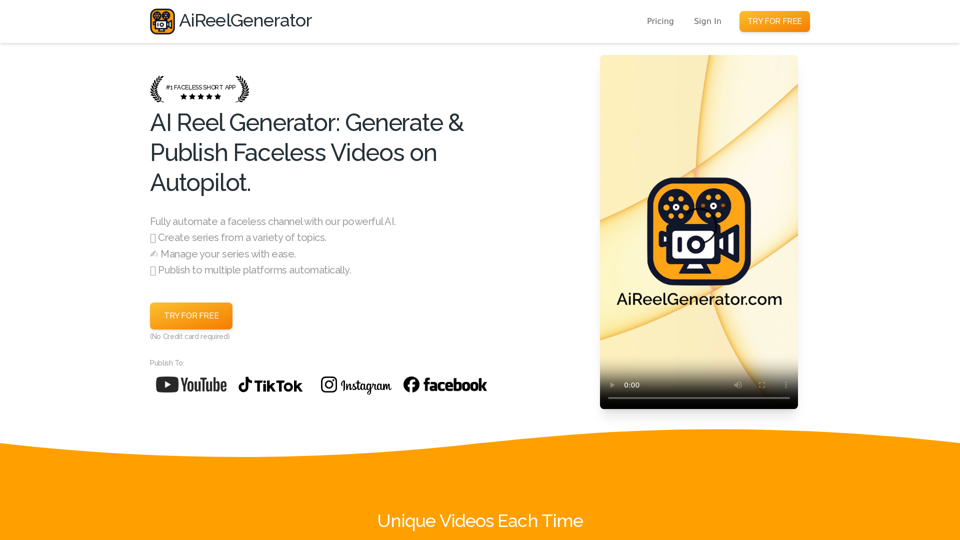
AiReelGenerator.com | Faceless Videos on Autopilot.

Discover AiReelGenerator, the newest app that automatically makes videos without faces. Just pick a subject, and our AI will make and upload fresh videos to your YouTube, TikTok, Instagram, or Facebook account every day.
Visit Website
AiReelGenerator.com | Faceless Videos on Autopilot.
Visit Website

Introduction

AiReelGenerator is an innovative app that automates the creation of faceless videos using advanced AI technology. It enables users to generate and upload new videos to their social media accounts daily without manual effort. This tool is designed to streamline content creation for social media marketers, influencers, and businesses looking to maintain a consistent online presence.

Feature

Faceless Video Generation

AiReelGenerator utilizes AI to create unique, faceless videos for social media channels based on user-selected topics and schedules.

Customizable Series

Users can create video series on chosen topics, with AI generating new content daily. Series can be tailored to specific needs and preferences.

Automatic Publishing

Generated videos are automatically published on designated social media platforms according to user-defined schedules.

HD Video Resolution

All videos are produced in high-definition, ensuring top-quality content for viewers.

Background Music Integration

Users can enhance their videos by adding background music, increasing engagement and entertainment value.

No Watermark

Unlike many competitors, AiReelGenerator does not add watermarks to generated videos.

Video Download Option

Users have the ability to download their generated videos for use outside the platform.

User-Friendly Interface

The app offers a simple three-step process: create a series, preview and edit, and publish.

Flexible Pricing Plans

AiReelGenerator provides various pricing options, including a free plan, starter plan, and growth plan to suit different needs and budgets.

FAQ

Is there a free trial available?

Yes, AiReelGenerator offers a free trial for users to test the platform.

How do I create a video using AiReelGenerator?

To create a video, you need to set up a series by choosing a topic and schedule. The AI will then generate your first video based on these parameters.

Can I edit the videos before publishing?

Yes, you can edit your video's script, title, and caption at any time before it is scheduled to post.

Are the generated videos unique?

Each video created by AiReelGenerator is unique and generated using AI technology.

What tips can help me make the most of AiReelGenerator?

  • Always preview videos before posting to ensure appropriateness for your audience.
  • Use custom prompts to generate varied content within a general category.
  • For new accounts, consider posting less frequently initially to avoid being flagged as spam.

How can I get support if I have questions?

If you need assistance or have any questions, you can contact the AiReelGenerator support team via email.

Latest Traffic Insights

  • Monthly Visits

    196

  • Bounce Rate

    37.33%

  • Pages Per Visit

    1.04

  • Time on Site(s)

    0.00

  • Global Rank

    13614067

  • Country Rank

    -

Recent Visits

Traffic Sources

  • Social Media:
    8.58%
  • Paid Referrals:
    1.16%
  • Email:
    0.05%
  • Referrals:
    4.90%
  • Search Engines:
    9.05%
  • Direct:
    76.26%
More Data

Related Websites

ImagePrompt - Reverse Image To Prompt

This tool takes an image as input and generates a textual description (prompt) that can be used to recreate the image using text-to-image AI models.
View Detail

ImagePrompt - Reverse Image To Prompt This tool takes an image as input and generates a textual description (prompt) that can be used to recreate the image using text-to-image AI models.

ImagePrompt - Reverse Image To Prompt This tool takes an image as input and generates a textual description (prompt) that can be used to recreate the image using text-to-image AI models.

ImagePrompt: The Ultimate Tool for Generating Prompts From Images.

193.90 M
doSmartQA Personal Edition
View Detail

doSmartQA Personal Edition

doSmartQA Personal Edition

Smart Probing Assistant

193.90 M
ScanGPT
View Detail

ScanGPT

ScanGPT

Our extension makes it simple to find GPT-generated text on any website or any text given to it.

193.90 M
Horus
View Detail

Horus

Horus

Horus is your AI assistant for creating summaries, insights, and expanding knowledge.

193.90 M
Landing Page | Guide
View Detail

Landing Page | Guide

Landing Page | Guide

Upload any outfit photo and try it on virtually. Upload your photo and try it for free.

0
HindustanGPT: GPT in Indian Languages on Google™
View Detail

HindustanGPT: GPT in Indian Languages on Google™

HindustanGPT: GPT in Indian Languages on Google™

ChatGPT™ for all Google™ searches in Indian languages.

193.90 M
Free ChatGPT Omni (GPT4o) | gptomni.ai
View Detail

Free ChatGPT Omni (GPT4o) | gptomni.ai

Free ChatGPT Omni (GPT4o) | gptomni.ai

Free ChatGPT Omni: gptomni.ai offers a free, easy-to-use, web-based chat interface for conversations with the GPT4o AI model.

1.25 K
Open ChatGPT in a New Tab

You can open ChatGPT in a new tab by following these steps:

#Method 1: Using the Browser's Context Menu

1. Right-click on the ChatGPT link or button.
2. Select "Open in new tab" or "Open link in new tab" from the context menu.

#Method 2: Using the Keyboard Shortcut

1. Press `Ctrl + Click` (Windows/Linux) or `Cmd + Click` (Mac) on the ChatGPT link or button.

#Method 3: Using the Browser's Toolbar

1. Click on the ChatGPT link or button while holding down the `Ctrl` key (Windows/Linux) or `Cmd` key (Mac).
2. Release the key after the new tab is opened.

By following these methods, you can easily open ChatGPT in a new tab and start chatting without leaving your current page.
View Detail

Open ChatGPT in a New Tab You can open ChatGPT in a new tab by following these steps: #Method 1: Using the Browser's Context Menu 1. Right-click on the ChatGPT link or button. 2. Select "Open in new tab" or "Open link in new tab" from the context menu. #Method 2: Using the Keyboard Shortcut 1. Press `Ctrl + Click` (Windows/Linux) or `Cmd + Click` (Mac) on the ChatGPT link or button. #Method 3: Using the Browser's Toolbar 1. Click on the ChatGPT link or button while holding down the `Ctrl` key (Windows/Linux) or `Cmd` key (Mac). 2. Release the key after the new tab is opened. By following these methods, you can easily open ChatGPT in a new tab and start chatting without leaving your current page.

Open ChatGPT in a New Tab You can open ChatGPT in a new tab by following these steps: #Method 1: Using the Browser's Context Menu 1. Right-click on the ChatGPT link or button. 2. Select "Open in new tab" or "Open link in new tab" from the context menu. #Method 2: Using the Keyboard Shortcut 1. Press `Ctrl + Click` (Windows/Linux) or `Cmd + Click` (Mac) on the ChatGPT link or button. #Method 3: Using the Browser's Toolbar 1. Click on the ChatGPT link or button while holding down the `Ctrl` key (Windows/Linux) or `Cmd` key (Mac). 2. Release the key after the new tab is opened. By following these methods, you can easily open ChatGPT in a new tab and start chatting without leaving your current page.

New Tab with Quick ChatGPT Access

193.90 M