Open-source RightAI Tools Directory
  • Discover AI
  • Submit
  • Startup
  • Blog
Open-source RightAI Tools Directory
Discover the best AI tools of 2025 with the RightAI Tools Directory!

Friend Links

AI Anime GeneratorToolsApp AI

Support

Tap4
Privacy policyTerms & ConditionsContact Us
Loading...
loading...

AI Writer for Realtors This AI-powered writing tool is designed to help real estate agents save time and create compelling content. Here's what it can do: * Generate property descriptions: Craft engaging and informative descriptions that highlight key features and benefits. * Write listing headlines: Create attention-grabbing headlines that attract potential buyers. * Compose social media posts: Share property updates, market insights, and client testimonials in a concise and engaging way. * Draft email campaigns: Automate email marketing efforts with personalized messages to potential clients. * Summarize property reports: Quickly understand key information from property reports and market analyses. Benefits for Realtors: * Save time and effort: Automate repetitive writing tasks and focus on client interactions. * Improve content quality: Generate high-quality, engaging content that resonates with target audiences. * Boost marketing effectiveness: Create compelling content that drives leads and increases sales. * Stay ahead of the competition: Leverage AI technology to streamline your workflow and deliver exceptional service.

Unlock the Power of AI for Captivating Real Estate Listings Tired of crafting bland, forgettable property descriptions? Let AI revolutionize your listings and attract more potential buyers! Here's how AI can elevate your real estate game: * Craft Compelling Narratives: AI can weave engaging stories around your properties, highlighting their unique features and benefits in a way that resonates with buyers. * Optimize for Search Engines: AI-powered tools can analyze market trends and keywords to ensure your listings rank higher in search results, boosting visibility and attracting more clicks. * Personalize the Experience: AI can tailor descriptions to specific buyer demographics, creating a more personalized and impactful connection. * Generate Stunning Visuals: From virtual tours to 3D floor plans, AI can enhance your listings with captivating visuals that showcase your properties in their best light. Stop settling for ordinary listings. Embrace the future of real estate with AI-powered descriptions that captivate, convert, and close deals.
Visit Website
AI Writer for Realtors 

This AI-powered writing tool is designed to help real estate agents save time and create compelling content. 

Here's what it can do:

* Generate property descriptions: Craft engaging and informative descriptions that highlight key features and benefits.
* Write listing headlines:  Create attention-grabbing headlines that attract potential buyers.
* Compose social media posts:  Share property updates, market insights, and client testimonials in a concise and engaging way.
* Draft email campaigns:  Automate email marketing efforts with personalized messages to potential clients.
* Summarize property reports:  Quickly understand key information from property reports and market analyses.

Benefits for Realtors:

* Save time and effort:  Automate repetitive writing tasks and focus on client interactions.
* Improve content quality:  Generate high-quality, engaging content that resonates with target audiences.
* Boost marketing effectiveness:  Create compelling content that drives leads and increases sales.
* Stay ahead of the competition:  Leverage AI technology to streamline your workflow and deliver exceptional service.
Visit Website

Introduction

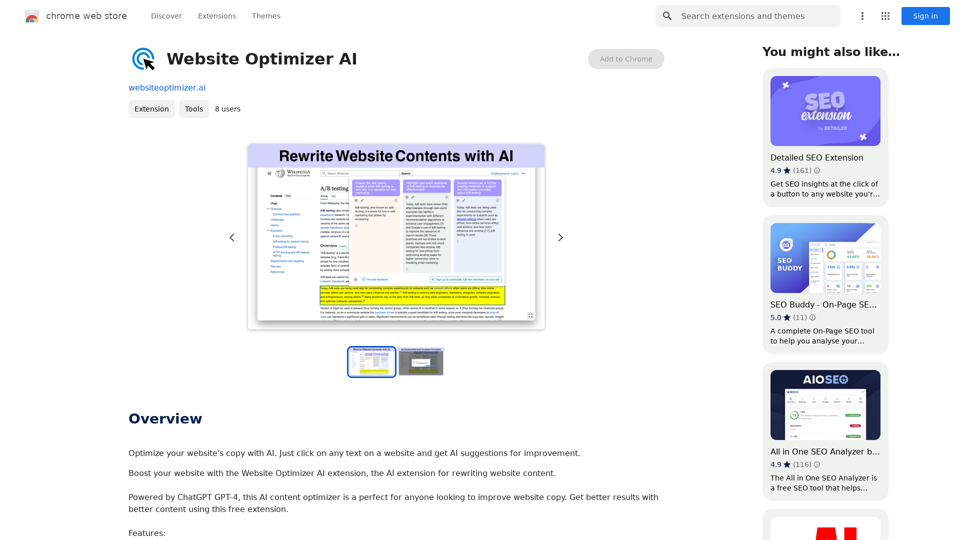
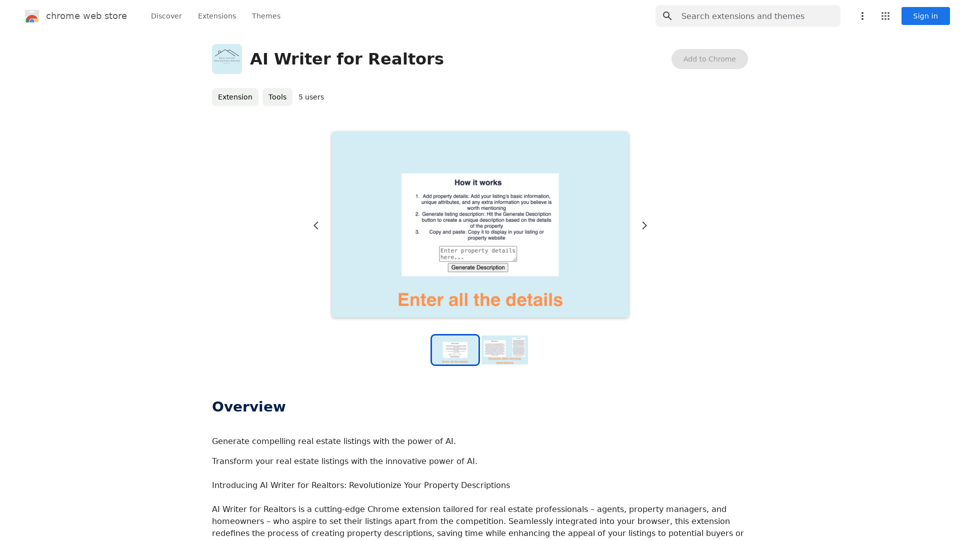
AI Writer for Realtors is a Chrome extension designed to revolutionize property description creation for real estate professionals. This tool uses advanced AI algorithms to generate unique, captivating descriptions based on input property details. It aims to save time and enhance the appeal of listings for potential buyers or renters.

Feature

Effortless Data Input

Users can easily input vital property details, standout features, and other relevant information directly into the extension's intuitive interface.

AI-Driven Description Generation

With a single click, the tool harnesses advanced AI algorithms to create unique, captivating property descriptions tailored to specific listing details.

Streamlined Marketing

Generated descriptions can be easily copied and seamlessly integrated into listings or property websites, optimizing marketing efforts.

Continual Support and Improvement

Users can contribute to the ongoing development of the tool, ensuring continuous enhancements and expansions.

How It Works

  1. Enter Property Details
  2. Instant Description Creation
  3. Effortless Integration

Customization Options

Users can experiment with different AI-driven description generation options to find the perfect fit for their marketing strategy.

FAQ

How does AI Writer for Realtors work?

AI Writer for Realtors uses advanced AI algorithms to generate unique, captivating property descriptions based on the inputted property details.

Is AI Writer for Realtors free?

The price of AI Writer for Realtors is not specified on the Chrome Web Store.

Can I customize the generated description?

Yes, you can experiment with different AI-driven description generation options to find the perfect fit for your marketing strategy.

Related Websites
Print Perfect AI Text Editor
View Detail

Print Perfect AI Text Editor

Print Perfect AI Text Editor

Print Perfect helps you correct and edit your text to make it sound like it was written by a native English speaker.

193.90 M
CO-STAR Prompt Template
==========================

Task Description
Describe the task you want the AI to perform. Be specific and concise.

Input Prompt
Provide the input prompt that the AI will receive. This can be a question, a statement, or a scenario.

Desired Response
Describe the desired response from the AI. What type of answer or output are you expecting?

Constraints
List any constraints or rules that the AI should follow when generating a response. This can include tone, style, or specific keywords to include or avoid.

Evaluation Metrics
Describe how you will evaluate the AI's response. What metrics or criteria will you use to determine the quality of the response?

Example Output
Provide an example of what a good response from the AI might look like. This can help clarify the task and provide a target for the AI to aim for.
View Detail

CO-STAR Prompt Template ========================== Task Description Describe the task you want the AI to perform. Be specific and concise. Input Prompt Provide the input prompt that the AI will receive. This can be a question, a statement, or a scenario. Desired Response Describe the desired response from the AI. What type of answer or output are you expecting? Constraints List any constraints or rules that the AI should follow when generating a response. This can include tone, style, or specific keywords to include or avoid. Evaluation Metrics Describe how you will evaluate the AI's response. What metrics or criteria will you use to determine the quality of the response? Example Output Provide an example of what a good response from the AI might look like. This can help clarify the task and provide a target for the AI to aim for.

CO-STAR Prompt Template ========================== Task Description Describe the task you want the AI to perform. Be specific and concise. Input Prompt Provide the input prompt that the AI will receive. This can be a question, a statement, or a scenario. Desired Response Describe the desired response from the AI. What type of answer or output are you expecting? Constraints List any constraints or rules that the AI should follow when generating a response. This can include tone, style, or specific keywords to include or avoid. Evaluation Metrics Describe how you will evaluate the AI's response. What metrics or criteria will you use to determine the quality of the response? Example Output Provide an example of what a good response from the AI might look like. This can help clarify the task and provide a target for the AI to aim for.

Using CO-STAR to Make Your Prompt 10 Times More Effective!

193.90 M
WebBites - Browser Extension
View Detail

WebBites - Browser Extension

WebBites - Browser Extension

WebBites - Save and manage all your bookmarks with AI.

193.90 M
Help me read | GPT Reading Assistant
View Detail

Help me read | GPT Reading Assistant

Help me read | GPT Reading Assistant

Help me read | GPT Reading Assistant, a free Chrome browser extension, summarizes any webpage using ChatGPT, supporting the use of GPT-3.5 or GPT-4 models. ...

193.90 M
EasyRead.AI - Reading Assistant
View Detail

EasyRead.AI - Reading Assistant

EasyRead.AI - Reading Assistant

Your ultimate reading assistant powered by GPT. Compose AI summaries, mind maps, or just translate and explain everything you select.

193.90 M
AI Board (GPT Support)
View Detail

AI Board (GPT Support)

AI Board (GPT Support)

This is a service that uses the general ChatGPT API with enhanced security for corporate use.

193.90 M
Sketch2Code GPT4-128K GPT4-Vision - Sidebar 

This is a simple sidebar for a Sketch2Code application powered by GPT4-128K and GPT4-Vision. 

It likely contains:

* Upload Sketch: A button or area to upload an image sketch.
* Code Generation Options:  Settings to choose the programming language, desired code complexity, or other generation parameters.
* Output Code: A display area to show the generated code.
* Clear Output: A button to clear the generated code.


Let me know if you'd like me to elaborate on any specific aspect of the sidebar!
View Detail

Sketch2Code GPT4-128K GPT4-Vision - Sidebar This is a simple sidebar for a Sketch2Code application powered by GPT4-128K and GPT4-Vision. It likely contains: * Upload Sketch: A button or area to upload an image sketch. * Code Generation Options: Settings to choose the programming language, desired code complexity, or other generation parameters. * Output Code: A display area to show the generated code. * Clear Output: A button to clear the generated code. Let me know if you'd like me to elaborate on any specific aspect of the sidebar!

Sketch2Code GPT4-128K GPT4-Vision - Sidebar This is a simple sidebar for a Sketch2Code application powered by GPT4-128K and GPT4-Vision. It likely contains: * Upload Sketch: A button or area to upload an image sketch. * Code Generation Options: Settings to choose the programming language, desired code complexity, or other generation parameters. * Output Code: A display area to show the generated code. * Clear Output: A button to clear the generated code. Let me know if you'd like me to elaborate on any specific aspect of the sidebar!

Sketch2Code GPT4-128K GPT4-Vision - FREE

193.90 M
Spot Translator 

This is a simple tool to translate text from one language to another. 

How to use:

1. Enter the text you want to translate in the input box.
2. Choose the source language from the dropdown menu.
3. Choose the target language from the dropdown menu.
4. Click the "Translate" button.

The translated text will appear in the output box.
View Detail

Spot Translator This is a simple tool to translate text from one language to another. How to use: 1. Enter the text you want to translate in the input box. 2. Choose the source language from the dropdown menu. 3. Choose the target language from the dropdown menu. 4. Click the "Translate" button. The translated text will appear in the output box.

Spot Translator This is a simple tool to translate text from one language to another. How to use: 1. Enter the text you want to translate in the input box. 2. Choose the source language from the dropdown menu. 3. Choose the target language from the dropdown menu. 4. Click the "Translate" button. The translated text will appear in the output box.

Just click and get the translation right below.

193.90 M