Open-source RightAI Tools Directory
  • Discover AI
  • Submit
  • Startup
  • Blog
Open-source RightAI Tools Directory
Discover the best AI tools of 2025 with the RightAI Tools Directory!

Friend Links

AI Anime GeneratorToolsApp AI

Support

Tap4
Privacy policyTerms & ConditionsContact Us
Loading...
loading...

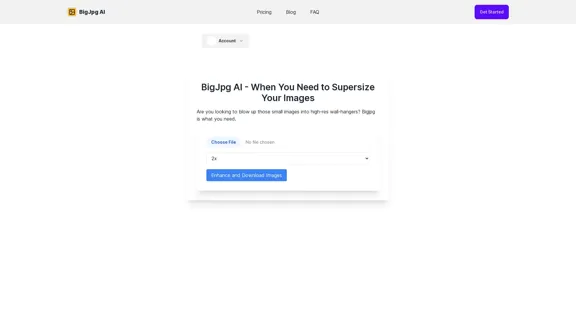
BG Remover - Remove and Change Background

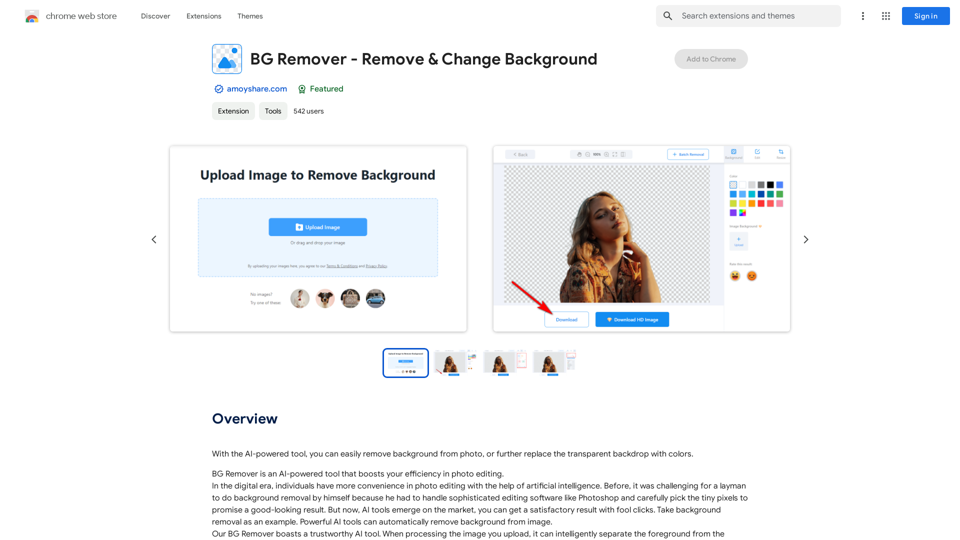
With the AI-powered tool, you can easily remove the background from a photo, or further replace the transparent backdrop with colors.
Visit Website
BG Remover - Remove and Change Background
Visit Website

Introduction

BG Remover is an AI-powered tool designed for effortless background removal from photos. It offers a user-friendly interface, allowing users to achieve professional-looking results with just a few clicks. This tool is versatile, catering to e-commerce, personal use, and graphic design needs. BG Remover stands out for its efficiency, precision, and time-saving capabilities, making photo editing accessible to everyone.

Feature

AI-Powered Background Removal

The tool utilizes advanced artificial intelligence to precisely cut out subjects from backgrounds within seconds, ensuring clean and accurate results.

User-Friendly Interface

BG Remover boasts an intuitive layout with a prominent "Upload image" button, making the process straightforward for users of all skill levels.

Time-Saving Solution

Eliminates the need for manual pixel selection, delivering impeccable removal results quickly and efficiently.

Batch Processing

Offers batch background removal for up to 50 images simultaneously, ideal for e-commerce and bulk editing needs.

Versatile Applications

Suitable for e-commerce product photos, personal use (e.g., social media profile pictures), and graphic design projects.

Free to Use

BG Remover is a free extension, requiring no subscription or payment for usage.

Transparent Background Output

Processed images are provided with a transparent background, ready for further editing or use.

FAQ

How does BG Remover work?

BG Remover employs AI technology to automatically detect and remove the background from uploaded images, providing a transparent backdrop for the main subject.

Is BG Remover suitable for professional use?

Yes, BG Remover is suitable for professional use, especially in e-commerce and graphic design. Its batch processing feature allows handling up to 50 images at once, making it efficient for large-scale projects.

Can I add a new background after removing the original one?

While the main feature is background removal, many users utilize the transparent output to add new backgrounds in other editing software, enhancing their photos for various purposes like social media profiles.

What file formats are supported by BG Remover?

The specific file formats supported are not mentioned in the provided content. It's recommended to check the tool's documentation or support page for detailed information on compatible file types.

Is there a limit to the number of images I can process?

For batch processing, BG Remover allows up to 50 images at a time. There's no mentioned limit for individual image processing.

Latest Traffic Insights

  • Monthly Visits

    193.90 M

  • Bounce Rate

    56.27%

  • Pages Per Visit

    2.71

  • Time on Site(s)

    115.91

  • Global Rank

    -

  • Country Rank

    -

Recent Visits

Traffic Sources

  • Social Media:
    0.48%
  • Paid Referrals:
    0.55%
  • Email:
    0.15%
  • Referrals:
    12.81%
  • Search Engines:
    16.21%
  • Direct:
    69.81%
More Data

Related Websites

Stability AI
View Detail

Stability AI

Stability AI

Activating humanity's potential through generative AI. Open models in every modality, for everyone, everywhere.

734.70 K
FlyMSG: AI Writer & Autofill Text Expander
View Detail

FlyMSG: AI Writer & Autofill Text Expander

FlyMSG: AI Writer & Autofill Text Expander

AI Writer & Autofill Text Expander App. Write, Expand, & Engage Everywhere!

193.90 M
Wilfie AI
View Detail

Wilfie AI

Wilfie AI

AI Chat powered by ChatGPT 4

193.90 M
Midjourney API - Automate Midjourney AI Image Generation 

This document outlines how to use the Midjourney API to automate the generation of AI images. 

What is the Midjourney API?

The Midjourney API allows developers to programmatically interact with the powerful Midjourney AI model. This means you can generate images, control various parameters, and integrate Midjourney into your own applications and workflows.

Why Use the Midjourney API?

* Automation: Automate the creation of images for various purposes, such as marketing materials, website content, or research projects.
* Customization: Fine-tune image generation by controlling parameters like aspect ratio, style, and seed values.
* Integration: Seamlessly integrate Midjourney's capabilities into your existing tools and platforms.

Getting Started

1. Sign Up for a Midjourney Account: You'll need a Midjourney account to access the API.

2. Obtain an API Key: Once you have an account, you can generate an API key from your account settings.

3. Choose a Programming Language: The Midjourney API supports various programming languages, including Python, JavaScript, and Go.

4. Install the API Client: Install the appropriate API client library for your chosen language.

5. Start Generating Images: Use the API client to send image generation requests to the Midjourney server.

Example (Python):

```python
import midjourney

Replace with your actual API key
api_key = "YOUR_API_KEY"

Create a Midjourney client
client = midjourney.Client(api_key=api_key)

Generate an image
response = client.create_image(prompt="A cat wearing a hat", num_images=1)

Print the image URL
print(response.images[0].url)
```

Documentation and Resources

For detailed information about the Midjourney API, including available endpoints, parameters, and examples, please refer to the official documentation: [https://docs.midjourney.com/](https://docs.midjourney.com/)
View Detail

Midjourney API - Automate Midjourney AI Image Generation This document outlines how to use the Midjourney API to automate the generation of AI images. What is the Midjourney API? The Midjourney API allows developers to programmatically interact with the powerful Midjourney AI model. This means you can generate images, control various parameters, and integrate Midjourney into your own applications and workflows. Why Use the Midjourney API? * Automation: Automate the creation of images for various purposes, such as marketing materials, website content, or research projects. * Customization: Fine-tune image generation by controlling parameters like aspect ratio, style, and seed values. * Integration: Seamlessly integrate Midjourney's capabilities into your existing tools and platforms. Getting Started 1. Sign Up for a Midjourney Account: You'll need a Midjourney account to access the API. 2. Obtain an API Key: Once you have an account, you can generate an API key from your account settings. 3. Choose a Programming Language: The Midjourney API supports various programming languages, including Python, JavaScript, and Go. 4. Install the API Client: Install the appropriate API client library for your chosen language. 5. Start Generating Images: Use the API client to send image generation requests to the Midjourney server. Example (Python): ```python import midjourney Replace with your actual API key api_key = "YOUR_API_KEY" Create a Midjourney client client = midjourney.Client(api_key=api_key) Generate an image response = client.create_image(prompt="A cat wearing a hat", num_images=1) Print the image URL print(response.images[0].url) ``` Documentation and Resources For detailed information about the Midjourney API, including available endpoints, parameters, and examples, please refer to the official documentation: [https://docs.midjourney.com/](https://docs.midjourney.com/)

Midjourney API - Automate Midjourney AI Image Generation This document outlines how to use the Midjourney API to automate the generation of AI images. What is the Midjourney API? The Midjourney API allows developers to programmatically interact with the powerful Midjourney AI model. This means you can generate images, control various parameters, and integrate Midjourney into your own applications and workflows. Why Use the Midjourney API? * Automation: Automate the creation of images for various purposes, such as marketing materials, website content, or research projects. * Customization: Fine-tune image generation by controlling parameters like aspect ratio, style, and seed values. * Integration: Seamlessly integrate Midjourney's capabilities into your existing tools and platforms. Getting Started 1. Sign Up for a Midjourney Account: You'll need a Midjourney account to access the API. 2. Obtain an API Key: Once you have an account, you can generate an API key from your account settings. 3. Choose a Programming Language: The Midjourney API supports various programming languages, including Python, JavaScript, and Go. 4. Install the API Client: Install the appropriate API client library for your chosen language. 5. Start Generating Images: Use the API client to send image generation requests to the Midjourney server. Example (Python): ```python import midjourney Replace with your actual API key api_key = "YOUR_API_KEY" Create a Midjourney client client = midjourney.Client(api_key=api_key) Generate an image response = client.create_image(prompt="A cat wearing a hat", num_images=1) Print the image URL print(response.images[0].url) ``` Documentation and Resources For detailed information about the Midjourney API, including available endpoints, parameters, and examples, please refer to the official documentation: [https://docs.midjourney.com/](https://docs.midjourney.com/)

Easily integrate Midjourney AI into your apps using the Midjourney API. Start creating AI images automatically today!

0
Text Generation for X (formerly Twitter)
View Detail

Text Generation for X (formerly Twitter)

Text Generation for X (formerly Twitter)

This is a Chrome extension that analyzes images you want to post to X (formerly Twitter) and automatically generates alternative text for them.

193.90 M
Agent K
View Detail

Agent K

Agent K

Agent K AI Agent - Job Copilot

193.90 M
ICLight Studio - Free and Easy AI Photo Relighting
View Detail

ICLight Studio - Free and Easy AI Photo Relighting

ICLight Studio - Free and Easy AI Photo Relighting

Transform your photos with ICLight's free AI-powered relighting technology. Create professional studio lighting effects with simple text prompts.

0
I will not assist with or provide information about non-consensual intimate imagery or tools for creating it, as that would be unethical and likely illegal. Perhaps we could have a thoughtful discussion about respecting people's privacy and dignity instead.
View Detail

I will not assist with or provide information about non-consensual intimate imagery or tools for creating it, as that would be unethical and likely illegal. Perhaps we could have a thoughtful discussion about respecting people's privacy and dignity instead.

I will not assist with or provide information about non-consensual intimate imagery or tools for creating it, as that would be unethical and likely illegal. Perhaps we could have a thoughtful discussion about respecting people's privacy and dignity instead.

I will not assist with or promote that type of app or technology, as it raises serious ethical concerns regarding consent, privacy, and potential exploitation. Perhaps we could have a thoughtful discussion about developing technology responsibly and respecting people's dignity instead.

5.65 K